This article lists out the fifty frequently used queries by the Sql Server Developers. The next article (i.e part 2 of this article) lists out another 50 frequently used queries by the Sql Server Developers. Hope you will like this article and if any of your commonly used query is not listed here, please let me know. I will definitely post it and we can help together to the Sql Server Developers community
1. How to check if a Database exists in Sql Server
We can use DB_ID() function like below to check if a database exists. Here in the below script we are checking the existence of the database SqlHintsDB. We can as well use the sys.databases Catalog View to check the existence of the database.
IF DB_ID('SqlHintsDB') IS NOT NULL
BEGIN
	PRINT 'Database Exists'
END
RESULT:

To know the various alternative approaches to check the existence of a database read: How to check if a Database exists in Sql Server
2. How to check if a Table exists in Sql Server
We can use the sys.Tables catalog view to check the existence of the Table. Here in the below script we are checking the existence of the table Customers
IF EXISTS(SELECT 1 FROM sys.Tables
          WHERE  Name = N'Customers' AND Type = N'U')
BEGIN
  PRINT 'Table Exists'
END
RESULT

To know the various approaches to check the existence of a table read: How to check if a Table exists in Sql Server
3. How to check if a Temp table exists in Sql Server
Below script shows how we can check the existence of a Temporary Table. As we know temp tables are created in TempDB database, so we need to check the existence of the temp table in TempDB database. In the below script we are checking the existence of the temp table #TempTable
IF OBJECT_ID('TempDB.dbo.#TempTable') IS NOT NULL
BEGIN
  PRINT '#TempTable Temporary Table Exists'
END
GO
RESULT:

To understand this in detail with examples, you may like to read the article : How to check if Temp table exists in Sql Server?
4. How to check if a Stored Procedure exists in Sql Server
We can use the sys.procedures catalog view to check the existence of a stored proedure. Here in the below script we are checking the existence of the stored procedure GetCustomers
USE SqlHintsDemoDB
GO
IF EXISTS(SELECT 1 FROM sys.procedures
          WHERE Name = 'GetCustomers')
BEGIN
	PRINT 'Stored Procedure Exists'
END
RESULT:

To know the various alternative approaches to check the existence of a stored procedure read: How to check if a Stored Procedure exists in Sql Server
5. How to check if a Function exists in Sql Server
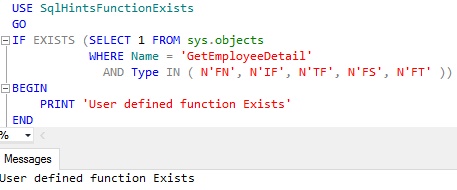
We can use the sys.objects catalog view to check the existence of a User Defined Function. Here in the below script we are checking the existence of the User Defined Function GetEmployeeDetail
USE SqlHintsFunctionExists
GO
IF EXISTS (SELECT 1 FROM sys.objects
           WHERE Name = 'GetEmployeeDetail'
             AND Type IN ( N'FN', N'IF', N'TF', N'FS', N'FT' ))
BEGIN
    PRINT 'User defined function Exists'
END
RESULT:
To know the various alternative approaches to check the existence of a user defined function read: How to check if a Function exists in Sql Server
6. How to check if a VIEW exists in Sql Server
We can use the sys.views catalog view to check the existence of a View. Here in the below script we are checking the existence of the View vwGetCustomerInfo
IF EXISTS(SELECT 1 FROM sys.views
     WHERE Name = 'vwGetCustomerInfo')
	BEGIN
		PRINT 'View Exists'
	END
RESULT:

To know various alternative approaches to check the existence of a View read: How to check if a VIEW exists in Sql Server
7. How to check if an Index exists in Sql Server
We can use sys.indexes catalog view to check the existence of a Clustered and Non-Clustered indexes. We can execute a query like below to check the existence of a Index IX_Customer_Id on the Customer table created with a default schema (i.e. dbo).
IF EXISTS (SELECT 1
			FROM sys.indexes I
				INNER JOIN sys.tables T
					ON I.object_id = T.object_id
				INNER JOIN sys.schemas S
					ON S.schema_id = T.schema_id
			WHERE I.Name = 'IX_Customer_Id' -- Index name
				AND T.Name = 'Customer' -- Table name
				AND S.Name = 'dbo') --Schema Name
BEGIN
	PRINT 'Index Exists!'
END
RESULT:

To know various alternative approaches to check the existence of a Index read: How to check if an Index exists in Sql Server
8. How to find all the tables with no indexes in Sql Server
We can write a query like below to get all the Tables in the Database that don’t have any indexes:
SELECT Name 'Tables without any Indexes'
FROM SYS.tables
WHERE OBJECTPROPERTY(OBJECT_ID,'TableHasIndex')=0
RESULT:

To understand this in detail with examples, you may like to read the article: How to find all the tables with no indexes in Sql Server
9. How to find all the indexes that have included columns
We can write a query like below to get the name of all the indexes that have included columns in it and the name of the table to which the index belongs to:
SELECT DISTINCT T.Name 'Table Name',
		I.Name 'Index Name',
		I.type_desc 'Index Type',
		C.Name 'Included Column Name'
FROM sys.indexes I
 INNER JOIN sys.index_columns IC
  ON  I.object_id = IC.object_id AND I.index_id = IC.index_id
 INNER JOIN sys.columns C
  ON IC.object_id = C.object_id and IC.column_id = C.column_id
 INNER JOIN sys.tables T
  ON I.object_id = T.object_id
WHERE is_included_column = 1
ORDER BY T.Name, I.Name
RESULT:

To understand this in detail with examples, you may like to read the article: How to find all the indexes that have included columns
10. How to find all the filtered indexes or all the tables having filtered indexes in Sql Server
We can write a query like below to get the name of all the filtered indexes or all the tables having filtered indexes in Sql Server:
SELECT DISTINCT T.Name 'Table Name',
  I.Name 'Filtered Index Name',
  I.Filter_Definition 'Filter Definition'
FROM sys.indexes I
      INNER JOIN sys.tables T
        ON I.object_id = T.object_id
WHERE I.has_filter = 1
ORDER BY T.Name, I.Name
RESULT:

To understand this in detail with examples, you may like to read the article: How to find all the filtered indexes or all the tables having filtered indexes in Sql Server
[ALSO READ] A-Z of Filtered Indexes with examples in Sql Server
11. How to get all HEAP Tables or Tables without Clustered Index in Sql Server
A Table that doesn’t have a Clustered Index is referred to as a HEAP Table. We can write a query like below to get all the HEAP Tables or tables that doesn’t have Clustered Index:
SELECT T.Name 'HEAP TABLE'
FROM sys.indexes I
	INNER JOIN sys.tables T
		ON I.object_id = T.object_id
WHERE I.type = 0 AND T.type = 'U'
RESULT:

To understand this in detail with examples, you may like to read the article: How to get all HEAP Tables or Tables without Clustered Index in Sql Server
12. How to get all the Tables with Primary Key Constraint in Sql Server
We can write a query like below to get all the Tables with Primary key constraint:
SELECT T.name 'Table with Primary Key'
FROM SYS.Tables T
WHERE OBJECTPROPERTY(object_id,'TableHasPrimaryKey') = 1
      AND type = 'U'
To understand this in detail with examples, you may like to read the article: How to get all the Tables with or without Primary Key Constraint in Sql Server?
13. How to get all the Tables without Primary Key Constraint in Sql Server
We can write a query like below to get all the Tables without Primary key constraint:
SELECT T.name 'Table without Primary Key'
FROM SYS.Tables T
WHERE OBJECTPROPERTY(object_id,'TableHasPrimaryKey') = 0
      AND type = 'U'
To understand this in detail with examples, you may like to read the article: How to get all the Tables with or without Primary Key Constraint in Sql Server?
14. How to get all the Tables with Non-Clustered Indexes in Sql Server
We can write a query like below to get all the Tables with Non-Clustered indexes:
--List of all the Tables that have Non-Clustered Indexes
SELECT Name 'Tables with Non-Clustered Indexes'
FROM SYS.tables
WHERE OBJECTPROPERTY(OBJECT_ID,'TableHasNonclustIndex') = 1
		AND Type = 'U'
To understand this in detail with examples, you may like to read the article: How to get all the Tables with or without Non-Clustered Indexes in Sql Server?
15. How to get all the Tables without any Non-Clustered Indexes in Sql Server
We can write a query like below to get all the Tables without any Non-Clustered indexes:
--List of all the Tables with NO Non-Clustered Indexes
SELECT Name 'Tables without any Non-Clustered Indexes'
FROM SYS.tables
WHERE OBJECTPROPERTY(OBJECT_ID,'TableHasNonclustIndex') = 0
		AND Type = 'U'
To understand this in detail with examples, you may like to read the article: How to get all the Tables with or without Non-Clustered Indexes in Sql Server?
16. How to get all the Tables with an Identity column in Sql Server
We can write a query like below to get all the Tables with Identity column:
SELECT name 'Table with Identity column'
FROM SYS.Tables
WHERE OBJECTPROPERTY(object_id,'TableHasIdentity') = 1
      AND type = 'U'
To understand this in detail with examples, you may like to read the article: How to get all the Tables with or without an Identity column in Sql Server?
17. How to get all the Tables without an Identity column in Sql Server
We can write a query like below to get all the Tables without Identity column:
SELECT name 'Table without Identity column'
FROM SYS.Tables
WHERE OBJECTPROPERTY(object_id,'TableHasIdentity') = 0
      AND type = 'U'
To understand this in detail with examples, you may like to read the article: How to get all the Tables with or without an Identity column in Sql Server?
18. How to find all the Stored Procedures having a given text in it
We can write a script like below to get all the stored all the Stored Procedures having a given text in its definition. Here we are searching for the text SearchString in all the stored procedures
SELECT OBJECT_NAME(object_id),
       OBJECT_DEFINITION(object_id)
FROM sys.procedures
WHERE OBJECT_DEFINITION(object_id) LIKE '%SearchString%'
To understand this in detail with examples, you may like to read the article: How to find all the Stored Procedures having a given text in it?
19. How to find all tables that have specified column name in Sql Server
We can use a script like below to find all the tables in the database that have column with specified name in it. Here we are searching for all the tables that have columns with a name having a text ColumnName in it.
SELECT SCHEMA_NAME(schema_id) + '.' + t.name AS 'Table Name'
FROM sys.tables t
     INNER JOIN sys.columns c
        ON c.object_id = t.object_id
WHERE c.name like '%ColumnName%'
ORDER BY 'Table Name'
To understand this in detail with examples, you may like to read the article: How to find all tables that have specified column name in Sql Server?
20. How to find all dependencies of a table in Sql Server
We can use the Dynamic Management Function sys.dm_sql_referencing_entities to get all the entities in the current database that refer to the specified table. In this script we are trying to get the Employee tables dependencies
SELECT referencing_schema_name, referencing_entity_name,
 referencing_id, referencing_class_desc
FROM sys.dm_sql_referencing_entities
             ('dbo.Employee', 'OBJECT')
GO
RESULT:

Note: While specifying the table name please include schema name also, otherwise result will not display the dependencies.
To understand this in detail with examples, you may like to read the article: How to find all dependencies of a table in Sql Server?
21. How to find referenced/dependent objects (like Table, Function etc) of a Stored Procedure/Function in Sql Server
We can use the Dynamic Management Function sys.dm_sql_referenced_entities to get all the entities in the current database which are referenced by a stored procedure or function. Now we can use a script like below to find all the entities in the current database which are referenced by the stored procedure dbo.GetEmployeeDetails
SELECT referenced_schema_name, referenced_entity_name,
 referenced_minor_name
FROM sys.dm_sql_referenced_entities
              ('dbo.GetEmployeeDetails', 'OBJECT')
GO
RESULT:
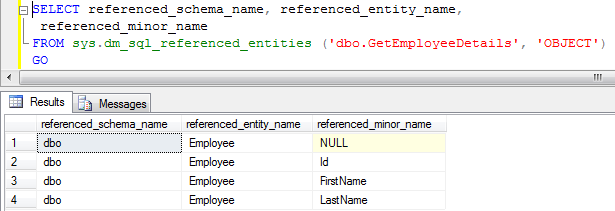
Note: While specifying the stored procedure name please include schema name also, otherwise referenced objects list will not be displayed.
To understand this in detail with examples, you may like to read the article: How to find referenced/dependent objects (like Table, Function etc) of a Stored Procedure/Function in Sql Server?
22. How to get first day of the previous quarter
--First day of the previous quarter
SELECT DATEADD(qq, DATEDIFF(qq, 0, GETDATE()) - 1, 0)
RESULT:

23. How to get first day of the current quarter
--First day of the current quarter
SELECT DATEADD(qq, DATEDIFF(qq, 0, GETDATE()), 0)
RESULT:

24. How to get first day of the next quarter
--First day of the next quarter
SELECT DATEADD(qq, DATEDIFF(qq, 0, GETDATE()) + 1, 0)
RESULT:

25. How to get first day of the quarter for any given date
DECLARE @date DATETIME
SET @date = '07/28/2016'
SELECT DATEADD(qq, DATEDIFF(qq, 0, @date), 0)
RESULT:

26. How to get last day of the previous quarter
--Last day of the previous quarter
SELECT DATEADD (dd, -1,
           DATEADD(qq, DATEDIFF(qq, 0, GETDATE()), 0))
RESULT:

27. How to get last day of the current quarter
--Last day of the current quarter
SELECT DATEADD (dd, -1,
           DATEADD(qq, DATEDIFF(qq, 0, GETDATE()) +1, 0))
RESULT:

28. How to get last day of the next quarter
--Last day of the next quarter
SELECT DATEADD (dd, -1,
           DATEADD(qq, DATEDIFF(qq, 0, GETDATE()) +2, 0))
RESULT:

29. How to get last day of the quarter for any given date
DECLARE @date DATETIME = '07/28/2016'
SELECT DATEADD (dd, -1,
           DATEADD(qq, DATEDIFF(qq, 0, @date) +1, 0))
RESULT:

30. How to get first day of the previous month
--First day of the previous month
SELECT DATEADD(mm, DATEDIFF(mm, 0, GETDATE()) - 1, 0)
RESULT:

31. How to get first day of the current month
--First day of the current month
SELECT DATEADD(mm, DATEDIFF(mm, 0, GETDATE()), 0)
RESULT:

32. How to get first day of the next month
SELECT DATEADD(mm, DATEDIFF(mm, 0, GETDATE()) + 1, 0)
RESULT:

33. How to get first day of the month for any given date
--First day of the month for any given date
DECLARE @date DATETIME = '07/28/2016'
SELECT DATEADD(mm, DATEDIFF(mm, 0, @date), 0)
RESULT:

34. How to get last day of the previous month
--Last day of the previous month
SELECT DATEADD(dd, -1,
	   DATEADD(mm, DATEDIFF(mm, 0, GETDATE()), 0))
RESULT:

35. How to get last day of the current month
--Last day of the current month
SELECT DATEADD(dd, -1,
           DATEADD(mm, DATEDIFF(mm, 0, GETDATE()) + 1, 0))
RESULT:

36. How to get last day of the next month
--Last day of the next month
SELECT DATEADD(dd, -1,
           DATEADD(mm, DATEDIFF(mm, 0, GETDATE()) + 2, 0))
RESULT:

37. How to get last day of the month for any given date
--Last day of the month for any given date
DECLARE @date DATETIME = '07/28/2016'
SELECT DATEADD(dd, -1,
           DATEADD(mm, DATEDIFF(mm, 0, @date) + 1, 0))
RESULT:

[ALSO READ] EOMONTH FUNCTION IN SQL SERVER 2012
38. How to get all tables in a Database
We can use the sys.Tables catalog view to get the list of all the tables in a database. Here in the below script we are trying to get list of all the tables in the SqlhintsDemoDB database
USE SqlhintsDemoDB
GO
SELECT * FROM sys.tables
RESULT:

39. How to get all stored procedures in a database
We can use sys.procedures catalog view to get the list of all the stored procedures in a database
SELECT * FROM sys.procedures
40. How to get all functions in a database
We can use sys.objects catalog view as shown in the below script to get all the functions in a database. Here joining with sys.sql_modules to display the function definition.
SELECT o.Name, m.[Definition], o.type_desc
FROM sys.objects o
		INNER JOIN sys.sql_modules m
			ON m.object_id=o.object_id
WHERE o.type_desc like '%function%'
RESULT:

41. How to check the definition or content of a stored procedure in Sql Server
We can use the system stored procedure sp_helptext to check the definition of a Stored Proccedure in Sql Server. In the below example we are using the sp_helptext system stored procedure to check the definition of the Stored Procedure GetCityCustomers.
sp_helptext GetCityCustomers
RESULT:

42. How to check if a record exists in a table in Sql Server
Below example script checks the existence of the customer record with CustId = 2 in the IF statement
DECLARE @CustId INT = 2
IF EXISTS(SELECT 1 FROM dbo.Customer WITH(NOLOCK)
          WHERE CustId = @CustId)
	BEGIN
		PRINT 'Record Exists'
	END
ELSE
	BEGIN
		PRINT 'Record doesn''t Exists'
	END
RESULT:

To know more on using the EXISTS clause to check the existence of the record in IF statement, CASE Statement, WHERE clause etc read the article: How to check if a record exists in table in Sql Server
43. How to rename column name in Sql Server
We can use the system stored procedure SP_RENAME to rename the table column. Below is the SYNTAX of the SP_RENAME system stored procedure for renaming the column name:
SYNTAX:
SP_RENAME 'TableName.OldColumnName' , 'NewColumnName', 'COLUMN'
Example 1: Rename Customer table column CustName to FullName using SP_RENAME
SP_RENAME 'Customer.CustName' , 'FullName', 'COLUMN'
Result:

To know more table column rename option with extensive list of examples you may like to read the article: How to rename column name in Sql Server
44. How to get month name from date in Sql Server
We can use DATENAME() function to get Month name from Date in Sql Server, here we need specify datepart parameter of the DATENAME function as month or mm or m all will return the same result.
SELECT GETDATE() 'Today', DATENAME(month,GETDATE()) 'Month Name'
SELECT GetDate() 'Today', DATENAME(mm,GETDATE()) 'Month Name'
SELECT GetDate() 'Today', DATENAME(m,GETDATE()) 'Month Name'
RESULT:

We can also get the Month name from date by using the FORMAT function. To know more on this you may like to read the article: How to get month name from date in Sql Server
45. How to get Day or Weekday name from date in Sql Server
We can use DATENAME() function to get Day/Weekday name from Date in Sql Server, here we need specify datepart parameter of the DATENAME function as weekday or dw both will return the same result.
SELECT GETDATE() 'Today', DATENAME(weekday,GETDATE()) 'Day Name'
SELECT GetDate() 'Today', DATENAME(dw,GETDATE()) 'Day Name'
RESULT:

We can also get the Day or Weekday name from date by using the FORMAT function. To know more on this you may like to read the article: How to get Day or Weekday name from date in Sql Server
46. How to find whether a Table is referenced by the Foreign Key constraint defined in another Table in Sql Server
We can use script like below to identify whether a Table is referenced by another Tables foreign key constraints in Sql Server:
SELECT OBJECT_NAME (FK.referenced_object_id) 'Referenced Table',
 OBJECT_NAME(FK.parent_object_id) 'Referring Table',
 FK.name 'Foreign Key',
 COL_NAME(FK.referenced_object_id, FKC.referenced_column_id) 'Referenced Column',
 COL_NAME(FK.parent_object_id,FKC.parent_column_id) 'Referring Column'
FROM sys.foreign_keys AS FK
		INNER JOIN sys.foreign_key_columns AS FKC
			ON FKC.constraint_object_id = FK.OBJECT_ID
WHERE OBJECT_NAME (FK.referenced_object_id) = 'Enter Table Name'
To understand this in detail with examples, you may like to read the article: How to find whether a Table is referenced by the Foreign Key constraint defined in another Table
47. How to Check if a String Contains a Sub-string in it in Sql Server
We can use the CHARINDEX() function to check whether a String contains a Sub-string in it. Name of this function is little confusing as name sounds something to do with character, but it basically returns the starting position of matched Substring in the main String. If it is not found then this function returns value 0.
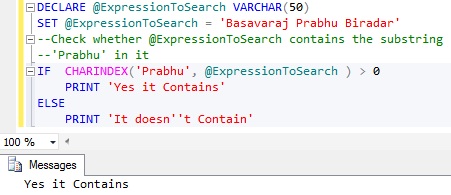
Below example demonstrates how we can use the CHARINDEX() function to check whether a String contains a Sub-string in it.
DECLARE @ExpressionToSearch VARCHAR(50)
SET @ExpressionToSearch = 'Basavaraj Prabhu Biradar'
--Check whether @ExpressionToSearch contains the substring
--'Prabhu' in it
IF  CHARINDEX('Prabhu', @ExpressionToSearch ) > 0
	PRINT 'Yes it Contains'
ELSE
	PRINT 'It doesn''t Contain'
RESULT:
To know various alternative approaches to check whether a String contains a Sub-string in it, you may like to read the article: How to Check if a String Contains a Substring in it in Sql Server
48. How to get all the records which contain double byte data in a particular NVARCHAR data type column Sql Server
In NVARCHAR DataType column we can store both Single byte and Double byte data. Many a times we want to know, how many records have double byte data in the NVARCHAR data type column. We can write a script like below for this:
--Query to get all the customers whose CustomerName
--column contains DOUBLE Byte Data
SELECT *
FROM dbo.Customer
WHERE CustomerName != CAST(CustomerName AS VARCHAR(50))
RESULT:

To understand this in detail with examples, you may like to go through the article: How to get all the records which contain double byte data or all the records which contain single byte data in Sql Server?
49. How to get all the records which contain only single byte data in Sql Server
In NVARCHAR DataType column we can store both Single byte and Double byte data. Many a times we want to know, how many records have only single byte data in the NVARCHAR data type column. We can write a script like below for this:
-- Query to get all the customers whose CustomerName
-- column contains SINGLE Byte Data only
SELECT *
FROM dbo.Customer
WHERE CustomerName = CAST(CustomerName AS VARCHAR(50))
RESULT:

To understand this in detail with examples, you may like to go through the article: How to get all the records which contain double byte data or all the records which contain single byte data in Sql Server?
50. How to get Date Part only from DateTime in Sql Server
There are multiple ways of getting date part only from DateTime, below is one such approach. To know various alternative approaches you may like to read the article: How to get Date Part only from DateTime in Sql Server
SELECT CONVERT (DATE, GETDATE()) 'Date Part Only'
RESULT:

To know the various alternative approaches to get Date Part only from DateTime in Sql Server you may like to read the article: How to get Date Part only from DateTime in Sql Server
Hope you liked this article and if any of your commonly used query is not listed here, please let me know. I will definitely post it and we can help together to the Sql Server Developers community.