Sharraxaad
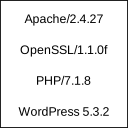
Displays Apache and PHP version in footer of admin section for easy access.
These information are usually needed if reporting bugs or checking hosting service configuration. WordPress displays only it’s own version which is not enough.
Plugin is very simple and uses almost no resources. After all, it just displays version information.
Rakibaad
- Extract package and upload to plugins directory
- Activate the plugin through the ‘Plugins’ menu in WordPress
SBI
None
Dibu-eegisyo
Ma jiraan wax dibu-eegis ah oo ku saabsan kaabahan.
Ka-qaybgalayaasha & Horumariyayaasha
“Show Apache and PHP version” waa softiweer il furan. Dadka soo socda ayaa wax ku biiriyay kaabahan.
Ka-qaybgalayaasha
Ku tarjun “Show Apache and PHP version” luqaddaada.
Ma xiisaynaysaa horumarinta?
Baadh koodka, fiiri bakhaarka SVN, ama iska qor diiwaanka horumarinta adigoo adeegsanaya RSS.
Isbeddellada
0.1
Initial release