QualCoder 2.2 Release

The latest release of QualCoder is available from:

https://github.com/ccbogel/QualCoder/releases/tag/2.2

The changes are:

  • Improved UI features,with the use of icons and files selector list.
  • Improved imports and exports of REFI-QDA projects. Still an experimental function.
  • An option to link to files rather than store them internally in the project folder.
  • No longer store files larger than 2 Gbytes internally in the project folder for REFI-QDA compatibility.
  • Coded text memo functionality added.
  • Additional text auto-coding options for sentences (in one file or across all text files).
  • Auto-coding undo option.
  • Select multiple files for deletion function.
  • Italian language added.
  • Greek language added (translation requires revision).
  • Added warning when entering text into numeric case attribute.
  • Fixed error, new case attributes were always assigned to numeric type.

Revision of Japanese and Spanish translations is also required.

REFI-QDA:

REFI-QDA project export and import has improved. However, further testing of absolute and relative file links needs to be undertaken. In audio and video transcripts, the transcript codings and syncpoints require further testing. For REF-QDA project import, variables are stored as text so: boolean, date, integer and floating point. Although some of these are cast as numeric during operations. QualCoder does not import sets or graphs as it does not have this functionality.

With the newer iconified toolbars, the icons have not been tested on Mac OS.

10 Comments

Filed under Uncategorized

QualCoder 2.1

The latest QualCoder release is now available.

Improved REFI MAXQDA import – Qualcoder now tests for Sources and sources directory in the qdpx folder.
Improved REFI-QDA and RQDA imports by auto-selecting a coder name for use on import.
Added key commands for changing text coding sizes. Shift + Left arrow, Shift + Right arrow, Alt + Left arrow, Alt + Right arrow.

Audio and Video play speed now ranges from 0.1 speed up to 2.0 speed.
Added key commands for audio/video play speed. Ctrl + Shift + < and Ctrl + Shift + >

Added video window right-context menu. This can be used to resize the window if re-sizing is difficult. It can also export a screenshot of the current image in the window.

Added exportable relation table to match the RQDA relation function.
Added the RQDA getCodingTable function. This is a SQL command, under joins in the SQL Dialog).

Release:

https://github.com/ccbogel/QualCoder/releases/tag/2.1

Leave a comment

Filed under Uncategorized

QualCoder 2.0

The August 2020 of QualCoder is available from https://github.com/ccbogel/QualCoder/releases

This release contains bug fixes. It also contains a lot of GUI improvements, including storing window sizes and a recent project menu. There is improved importing and exporting of files. Import of survey files in xlsx format is now available. There is also a Japanese language option (which will need revision), https://www.qdaa.info/qual-coder-install-windows10?fbclid=IwAR010UsEE_tq4_5iNbOZ_Tp91587YJnp1QGUtXvB9F4xa0g9F3fTJOUGrmw

The importation and exportation of projects in the REFI-QDA format is experimental and not fully compliant with the standards. There is improvement in text coding with better support for imported REFI-QDA files with some characters, e.g. smart quotes, than the previous version.

This release requires the installation of the python module: openpyxl
The manual contains the instructions to install this module.

The release contains a Debian for Linux and a master.zip folder. The source.zip, source.tar.gz contains one bug in the AV module to do with coding AV segments. The master.zip contains the source code also, without the bug.

7 Comments

Filed under Uncategorized

Qualcoder-1.9 Release

This latest release May 2020 of QualCoder is available from https://github.com/ccbogel/QualCoder/releases

This release fixes some bugs.

Improvements

  • Improved French translations.
  • When image coding the boxes are colored to match the code color.
  • Auto-coding text allows you to assign multiple differing sections of text with the same code by using the pipe ‘|’ separator. For example assigning the words politics|politicians with a selected code.
  • There are additional options in the view graph dialog. Right-click context menu on a line gives options to emphasis selected lines by color, thickness and style.

Citing

There have been some requests of how to cite QualCoder. This is an example in APA style:

Curtain, C. (2020) QualCoder 1.9 [Computer software]. Retrieved from
Some limitations
ebook importation may not always work.The importation and exportation of projects in the REFI-QDA format is experimental and not fully compliant with the standards.
Exports
Functionalities that may not match the standard:
Coding for a/v transcripts is also exported as a TextSource.
Transcript synchronization with a/v is approximated from textual timepoints in the transcript.
Large > 2GBfiles are not stored externally.

Imports

PDF sources not imported.
Audio and video transcriptions, synchpoints and transcription coding to be further tested.
Sets and Node Graphs are not imported: Qualcoder does not use this functionality.
Large > 2GBfiles are not stored externally.

Comments Off on Qualcoder-1.9 Release

Filed under Uncategorized

Latest release

The latest source code and a Linux debian release are now available.

Changes include the RQDA project import function and various bug fixes.

https://github.com/ccbogel/QualCoder/releases

6 Comments

Filed under Uncategorized

RQDA import

Several github people have asked for RQDA import. The feature has now been added to import RQDA projects. All data is imported except for the file categories tables.

The latest Linux debian file (version 1.4.1) also contains this feature https://github.com/ccbogel/QualCoder-Debians

3 Comments

Filed under Uncategorized

Audio tracks

I have added an option to audio/video coding where the media has multiple audio tracks. It is now possible to select from multiple audio tracks when viewing or coding a video. This is providing the video contains multiple audio tracks.

2 Comments

Filed under Uncategorized

Windows 10 and VLC versions

On Windows 10, the standard qualcoder with vlc does not run. I added a qualcoder_non_av folder so that Windows users who get an error with vlc can use this version instead. This version does not allow audio/video coding or viewing.

I think the key problem is some programs are written for 32 bit architecture and some are written for 64 bit architecture.

This means: If you have a 32 bit python installed and a 64 bit vlc installed (or vice-versa, a 64 bit python and 32 bit vlc) QualCoder will not run as the two architectures do not talk to each other.

The easiest solution is to install a vlc bit version that matches the python bit version. This should then allow QualCoder to first run and open, and secondly to work with audio and video.

This image shows I am running Python in 32 bit architecture:

python32.png

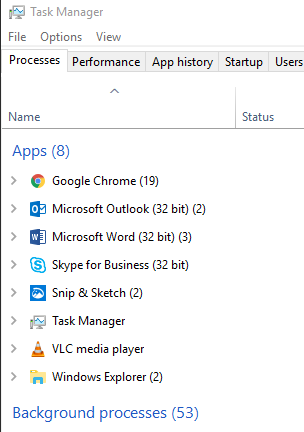
This image, from the task manager,  shows vlc is running as 64 bit architecture. If it was 32 bit is would be noted as such in brackets.

task_manager.png

Leave a comment

Filed under Uncategorized

Debian Package

The latest Debian package qualcoder-1.4.deb is available from https://github.com/ccbogel/QualCoder-Debians

This is for easy instillation on Debian based Linux systems such as Debian, Ubuntu and Linux Mint.

It may not be standards compliant but it works. It creates an application launcher or you can run it from the terminal via the following command:

python3 /usr/share/qualcoder/qualcoder.py

Post updated 27 Oct 2019


3 Comments

Filed under Uncategorized

Audio and Video coding

Audio and video can be coded in the code_av dialog. One screen shows the video the other contains the coding and video controls. Coded segments are shown in the upper section of the pane. Hovering the mouse over a coded segment give you detail about that segment. Right-clicking brings up a menu where you can add a memo, play the video from that point, or delete the segment.

pic9

Leave a comment

Filed under Uncategorized