About PostFinance App
Keep your finances under control at all times with the PostFinance App Carry out your banking transactions easily and securely whether you’re at home or on the go. With the PostFinance App, you can keep track of your...
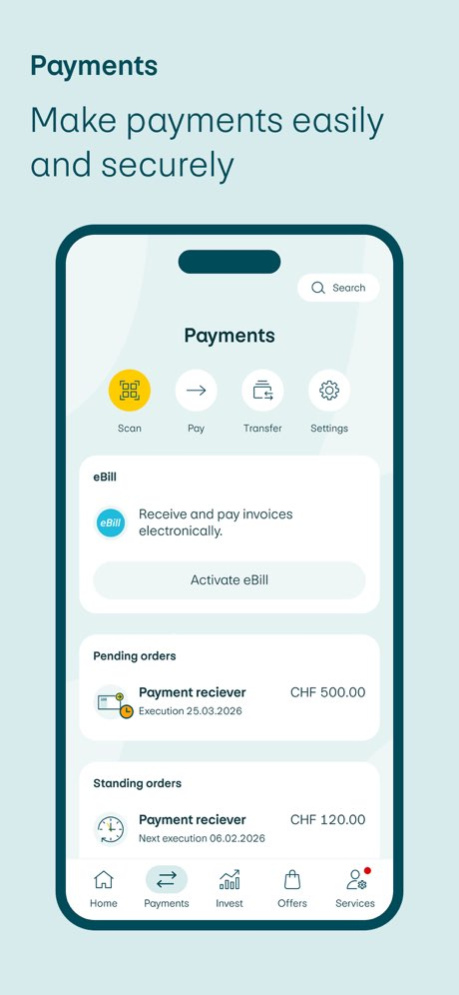
Keep your finances under control at all times with the PostFinance App Carry out your banking transactions easily and securely whether you’re at home or on the go. With the PostFinance App, you can keep track of your accounts, payments and investments. Access is quick and easy with Face ID or Touch ID. All you need to know about your account at a glance . Check your account balance, keep track of income and expenditure, and analyse what you spend your money on. . Scan or upload QR-bills, pay eBills directly in the app and send money easily to mobile numbers. . Documents can also be displayed and shared easily as PDFs. . Apple Pay and PostFinance Pay are available for convenient payment. Settings and support directly in the app . Adjust card limits, block or unblock your cards or order a replacement. . Set up push notifications for credits, debits or eBill. . You can also change your address or reset your password directly in the app. . If you have any questions, the PostFinance chatbot will be happy to help you at any time. Investing and retirement planning made easy . Track stock market prices, access your custody account and manage your investment products from digital asset management to fund self-service and e-trading. Digital vouchers and prepaid credit . Buy or gift vouchers for iTunes, PaysafeCard and many other providers or top up prepaid credit for your mobile phone. Security is top priority Your data is optimally protected using modern encryption methods. For even greater security, we recommend keep-ing the operating system and all apps up to date. The app can be set up so that you can log out quickly by shaking your smartphone. More information: https://www.postfinance.ch/en/support/security/e-finance-security.html General information on security . Keeping your data secure is our top priority. A multi-stage encryption and identification process ensures that only you have access to your accounts. . Apple Store must be preinstalled on your device. Manual installation of the Store and installation of the Post-Finance App via this channel or downloading the PostFinance App via a third-party provider are not permitted. . PostFinance observes the provisions of Swiss data protection legislation when collecting and processing personal data. In all areas of its online product range, comprehensive technical tools and organizational measures are used to protect against unauthorized access, manipulations and data loss. . If you lose your mobile phone and/or your SIM card or if there is reason to suspect misuse, please contact our Customer Center immediately on +41 58 448 14 14. Important information For regulatory reasons, the app does not support onboarding or sign-up to new products and services for people who are not domiciled in Switzerland. For customers living abroad, the app acts as a login mechanism for their existing relationship with PostFinance. More information: postfinance.ch/app
Previous Versions
Here you can find the changelog of PostFinance App since it was posted on our website on 2026-02-17 03:18:21.
The latest version is 6.1.1 and it was updated on 2026-06-24 18:26:11. See below the changes in each version.
PostFinance App version 6.1.1
Updated At: 2026-06-03
Changes: Version History Troubleshooting: the PostFinance App is subject to on-going development and optimization to improve the user experience. 6.1.1 May 4 • Customizing quick access: You can now customize the "Quick access" links on the home screen yourself. You can remove existing shortcuts or select additional ones from the list. To do this, longpress the desired button; a menu will open where you can change or delete the button.
• Show/hide and rename accounts: You can now show and hide accounts. To do this, longpress the desired account until a menu appears. There you can choose whether you want to rename the account or show/hide it. If you hide an account, it will no longer appear in the assets overview. On the home screen, you can see how many accounts are hidden. Hidden accounts are not included in the total balance of the assets overview.
• Standing transfers now also available in E-Trading: You can now also set up standing transfers in E-Trading. To do this, go to Payments > Transfer and select the "Standing order" option at the top. Enter your transfer as usual and specify how frequently it should be executed.
• Keep track of your appointments: Save appointments directly to your calendar. Simply click on "Book a consultation" and transfer the appointment directly to your calendar via "Add to calendar".
• Order foreign currencies: Foreign currencies can now be easily ordered in the app and delivered to an address of your choice. 6.1.0 Mar 11 Troubleshooting: the PostFinance App is subject to on-going development and optimization to improve the user experience. 6.0.2 Feb 10 The app is now even easier to use. In the five areas of Home, Payments, Invest, Offers and Services, you can find what you need even faster.
• With quick access, you can access the most important functions directly, Scan, Pay, Transfer and Analysis.
• The search will be available on each of the main screens (tab: Home, Payments, Invest, Offers, Services).
• In the “Invest” section, you will find everything you need for your financial investments:
• Discover: inspiration for new investment and retirement planning options
• Market overview: overview of the most important developments and trends, concise and clear.
• Consultation appointment: arrange an appointment with experts for a personal consultation.
• “More” is now called “Services”. Under “Services”, you will now find five sections: Cards, Notifications, Documents, Profile and Settings, as well as Contact and Support.
• Notification (“bell”): the current notification feature “bell icon” will be removed from the home screen and can now be found under “Services” as a separate menu item “Notifications”.
• In the “Profile and settings” section, you have all the options for designing the app individually according to your needs. 6.0.1 12/13/2025 The app is now even easier to use. In the five areas of Home, Payments, Invest, Offers and Services, you can find what you need even faster.
• With quick access, you can access the most important functions directly, Scan, Pay, Transfer and Analysis.
• The search will be available on each of the main screens (tab: Home, Payments, Invest, Offers, Services).
• In the “Invest” section, you will find everything you need for your financial investments:
• Discover: inspiration for new investment and retirement planning options
• Market overview: overview of the most important developments and trends, concise and clear.
• Consultation appointment: arrange an appointment with experts for a personal consultation.
• “More” is now called “Services”. Under “Services”, you will now find five sections: Cards, Notifications, Documents, Profile and Settings, as well as Contact and Support.
• Notification (“bell”): the current notification feature “bell icon” will be removed from the home screen and can now be found under “Services” as a separate menu item “Notifications”.
• In the “Profile and settings” section, you have all the options for designing the app individually according to your needs. 6.0.0 12/10/2025 Troubleshooting: the PostFinance App is subject to on-going development and optimization to improve the user experience. 5.18.2 10/31/2025 Bugfixes 5.18.1 09/15/2025 • ESG category in the PostFinance app: From January 1, 2026, financial service providers must indicate how sustainable a fund is. In the PostFinance app, you will now find the “ESG category” in the fund details, along with a link to further information on sustainability.
• Optimized search in the PostFinance app: The search function has been revised and is now located in the asset overview (top left). The search is a beta version – we welcome your feedback to help us further develop it according to your needs.
• Improved overview of limit orders in the order summary: The limit price is now shown directly in the order overview in the PostFinance app. In the “individual orders” list, market and limit orders are now listed separately – including display of the respective limit price.
• New: You can now view transactions and analyses going back four years.
• Various bug fixes: The app is continuously developed and optimized to improve your user experience. 5.18.0 09/10/2025 Troubleshooting: the PostFinance App is subject to on-going development and optimization to improve the user experience. 5.17.3 07/16/2025 Troubleshooting: the PostFinance App is subject to on-going development and optimization to improve the user experience. 5.17.2 07/14/2025 • The settings area has been optimized. Under "More", you will now find new categories to adjust your settings even more easily. Business customers can now use the administration area in the app under "More".
• You can now schedule or reschedule a consultation appointment under "More" > "Contact and Support".
• QR Scanner Widget: You can now place the QR scanner widget flexibly – e.g. on the home screen, as an accessory widget, in the control center or via shortcuts. This way, you can scan QR invoices and pay in online shops with PostFinance Pay even faster and easier.
• You can now generate a booking proof and payment confirmation at any time. If the document is already available, it will be displayed; otherwise, it will be automatically created and deposited in the document center.
• Analyses:
Compare your income and expenses with the previous year.
Get an overview of your average monthly expenses.
Do you use personal labels like "Vacation", "Dog" or "Food"? Now you can graphically represent their development and compare it with the previous year.
• Crypto: The view of the crypto portfolio has been extended with an additional chart "Performance in %".
• PostFinance App Language: Under "More" > "App Settings" > "Preferred App Language", you can adjust the language of the PostFinance App in the device settings.
• Various bug fixes: The app is continuously developed and optimized to improve your user experience. 5.17.0 06/04/2025 • Various bug fixes: The app is continuously developed and optimized to improve your user experience. 5.16.1 04/25/2025 • Overview of your subscriptions: You can now have access to your subscriptions and services under the "Analytics" overview.
• Register your QR-bills faster and easier: The process of entering a QR-bill in the app is simplified and shortened.
• Scan multiple QR-bills at once: You can scan or upload multiple QR-bills approved them simultaneously.
• New brand identity: New logo, new font and colours… We are creating a consistent brand experience across all channels with the new brand identity.
• Reorder account documents: Customers now have the option to reorder account documents directly through the PostFinance app.
• PIN order without a PostFinance replacement card: It is now possible, in case of a forgotten PIN for the PostFinance card, to order a new PIN directly via the app without issuing a new card. The new PIN can be requested under More > My Cards > Request PIN.
• Account opening for minors: New customers aged 12 and above can now independently open an account via the PostFinance app.
• Various bug fixes: The app is continuously developed and optimized to improve your user experience. 5.16.0 03/07/2025 Troubleshooting: the PostFinance App is subject to on-going development and optimization to improve the user experience. 5.15.2 01/27/2025 - New push notifications for tax and customer documents: Set up the appropriate notifications in the PostFinance app.
- International payments: The transfer amount, the expected exchange rate, and the applicable fees are now displayed immediately.
- Various bug fixes: The app is continuously developed and optimized to improve your user experience. 5.15.0 12/04/2024 Troubleshooting: the PostFinance App is subject to on-going development and optimization to improve the user experience. 5.14.1 10/15/2024 • You can now upload photos and screenshots of QR-bills with the PostFinance App.
• The scanner for all functions, such as scanning and uploading QR-bills and making payments with PostFinance Pay and e-finance, is now located in the overview of assets.
• You can now access the CO2 calculator under “Analyses” in the PostFinance App.
• Troubleshooting: the PostFinance App is subject to on-going development and optimization to improve the user experience. 5.14.0 08/28/2024 Various bug fixes: The PostFinance App is subject to on-going development and optimization to improve the user experience. 5.13.3 08/12/2024 Various bug fixes: The PostFinance App is subject to on-going development and optimization to improve the user experience. 5.13.1 07/17/2024 - My analyses: Budgets can now be set for expenditure according to categories and tags (with or without notification).
- One scanner for all functions: You can now use any scanner for everything in the PostFinance App: logging in, scanning and uploading QR-bills, and making payments with PostFinance Pay and e-finance.
- New look and feel for e-trading: Various visual changes in e-trading
- Various bug fixes 5.13.0 06/05/2024 - Various bug fixes: The PostFinance App is subject to on-going development and optimization to improve the user experience. 5.12.1 04/16/2024 Cryptocurrency: Trade in selected cryptocurrencies 24/7 directly from your private or savings account. With a saving plan, you can invest in cryptocurrencies on a regular basis.
My finances: A custom time period can now be selected for the analysis. It is also possible to recategorize or label several transactions at the same time.
Set up login: Login (Face ID / fingerprint) is now very easy to set up when changing your smartphone.
Various bug fixes: The PostFinance App is subject to on-going development and optimization to improve the user experience. 5.12.0 03/04/2024 Various bug fixes 5.11.2 02/08/2024 - Optimized and revised settings panel: The settings panel has been thoroughly revised.
- My analyses: Recategorize your transactions and decide whether this should be applied once or also for all following transactions.
- Various bug fixes: The PostFinance App is subject to on-going development and optimization to improve the user experience. 5.11.1 01/03/2024 - Optimized and revised settings panel: The settings panel has been thoroughly revised.
- My analyses: Recategorize your transactions and decide whether this should be applied once or also for all following transactions.
- Various bug fixes: The PostFinance App is subject to on-going development and optimization to improve the user experience. 5.11.0 11/29/2023
PostFinance App version 6.1.0
Updated At: 2026-03-11
Changes: • Customizing quick access: You can now customize the "Quick access" links on the home screen yourself. You can remove existing shortcuts or select additional ones from the list. To do this, longpress the desired button; a menu will open where you can change or delete the button.
• Show/hide and rename accounts: You can now show and hide accounts. To do this, longpress the desired account until a menu appears. There you can choose whether you want to rename the account or show/hide it. If you hide an account, it will no longer appear in the assets overview. On the home screen, you can see how many accounts are hidden. Hidden accounts are not included in the total balance of the assets overview.
• Standing transfers now also available in E-Trading: You can now also set up standing transfers in E-Trading. To do this, go to Payments > Transfer and select the "Standing order" option at the top. Enter your transfer as usual and specify how frequently it should be executed.
• Keep track of your appointments: Save appointments directly to your calendar. Simply click on "Book a consultation" and transfer the appointment directly to your calendar via "Add to calendar".
• Order foreign currencies: Foreign currencies can now be easily ordered in the app and delivered to an address of your choice.
PostFinance App version 6.0.2
Updated At: 2026-02-10
Changes: Troubleshooting: the PostFinance App is subject to on-going development and optimization to improve the user experience.
Disclaimer
Official App Store Link
We do not host PostFinance App on our servers. We did not scan it for viruses, adware, spyware or other type of malware. This app is hosted by Apple and passed their terms and conditions to be listed there. We recommend caution when installing it.
The App Store link for PostFinance App is provided to you by apps112.com without any warranties, representations or guarantees of any kind, so access it at your own risk.
If you have questions regarding this particular app contact the publisher directly. For questions about the functionalities of apps112.com contact us.