Changeset 1772590
- Timestamp:
- 11/21/2017 07:58:47 PM (8 years ago)
- Location:
- ws-force-login-page
- Files:
-
- 6 added
- 3 edited
- 9 copied
-
nbproject (added)
-
nbproject/project.properties (added)
-
nbproject/project.xml (added)
-
tags/2.4.7 (added)
-
tags/2.4.7/README.md (copied) (copied from ws-force-login-page/trunk/README.md) (1 diff)
-
tags/2.4.7/admin (added)
-
tags/2.4.7/admin/index.php (copied) (copied from ws-force-login-page/trunk/admin/index.php)
-
tags/2.4.7/admin/ws-force-login-page-admin.php (copied) (copied from ws-force-login-page/trunk/admin/ws-force-login-page-admin.php)
-
tags/2.4.7/index.php (copied) (copied from ws-force-login-page/trunk/index.php)
-
tags/2.4.7/languages (added)
-
tags/2.4.7/languages/ws-force-login-page-et.mo (copied) (copied from ws-force-login-page/trunk/languages/ws-force-login-page-et.mo)
-
tags/2.4.7/languages/ws-force-login-page-et.po (copied) (copied from ws-force-login-page/trunk/languages/ws-force-login-page-et.po)
-
tags/2.4.7/readme.txt (copied) (copied from ws-force-login-page/trunk/readme.txt) (1 diff)
-
tags/2.4.7/uninstall.php (copied) (copied from ws-force-login-page/trunk/uninstall.php)
-
tags/2.4.7/ws-force-login-page.php (copied) (copied from ws-force-login-page/trunk/ws-force-login-page.php) (1 diff)
-
trunk/README.md (modified) (1 diff)
-
trunk/readme.txt (modified) (1 diff)
-
trunk/ws-force-login-page.php (modified) (1 diff)
Legend:
- Unmodified
- Added
- Removed
-
ws-force-login-page/tags/2.4.7/README.md
r1680312 r1772590 1 # Wordpress plugin for redirecting non-logged users to login page 1 # WS Force Login Page 2 3 * Version: 2.4.7 4 * [Homepage](https://www.silvermuru.ee/en/wordpress/plugins/ws-force-login-page/) 2 5 3 6 Redirecting user to login page if not logged in, working also with domains what includes umlaut letters like ö, ä, õ, ü 7 8 ## Description 9 10 WS Force Login Page force users who are not logged in by redirect into login page, this way it is good tool for developers to install sites which are in development process by restrict access to site and its content. Or when you want to put all site articles under password this plugin will do this! Working also with domains what includes umlaut letters like ö, ä, õ, ü 11 12 Suitable also for putting site to maintenance mode and show custom message in login view. 13 14 ## Installation 15 16 1. Upload the plugin files to the '/wp-content/plugins/plugin-name' directory, or install the plugin through the WordPress plugins screen directly. 17 2. Activate the plugin through the 'Plugins' screen in WordPress 18 19 20 ## Frequently Asked Questions 21 22 #### How to restore web page normal behavior? 23 24 To remove redirection to login page the plugin needs to be deactivated 25 26 27 ## Screenshots 28 29 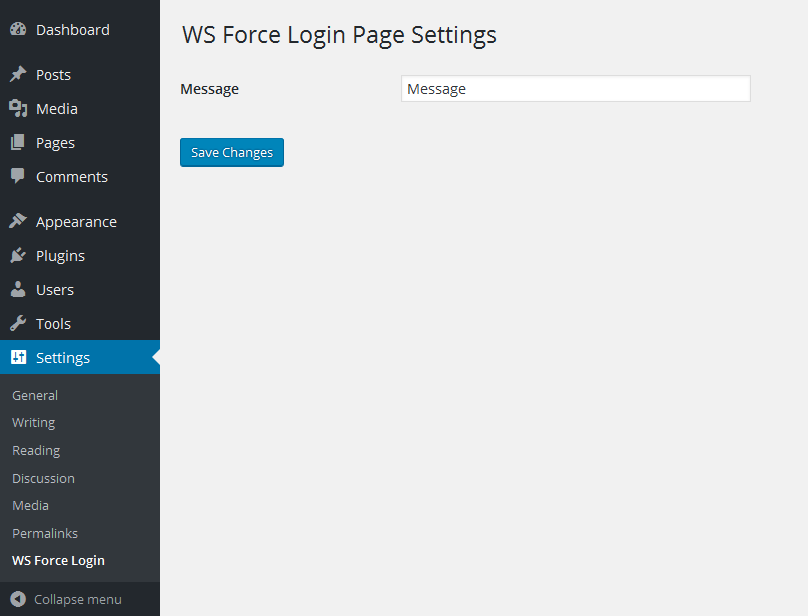 30 31 1. Settings page for the message 32 33 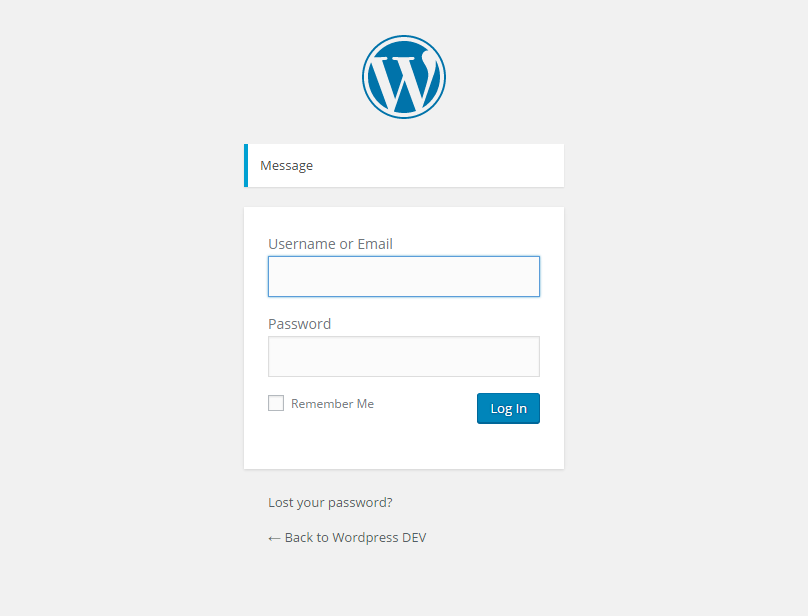 34 35 2. Login page with message 36 37 38 ## Changelog 39 40 #### 2.4.6 41 42 Tested up to Wordpress 4.8 version 43 44 #### 2.4.5 45 46 Tested up to Wordpress 4.7 version 47 48 #### 2.4.4 49 50 Wordpress 4.6.1 tested 51 52 #### 2.4.3 53 54 Code refactory 55 56 #### 2.4.2 57 58 Improvement 59 60 #### 2.4.1 61 62 Bug fix 63 64 #### 2.4 65 66 Admin side code refactoring 67 68 #### 2.3.3 69 70 Plugin improvement 71 72 * Plugin data will be deleted from database after the plugin is deleted 73 74 #### 2.3.2 75 76 Estonian tranlation bug fixed 77 78 #### 2.3.1 79 80 Estonian translation added 81 82 #### 2.3 83 84 It is possible to translate admin side panel 85 86 #### 2.2.2 87 88 Security fix 89 90 * Admin side control added for not getting direct access to file 91 92 #### 2.2.1 93 94 Bug fix 95 96 * Message url variable parameter fixed 97 98 #### 2.2 99 100 Improved message control 101 102 * Message is only shown when referral is main site 103 104 #### 2.1 105 106 Bug fix 107 108 * Message register filter added 109 110 #### 2.0 111 112 New functionality added 113 114 * Possible to show custom message in login view 115 * Settings page added for adding custom message for showing login view 116 117 #### 1.2 118 119 Security improvements. 120 121 * Added index to plugin folder 122 * Added control for not getting direct access to plugin 123 124 #### 1.1 125 126 Code refactoring 127 128 #### 1.0 129 130 First version -
ws-force-login-page/tags/2.4.7/readme.txt
r1680312 r1772590 3 3 Tags: admin, administration, access, closed, force user login, hidden, login, maintenance mode, under construction, password, privacy, private, protected, registered only, restrict, restricted, testing 4 4 Requires at least: 4.4 5 Tested up to: 4. 86 Stable tag: 2.4. 65 Tested up to: 4.9 6 Stable tag: 2.4.7 7 7 License: GPLv2 or later 8 8 License URI: http://www.gnu.org/licenses/gpl-2.0.html -
ws-force-login-page/tags/2.4.7/ws-force-login-page.php
r1680312 r1772590 2 2 /** 3 3 * Plugin Name: WS Force Login Page 4 * Plugin URI: http ://www.silvermuru.ee/en/wordpress/plugins/ws-force-login-page/4 * Plugin URI: https://www.silvermuru.ee/en/wordpress/plugins/ws-force-login-page/ 5 5 * Description: Redirecting user to login page if not logged in and when needed the custom message is shown 6 * Version: 2.4. 66 * Version: 2.4.7 7 7 * Author: WebShark 8 * Author URI: http ://www.webshark.ee/8 * Author URI: https://www.webshark.ee/ 9 9 * Text Domain: ws-force-login-page 10 10 **/ -
ws-force-login-page/trunk/README.md
r1418015 r1772590 1 # Wordpress plugin for redirecting non-logged users to login page 1 # WS Force Login Page 2 3 * Version: 2.4.7 4 * [Homepage](https://www.silvermuru.ee/en/wordpress/plugins/ws-force-login-page/) 2 5 3 6 Redirecting user to login page if not logged in, working also with domains what includes umlaut letters like ö, ä, õ, ü 7 8 ## Description 9 10 WS Force Login Page force users who are not logged in by redirect into login page, this way it is good tool for developers to install sites which are in development process by restrict access to site and its content. Or when you want to put all site articles under password this plugin will do this! Working also with domains what includes umlaut letters like ö, ä, õ, ü 11 12 Suitable also for putting site to maintenance mode and show custom message in login view. 13 14 ## Installation 15 16 1. Upload the plugin files to the '/wp-content/plugins/plugin-name' directory, or install the plugin through the WordPress plugins screen directly. 17 2. Activate the plugin through the 'Plugins' screen in WordPress 18 19 20 ## Frequently Asked Questions 21 22 #### How to restore web page normal behavior? 23 24 To remove redirection to login page the plugin needs to be deactivated 25 26 27 ## Screenshots 28 29  30 31 1. Settings page for the message 32 33  34 35 2. Login page with message 36 37 38 ## Changelog 39 40 #### 2.4.6 41 42 Tested up to Wordpress 4.8 version 43 44 #### 2.4.5 45 46 Tested up to Wordpress 4.7 version 47 48 #### 2.4.4 49 50 Wordpress 4.6.1 tested 51 52 #### 2.4.3 53 54 Code refactory 55 56 #### 2.4.2 57 58 Improvement 59 60 #### 2.4.1 61 62 Bug fix 63 64 #### 2.4 65 66 Admin side code refactoring 67 68 #### 2.3.3 69 70 Plugin improvement 71 72 * Plugin data will be deleted from database after the plugin is deleted 73 74 #### 2.3.2 75 76 Estonian tranlation bug fixed 77 78 #### 2.3.1 79 80 Estonian translation added 81 82 #### 2.3 83 84 It is possible to translate admin side panel 85 86 #### 2.2.2 87 88 Security fix 89 90 * Admin side control added for not getting direct access to file 91 92 #### 2.2.1 93 94 Bug fix 95 96 * Message url variable parameter fixed 97 98 #### 2.2 99 100 Improved message control 101 102 * Message is only shown when referral is main site 103 104 #### 2.1 105 106 Bug fix 107 108 * Message register filter added 109 110 #### 2.0 111 112 New functionality added 113 114 * Possible to show custom message in login view 115 * Settings page added for adding custom message for showing login view 116 117 #### 1.2 118 119 Security improvements. 120 121 * Added index to plugin folder 122 * Added control for not getting direct access to plugin 123 124 #### 1.1 125 126 Code refactoring 127 128 #### 1.0 129 130 First version -
ws-force-login-page/trunk/readme.txt
r1666684 r1772590 3 3 Tags: admin, administration, access, closed, force user login, hidden, login, maintenance mode, under construction, password, privacy, private, protected, registered only, restrict, restricted, testing 4 4 Requires at least: 4.4 5 Tested up to: 4. 86 Stable tag: 2.4. 65 Tested up to: 4.9 6 Stable tag: 2.4.7 7 7 License: GPLv2 or later 8 8 License URI: http://www.gnu.org/licenses/gpl-2.0.html -
ws-force-login-page/trunk/ws-force-login-page.php
r1666686 r1772590 2 2 /** 3 3 * Plugin Name: WS Force Login Page 4 * Plugin URI: http ://www.silvermuru.ee/en/wordpress/plugins/ws-force-login-page/4 * Plugin URI: https://www.silvermuru.ee/en/wordpress/plugins/ws-force-login-page/ 5 5 * Description: Redirecting user to login page if not logged in and when needed the custom message is shown 6 * Version: 2.4. 66 * Version: 2.4.7 7 7 * Author: WebShark 8 * Author URI: http ://www.webshark.ee/8 * Author URI: https://www.webshark.ee/ 9 9 * Text Domain: ws-force-login-page 10 10 **/
Note: See TracChangeset
for help on using the changeset viewer.