Changeset 1595191
- Timestamp:
- 02/13/2017 07:35:43 PM (9 years ago)
- Location:
- listig
- Files:
-
- 3 added
- 6 edited
-
assets/screenshot-2.png (added)
-
trunk/README.md (modified) (3 diffs)
-
trunk/composer.json (modified) (1 diff)
-
trunk/globals/functions.php (modified) (1 diff)
-
trunk/globals/registers.php (modified) (1 diff)
-
trunk/listig.php (modified) (1 diff)
-
trunk/readme.txt (modified) (3 diffs)
-
trunk/screenshot-1.png (added)
-
trunk/screenshot-2.png (added)


Legend:
- Unmodified
- Added
- Removed
-
listig/trunk/README.md
r1594408 r1595191 3 3 Editorial plugin to manage custom post lists. 4 4 5 ## WIP 6 Version *0.1* 5 The plugin is published at the official [WordPress plugin repository](https://wordpress.org/plugins/listig/) for download. 6 7 ## Work In Progress 8 Version *0.2.1* 7 9 8 10 This is a plugin in beta phase. A lot of work in progress. … … 14 16 * WordPress ^4.7 15 17 18 ## Usage with shortcodes 19 You can render your list with the following shortcodes: 20 21 * `[listig]`, takes all its content and repeats it for every post item in your list. 22 * `[listig-headline]`, shows the current post items headline. 23 * `[listig-excerpt]`, shows the current post items text. 24 * `[listig-url]`, gives the url to the post item edited. Takes one argument `target`, eg: `[listig-url target="_blank"]` will render a hyperlink that opens in a new tab. 25 * `[listig-image]`, renders an image from the post item. You have the same arguments as to wp_get_attachment_image. Eg: `[listig-image size="medium"]` will render an image with the defined medium size. 26 27 Here is an example from a post content to render a complete list with id=236: 28 29 ``` 30 [listig id="236"] 31 32 [listig-headline] 33 34 [listig-image] 35 36 [listig-excerpt] 37 38 [listig-url]Read more![/listig-url] 39 40 [/listig] 41 ``` 42 43 Then you can format the shortcodes, eg set the headline to H2 and the read more link to italic. 44 45 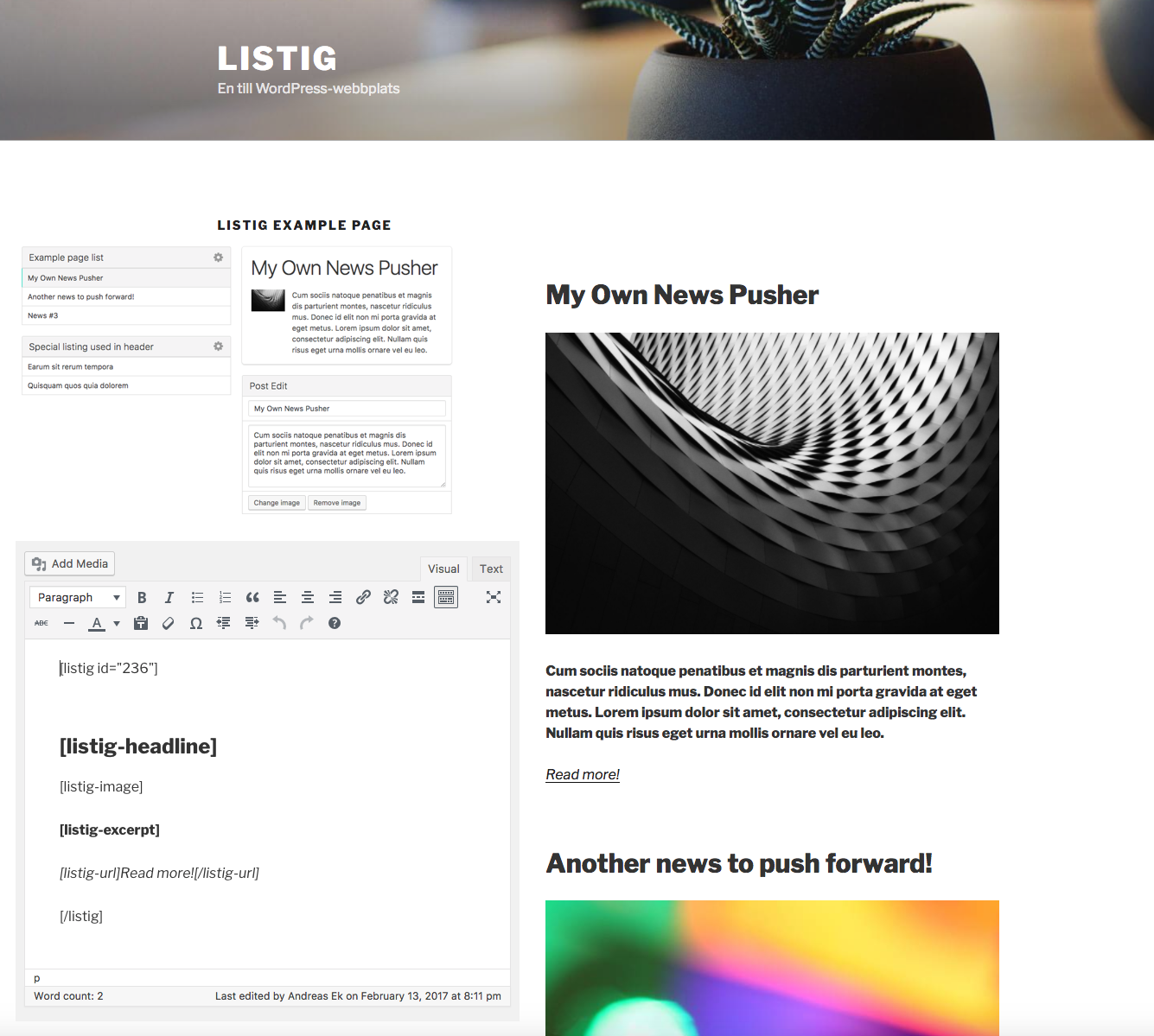 46 16 47 ## Usage in templates 17 48 The global function `listig` accepts the ID of the list you want to loop. The ID is printed in the list settings (the gear icon). … … 20 51 21 52 A simple example to render the output from a list: 22 ``` 53 54 ```php 23 55 $posts = listig(236); 24 56 foreach ($posts as $post) { -
listig/trunk/composer.json
r1594408 r1595191 1 1 { 2 2 "name": "ekandreas/listig", 3 "version": "0. 1",3 "version": "0.2.1", 4 4 "description": "List Manager as a WordPress plugin", 5 5 "keywords": ["wordpress","wordpress-plugin","list-manager","query","structures","tool","editorial"], -
listig/trunk/globals/functions.php
r1594408 r1595191 16 16 function listig($id) 17 17 { 18 $id = (int)$id; 18 19 $listig = \EkAndreas\Listig\Model\ListingModel::get($id); 19 20 if ($listig && $listig->posts) { -
listig/trunk/globals/registers.php
r1594408 r1595191 11 11 EkAndreas\Listig\Controller\UserSettingController::class, 12 12 ]); 13 14 new \EkAndreas\Listig\Shortcode\ShortcodeService([ 15 \EkAndreas\Listig\Shortcode\Listig::class, 16 \EkAndreas\Listig\Shortcode\ListigHeadline::class, 17 \EkAndreas\Listig\Shortcode\ListigExcerpt::class, 18 \EkAndreas\Listig\Shortcode\ListigUrl::class, 19 \EkAndreas\Listig\Shortcode\ListigImage::class, 20 ]); -
listig/trunk/listig.php
r1594408 r1595191 4 4 Plugin URI: https://github.com/ekandreas/listig/ 5 5 Description: List Manager 6 Version: 0. 16 Version: 0.2.1 7 7 Author: Andreas Ek 8 8 Author URI: https://www.elseif.se/ -
listig/trunk/readme.txt
r1594441 r1595191 4 4 Requires at least: 4.7 5 5 Tested up to: 4.7.2 6 Stable tag: 0. 16 Stable tag: 0.2.1 7 7 License: MIT 8 8 License URI: https://opensource.org/licenses/MIT … … 15 15 More information about the plugin and how to use it: [Github](https://github.com/ekandreas/listig) 16 16 17 Create your lists and render the modified post items with shortcodes or use the lists in your theme development. 18 17 19 == Installation == 18 20 1. Upload the contents of the zip (including the folder) to the `/wp-content/plugins/` directory … … 24 26 1. Searching your posts and order them into custom lists with possible Post Edit to create a custom pusher for rendering the posts. 25 27 28 2. Shortcode example to render a list on a standard page without code development. 29 26 30 == Frequently Asked Questions == 27 No tyet!31 None yet!
Note: See TracChangeset
for help on using the changeset viewer.