ຄຳອະທິບາຍ
This plugins aims to provides widgets that make your discourse forum more visible in your wordpress website.
Getting started
In order to retrieve data from your discouerse instance, all you need to do is going to Appearance->Widget, add the widget named “Discourse Widget”, then specify the URL of your discourse website. You can also choose whether to display top topics or latest topics.
ພາບໜ້າຈໍ

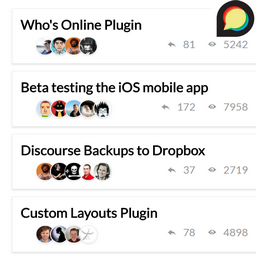
This screenshot is a demo of the plugin on the frontend
ການຕິດຕັ້ງ
- Upload the plugin files to the
/wp-content/plugins/discourse-widgetdirectory, or install the plugin through the WordPress plugins screen directly. - Activate the plugin through the ‘Plugins’ screen in WordPress
- Go to Appearance->Widgets, then add “Discourse Widget”
- Specify the URL of your Discourse website as well as the title of your widget
ຄຳຖາມທີ່ພົບເລື້ອຍ
- Installation Instructions
-
- Upload the plugin files to the
/wp-content/plugins/discourse-widgetdirectory, or install the plugin through the WordPress plugins screen directly. - Activate the plugin through the ‘Plugins’ screen in WordPress
- Go to Appearance->Widgets, then add “Discourse Widget”
- Specify the URL of your Discourse website as well as the title of your widget
- Upload the plugin files to the

ຜູ້ຮ່ວມພັດທະນາ ແລະ ຜູ້ພັດທະນາ
“Discourse Widgets” ແມ່ນຊອຟແວໂອເພັນຊອດ (Open Source). ບຸກຄົນຕໍ່ໄປນີ້ໄດ້ມີສ່ວນຮ່ວມໃນການພັດທະນາປລັກອິນນີ້.
ຜູ້ຮ່ວມພັດທະນາ
ແປ “Discourse Widgets” ເປັນພາສາຂອງເຈົ້າ.
ສົນໃຈຮ່ວມພັດທະນາບໍ່?
ເບິ່ງລະຫັດ, ກວດເບິ່ງ ຄັງເກັບ SVN, ຫຼື ຕິດຕາມ ບັນທຶກການພັດທະນາ ຜ່ານ RSS.
ບັນທຶກການປ່ຽນແປງ
0.2
- Code Refactoring
0.1
- Initial version