
ຄຳອະທິບາຍ
This plugin requires you use WPengine.com hosting. This plugin is not developed, endorsed or supported by WPengine.com.
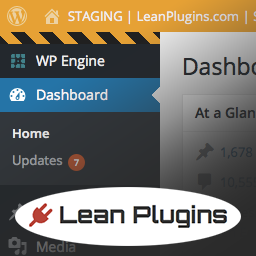
Lean WP Engine Staging Theme will change the color of your admin bar add striped bars at the top and bottom of the admin sidebar and add STAGING text to the admin bar when you are using your staging site on WPengine. This will help alert you visually that you are on the STAGING site. This is helpful if you have both the STAGING and Production sites open at the same time in different browsers or tabs.
ພາບໜ້າຈໍ

ການຕິດຕັ້ງ
- Upload the folder
lean-wp-engine-staging-themeto the/wp-content/plugins/directory - Activate the plugin through the ‘Plugins’ menu in WordPress
There currently is not a settings panel. This may be added in the future if there are enough installs or interest in expanding the plugin. Feel free to contact us at support@leanplugins.com.
ຄຳຖາມທີ່ພົບເລື້ອຍ
- Installation Instructions
-
- Upload the folder
lean-wp-engine-staging-themeto the/wp-content/plugins/directory - Activate the plugin through the ‘Plugins’ menu in WordPress
There currently is not a settings panel. This may be added in the future if there are enough installs or interest in expanding the plugin. Feel free to contact us at support@leanplugins.com.
- Upload the folder
- Does this affect the Production Admin Header?
-
No, changes are only applied when you are on the staging site on WPengine. The plugin can reside in your /plugins/ folder on both the production and staging site. No need to uninstall/reinstall.
- What if I don’t use WPengine.com for hosting?
-
Then this plugin will not have any affect on your wordpress install. So no need to install it.
ການຣີວິວ
ບໍ່ມີການຣີວິວສຳລັບປລັກອິນນີ້.
ຜູ້ຮ່ວມພັດທະນາ ແລະ ຜູ້ພັດທະນາ
“Lean WP Engine Staging Theme” ແມ່ນຊອຟແວໂອເພັນຊອດ (Open Source). ບຸກຄົນຕໍ່ໄປນີ້ໄດ້ມີສ່ວນຮ່ວມໃນການພັດທະນາປລັກອິນນີ້.
ຜູ້ຮ່ວມພັດທະນາ
ແປ “Lean WP Engine Staging Theme” ເປັນພາສາຂອງເຈົ້າ.
ສົນໃຈຮ່ວມພັດທະນາບໍ່?
ເບິ່ງລະຫັດ, ກວດເບິ່ງ ຄັງເກັບ SVN, ຫຼື ຕິດຕາມ ບັນທຶກການພັດທະນາ ຜ່ານ RSS.
ບັນທຶກການປ່ຽນແປງ
1.0
- Initial Release.