About Laboratory Timer
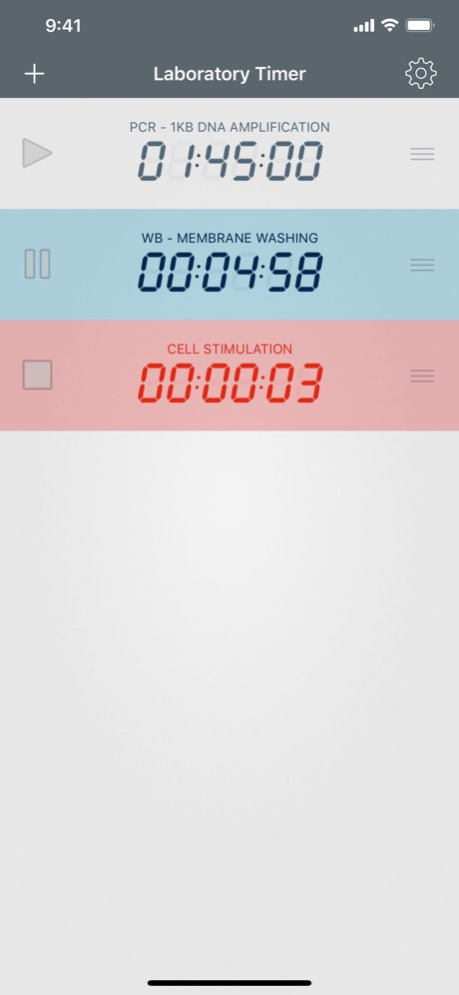
Laboratory Timer is an easy-to-use countdown timer designed to run multiple alarm timers for laboratory at once. With Laboratory Timer’s gorgeous interface and user friendly navigation, it has never been easier to manage...
Laboratory Timer is an easy-to-use countdown timer designed to run multiple alarm timers for laboratory at once. With Laboratory Timer’s gorgeous interface and user friendly navigation, it has never been easier to manage scientific experiments. You can also use your Apple Watch to visualize all your timers in real-time, and get notifications on your wrist. To use the Laboratory Timer app just pull down to add a new timer, set the duration and press “Play”. Key Features: . Add and run as many timers as you need . Save preset timers with name and duration . Pause and resume timers . Receive a notification when the alarms go off Learn more about shazino at www.shazino.com Follow us on Twitter @shazino
Version History - Bug fixes 2.3.4 11/21/2019 - Bug fixes 2.3.3 05/27/2016 - Add delete timer confirmation dialog - Improve keyboard shortcuts support 2.3.2 04/10/2016 - Update “Set Timer” button for new timers (Apple Watch) - Fix timer state restoration (Apple Watch) 2.3.1 02/29/2016 - New Apple Watch native app, running entirely on your Apple Watch (requires watchOS 2) 2.3 02/02/2016 - Quick Action to create new timers with 3D Touch - Apple TV app 2.2 12/07/2015 - Optimized for iOS 9 - Searchable timers with Spotlight - iPad support, including Slide Over and Split View on compatible devices - Hardware keyboard shortcuts 2.1 09/21/2015 - Available on the Apple Watch. Visualize all the timers from your iPhone, in real-time, on your Apple Watch. 2.0 04/10/2015 - iOS 8 support - iPhone 6 and iPhone 6 Plus support 1.4 09/29/2014 - iOS 7 support 1.3 11/05/2013 Interface improvement. Bug fixes. 1.2.1 03/22/2013 iPhone5 4" screen compatible. 1.2 10/10/2012 Design improvements. 1.1 08/02/2012 1.0 06/26/2012
Previous Versions
Here you can find the changelog of Laboratory Timer since it was posted on our website on 2016-09-24 15:45:05.
The latest version is 2.3.4 and it was updated on 2026-06-10 08:01:29. See below the changes in each version.
Laboratory Timer version 2.3.4
Updated At: 2026-06-10
Changes: Version History - Bug fixes 2.3.4 11/21/2019 - Bug fixes 2.3.3 05/27/2016 - Add delete timer confirmation dialog
- Improve keyboard shortcuts support 2.3.2 04/10/2016 - Update “Set Timer” button for new timers (Apple Watch)
- Fix timer state restoration (Apple Watch) 2.3.1 02/29/2016 - New Apple Watch native app, running entirely on your Apple Watch (requires watchOS 2) 2.3 02/02/2016 - Quick Action to create new timers with 3D Touch
- Apple TV app 2.2 12/07/2015 - Optimized for iOS 9
- Searchable timers with Spotlight
- iPad support, including Slide Over and Split View on compatible devices
- Hardware keyboard shortcuts 2.1 09/21/2015 - Available on the Apple Watch. Visualize all the timers from your iPhone, in real-time, on your Apple Watch. 2.0 04/10/2015 - iOS 8 support
- iPhone 6 and iPhone 6 Plus support 1.4 09/29/2014 - iOS 7 support 1.3 11/05/2013 Interface improvement.
Bug fixes. 1.2.1 03/22/2013 iPhone5 4" screen compatible. 1.2 10/10/2012 Design improvements. 1.1 08/02/2012 1.0 06/26/2012
Laboratory Timer version 2.3.4
Updated At: 2019-11-21
Changes: - Bug fixes
Laboratory Timer version 2.3.4
Updated At: 2019-11-21
Changes: Nov 21, 2019 Version 2.3.4
- Bug fixes
Laboratory Timer version 2.3.3
Updated At: 2012-06-28
Laboratory Timer version 2.3.4
Updated At: 1970-01-01
Changes: 21 de Nov de 2019 Version 2.3.4
- Bug fixes
Laboratory Timer version 2.3.4
Updated At: 1970-01-01
Changes: 2019年11月21日 Version 2.3.4
- Bug fixes
Disclaimer
Official App Store Link
We do not host Laboratory Timer on our servers. We did not scan it for viruses, adware, spyware or other type of malware. This app is hosted by Apple and passed their terms and conditions to be listed there. We recommend caution when installing it.
The App Store link for Laboratory Timer is provided to you by apps112.com without any warranties, representations or guarantees of any kind, so access it at your own risk.
If you have questions regarding this particular app contact the publisher directly. For questions about the functionalities of apps112.com contact us.