<?xml version="1.0" encoding="utf-8"?><feed xmlns="http://www.w3.org/2005/Atom" ><generator uri="https://jekyllrb.com/" version="3.10.0">Jekyll</generator><link href="https://kuator.github.io/feed.xml" rel="self" type="application/atom+xml" /><link href="https://kuator.github.io/" rel="alternate" type="text/html" /><updated>2025-10-14T13:49:18+00:00</updated><id>https://kuator.github.io/feed.xml</id><title type="html">Super Bruh</title><subtitle>Linux, zsh, neovim...</subtitle><entry><title type="html">UV+Neovim+Python LSPs</title><link href="https://kuator.github.io/neovim/uv/basedpyright/pyrefly/ty/2025/10/14/uv-python-lsps-neovim.html" rel="alternate" type="text/html" title="UV+Neovim+Python LSPs" /><published>2025-10-14T05:56:48+00:00</published><updated>2025-10-14T05:56:48+00:00</updated><id>https://kuator.github.io/neovim/uv/basedpyright/pyrefly/ty/2025/10/14/uv-python-lsps-neovim</id><content type="html" xml:base="https://kuator.github.io/neovim/uv/basedpyright/pyrefly/ty/2025/10/14/uv-python-lsps-neovim.html"><![CDATA[<p>I use Neovim with the built-in LSP client, but I’m encountering an issue when working with multiple Python projects that each have their own virtual environments.</p>

<p>To ensure Neovim picks up the correct virtual environment, I need to <code class="language-plaintext highlighter-rouge">cd</code> into the project directory and manually activate the environment using <code class="language-plaintext highlighter-rouge">source &lt;venv&gt;/bin/activate</code>. This works fine when editing a single project.</p>

<p>However, if I want to open a different Python project during the same Neovim session, I must start a new instance of Neovim and repeat the activation process. Without doing this, the Python LSP does not use the appropriate environment for the second project.</p>

<p>There is an ongoing <a href="https://github.com/neovim/nvim-lspconfig/issues/500">GitHub issue (#500)</a> that discusses various solutions and workarounds for this problem.</p>

<p>Fortunately, <code class="language-plaintext highlighter-rouge">ty</code>, <code class="language-plaintext highlighter-rouge">pyrefly</code> and <code class="language-plaintext highlighter-rouge">basedpyright</code> support project-specific virtual environments: <a href="https://github.com/microsoft/pyright/issues/30#issuecomment-477892706">link</a> for <code class="language-plaintext highlighter-rouge">basedpyright</code>.</p>

<p>To ensure <code class="language-plaintext highlighter-rouge">basedpyright</code> picks up the correct virtual environment, it is necessary to create a <code class="language-plaintext highlighter-rouge">pyrightconfig.json</code> file at the root of each project with the following structure:</p>

<div class="language-plaintext highlighter-rouge"><div class="highlight"><pre class="highlight"><code>{
  "venvPath": "&lt;absolute-path-to-parent-directory-of-venv&gt;",
  "venv": "&lt;name-of-virtual-environment&gt;"
}
</code></pre></div></div>

<p><code class="language-plaintext highlighter-rouge">venvPath</code> is the directory containing all virtual environments, while <code class="language-plaintext highlighter-rouge">venv</code> refers to an individual virtual environment.</p>

<p>I wrote a small utility script called <a href="https://github.com/kuator/dotfiles/blob/main/bin/workon"><code class="language-plaintext highlighter-rouge">workon</code></a> to help manage Python virtual environments more efficiently.</p>

<p>Python versions used for the environments are those installed via <a href="https://docs.astral.sh/uv/"><code class="language-plaintext highlighter-rouge">uv</code></a>.</p>

<p>When executed, <code class="language-plaintext highlighter-rouge">workon</code> attempts to activate the appropriate virtual environment for the current project directory. If no associated virtual environment is found, it prompts the user to create a new one.</p>

<p>Then, it generates the <code class="language-plaintext highlighter-rouge">pyrightconfig.json</code>, <code class="language-plaintext highlighter-rouge">ty.toml</code> and <code class="language-plaintext highlighter-rouge">pyrefly.toml</code> files. I put them in global <code class="language-plaintext highlighter-rouge">~/.config/git/gitignore</code> to avoid polluting the git history.</p>

<!-- |![workon in action](https://raw.githubusercontent.com/kuator/kuator.github.io/refs/heads/gh-pages/500772136-4f4f9fd1-df31-4ca0-b15d-8addda2157ae.mp4)|  -->
<!-- |:--:|  -->
<!-- | *workon in action* | -->
<style>
.video-container {
  position: relative;
  padding-bottom: 56.25%;
  height: 0;
  overflow: hidden;
  max-width: 100%;
  margin: 2em auto;
}

.video-container video {
  position: absolute;
  top: 0;
  left: 0;
  width: 100%;
  height: 100%;
}
</style>

<div class="video-container">
  <video controls="">
    <source src="https://raw.githubusercontent.com/kuator/kuator.github.io/refs/heads/gh-pages/500772136-4f4f9fd1-df31-4ca0-b15d-8addda2157ae.mp4" type="video/mp4" />
    Your browser does not support the video tag.
  </video>
</div>

<p align="center"><em>workon in action</em></p>

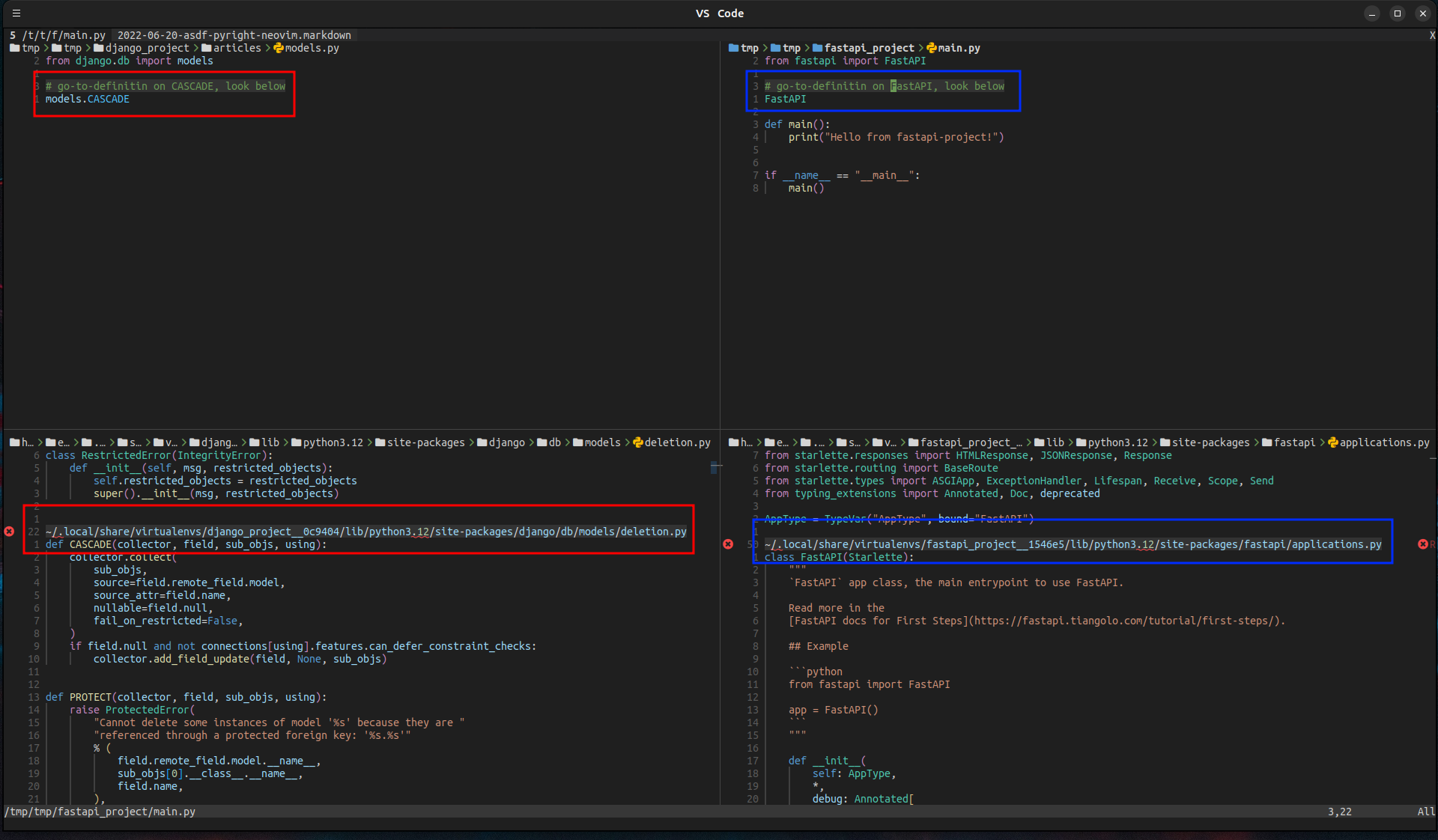
<p>Two projects, one with fastapi and another with django installed, both distinct virtual environments.
Go-to-definition jumps to the project-specific virtual environments.</p>

<table>
  <thead>
    <tr>
      <th style="text-align: center"><img src="https://raw.githubusercontent.com/kuator/kuator.github.io/refs/heads/gh-pages/500780234-0caf868c-e1a4-4901-95fd-481c449dcc73.png" alt="in action in neovim" /></th>
    </tr>
  </thead>
  <tbody>
    <tr>
      <td style="text-align: center"><em>inside neovim</em></td>
    </tr>
  </tbody>
</table>

<p>There is also <img src="https://github.com/linux-cultist/venv-selector.nvim" alt="venv-selector" /> plugin for neovim</p>]]></content><author><name></name></author><category term="neovim" /><category term="uv" /><category term="basedpyright" /><category term="pyrefly" /><category term="ty" /><summary type="html"><![CDATA[I use Neovim with the built-in LSP client, but I’m encountering an issue when working with multiple Python projects that each have their own virtual environments.]]></summary></entry></feed>