
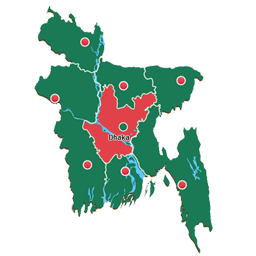
설명
This plugin allows you to embed the colorful interactive map of Bangladesh to your WordPress powered website. Interactive map is the best way to provide your blog with geographically-related content or effective navigation system. Just add a special shortcode into any blog page or post and you will find our map in the blog after the few seconds. Functional editor allows you to easily add popup for additional information.
Features:
- Interactive map of Bangladesh
- Clickable divisions
- Popup windows that show when the mouse cursor is over it
- Simple shortcode
For even more features, try the Premium Interactive Bangladesh Map
스크린샷

Map Preview page
설치
- Use the Plugins -> Add new -> Upload menu and select plugin’s zip file to open.
- Wait for the upload to complete and activate the plugin.
- After that, insert the following shortcode into the text of a page or a post where you want the map to be:
[bangladeshmap71].
Alternatively, upload the folder of the plugin to your /wp-content/plugins/ folder then follow steps 2 and the rest as above.
FAQ
-
How can I insert a map to a page?
-
Type
[bangladeshmap71]in the text of a page or a post. -
Can I use two differently configured maps on the same blog?
-
No, all maps inserted with the
[bangladeshmap71]will share the same configuration.
후기
이 플러그인에 대한 평가가 없습니다.
기여자 & 개발자

자국어로 “Interactive Bangladesh Map”(을)를 번역하세요.
개발에 관심이 있으십니까?
변경이력
2.0
- Add widget features.
1.0
- Initial release.