Today we are releasing updates for Helium 17.3, Helium 17.4 beta and Helium Audio Converter.
News in Helium 17.3
This version is a service release aggregating multiple fixes and minor improvements since the initial release of Helium 17.3. It contains important database driver updates and improvements for connecting to a MySQL/MariaDB database on NAS drives and Linux based machines. It is recommended that you update to this version if you are using an older Helium 17.x release.
Welcome to a new strong Helium release with focus on performance and usability. This version comes with many new cool features, continue to read for all details!
Releases view
It’s now possible to group albums by various criteria—such as added date, collection, series, year, and more—in the album view.
When grouping is active, a header appears above each group’s albums. Grouping is available in thumbnails, cards, and split-view modes. The split view supports expandable/collapsible groups (not available in thumbnails or cards, for performance reasons). Filtering works seamlessly with grouping. You can also quickly access the grouping and sorting options by clicking the cog icon to the left of the view-mode buttons. From that menu, you can jump directly to any specific group in thumbnails or card mode.
Artists view
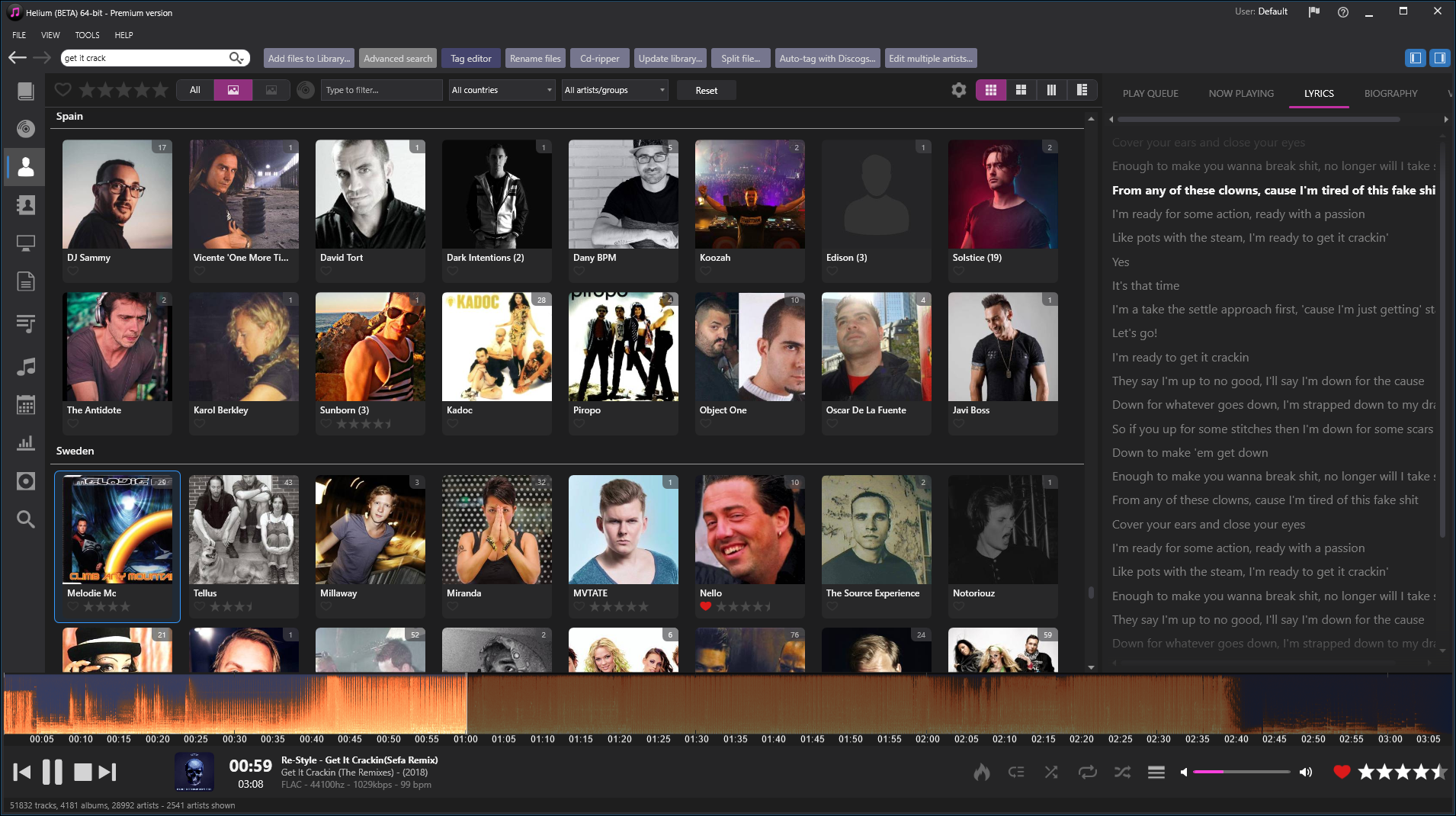
Just as in the albums view, the artists view now supports grouping in the same way. In addition to grouping, we’ve added a carousel layout so you can browse your artists in a new format.
Other minor changes in the artists view include:
Multi-select support
Ability to delete multiple artists from the artist-detail view
Option to exclude remixes from Artists Details → All Tracks
In the albums, artists, and label thumbnail views, you can now enable a more memory-efficient per-item rendering mode. This mode disables the play-button overlays and “⋯” menus where available, but slightly improves performance.
Tag-editor improvements
This Helium version lets you tag multiple albums in a batch using the Tag Editor. In batch mode, all loaded albums appear in a list; selecting one opens the standard editing interface. You can edit them in any order, and when you’re satisfied with your changes, click OK to apply them all at once. This dramatically speeds up tagging of multiple albums.
The Tag Editor can also serve as the in-place editor in track lists instead of editing directly in the list. When active, the Tag Editor is embedded within the track list so you can use its full feature set on the loaded files. It also works with the new multi-album editing mode.
Lyrics improvements
When replaying a track, Helium can now download its lyrics. Time-coded, length-matched lyrics are prioritized; if unavailable, plain lyrics are used. Downloaded lyrics can automatically be saved to tags. If lyrics are presented in external .LRC files, Helium will try to load them as well. When playing a file with time-coded lyrics, Helium displays a “sing-along” mode that syncs the text with the music. Sing-along is available in the right sidebar, within the Visuals pane, and in Theater mode. The Theater view has also received minor design updates.
Advanced search and smart playlists
We’ve completely rewritten the engine that builds the query backend, enabling support for more complex searches that execute more quickly.
General changes
You can delete files from both a playlist and your library at the same time from the Playlists view.
Improved validation of database names when creating a new database.
The Tag Downloader tool is now available in the My Computer view.
Various database optimizations.
Multiple stability and performance improvements.
Updated database drivers.
Beta version information
Please note that this version is a beta release, meaning not all features have been fully tested. Also, the documentation is not yet fully updated with the new features.
Since no database upgrades are required, you can easily switch between Helium 17.3 and Helium 17.4 as needed.
For added peace of mind, remember to back up your database and settings before installing this version.
We are excited to announce Helium 17.3, a release filled with many new improvements and features.
A strong focus has been placed on automated tagging using Discogs, clearer and more concise settings, as well as a more polished and responsive user interface.
Major Updates in Helium 17.3
Auto Tag with Discogs – Tag one or more albums simultaneously using Discogs as a data source to fully automate the tagging process, while ensuring that the data remains 100% accurate. Available in the Premium version.
Edit Multiple Artists – A new tool that simplifies the editing of multiple artists’ information. The tool fully supports downloading information for multiple artists using Discogs or downloading individual artist data using any available plugins or scripts. The Discogs downloading process has been optimized to support additional metadata fields, smart lookup for country of origin, birth/formation date, as well as identifying whether the entry is for an artist or group. Available in the Premium version.
Options – The tool has been redesigned for better readability, making it easier to find specific options through logical grouping. It also includes a filter functionality, allowing you to quickly locate a page where a setting is found.
User interface improvements:
Support for colored icons in the Music Explorer and supplementary tools.
Multi-CD albums are grouped within their tracklists in the Album Details view.
Possibility to Export the tracklist to Excel.
When column filters are applied to the tracklist, they will persist when starting tools, ensuring that only visible items are loaded into the tool.
Ability to use the album card view from the tracklist.
Ability to access an artist view from the tracklist, providing a quick way to edit either multiple artists or individual artists.
Tag Downloader – The tool performs faster, supports item previews for fuzzy matches, and can be accessed from more tools.
In addition to the new features listed below, this version includes many small fixes related to tag support, usability, performance, translations, updated SQLite, MySQL/MariaDB, PostgreSQL database drivers and much more!
For a more detailed description of what’s new, see the two beta release posts:
Help Updates Added and updated help documentation for several tools.
Lyrics Download You can now download lyrics for multiple selected files in the Tag Editor.
Keyboard Navigation Improved keyboard navigation in the Edit Multiple Artists tool.
Picture Management Pictures downloaded or managed via the Edit Multiple Artists tool are now saved in the correct folders with the correct filename format.
Refined Artist Search You can refine searches for artists with no or multiple matches in the Edit Multiple Artists tool. Use the search syntax id:<xxxxx> to download a specific match from Discogs, where xxxxx is the exact DiscogsId.
Group Resolution The “Is Group” status in the Edit Multiple Artists tool is now resolved based on downloaded group members (if any) or the biography unless explicitly set.
Artist State Management When downloading an artist using the Edit Multiple Artists tool, the artist’s state will be stored. This allows you to de-select artists that have already been downloaded.
Country Resolution Improved how the country is resolved when downloading artist information with the Edit Multiple Artists tool.
Discogs Service Improvements Enhanced the performance and reliability of the Discogs download service.
Auto-Tag with Discogs Improved handling of multiple artists when using the Auto-Tag with Discogs tool.
Artist Relations Corrected saving of artist relations.
Album Sorting You can now sort albums by clicking the column names in the Tag Downloaders preview window.
Background Color Fix Corrected and optimized how the background color for a playing track is set.
Corner Radius Option Added an option to disable the corner radius for image thumbnails shown in the Albums, Artists, and Labels views. Access this from Tools > Options.
PostgreSQL Drivers Updated PostgreSQL drivers.
WebView2 Control The installer now ensures the WebView2 control is installed if needed.
Additional Improvements
We have also made various performance and stability improvements in this release.
If you are using Helium 17.3 Beta 1 or want to try all the new features, we recommend updating to Helium 17.3 Beta 2 today.
Welcome to the latest version of Helium, packed with exciting new features and enhancements!
We’ve focused on streamlining the tagging process to help you gather more accurate and detailed information with fewer steps – saving you time and effort.
The major changes in this release are listed below:
Auto-tag with Discogs
Effortlessly enrich your music collection with the new Auto-Tag with Discogs tool, exclusively available in the Premium version. This smart tagging solution allows you to:
Automated Precision: Analyze tracks, albums, and artists from your current view and auto-tag all unique albums using Discogs as a source.
Customizable Tagging: Select which albums to tag using a user-friendly graphical interface.
Smart Lookup Options: Leverage stored Discogs IDs, catalog numbers, or barcodes for precise tagging—or rely on a standard text lookup if necessary.
Interactive Matching: Preview multiple matches and make informed choices with an easy-to-use comparison interface.
Track-Level Control: Decide whether to save all tags, specific frames, or only Discogs IDs for each track.
Comprehensive Coverage: Tag albums from scratch or supplement existing metadata, including valuable Discogs artist IDs, enabling seamless integration with other tools like Edit Multiple Artists.
This tool streamlines tagging for a richer, more organized music library.
Simplify artist management with the innovative Edit Multiple Artists tool, available in the Premium version. Key benefits include:
Batch Editing Efficiency: Automatically gather all unique artists from the current view into a graphical interface.
Flexible Workflows: Manually edit individual artists or select multiple entries to fetch Discogs data in bulk.
Powerful Matching: Use Discogs IDs for precise lookups and view multiple matches side-by-side with embedded previews.
Smart Selection: Filter artists with custom criteria like “without country” to refine your updates.
Optimized for performance: Enjoy faster loading and editing with local caching and keyboard shortcuts (Ctrl+N for next, Ctrl+B for previous) to quickly navigate and tag your artists.
Perfect for quickly populating your database with detailed artist information with minimal effort. Click here for more information
Tag Downloader enhancements
The Tag Downloader now offers improved performance and usability and new features:
Enhanced Accessibility: Use the tool directly from track lists, the Advanced Tag Editor or the Splitter.
Detailed Previews: Preview selected releases, compare contents visually, and identify differences with ease.
Rich Metadata Support: Download multiple artists, more tag-fields and Discogs IDs for accurate lookups with other tools like Auto-Tag with Discogs and Edit Multiple Artists.
Picture downloading enhancements
Quick Selection: Easily toggle between name, catalog number, or barcode for more accurate searches.
Improved Precision: Automatically prioritize barcodes or catalog numbers when available.
Better Management: The redesigned Album and Artist Picture Manager supports external download scripts, optionally hides unselected items, and provides a clearer overview of active selections.
Splitter and Tag Editor improvements
Splitter: Enjoy a smoother interface, faster operations, and more reliable tag saving.
Tag Editor: Gain better support for series metadata in built-in downloaders and improved customization for album tags.
Edit Artist enhancements
Refined Edit Artist functionality brings:
Optimized Editing: Improved tab ordering and quick-access keys for effortless navigation.
Better Downloads: Extract boen/formed dates from downloaded biographies and store Discogs artist IDs for reuse.
Enhanced Saving: Save artist data efficiently for faster updates across tools.
System-Wide improvements
Experience a more robust and responsive Helium environment with:
Optimized view and tool flow: A rewritten internal system ensures precise updates and improved event handling.
Keyboard Shortcuts: Possibility to set a shortcut to browse the selected item in Windows Explorer.
Database and UI Enhancements: Enjoy upgraded database drivers, better multiple-artist handling, and improved sorting in the My Computer view.
New Track List features
Unlock greater flexibility and insights with new Track Lists options:
Export Capability: Save visual contents directly to Excel.
Alternative Views: Use the Album Card View for a fresh perspective on your tracks.
Artist Integration: Quickly view and edit artist details or images directly from the active view—perfect for launching the new Edit Multiple Artists tool.
Refined Filtering: Tools launched from Track Lists now respect column filters for precise control.
Elevate your music management experience with these powerful updates, now available in Helium. Whether you’re organizing your library, tagging albums, or refining artist details, Helium puts you in control with tools that save time, improve precision, and enhance usability. Upgrade to Premium and unlock the full potential of your collection today!
Beta version information
Please note that this version is a beta release, meaning not all features have been fully tested.
Since no database upgrades are required, you can easily switch between Helium 17.2 and Helium 17.3 as needed.
For added peace of mind, remember to back up your database and settings before installing this version.
We’re excited to announce the release of Helium 17.2, packed with enhancements and improvements that make it better than ever.
Here’s what’s new:
Tag Downloader – A simplified way of downloading metadata for specific releases. This tool allows you to select from built-in download sources (Discogs or MusicBrainz), as well as an external script source (more on that later). The tool guides you through three main steps:
Select input (album and artist, barcode, or catalog number).
Results – Review the matches using a graphical interface with full filtering options. If an exact match is found (typically via barcode or catalog number), you’re taken directly to the final step.
Adjust – In this final step, adjust the downloaded track information using an editor similar to the Tag Editor. You can also modify artist and label information.
Instead of using three different editors for release/track, artist, and label information, you can now do everything with one tool—fewer clicks and more precise matches.
Tag Editor and CD Ripper – Now support the new Tag Downloader (for release and track information only), simplifying and enhancing the download experience.
New Script Engine for Downloading – It’s now possible to use scripts written in JavaScript instead of plug-ins to download information. The new engine supports hot-reloading, meaning you don’t need to restart Helium when creating a new script or modifying an existing one.
Since the old plug-in engine only supported C#, we’ve switched to JavaScript, which is more common and user-friendly. Note that Helium still supports old plug-ins.
Picture Download Tool – Now supports scripts as download sources.
Support for Lyrics Downloading – You can now download lyrics via scripts in the Tag Editors.
Multiple Improvements usability improvements for the CD Ripper.
Action Manager Support – Now includes the ability to add/modify ratings.
Toolbar Customization – Support for up to three toolbar actions, with the ability to assign specific actions, and one customizable toolbar that can execute an assigned script.
Lyrics Overlay – You can now display lyrics as an overlay in the visualizations view.
Flicker Correction – Applied to album, artist, and label controls.
Minor User Interface Changes – Made to various picture controls for a more pleasant look.
Filename-to-Tag Insertion – Now allows you to insert code at the caret position.
Track Information Fixes – Corrected the reading of BPS for tracks.
Various SQL Server Fixes.
Improvements for WAVE Files – Read-only support for WAVE files with embedded ID3 tags, for compatibility reasons.
Updated UI Components and Database Drivers.
General Optimizations – Minor optimizations and bug fixes as always.
Don’t miss out on these fantastic new features! Upgrade to Helium 17.2 today and elevate your music experience.
Note: Download scripts for pictures, artist, and label information are disabled by default since they require authentication variables to be set up in Helium.
Helium 17, despite its familiar appearance, is a true performance beast. With robust 64-bit support and a slew of performance enhancements (start-up time up to 45% faster!), working with Helium 17 is a delightful leap forward compared to older versions.
🚀 Enhanced Performance: Helium 17 doesn’t just increase speed and stability; it breaks through the old 3GB memory barrier, ensuring your system’s full potential is realized.
💪 Future-Proof and Secure: Our dedication to improvement extends beyond speed and stability. Helium 17 is designed to be future-proof and secure, ensuring your music management needs are met today and tomorrow.
Major upgrades in Helium 17
🎵 Album Details View: We introduce a game-changing way to explore your tracks. The Album Details view neatly organizes your music by albums, providing an aesthetically pleasing and user-friendly experience.
🌟 Stunning Visualizations: Say goodbye to 32-bit visualization plugins and welcome a new, fully open, and programmable way to create hardware-accelerated visualizations that dance to your music. These visualizations even have their own fullscreen view and can be seamlessly embedded into the right sidebar. Crafting custom visualizations is now a breeze, and ShaderToy enthusiasts will feel right at home. (Thanks for Virgill for allowing us to use his fantastic shaders)
🎶 Seamless Spotify Integration: Import your favorite Spotify playlists into Helium 17, and let it work its magic by detecting matching tracks in your library. Customize the results as you see fit before creating the playlist. And, just as easily, export your Helium 17 playlists to Spotify.
📝 Manage File Naming Templates: Handle Filename to Tag templates effortlessly from a new window. Add, remove, edit, and rearrange your templates as you need.
🔀 Shuffle Play Mode: Introducing a brand-new shuffle mode. Enjoy your tracks in a randomized order within the Play queue without altering the original sequence.
🌐 Explore with Ease: Navigate your tracks, albums, and artists seamlessly through the Explore context menu. Move effortlessly between Helium views or use Windows Explorer to find what you need.
Minor tweaks in Helium 17
64-bit Performance: Upgraded database drivers for top-notch 64-bit performance.
Custom Toolbar Colors: Choose from 21 custom toolbar colors instead of 7, offering even more personalization.
Smart Playlists: Use playlists as expressions when creating Smart playlists.
Audio Quality Control: When converting or ripping to WAVE format, fine-tune the bit-depth to your preference, either 16 bits or 32 bits.
Enhanced Compatibility: Numerous fixes for file and tag format compatibility issues.
Streamlined Plugins: A reworked iTunes, Discogs, and Spotify plugins ensure quicker execution and superior results.
Player Improvements: Revamped buttons in the bottom player for Visualizations, Auto-queue, Crossfade, Repeat Play queue, and Shuffle Play queue. The old Play queue button is now conveniently located under the View > Views menu.
In addition to these substantial upgrades, we’ve rewritten and optimized a significant portion of the underlying code to enhance stability and overall performance.
Helium Streamer has been updated to the most recent version of .NET for improved stability and performance. It also gains from a lot of the benefits in Helium 17.
Helium 17, despite its familiar appearance, is a true performance beast. With robust 64-bit support and a slew of performance enhancements (start-up time up to 45% faster!), working with Helium 17 is a delightful leap forward compared to older versions.
🚀 Enhanced Performance: Helium 17 doesn’t just increase speed and stability; it breaks through the old 3GB memory barrier, ensuring your system’s full potential is realized.
💪 Future-Proof and Secure: Our dedication to improvement extends beyond speed and stability. Helium 17 is designed to be future-proof and secure, ensuring your music management needs are met today and tomorrow.
Major upgrades in Helium 17
🎵 Album Details View: We introduce a game-changing way to explore your tracks. The Album Details view neatly organizes your music by albums, providing an aesthetically pleasing and user-friendly experience.
🌟 Stunning Visualizations: Say goodbye to 32-bit visualization plugins and welcome a new, fully open, and programmable way to create hardware-accelerated visualizations that dance to your music. These visualizations even have their own fullscreen view and can be seamlessly embedded into the right sidebar. Crafting custom visualizations is now a breeze, and ShaderToy enthusiasts will feel right at home. (Thanks for Virgill for allowing us to use his fantastic shaders)
🎶 Seamless Spotify Integration: Import your favorite Spotify playlists into Helium 17, and let it work its magic by detecting matching tracks in your library. Customize the results as you see fit before creating the playlist. And, just as easily, export your Helium 17 playlists to Spotify.
📝 Manage File Naming Templates: Handle Filename to Tag templates effortlessly from a new window. Add, remove, edit, and rearrange your templates as you need.
🔀 Shuffle Play Mode: Introducing a brand-new shuffle mode. Enjoy your tracks in a randomized order within the Play queue without altering the original sequence.
🌐 Explore with Ease: Navigate your tracks, albums, and artists seamlessly through the Explore context menu. Move effortlessly between Helium views or use Windows Explorer to find what you need.
Minor tweaks in Helium 17
64-bit Performance: Upgraded database drivers for top-notch 64-bit performance.
Custom Toolbar Colors: Choose from 21 custom toolbar colors instead of 7, offering even more personalization.
Smart Playlists: Use playlists as expressions when creating Smart playlists.
Audio Quality Control: When converting or ripping to WAVE format, fine-tune the bit-depth to your preference, either 16 bits or 32 bits.
Enhanced Compatibility: Numerous fixes for file and tag format compatibility issues.
Streamlined Plugins: A reworked iTunes, Discogs, and Spotify plugins ensure quicker execution and superior results.
Player Improvements: Revamped buttons in the bottom player for Visualizations, Auto-queue, Crossfade, Repeat Play queue, and Shuffle Play queue. The old Play queue button is now conveniently located under the View > Views menu.
In addition to these substantial upgrades, we’ve rewritten and optimized a significant portion of the underlying code to enhance stability and overall performance.
Beta version alert
Please keep in mind that this version is a beta release, which means that not all features have undergone 100% testing. However, you can have both Helium 16 and 17 installed simultaneously since beta versions are isolated in their own folder. Your Helium 17 databases can still be used in Helium 16, as they won’t be upgraded.
Remember to back up your database and settings before installing this version for added peace of mind.
Stay tuned for more visualizations and comprehensive documentation on creating visualizations, coming soon!



 Imploded Software blog