Welcome to Neon – release Blümchen!

Today we are proud to present the second official release of Neon, formerly known as Väth.

Neon is the next generation of Helium.

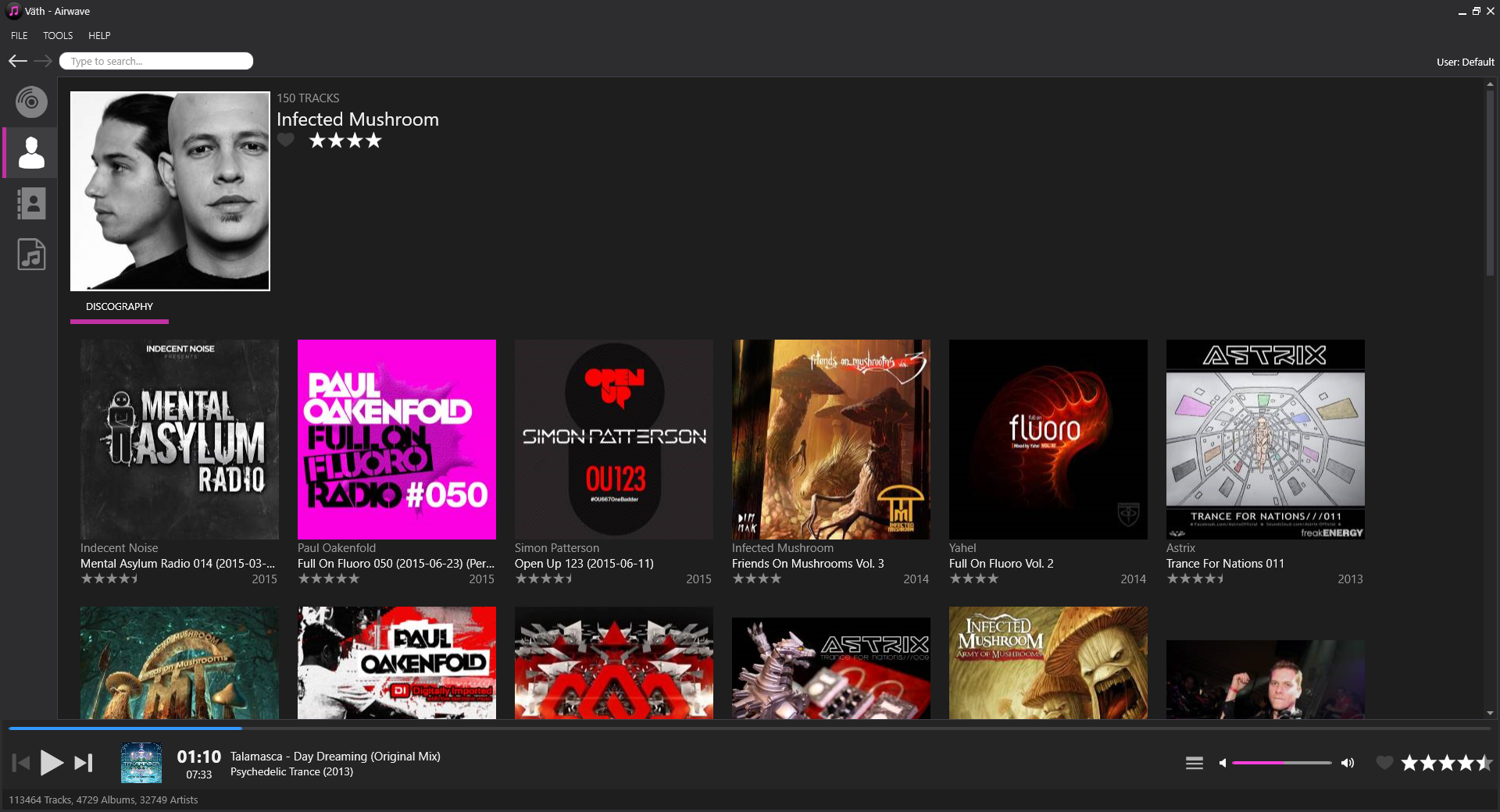
Releases view

Since release Airwave was released officially we have continued to work with many of the core functions like tagging, support for multiple databases and a lot of other improvements.

Primary goals with this version

  • Correct reported bugs
  • Create a new version of the Advanced Tag Editor with improved template support like multiple controls on one line
  • Create an initial capitalization/word replacement engine that should be used in tagging related tools
  • Possibility to import a Helium 11 database of any supported format
  • Possibility to Edit artist information for an artist
  • Possibility to browse related artists, generated via the Edit artist tool
  • Improved context menu support for all views
  • Create a library management tool which allows users to create new databases of any type and open databases of any type
  • Plug-in support for downloading of artist information and artist pictures. This version comes with a Last.fm plug-in and a Spotify plug-in. The Last.fm plug-in can download both artist information and pictures, the Spotify plug-in can only download artist pictures
  • A basic toast notification system which should be triggered, if enabled, when specific events are completed
  • Create a view for Playlist management, with folder support
  • Changed replaying default logic

What’s not included in this version

We are still working with core functions meaning that we have not started to review features like

  • Template editors (Advanced Tag Editor)
  • Extra columns in track lists
  • Icons and other graphic elements

Please bear in mind that this version is still in a quite early beta state, meaning that function may not be fully completed nor tested in depth yet, so please continue to use test data when using this version.
When it comes to testing, we would like to give a big thank to all of our internal testing team which helps us to test features in detail and come with good feedback for usage and more.

Edit artist Advanced Tag Editor

What’s next?

For our next release, Chakra, we will focus on the following main areas:

  • A first version of a Statistics view
  • A Music Explorer view with the most basic node types
  • A Tag Editor like the standard Tag editor in Helium today
  • Testing of how columns can be configured and persisted
  • Extension of the plug-in engine to handle more download types and sources

Testing

We are still welcoming testers to our internal test team. If you are interesting in helping us out with testing and early feedback, please contact us for more details.
It is a big bonus if you are working with any of the SQL Server products in Helium today (not Compact).

Download and installation

Click here to download Neon, build 209

Helium Streamer 3.0

Helium Streamer

We previously mentioned that we are working on a new version of Helium Streamer parallell to Neon. We now want to make it public by letting you try it out. Just like Neon, the Helium Streamer only has basic funcionality so far but we will be releasing updates to the Streamer as often as Neon from now on.

What’s in this release?

Helium Streamer 3 comes with a user interface that resembles Neon. This first release comes with an album and artist view just like Neon, with similar filtering and search features.

Simple playback can be done by double-clicking on tracks or using the play-button on album covers. The play queue can be reached in a read-only view from a button in the player.

There is a playlist view that reads playlists and playlist folders from Neon.

A basic version of the Launcher tool is delivered with this release. It currently displays which database that Helium Streamer is connected to with no ability to change it.

What comes next?

Many things are planned for upcoming releases of Helium Streamer. Below are some of them, without individual order:

  • A statistics view
  • A tracks view
  • Ability to create new playlists and add tracks to existing playlists.
  • Ability to enqueue individual tracks and modify the play queue.
  • Improvements to the Launcher tool to be able to switch database and more.

Click here to download Helium Streamer, build 889

Let us know what you think in the comments!

Current progress

Since the release of Väth – Airwave we have been working intensively on the following areas:

Bug corrections
All reported issues from the first version of Väth are resolved. Thanks to all of you who have helped us in reporting issues!

Database importing
A feature we have worked hard with is importing of Helium 11 databases (Sql Server Compact only at the moment).

This allows users to easily convert data from Helium 11 without loosing any information.

Support for importing of Sql Server and MySql databases if something we are working on at the moment.

Advanced tag editor
The first tagging tool in Väth is now ready in it’s first version.

The Advanced tag editor supports all fields which the same tool in Helium 11 does, but it adds a lot more flexibility to editing templates.

As an end user you can select how many columns the contents of a tab will contain as well as if a specific field should span over all columns.

Adding “blank” placeholders is also possible.

All this functionallity will give you a much more flexible templating engine to work with with superb support for different screen resolutions.

tageditor1 tageditor2

Editing of artist information
It is now possible to edit information for an artist just as in Helium 11. Edit everything for basic information, picture to various relations. It is now also possible for browse relations for an artist.

editartist

Plug-ins
A first version of the new plug-in engine is now implemented. You can easily download artist information including picture using the Last.fm plug-in and pictures with the Last.fm plug-in and the new Spotify plug-in.

Other features
Parallell to the above, which will appear in our next official release (planned for mid-end October) we are working with:

  • The Music Explorer.
  • Support for creation and using SQL Server databases and MySQL databases.
  • Improved Last.fm support – connect easily to Last.fm and scrobble your tracks.

Streamer 3.0
Parallell to Väth we are also developing a brand new version of Helium Music Streamer. The new release will be much more in synch with how Helium Music Manager looks and works, so it will be easier to switch between the two.

We have big plans for the future of Helium Streamer (we will drop the “Music” in the name going forward) which includes support for tagging files, adding and removing files and more. We have already made several improvements compared to the old Streamer, for example the search is already improved and can show search results for artists, albums and tracks.

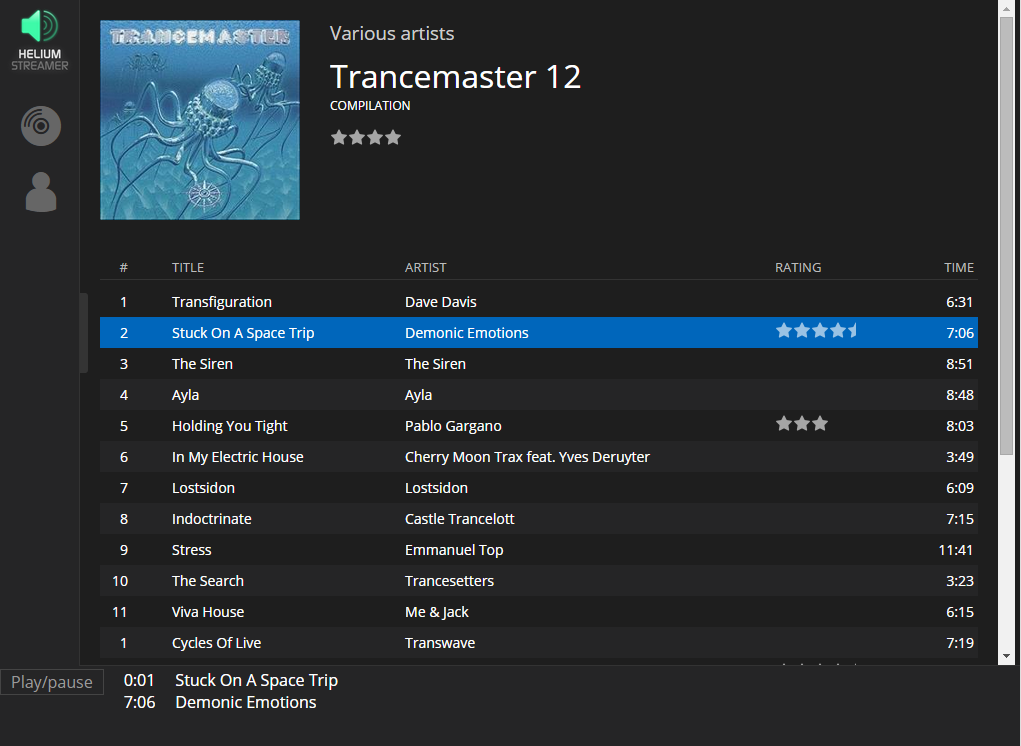
We plan on delivering a testable version of the Streamer at the same time as next release of Väth. In the meantime, here’s a screenshot of the current state:

Helium Streamer 3.0

Welcome to Väth – release Airwave!

We are today proud to present the first official version of Väth – the next generation of Helium!

Väth main screen
Releases view

The past 5 ½ months we have worked hard to get all the basics of Väth to work. Most code is rewritten from scratch but with the long experience from Helium Music Manager in mind. We are now at a point where we need you help to further test the application and to give us feedback on the features implemented so far.

Goals with this version

Our main goals with this version are:

  • Deliver a fully rewritten tag engine, with equal to or better support for all file and tag formats as in todays Helium version.
  • Deliver a totally new user interface (UI) with hardware accelerated graphics and proper DPI-scaling.
  • The UI in this first release should include new browsing views for Releases (albums), Artists and Labels.
  • Take more advantages of pictures and hyperlinks than in today’s Helium version to give a richer and quicker browsing experience
  • Create a data model that is quicker than todays Helium version, even when using the default database type, SQL Server Compact on large music collections. Our tests have been performed with databases with over 65.000 tracks, 2.900 albums and 20.000 artists.
  • Create a basic player function together with a play queue that’s easily accessible from all views. Playback support for all formats that Helium supports today. The player should support Last.fm scrobbling.
  • Create an tool for adding music which allows users to easily add their music to their library. Album pictures should be read from both folders and tags, artists pictures should be read from tags.
  • Create a tool that updates changed tracks in your music library as well as add new tracks that have been added in certain folders.
  • Create a file properties tool which will allow users to inspect tags for one or more selected files.
  • When playing a track, a user should be able to change rating for the currently played file. The rating should update the library as well as be written to tags in the background.

What’s included in this version?

A lot of things related to non-visible core functions like the tag engine, a revised and optimized database model, navigation flows and a lot of logic related to track handling.

You can add tracks by scanning folders on your computer as well as update your library (search for new or changed files).

What you can test with this version is a limited subset of today’s Helium functions focused on our new graphical user interface divided into the following specific views:

  • Releases (formely named albums)
  • Release details
  • Artists
  • Artist details
  • Labels
  • Label details
  • Tracks
  • Play queue

Release details
Release details

Artist details
Artist details

The new views in Väth works a bit different compared to the views in Helium today: They all support hyperlinks which will allow you to quickly navigate between various types of data as well as more easily explore your music collection.

From views presenting releases and/or tracks you can easily play them as well as enqueue them to the play queue.

Subtracks are nowadays handled as other tracks, giving you a much better browsing and playing experience when working with subtracks mixed with regular tracks.

Last.fm replaying is supported and can be configured from options.

When you play a track you can mark it as a favourite from the player as well as apply rating to it. Ratings will be written to tags.

There is a file properties tool that lets you inspect file details as well as tag contents.

This version of Väth will only support a SQL Server Compact database, which will be created during the first start of the application. Future versions will support SQL Server and MySQL databases – just like in previous releases of Helium Music Manager has.

Global search in action

What’s NOT included or finished in this version?

No tools for tagging has been implemented for this version, this is what we will focus on next although you can already test the tag engine for reading tracks and simple tagging when applying rating to tracks during playback.

Other tools and features will be implemented in coming releases.

Play queue handling and replaying of tracks is not yet in a finished state. We plan on improving many things related to this.

Picture handling is not finished. This means that wrong album pictures may be assigned since there is no real prioritizing being done currently.

The user interface is also something that will continue to grow. We have plans to extend it with more views, customizable tracklists with resizable and selectable columns as well as a light theme.

Please remember that this is an early beta version so we recommend you to work with copies of your files, just to be safe if something goes wrong.

Also, we might change the database model further, meaning that you may need to recreate your database in a future release.

Please bear in mind that this is a very early preview. Even though we have tested the tag engine extensively on all types of file we could get our hands on, we expect to find files with either broken tags, or otherwise hard-to-read contents. We want your help with finding such files so we can improve on the tag engine for upcoming releases. We have not re-implemented support for the legacy ID3v2 standard (v2.2) since it is in large incompatible with the ID3v2 v2.3 standard. This is also something that we want to get a feeling for how many users still have files with these tags. Our hope is that people with these tags can re-tag them from Helium Music Manager 11 to migrate into ID3v2 v2.3 tags.

What’s next?

We will use a naming scheme during the development of Väth that you have probably seen before. We’ll name the different versions alphabetically, starting with A. As this is the first release, it’s called Airwave. We plan to release bug fixes and corrections to the Airwave release before we continue with the development of next version – Blümchen.

We have some milestones set for Blümchen:

  • Implement the Advanced tag editor with some cool and highly useful new features.
  • Possibility to edit information for an artist together with basic possibilities to automatically downloading for information.
  • Improvements for the Play queue logic.
  • Migration of SQL Server compact Helium 11 databases.

An actual release date of Blümchen is not yet set, but expect it to appear sometime during Q3 2015.

Interested in assisting us with testing?

Are you are interested in becoming a tester with the possibility to test our most recent daily builds, give us early feedback and ideas?

If this is the case, send us a mail with a short description of how you are working with Helium today, what database type you are using, which file formats you are using mostly and how many tracks your collection consists of as well as a short description of how you will contribute to our testing.

Click here to download Väth – Airwave, build 94

Subtracks == tracks

A new cool feature in Väth will be the handling of subtracks.

Subtracks have existed since long in Helium and is easily explained a master track which contains two or more “internal” tracks.

This technique is highly useful when working with mixes, live performances and identfying hidden tracks.

When searching for tracks in Väth, it will handle a track, no matter if it is a regular track or a subtrack equally.

This means that it will be very easy to find subtracks via searches and filters, but also that they will be playable just as a regular track.

When playing a subtrack you will see all details of the track and the played time/total time will be shown with the subtracks values – not the “parent” tracks data as in prior Helium versions.

If multiple subtracks are enqueued in a row, you will get perfect gapless playback to enjoy the mix without any interruptions.

Apart from the above, much is going on right now.

We are working hard to get the first official alpha version ready – something we plan to have ready at the end of August.

If you are interested in testing it right now, please contact us and write a little about how you will be able to test the version and how you are using Helium today.

Please note that no tagging tools will be included, the main focus will be on trying the new user interface and the application flow.

Contact us at: dev@imploded.com

Preview of new UI

Since the middle of May 2015 we have been focusing on creating a new user interface (UI). The new UI is planned to follow the same pattern as in Helium Music Manager 11 where there is a Music Explorer, an Album view, an Artist view etc. What we don’t plan on implementing separately is the Music Browser (aka the MiB). The current plan is to take the best out of the Music Browser and merge into the other views (e.g. album and artist).

We are thrilled to finally be able to present some screenshots showing the Album view and the simple album details pages from both Helium and Helium Streamer.

Please note that this is a very early preview with only a few features implemented. There will be changes along the way.

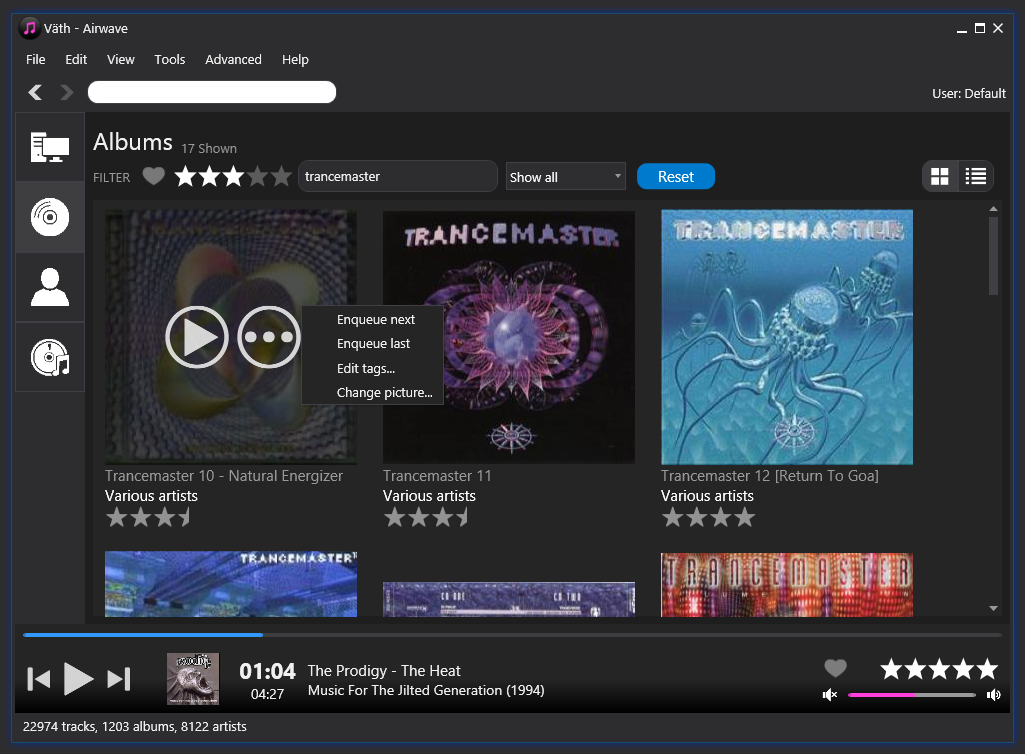
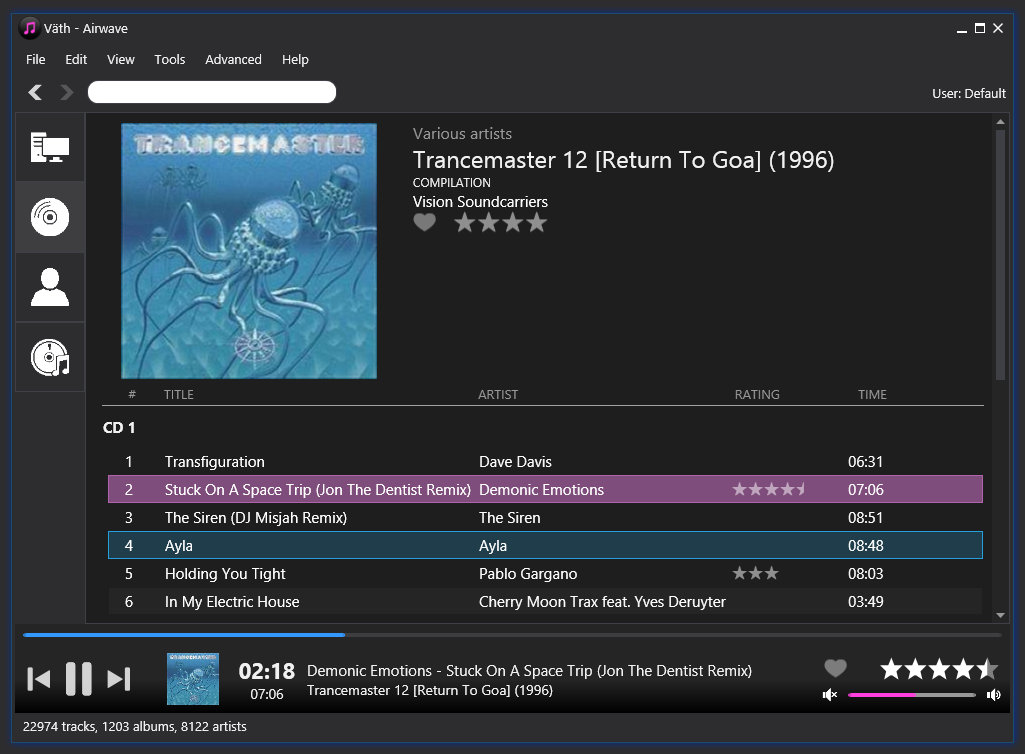
Helium (album view and album page)

vath1 vath2

Helium Streamer  (album view and album page)

streamer1 streamer2

As you can see, both products follow the same design and flow (apart from some inconsistencies that we will iron out) to help you easily switch between Helium and Helium Streamer while maintaining the most common and useful features. This also allows us to re-use good solutions and to avoid reinventing the wheel.

One of our main goals has been a more responsive and quicker application in combination with displaying the most useful meta-data up front.

So, how does this connect to what you can see in the screenshots?

To start with, the user interface in Helium is now fully scalable and is using hardware accelerated graphics when rendered. This means that Helium will automatically understand your active DPI settings – if you have set Windows to use larger fonts, the same scaling will automatically be applied to Helium.

What we have done next is to apply a dark theme, something which has been requested by many users. We also plan to create a light theme.

Just below the main menu you will find a navigation bar which allows back and next navigation as well as a global search.

For the Album, Artist and Label view we are testing a new concept – each of the views supports 4 times larger thumbnails, which is presented in a thumbnail flow to be able to give you a richer graphical user experience and using your meta data smarter.

Despite the increased thumbnail size, performance is much better than in Helium 11.

Per default all albums, artists and labels are shown. To quickly find one or more specific items you can now use the top filter. At the moment we support filtering of favorites, rating, free-text (album name or album artist) and release type. As soon as you change any of the filters the results will be immediately be shown which is a huge improvement compared to how it works in Helium 11 where each filter requires a full refresh. For example if you type “goa” in the free-text filter, all results matching goa will be shown instantly. If you then change the rating filter, the result will be narrowed down.

We are also experimenting with two different view modes for these views, the thumbnail view as shown in the screenshots and a card view. The card-view still shows an album image, but a little smaller one with more information about the album to the right of the image.

The information shown to the right follows a template which you can design, just like in Helium 11 today. You can easily toggle between these modes with the buttons to the right.

To simplify which commands that can apply to a specific item (album, artist, label) we have implemented a special state when hovering an item. For an album you will see two buttons, one play button which will play the album and one more button (…) which will show you a context menu with commands related to the specific item. These commands can for example be Enqueue next, Add to playlist, Edit tags, Download information and more.

The text under each album will show the name of the album, the album artist, rating and whether it’s a favourite item or not. The album artist label is in fact a hyperlink which allows you to click on the name to quickly navigate to the artist detail page. When you double-click on an album you will be taken to the album details page which will show various details about the album as well the full track list.

The track list will be grouped per CD if it is a multiple CD album. From the track list you can double click an track to play it as well as execute various commands from its context menu. The artist name for each track is also linked so that you quickly can navigate to a specific artists details directly from the track list.

You can toggle between simple (default) and advanced view mode from the View menu. When you enable advanced mode, more album details will be shown (defined via a template) as well as a more traditional track list for the album.

This track list works much like the track list in Helium today, allowing you to quickly show/hide columns, change the order of columns and more. What it also will allow you is to group the items in one or more levels with drag and drop, as well as quickly filter out items on one or more columns.

This summarizes this post about the new UI, with main focus on the Albums view.

During our next posts we will dig deeper into the Artist view and artist details as well as present the new Add to database dialog.

Sprint 3 – Week 20

The past week was a quite calm due to a visit at a coding conference in London.

The current focus is continued work with the Music Explorer, getting some basic replaying to work as well as continued work with the UI.

What we will spend the next weeks is to identify the best way to represent our datamodels in responsive UI. This is a quite complex task which will involve custom styling/theming and more.

We will do this by internal prototyping to identify the best solutions available.

Apart from the above we will also start to implement some “basic” features such as audio conversion and more.

Sprint 2 – Week 18

The past week we have been working hard on the following topics:

  • Improved the album handling during adding operations. More smart logic has been applied to detect albums better as well as adding support for pictures. Pictures can be identified from tags (optional) or from folders involved in the add process. We have verified that the adding of files is fully compatible with Helium’s data model by running it on a new database from the new application and then by opening it in Helium 11. Many unit tests have been created to ensure that the album and picture handling will remain stable and easy to refact and improve.
  • UI dialogs. We have created some specific controls to form Helium’s nice graphical look which can be seen in the most dialogs in Helium 11. The new look will support variable DPI font-sizes as well as vector graphics to be smoothly scalable.
  • File properties. As a “test” for the new UI dialog components we have implemented a first look of the File Properties tool (far from complete though) to test off that the UI behaves well.
  • Various async components so that several “heavy” operations can be used from background theads without locking the main UI. All async components should generally be cancellable.
  • Basic crash reporting system. A first version of an automated crash reporting system has been implemented. This system is implemented in the main application as well as in the Tag test tool (read more below).
  • Some preparations/proof-of-concept tests for the upcoming Music Explorer view.

Apart from the main changes above, we have also released a first version of our tag tester tool to a couple of selected testers.

This tool will scan a selected folder recursively and identify all audio files with the folder and it’s subfolders. After that each file found will be loaded with our new tag engine (running in the background with a cancellable progress dialog of course). After the scanning is  completed, a selection of the tag and file properties will be show for the end-user in a list and a list of “problematic” files is also show (if any).

The intial tests has been very successful, the most seems to run very stable and quick and problems identified as been able to be fixed quickly thanks to the crash reporting service.

If you are interesting in testing our tag test tool, please contact us at dev@imploded.com.

Sprint 2 – Week 17

This week’s focus has been on getting the data access layer (DAL) to work properly in conjunction with the other application layers.

The primary function we have been working on is the adding of files and all related add operations. This has involved user handling, album summary handling and artist summary handling to mention a few of the functions that are now basically implemented.

We have also started to work with the application UI with the goal to make it to look, act and behave as before but with some changes and improvements. Much of the graphic elements will now be vector-based giving our end-users a much better user experience. Font-scaling is another part that also will be highly improved.

Parallel to all this work we have started to create a public test application which tests the new tag-engine. The test application won’t do anything fancy, more than testing tag and format-reading, but will play an important role for end-user testing.

We would therefore like you to contact us at dev@imploded.com if you are interested in testing this application to early identify specific problems with one of the most central components in Helium Music Manager.

Sprint 1 – Week 16

The week have been a heavy coding week where focus has been on completing the tag engine for all supported audio formats and tag formats.

During the implementation we always do several automated tests for each format to ensure full compatibility with today Helium as well as adding improvements to how different things are handled.
All this to allow even better and more flexible controlling of tag data.

A couple of integration tests still remains to ensure that handling of specific fields such as multiple artists and per-user ratings are properly handled, but soon we will move to starting the “real” implementation of the application itself.

We have already made some starting tests during this week, nothing direct visible, but the code actually is running from an application.
The tests we have made relates to adding of files to the database, fully threaded by using .NET 4.5’s TPL async handling.
This is something which we will continue with during the next sprint.

The end-testing of Helium 11.1 is now completed and we will hopefully be able to release this new version during the next week.

Sprint 1 – week 15

This week we have worked on two main topics:

  • Selecting and getting all project tools up and running.
  • Rewriting of the tag engine.

To get full control over our project flow, we decided to work with the agile project method Kanban. We have setup a big backlog in KanbanFlow as well as selecting the user stories for Sprint 1.
We have also migrated from SVN to GIT to use as our new version handling system.

The coding tasks has been fully related to migrating and improving our tag engine to .NET 4.5.
We have do far been working with ID3v2, Vorbis comments, ID3v1, Lyrics3, APEv2, WAVE and WMA tags.
For each format we migrate we create unit tests to ensure top-notch stability and possibility to apply refactoring and improvements without the risk to break previously working code. We also create automated integration tests which we use for acceptance tests, ensuring that the new tag engine is equal (and even better) in compatibility as today’s tag engine. We have selected to use NUnit as our testing framework.

The new tag engine will be quicker on many operations as well as supporting 64-bit systems.

During the next week we will continue with completing the tag engine, since it’s the base component for the most of Helium’s tools.

We will also finalize the testing of Helium 11.1 so that we can release it officially. Helium 11.1 comes with several improvements and bug-fixes.

Stay tuned for more information!