Auto Complete (+address field)

Description

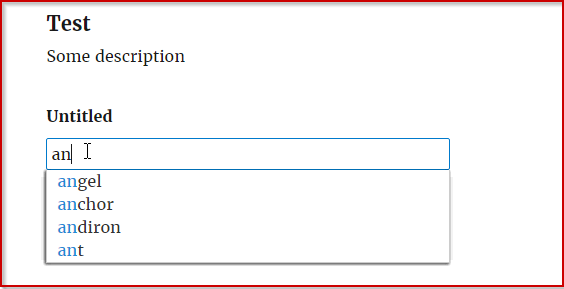
This add-on enables autocompletion: the add-on makes suggestions for what the user has started typing. Autocomplete simplifies and speeds up a form filling process. It saves your users time by finding the correct data. There is a autocomplete demo page available.

This add-on lets you choose sources for suggestions. Currently it supports the following sources:

  • WordPress (Post types, Taxonomy types)
  • URL (input needs to be JSON formatted)
  • Address (see the demo page)
  • Manual (insert options manually)

Screenshots

Infusionsoft

Description

The Infusionsoft add-on can integrate Contacts between Gravity Forms and Infusionsoft. Automatically add Contacts to Infusionsoft when a Gravity Forms form is submitted.

HubSpot Integration

Description

The HubSpot add-on integrates Contacts, Deals and Lead Capture Forms between Gravity Forms and HubSpot. Automatically add Contacts, Deals and Leads into HubSpot Gravity Forms submit.

Vision6

Description

Create Vision6 feeds from Gravity Forms. Capture website visitor data from newsletter subscription-, enquiry-, survey- or feedback forms to grow your lists.

Features include:

  • Choose the fields that will be sent to Vision6
  • Conditionally allow contacts to be redirected to Vision6, based on your Gravity Forms fields.
  • Publish Vision6 forms on your WordPress site
  • Manage your forms with WordPress widgets
  • Sync contact information in real time with your Vision6 account

Data Purge

Description

Data Purge adds a setting to the Gravity Forms menu called “Purge Data”. Under this option you set the number of days you would like to retain Gravity Forms entries for, for all forms on your site. This add-on might be useful to help you to comply with the European GDPR regulations.

Pay with Square

Description

The Pay with Square add-on allows your users to pay with the Square payment gateway, using gravity forms. Users will be able to pay via Credit Card and this payment will process through your Square account.

Borgun

Description

Integrate gravity forms with the Borgun payment gateway. Accept payments with Gravity Forms

Intercom

Description

Create Intercom conversations from Gravity Forms form entries.

WPDB – MySQL Connect

Description

The Gravity Forms WPDB / MySQL Connect plugin enables direct integration of Gravity Forms with WordPress database tables or any MySQL database. This tool is designed for professionals and developers who want to automate and customize data management by submitting form entries directly into database tables. With a simple table and field setup using Gravity Forms’ native feed settings, it provides a streamlined and flexible way to manage form data beyond the default storage options.

This plugin offers support for numerous Gravity Forms field types including standard, advanced, post, and pricing fields. It allows populating select, multiselect, radio, and checkbox fields dynamically using database queries. Additionally, the plugin supports field value validation with database lookups, handling data updates, deletions, and reflecting changes through a primary key mechanism to ensure synchronization between Gravity Forms and the connected database tables.

The plugin facilitates real-time synchronization, custom query execution, and advanced conditional logic for processing feeds. Its integration with the Gravity Forms API and the powerful capability to directly interface with database tables make it a robust solution for enhanced data handling and automation in WordPress environments.

  • Utilizes the Gravity Forms feed framework
  • Save a single entry to one or more database tables
  • Simple database table and -field setup
  • Utilizes the Gravity Forms API
  • Use primary keys to reflect changes from the Gravity Forms backend in your WPDB Table
  • Supports most of the standard-, advanced-, post- and pricing fields
  • Populate selects, multiselects, radio’s and checkboxes with database queries
  • Populate product-, option- and shipping fields with database queries
  • Validate field values for single line text- and paragraph text fields with database queries

Google Sheets

Description

Submit Gravity Forms entries to Google Spreadsheets when a user submits a form on your website. Each entry is added to your Google Sheet as a row.