

 presentator
Presentator v3 Roadmap discussion
Hi everyone,
I'd like to share with the community my plans for the next major version of Presentator and where the project is headed in general.
Without further ado, here is a short list of some of the currently planned changes and features for Presentator v3:
- Rewrite in Go and distribute as a single executable file (embedding the frontend, api and database) for easier self-hosted installation (breaking - no more shared-hosting support!)
- Redesign the frontend for more modern and cleaner UI
- Actual real-time collaboration support without relying on external services
- Better invite/share flow
- Prototype screens sections/grouping (eg. #146)
- Draw and annotate over the shared designs (eg. #87, #142)
- Finer controls over the received user notifications (eg. #83)
- Better incorporate the "Guidelines" feature in to the project prototypes
- Improve thumbs generation and memory consumption
- Super admin dashboard with some basic api metrics (eg. #144)
- (*) Allow users to have a public portfolio page to showcase their designs (like in Behance or Dribbble but without the pesky ads and tracking; depending on my schedule, this feature may not be included in the first v3 release)
The most breaking and time consuming change will be rewriting and redesigning the platform using Go.
Why the switch from PHP to Go?
Presentator has grown quite a lot since its first release in ~2016/2017. Not only the public free service (app.presentator.io) has already 12000+ registered users with more than 140GB+ uploaded files but there are also a lot of people self-hosting the platform. Which has led to numerous issues and support requests related to difficulties installing and properly configuring Presentator. In addition, the PHP API limits our options for real-time collaboration and you either have to further complicate the setup using something like Swoole or rely on 3rd party services like Pusher or Firebase.
This is why at the end of 2021 I decided to start working on a new general purpose backend written in Go - for now I've named it PocketBase. It will be a separate project but all its features will be aligned with what we'll need for Presentator. It is inspired by Nhost and Supabase but rather relying on several different microservices, PocketBase will have everything included in itself - authentication, SQLite database with real-time subscriptions, files handling and super admin dashboard. The end result would be a Go library that will allow us to build quickly single executable platforms by just doing something like:
package main

import pb "pocketbase"

func main() {
  pb.New().
    AddListener("BeforeUserApiCreate", func (e *pb.Event) {
      // some Presentator specific logic...
    }).
    Start()
}
If you are curious, this is how PocketBase dashboard currently looks like:
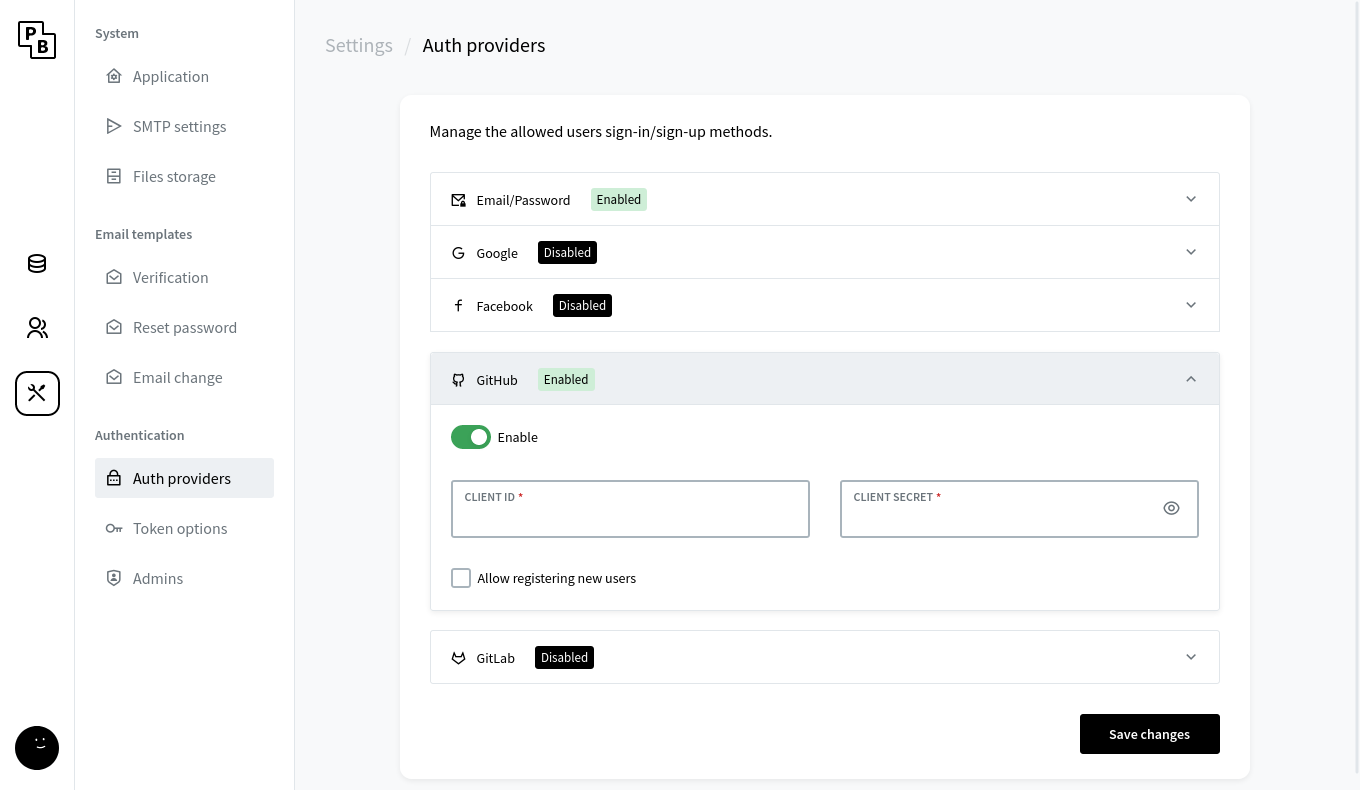 (it is still a very early MVP but you could also explore some of the other screenshots here - https://app.presentator.io/#/6mote1hf)
Release schedule:
- [x] finalize the unit tests and documentation for PocketBase and release it by the end of Q2/Q3 this year (the project repo(s) will be located here https://github.com/pocketbase)
- [ ] somewhere around Q4 (or Q1/Q2 the next year) release Presentator v3, including:
- migration script to automate the upgrade from v2 to v3
- new AdobeXD and Figma plugins to work with the new v3 api
- new landing site and api documentation
Please share your thoughts and what else you would like to see in Presentator v3 :)
One big step towards Presentator v3 has been completed - PocketBase, the new to be backend for Presentator v3, has been just published :tada:.
You could check https://github.com/pocketbase/pocketbase and share some feedback.
I recently found this project and it's really amazingly polished. Like really great job. I think feature that could greatly increase the possible audience of Presentator is commenting on public urls. It is probably tricky feature - mainly because websites are already inter linked, they can render in any resolution so its hard to keep the comment position and also the urls can change in meantime. But everything else is same like with images so it's done.
There is one product https://www.markup.io/ that has ux workflow extremely similar to Presenter and supports both images and urls. I know they are becoming very popular because of the urls support.
I am mentioning this mainly because most of the features on roadmap are more like quality of life upgrades. The urls could suddenly expand your project to web developers.
Just a thought - thanks for making this.
@iskrisis Thanks for the suggestion. As far as I know, there are usually 3 approaches for this:
v1. Create a "screenshot" of the website on server-side and upload it to Presentator like a regular image
- require complicated and resource heavy server setup
- may not always work, especially on websites with loading animations and a lot of js to execute
v2. Load the external url in an iframe and leave comment on a layer on top of it.
- this is the easiest way
- unfortunately, sometimes this is considered a vulnerability and most websites have CSP/iframe policies that allow iframes only for the same domain (if at all)
- because of the responsive of the website, comments may not be positioned correctly on all resolutions
v3. Create a browser extension and "inject" the comments in the html
- this is the best and most reliable way to implement this, because it allows us to interact with the actual html page, so we can make it work even on responsive
- Requires both ends to have the browser extension installed in order to be used
I haven't used https://www.markup.io but I'll investigate it in the future to see how they do it.
@ganigeorgiev They are indeed using Iframes. But they have a bit of magic there somewhere because the comments seem to somewhate correctly keep up with the reflows.
 I am not sure how they do this because i thought you can't really touch iframe.
The other thing they do is have 3 responsive "views" mobile/tablet/desktop which also group the comments. So they treat url basically as 3 "images" - very sensible ux wise. They also have switch between browsing/commenting so you can go to different urls.
I wouldn't worry about the CSP/iframe policies since the devs can change them if they want to present. AFAIK it's allowed as default on nginx/apache so mostly nobody cares tbh.
Possible path that requires least coding i can think of:
- Treat one url as one image. User would add url for each webpage they want to discuss just like images. This means no need for "browsing" mode and it might be even better for users (comment on these 3 main finished views, instead of unfinished pages).
- Use iframes but in fixed predefined widths that would overflow (or be transform - scaled) if they didn't fit in the users viewport (similar like responsive view browser devtools do it). Pretty crude approach but the position of comment then is just x,y coordinate just like with images. This means no need for magic to keep comment in right position.
I think that approach might have some limitations but they are minor. Most of usefulness of markup in my experience is that nobody has to create and edit screenshots and it's obvious where the comments are.
Hi @ganigeorgiev I just want to tell you, I really love what you do. I love your UI design.
Presentator v3 with Pocketbase.. It will be awesome.. Hope to see it soon..
I would love to contribute with this roadmap and also enhance my knowledge in Go.
Sorry for the lack of news for anyone still following here.
If nothing unexpected show up, Presentator v3 is going to be released next Sunday, 28.01 (or the week following it in the worst case scenario).
I'm currently finalizing some automated tests and polishing touches, and will gradually update the repos within the next couple days.
Presentator v3 is fully rewritten from scatch (both the API and the UI) and comes with multiple improvements:
- single executable for easier self-hosting (based on PocketBase)
- extendable via Go or JS, allowing listening to various app events like new comments for sending notifications to Slack or other external source
- realtime comments notification without the need of Firestore
- better notifications control
- better and improved OAuth2 support
- hotspot annotations
- 3x-6x speed up on average for the most "heavy" list requests
- new simplified and refreshed UI
- and many more
There are also some deprecated and removed functionality in v3:
-
No i18n support. Over the last couple years, this has proven to be difficult to maintain and keep up with new development, so I've decided to remove the translations support in v3. If there is enough users demand I may reconsider it, but I don't think it will be necessary as the UI is greatly simplified. Additionally, almost all modern browsers have some builtin auto translations support (including recently Firefox Automated translation).
-
No Adobe XD plugin. The future of Adobe XD is unclear and Adobe hasn't yet made an official statement after the failed Figma acquisition whether they will continue the development of XD or plan to shut it down (even the official XD download links seems to be no longer available or at least not listed in the Creative Cloud offerings). With that said, a new version of the Figma plugin is already deployed and it should work with both Presentator v2 and v3 APIs. If the situation around XD changes, I'll reconsider updating the existing XD plugin in a similar manner.
-
Removing the projects "Guideline" support. After discussions with some designers and based on the hosted service data, to simplify the UX I've decided to remove the support of the project "Guideline" section. This feature was rarely used because it was very limited and most users seem to preferred exporting their project specs as full Artboard(s) (mostly because it provided more flexibility and control on what and how the overall design specs are visualized).
Note1: For those who self-host Presentator there will be a dedicated migration command line tool to semi-automate the migration process (the migration tool is "incremental" and can be run safely several times to accommodate moving large datasets on portions).
Note2: The discussed above URL design feedback for now remains out of the initial scope for v3 as I don't have time at the moment to work on it but may reconsider it in the future.
@compgeniuses I haven't tried Penpot but I don't think it has a plugin API (or at least I can't find information about it).
i think you are right, the issue is detailed here: https://github.com/penpot/penpot/discussions/462
As for API documentation, they do have one, but it uses rPC, and is available here: https://design.penpot.app/api/_doc
For most, i think we might want to wait for v2 release: https://tree.taiga.io/project/penpot/epic/2662
Presentator v3 is finally public.
Most of the repos were updated (~only the Docker Hub image remains but that will be done a little bit later today~ done).
The free hosted service (https://app.presentator.io) was also migrated and everything should be working properly.
If you stumble on something, please report it in the repo issues tracker or on the support [at] presentator.io mail.