JavaScript scripts for Adobe Illustrator CS, CC.
test environment: Adobe Illustrator CC (Windows)
To download these scripts, please use Download button to get a ZIP archive. The button is on the top page of this repository. If you use right-click on each file to save, you'll get an HTML file.
This script duplicates the foreground selected object on the rest of selected paths with specified interval.
Optionally, you can apply random scaling to each of duplicated object.

Notice:
Smaller interval value causes longer calculation time.
This script is for growing grasses on the selected paths.
See the description image for the optional values.
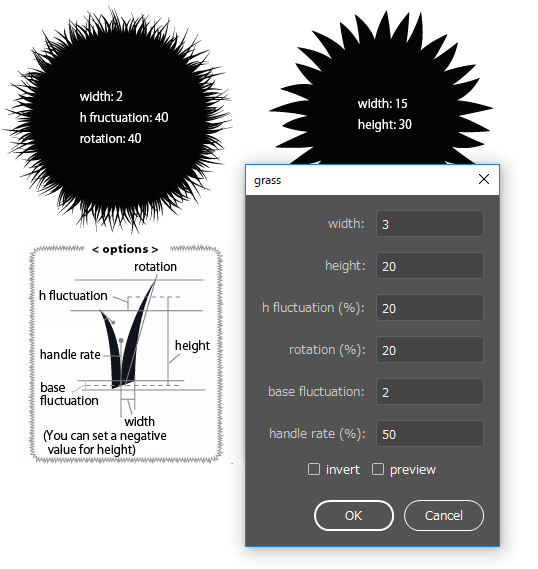
Notice:
Smaller width value causes longer calculation time.
Because of this issue, preview checkbox is forced unchecked when any value in the dialog is changed. Please check it manually again to draw a preview.
This script tries drawing an inscribed circle for each selected path.
Usage: select paths and run this script.

Notice:
This one simply uses an intersection point of two bisectors of angles to determine the center of the circle. It's not always an inscribed circle for the shape.
This script adds a new layer that has custom selection mark color above the active layer.

(&L) in the filename is for the Alt key shortcut in Windows.
You can run the script by Alt-F->R->L.
This script is for turning every selected path into an oval which fits the width and the height of the path.
If the width and the height are equal, it turns into a circle.
You can specify the number of the anchor points before the script modifies the paths.
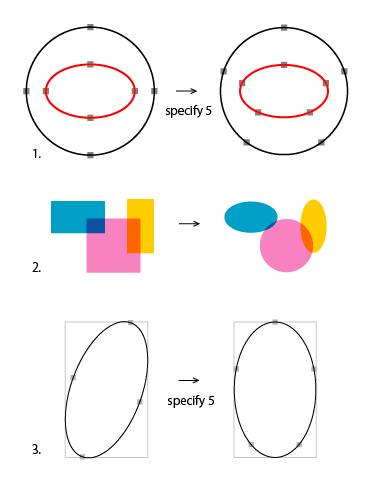
You can use this script in case if you want to draw a circle or an oval which has the number of anchor points other than four.
Draw a circle with the ellipse tool, select it, run this script, input the number and you are done.
Please notice the case 3 of the above image. This is a feature for now.
Resizes the objects in the selection at a magnification that makes the foremost path the specified length.
(The same magnification is applied to paths other than the front.)

For setting about resizing, please change the value of scaleOpt below.
Note that the width of the lines is not changed by default. (changeLineWIdths)
This script applys smoothing to selected pathPoints on selected polygon paths using the Catmull-Rom spline.
you can adjust the tension with a slider.

USAGE : Select anchors to smooth or whole paths and run this script. Adjust "tension" in the dialog. then click OK.
reference : Catmull-Rom to Bezier conversion. https://pomax.github.io/bezierinfo/#catmullconv
Copyright(c) 2013-2014 Hiroyuki Sato
https://github.com/shspage
This script is distributed under the MIT License.
See the LICENSE file for details.