Usage
The Mods are available through different library as below
-
easydeviceinfo- Main library which transitively includes both
easydeviceinfo-adsandeasydeviceinfo-base.
- Main library which transitively includes both
-
easydeviceinfo-ads- EasyDeviceInfo Ads, which facilitates information regarding ads. Has a dependency on
play-services-base. - Supported Mods
- EasyDeviceInfo Ads, which facilitates information regarding ads. Has a dependency on
-
easydeviceinfo-base- EasyDeviceInfo Base, which facilitates information regarding the device.
- Supported Mods + EasyAppMod + EasyBatteryMod + EasyBluetoothMod + EasyConfigMod + EasyCpuMod + EasyDeviceMod + EasyDisplayMod + EasyIdMod + EasyLocationMod + EasyMemoryMod + EasyNetworkMod + EasyNfcMod + EasySimMod + EasySensorMod + EasyFingerprintMod


Now, Create an instance of one of the Mods ( Easy*Mod class ), i.e EasyConfigMod
EasyConfigMod easyConfigMod = new EasyConfigMod(context);Next call an available function on the easyConfigMod instance such as
String time_in_ms= String.valueOf(easyConfigMod.getTime());-
Include a required permission check

-
Setup all constants returned in a switch statement.
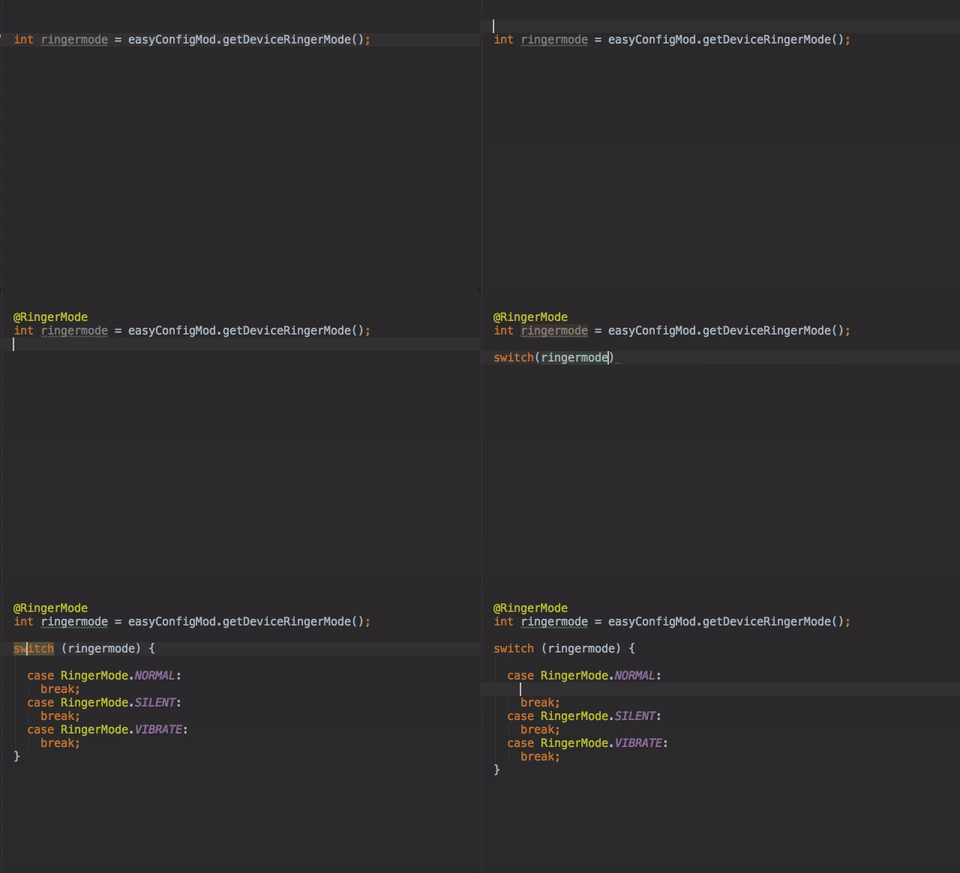
This applies to all annotations bundled with easydeviceinfo. Checkout the wiki to see where these annotations can be applied.
@RingerMode@DeviceType@PhoneType@OrientationType@NetworkType@BatteryHealth@ChargingVia
Now each Mods has a certain set of functions you can call on them to retrieve device information.
The list is as follows
To get Advertiser's ID
//Get Android Advertiser ID
easyAdsMod.getAndroidAdId(MainActivity.this, new EasyAdsMod.AdIdentifierCallback() {
    @Override
    public void onSuccess(String adIdentifier, boolean adDonotTrack) {
        // Do something with the advertiser's ID
    }
});
EasyIdMod easyIdMod = new EasyIdMod(context);| Value | functionName | returns |
|---|---|---|
| PseudoID | getPseudoUniqueID() |
String |
Android ID (DEPRECATED as of v26.0.0)
|
getAndroidID() |
String |
More Functions
-
To get User-Agent, call it from the UI thread ONLY
String ua = easyIdMod.getUA()
-
To get GSF ID
String gsf_id = getGSFID();
- Include the required permission in your AndroidManifest.xml
<uses-permission android:name="com.google.android.providers.gsf.permission.READ_GSERVICES"/>
-
DEPRECATED as of
v26.0.0To get Email IDs
//Get Google Email ID
String[] emailIds = easyIdMod.getAccounts();
  StringBuilder emailString = new StringBuilder();
  if (emailIds != null && emailIds.length > 0) {
    for (String e : emailIds) {
      emailString.append(e).append("\n");
    }
  } else {
    emailString.append("-");
  }

String emailId=emailString.toString();
- Include the required permission in your AndroidManifest.xml
<uses-permission android:name="android.permission.GET_ACCOUNTS"/>
EasySensorMod easySensorMod = new EasySensorMod(context);

// Get list of sensors installed in the device
List<Sensor> list = easySensorMod.getAllSensors();
Each Sensor element in the list has the following functions
| Value | functionName | returns |
|---|---|---|
| Vendor | getVendor() |
String |
| Version | getVersion() |
String |
| Power | getPower() |
String |
| Resolution | getResolution() |
String |
| Max Range | getMaximumRange() |
String |
| Name | getName() |
String |
EasyFingerprintMod easyFingerprintMod = new EasyFingerprintMod(context);| Value | functionName | returns |
|---|---|---|
| Is Fingerprint Sensor present | isFingerprintSensorPresent() |
boolean |
| Are fingerprints enrolled | areFingerprintsEnrolled() |
boolean |
EasyConfigMod easyConfigMod = new EasyConfigMod(context);| Value | functionName | returns |
|---|---|---|
| Is running on emulator | isRunningOnEmulator() |
boolean |
| Time (ms) | getTime() |
long |
| Formatted Time (24Hr) | getFormattedTime() |
String |
| Up Time (ms) | getUpTime() |
long |
| Formatted Up Time (24Hr) | getFormattedUpTime() |
String |
| Get Current Date | getCurrentDate() |
Date |
| Get Formatted Date | getFormattedDate() |
String |
| Has SD Card | hasSdCard() |
boolean |
Functions which return multiple results
- Device Ringer Mode
 @RingerMode
 int ringermode = easyConfigMod.getDeviceRingerMode();
Then match it against the constants provided
switch (ringermode) {
    case RingerMode.NORMAL:
      System.out.println("Ringer mode : Normal");
      break;
    case RingerMode.VIBRATE:
      System.out.println("Ringer mode : Vibrate");
      break;
    case RingerMode.SILENT:
      System.out.println("Ringer mode : Silent");
      break;
    default:
      //do nothing
      break;
  }
where constants available are
+ RingerMode.NORMAL
+ RingerMode.VIBRATE
+ RingerMode.SILENT
EasyNetworkMod easyNetworkMod = new EasyNetworkMod(context);| Value | functionName | returns |
|---|---|---|
| WiFi State | isNetworkAvailable() |
boolean |
| WiFi State | isWifiEnabled() |
boolean |
| IPv4 Address | getIPv4Address() |
String |
| IPv6 Address | getIPv6Address() |
String |
| WiFi SSID | getWifiSSID() |
String |
| Wifi Link Speed | getWifiLinkSpeed() |
String |
| WiFi BSSID | getWifiBSSID() |
String |
-
To get WiFi MAC Address
String wifi_mac = easyNetworkMod.getWifiMAC();
- Include the required permission in your AndroidManifest.xml
<uses-permission android:name="android.permission.ACCESS_WIFI_STATE"/>
Functions which return multiple results
-
To get network type
 @NetworkType
 int networkType = easyNetworkMod.getNetworkType();
Then match it against the constants provided
switch (networkType) {
    case NetworkType.CELLULAR_UNKNOWN:
      System.out.println("Network Type : Unknown");
      break;
    case NetworkType.CELLULAR_UNIDENTIFIED_GEN:
      System.out.println("Network Type : Cellular Unidentified Generation");
      break;
    case NetworkType.CELLULAR_2G:
      System.out.println("Network Type : Cellular 2G");
      break;
    case NetworkType.CELLULAR_3G:
      System.out.println("Network Type : Cellular 3G");
      break;
    case NetworkType.CELLULAR_4G:
      System.out.println("Network Type : Cellular 4G");
      break;
    case NetworkType.WIFI_WIFIMAX:
      System.out.println("Network Type : WIFI/WIFIMAX");
      break;
    case NetworkType.UNKNOWN:
    default:
      System.out.println("Network Type : Unknown");
      break;
  }
where constants available are
NetworkType.CELLULAR_UNKNOWNNetworkType.CELLULAR_UNIDENTIFIED_GENNetworkType.CELLULAR_2GNetworkType.CELLULAR_3GNetworkType.CELLULAR_4GNetworkType.WIFI_WIFIMAXNetworkType.UNKNOWN
-
Include the required permission in your AndroidManifest.xml
<uses-permission android:name="android.permission.ACCESS_NETWORK_STATE"/>
<uses-permission android:name="android.permission.INTERNET"/>
EasyMemoryMod easyMemoryMod = new EasyMemoryMod(context);| Value | functionName | returns(bytes) |
|---|---|---|
| Total RAM | getTotalRAM() |
long |
| Available Internal Memory | getAvailableInternalMemorySize() |
long |
| Available External Memory | getAvailableExternalMemorySize() |
long |
| Total Internal Memory | getTotalInternalMemorySize() |
long |
| Total External Memory | getTotalExternalMemorySize() |
long |
Util functions for conversions
| Value | functionName | returns |
|---|---|---|
| Convert to Kb | convertToKb(long valInBytes) |
float |
| Convert to Mb | convertToMb(long valInBytes) |
float |
| Convert to Gb | convertToGb(long valInBytes) |
float |
| Convert to Tb | convertToTb(long valInBytes) |
float |
EasyAppMod easyAppMod = new EasyAppMod(context);| Value | functionName | returns |
|---|---|---|
| Activity Name | getActivityName() |
String |
| Package Name | getPackageName() |
String |
| AppStore | getStore() |
String |
| App Name | getAppName() |
String |
| App Version | getAppVersion() |
String |
| App Version Code | getAppVersionCode() |
String |
| Is App with Packagename Installed | isAppInstalled(String packageName) |
boolean |
| Is Permission Granted | isPermissionGranted(String permission) |
boolean |
EasyBatteryMod easyBatteryMod = new EasyBatteryMod(context);| Value | functionName | returns |
|---|---|---|
| Battery Percentage (%) | getBatteryPercentage() |
int |
| Is Device Charging | isDeviceCharging() |
boolean |
| Technology used by battery | getBatteryTechnology() |
String |
| Temperature (Deg Celsius) | getBatteryTemperature() |
float |
| Voltage (mV) | getBatteryVoltage() |
int |
| Is battery present | isBatteryPresent() |
boolean |
Functions which return multiple results
- Battery Health
@BatteryHealth
int batteryHealth = easyBatteryMod.getBatteryHealth();
Then match it against the constants provided
switch (batteryHealth) {
    case BatteryHealth.GOOD:
      System.out.println("Battery health : Good");
      break;
    case BatteryHealth.HAVING_ISSUES:
      System.out.println("Battery health : Having issues");
      break;
    default:
      System.out.println("Battery health : Having issues");
      break;
  }
where constants available are
+ BatteryHealth.GOOD
+ BatteryHealth.HAVING_ISSUES
- Charging Source
@ChargingVia
int isChargingVia = easyBatteryMod.getChargingSource();
Then match it against the constants provided
switch (isChargingVia) {
    case ChargingVia.AC:
      System.out.println("Device charging via AC");
      break;
    case ChargingVia.USB:
      System.out.println("Device charging via USB");
      break;
    case ChargingVia.WIRELESS:
      System.out.println("Device charging via Wireless");
      break;
    case ChargingVia.UNKNOWN_SOURCE:
      System.out.println("Device charging via Unknown Source");
      break;
    default:
      System.out.println("Device charging via Unknown Source");
      break;
  }
where constants available are
+ ChargingVia.AC
+ ChargingVia.USB
+ ChargingVia.WIRELESS
+ ChargingVia.UNKNOWN_SOURCE
EasyBluetoothMod easyBluetoothMod = new EasyBluetoothMod(context);-
DEPRECATED as of
v26.0.0To get Bluetooth MAC Address
String bluetooth_mac = easyBluetoothMod.getBluetoothMAC();
- Include the required permission in your AndroidManifest.xml
<uses-permission android:name="android.permission.BLUETOOTH"/>
EasyCpuMod easyCpuMod = new EasyCpuMod();| Value | functionName | returns |
|---|---|---|
| Supported ABIS | getStringSupportedABIS() |
String |
| Supported 32 bit ABIS | getStringSupported32bitABIS() |
String |
| Supported 64 bit ABIS | getStringSupported64bitABIS() |
String |
Functions which return multiple results
- To get Supported ABIS
StringBuilder supportABI = new StringBuilder();
   for (String abis : easyCpuMod.getSupportedABIS()) {
       supportABI.append(abis).append("\n");
   }

String supportedABI=supportABI.toString();- To get Supported 32 Bit ABIS
StringBuilder support32ABI = new StringBuilder();
   for (String abis : easyCpuMod.getSupported32bitABIS()) {
       support32ABI.append(abis).append("\n");
   }

String supported32ABI=support32ABI.toString();- To get Supported 64 Bit ABIS
StringBuilder support64ABI = new StringBuilder();
   for (String abis : easyCpuMod.getSupported64bitABIS()) {
       support64ABI.append(abis).append("\n");
   }

String supported64ABI=support64ABI.toString();
EasyDeviceMod easyDeviceMod = new EasyDeviceMod(context);| Value | functionName | returns |
|---|---|---|
IMEI (DEPRECATED as of v26.0.0)
|
getIMEI() |
String |
| Screen Display ID | getScreenDisplayID() |
String |
| Build Version Codename | getBuildVersionCodename() |
String |
| Build Version Incremental | getBuildVersionIncremental() |
String |
| Build Version SDK | getBuildVersionSDK() |
int |
| Build ID | getBuildID() |
String |
| Manufacturer | getManufacturer() |
String |
| Model | getModel() |
String |
| OS Codename | getOSCodename() |
String |
| OS Version | getOSVersion() |
String |
| Phone Number | getPhoneNo() |
String |
| Radio Hardware Version | getRadioVer() |
String |
| Product | getProduct() |
String |
| Device | getDevice() |
String |
| Board | getBoard() |
String |
| Hardware | getHardware() |
String |
| Bootloader | getBootloader() |
String |
| Fingerprint | getFingerprint() |
String |
| Is Device rooted | isDeviceRooted() |
boolean |
| Build Brand | getBuildBrand() |
String |
| Build Host | getBuildHost() |
String |
| Build Tags | getBuildTags() |
String |
| Build Time | getBuildTime() |
long |
| Build User | getBuildUser() |
String |
| Build Version Release | getBuildVersionRelease() |
String |
Functions which return multiple results
-
To get device type
@DeviceType
int deviceType = easyDeviceMod.getDeviceType(activity);
Then match it against the constants provided
switch (deviceType) {
   case DeviceType.WATCH:
     System.out.println("watch");
     break;
   case DeviceType.PHONE:
     System.out.println("phone");
     break;
   case DeviceType.PHABLET:
     System.out.println("phablet");
     break;
   case DeviceType.TABLET:
     System.out.println("tablet");
     break;
   case DeviceType.TV:
     System.out.println("tv");
     break;
 }
where constants available are
DeviceType.WATCHDeviceType.PHONEDeviceType.PHABLETDeviceType.TABLETDeviceType.TV
-
To get phone type
 @PhoneType
 int phoneType = easyDeviceMod.getPhoneType();
Then match it against the constants provided
switch (phoneType) {
    case PhoneType.CDMA:
      System.out.println("Phone Type : CDMA");
      break;
    case PhoneType.GSM:
      System.out.println("Phone Type : GSM");
      break;
    case PhoneType.NONE:
      System.out.println("Phone Type : None");
      break;
    default:
      System.out.println("Phone Type : Unknown");
      break;
  }
where constants available are
PhoneType.CDMAPhoneType.GSMPhoneType.NONE
-
To get device orientation
@OrientationType
int orientationType = easyDeviceMod.getOrientation(this);
Then match it against the constants provided
switch (orientationType) { case OrientationType.LANDSCAPE: System.out.println("Orientation : Landscape"); break; case OrientationType.PORTRAIT: System.out.println("Orientation : Portrait"); break; case OrientationType.UNKNOWN: System.out.println("Orientation : Unknown"); break; default: System.out.println("Orientation : Unknown"); break; }
where constants available are
  + `OrientationType.LANDSCAPE`
  + `OrientationType.PORTRAIT`
  + `OrientationType.UNKNOWN`

#### **EasyDisplayMod**
```java
EasyDisplayMod easyDisplayMod = new EasyDisplayMod(context);
| Value | functionName | returns |
|---|---|---|
| Display Resolution | getResolution() |
String |
| Screen Density | getDensity() |
String |
| Display XY Coordinate | getDisplayXYCoordinates(motionevent) |
int[] |
| Refresh Rate | getRefreshRate() |
float |
| Screen Orientation | getDefaultOrientation() |
float |
| Screen Physical Size | getPhysicalSize() |
float |
EasySimMod easySimMod = new EasySimMod(context);| Value | functionName | returns |
|---|---|---|
| IMSI | getIMSI() |
String |
| SIM Serial Number | getSIMSerial() |
String |
| Country | getCountry() |
String |
| Carrier | getCarrier() |
String |
| SIM Locked | isSimNetworkLocked() |
boolean |
| Get Active SimInfo | getActiveMultiSimInfo() |
List |
| Is MultiSim | isMultiSim() |
boolean |
| Get number of active SIM | getNumberOfActiveSim() |
int |
NOTE : Multi SIM info works for devices running API 21 and above i.e Lollipop +
Check the sample app for working example
EasyLocationMod easyLocationMod = new EasyLocationMod(context);-
To get Latitude-Longitude (Geo)
//Get Lat-Long
double[] l = easyLocationMod.getLatLong();
String lat = String.valueOf(l[0]);
String lon = String.valueOf(l[1]);
- Include the one of the required permission in your AndroidManifest.xml
<uses-permission android:name="android.permission.ACCESS_COARSE_LOCATION"/>
Or
<uses-permission android:name="android.permission.ACCESS_FINE_LOCATION"/>
EasyNfcMod easyNfcMod = new EasyNfcMod(context);| Value | functionName | returns |
|---|---|---|
| Is NFC present | isNfcPresent() |
boolean |
| Is NFC enabled | isNfcEnabled() |
boolean |
| Value | functionName | returns |
|---|---|---|
| Library version | EasyDeviceInfo.getLibraryVersion() |
String |
| Enable Debugging | EasyDeviceInfo.debug() |
void |
To modify the value that is returned when a function cannot get the value from device, simply init EasyDeviceInfo with the new value before using any Easy*Mod
EasyDeviceInfo.setNotFoundVal("na");this will make the functions return na when the value is not found or an error is encountered.
By default if you don't use this, the value returned is unknown.


