{
"cells": [
{
"cell_type": "markdown",
"metadata": {},
"source": [
"# Introduction to Numpy\n",
""
]
},
{
"cell_type": "markdown",
"metadata": {},
"source": [
"\n",
"\n",
"\n",
"# What is Numpy?\n",
"---\n",
"\n",
"NumPy is a general-purpose array-processing package. It provides a high-performance multidimensional array object, and tools for working with these arrays.\n",
"\n",
"It is the fundamental package for scientific computing with Python. It contains among other things:\n",
"- a powerful N-dimensional array object\n",
"- sophisticated (broadcasting) functions\n",
"- tools for integrating C/C++ and Fortran code\n",
"- useful linear algebra, Fourier transform, and random number capabilities\n",
"\n",
"Besides its obvious scientific uses, NumPy can also be used as an efficient multi-dimensional container of generic data.\n",
"Arbitrary data-types can be defined. This allows NumPy to seamlessly and speedily integrate with a wide variety of databases."
]
},
{
"cell_type": "markdown",
"metadata": {},
"source": [
"# Installation\n",
"---\n",
"\n",
"\n",
"\n",
"- **Mac** and **Linux** users can install NumPy via pip command:\n",
" ```\n",
" pip install numpy\n",
" ```\n",
"\n",
"- **Windows** does not have any package manager analogous to that in linux or mac. Please download the pre-built windows installer for NumPy from [here](http://www.lfd.uci.edu/~gohlke/pythonlibs/#numpy) (according to your system configuration and Python version). And then install the packages manually.\n",
"\n",
"\n",
"Once you are done, just type this in python interpreter:\n",
"```python\n",
"import numpy as np\n",
"```\n",
"\n",
"If you are still experiencing some issues, then Stack Overflow is your friend!\n",
"\n",
"If no errors appear,congo! You have successfully installed NumPy. \n",
"Lets move ahead...\n"
]
},
{
"cell_type": "markdown",
"metadata": {},
"source": [
"## Arrays in NumPy\n",
"---\n",
"NumPy’s main object is the homogeneous multidimensional array.\n",
"- It is a table of elements (usually numbers), all of the same type, indexed by a tuple of positive integers.\n",
"- In NumPy dimensions are called *axes*. The number of axes is *rank*.\n",
"- NumPy’s array class is called **ndarray**. It is also known by the alias **array**. \n",
"\n",
"For example:\n",
"```python\n",
"[[ 1, 2, 3],\n",
" [ 4, 2, 5]]\n",
"``` \n",
"This array has:\n",
"- rank = 2 (as it is 2-dimensional or it has 2 axes)\n",
"- first dimension(axis) length = 2, second dimension has length = 3.\n",
"- overall shape can be expressed as: (2, 3)"
]
},
{
"cell_type": "code",
"execution_count": 1,
"metadata": {},
"outputs": [],
"source": [
"import numpy as np"
]
},
{
"cell_type": "code",
"execution_count": 17,
"metadata": {},
"outputs": [],
"source": [
"mylist = np.array([[ 1, 2, 3],\n",
" [ 4, 2,5]], dtype='int64')"
]
},
{
"cell_type": "code",
"execution_count": 11,
"metadata": {},
"outputs": [
{
"data": {
"text/plain": [
"array([list([1, 2, 3]), list([4, 2])], dtype=object)"
]
},
"execution_count": 11,
"metadata": {},
"output_type": "execute_result"
}
],
"source": [
"arr"
]
},
{
"cell_type": "code",
"execution_count": 12,
"metadata": {},
"outputs": [
{
"data": {
"text/plain": [
"numpy.ndarray"
]
},
"execution_count": 12,
"metadata": {},
"output_type": "execute_result"
}
],
"source": [
"# type of arr\n",
"type(arr)"
]
},
{
"cell_type": "code",
"execution_count": 13,
"metadata": {},
"outputs": [
{
"data": {
"text/plain": [
"(2,)"
]
},
"execution_count": 13,
"metadata": {},
"output_type": "execute_result"
}
],
"source": [
"# shape of arr\n",
"arr.shape"
]
},
{
"cell_type": "code",
"execution_count": 5,
"metadata": {},
"outputs": [
{
"data": {
"text/plain": [
"dtype('int64')"
]
},
"execution_count": 5,
"metadata": {},
"output_type": "execute_result"
}
],
"source": [
"# type of elements inside array\n",
"arr.dtype"
]
},
{
"cell_type": "markdown",
"metadata": {},
"source": [
""
]
},
{
"cell_type": "markdown",
"metadata": {},
"source": [
"## Array creation\n",
"---\n",
"There are various ways to create arrays in NumPy.\n",
"\n",
"- For example, you can create an array from a regular Python **list** or **tuple** using the **array** function. The type of the resulting array is deduced from the type of the elements in the sequences."
]
},
{
"cell_type": "code",
"execution_count": 18,
"metadata": {},
"outputs": [],
"source": [
"mylist = [[1,2,3,4],\n",
" [5,6,7,8]]"
]
},
{
"cell_type": "code",
"execution_count": 19,
"metadata": {},
"outputs": [],
"source": [
"myarr = np.array(mylist, dtype='float')"
]
},
{
"cell_type": "code",
"execution_count": 20,
"metadata": {},
"outputs": [
{
"data": {
"text/plain": [
"array([[1., 2., 3., 4.],\n",
" [5., 6., 7., 8.]])"
]
},
"execution_count": 20,
"metadata": {},
"output_type": "execute_result"
}
],
"source": [
"myarr"
]
},
{
"cell_type": "markdown",
"metadata": {},
"source": [
"- Often, the elements of an array are originally unknown, but its size is known. Hence, NumPy offers several functions to create arrays with **initial placeholder content**. These minimize the necessity of growing arrays, an expensive operation. **For example:** np.zeros, np.ones, np.full, np.empty, etc."
]
},
{
"cell_type": "code",
"execution_count": 21,
"metadata": {},
"outputs": [],
"source": [
"# create an array of size 3x4 filled with 0s\n",
"c = np.zeros((3,4), dtype='int')"
]
},
{
"cell_type": "code",
"execution_count": 22,
"metadata": {
"scrolled": true
},
"outputs": [
{
"data": {
"text/plain": [
"array([[0, 0, 0, 0],\n",
" [0, 0, 0, 0],\n",
" [0, 0, 0, 0]])"
]
},
"execution_count": 22,
"metadata": {},
"output_type": "execute_result"
}
],
"source": [
"c"
]
},
{
"cell_type": "markdown",
"metadata": {},
"source": [
"how to set complete "
]
},
{
"cell_type": "code",
"execution_count": 27,
"metadata": {},
"outputs": [],
"source": [
"# create an array of size 3x3 filled with 6s of complex type\n",
"d = np.full((3, 3), 6+2j, dtype = 'complex')"
]
},
{
"cell_type": "code",
"execution_count": 28,
"metadata": {},
"outputs": [
{
"data": {
"text/plain": [
"array([[6.+2.j, 6.+2.j, 6.+2.j],\n",
" [6.+2.j, 6.+2.j, 6.+2.j],\n",
" [6.+2.j, 6.+2.j, 6.+2.j]])"
]
},
"execution_count": 28,
"metadata": {},
"output_type": "execute_result"
}
],
"source": [
"d"
]
},
{
"cell_type": "code",
"execution_count": 29,
"metadata": {},
"outputs": [],
"source": [
"# 2x2 array with random values\n",
"e = np.random.random((2,2))"
]
},
{
"cell_type": "code",
"execution_count": 30,
"metadata": {},
"outputs": [
{
"data": {
"text/plain": [
"array([[0.15746976, 0.31089273],\n",
" [0.46481695, 0.01534476]])"
]
},
"execution_count": 30,
"metadata": {},
"output_type": "execute_result"
}
],
"source": [
"e"
]
},
{
"cell_type": "markdown",
"metadata": {},
"source": [
"- To create sequences of numbers, NumPy provides a function analogous to range that returns arrays instead of lists.\n",
" - **arange:** returns evenly spaced values within a given interval. **step** size is specified.\n",
" - **linspace:** returns evenly spaced values within a given interval. **num** no. of elements are returned."
]
},
{
"cell_type": "code",
"execution_count": 36,
"metadata": {},
"outputs": [],
"source": [
"# create a sequence of integers from 0 to 30 with steps of 5\n",
"f = np.arange(0, 30, 5)"
]
},
{
"cell_type": "code",
"execution_count": 37,
"metadata": {
"scrolled": true
},
"outputs": [
{
"data": {
"text/plain": [
"array([ 0, 5, 10, 15, 20, 25])"
]
},
"execution_count": 37,
"metadata": {},
"output_type": "execute_result"
}
],
"source": [
"f"
]
},
{
"cell_type": "code",
"execution_count": 33,
"metadata": {},
"outputs": [],
"source": [
"# create a sequence of 10 values in range 0 to 5\n",
"g = np.linspace(1, 10, 3)"
]
},
{
"cell_type": "code",
"execution_count": 35,
"metadata": {},
"outputs": [
{
"data": {
"text/plain": [
"array([ 1. , 5.5, 10. ])"
]
},
"execution_count": 35,
"metadata": {},
"output_type": "execute_result"
}
],
"source": [
"g"
]
},
{
"cell_type": "markdown",
"metadata": {},
"source": [
"multidimensional array of random integers"
]
},
{
"cell_type": "code",
"execution_count": 40,
"metadata": {},
"outputs": [],
"source": [
"# sequence of 10 random integers in range 0 to 10\n",
"h = np.random.randint(0, 10, (3,4))"
]
},
{
"cell_type": "code",
"execution_count": 41,
"metadata": {},
"outputs": [
{
"data": {
"text/plain": [
"array([[1, 6, 9, 6],\n",
" [2, 1, 1, 2],\n",
" [7, 6, 2, 8]])"
]
},
"execution_count": 41,
"metadata": {},
"output_type": "execute_result"
}
],
"source": [
"h"
]
},
{
"cell_type": "markdown",
"metadata": {},
"source": [
"- **Reshaping array:** We can use **reshape** method to reshape an array. Consider an array with shape (a1, a2, a3, ..., aN). We can reshape and convert it into another array with shape (b1, b2, b3, ....., bM). The only required condition is:
*a1 x a2 x a3 .... x aN = b1 x b2 x b3 .... x bM *. (i.e original size of array remains unchanged.)"
]
},
{
"cell_type": "code",
"execution_count": 44,
"metadata": {},
"outputs": [],
"source": [
"# reshaping 3X4 array to 2X2X3 array\n",
"arr = np.array([[1, 2, 3, 4],\n",
" [5, 2, 4, 2],\n",
" [1, 2, 0, 1]])\n",
"newarr = arr.reshape(1,1,1,1,1,1,12)"
]
},
{
"cell_type": "code",
"execution_count": 45,
"metadata": {},
"outputs": [
{
"data": {
"text/plain": [
"array([[[[[[[1, 2, 3, 4, 5, 2, 4, 2, 1, 2, 0, 1]]]]]]])"
]
},
"execution_count": 45,
"metadata": {},
"output_type": "execute_result"
}
],
"source": [
"newarr"
]
},
{
"cell_type": "markdown",
"metadata": {},
"source": [
"- **Flatten array:** We can use **flatten** method to get a copy of array collapsed into **one dimension**. It accepts *order* argument. Default value is 'C' (for row-major order). Use 'F' for column major order."
]
},
{
"cell_type": "code",
"execution_count": 46,
"metadata": {},
"outputs": [],
"source": [
"arr = np.array([[1, 2, 3], [4, 5, 6]])"
]
},
{
"cell_type": "code",
"execution_count": 47,
"metadata": {},
"outputs": [
{
"data": {
"text/plain": [
"array([[1, 2, 3],\n",
" [4, 5, 6]])"
]
},
"execution_count": 47,
"metadata": {},
"output_type": "execute_result"
}
],
"source": [
"arr"
]
},
{
"cell_type": "code",
"execution_count": 55,
"metadata": {},
"outputs": [],
"source": [
"flarr = arr.flatten(order='K')"
]
},
{
"cell_type": "code",
"execution_count": 58,
"metadata": {},
"outputs": [],
"source": [
"flarr = flarr.T"
]
},
{
"cell_type": "code",
"execution_count": 59,
"metadata": {},
"outputs": [
{
"data": {
"text/plain": [
"array([1, 2, 3, 4, 5, 6])"
]
},
"execution_count": 59,
"metadata": {},
"output_type": "execute_result"
}
],
"source": [
"flarr"
]
},
{
"cell_type": "markdown",
"metadata": {},
"source": [
"## Array Indexing\n",
"---\n",
"\n",
"Knowing the basics of array indexing is important for analysing and manipulating the array object.\n",
"NumPy offers many ways to do array indexing.\n",
"\n",
"- **Slicing:** Just like lists in python, NumPy arrays can be sliced. As arrays can be multidimensional, you need to specify a slice for each dimension of the array."
]
},
{
"cell_type": "code",
"execution_count": 60,
"metadata": {},
"outputs": [],
"source": [
"# an exemplar array\n",
"arr = np.array([[-1, 2, 0, 4],\n",
" [4, -0.5, 6, 0],\n",
" [2.6, 0, 7, 8],\n",
" [3, -7, 4, 2.0]])"
]
},
{
"cell_type": "code",
"execution_count": 61,
"metadata": {},
"outputs": [
{
"data": {
"text/plain": [
"(4, 4)"
]
},
"execution_count": 61,
"metadata": {},
"output_type": "execute_result"
}
],
"source": [
"arr.shape"
]
},
{
"cell_type": "code",
"execution_count": 70,
"metadata": {},
"outputs": [],
"source": [
"temp = arr[:3,:]"
]
},
{
"cell_type": "code",
"execution_count": 71,
"metadata": {},
"outputs": [
{
"data": {
"text/plain": [
"array([[-1. , 2. , 0. , 4. ],\n",
" [ 4. , -0.5, 6. , 0. ],\n",
" [ 2.6, 0. , 7. , 8. ]])"
]
},
"execution_count": 71,
"metadata": {},
"output_type": "execute_result"
}
],
"source": [
"temp"
]
},
{
"cell_type": "markdown",
"metadata": {},
"source": [
"- **Integer array indexing:** In this method, lists are passed for indexing for each dimension. One to one mapping of corresponding elements is done to construct a new arbitrary array."
]
},
{
"cell_type": "code",
"execution_count": 72,
"metadata": {},
"outputs": [],
"source": [
"temp = arr[[0, 1, 2, 3], [3, 2, 1, 0]]"
]
},
{
"cell_type": "code",
"execution_count": 73,
"metadata": {},
"outputs": [
{
"data": {
"text/plain": [
"array([4., 6., 0., 3.])"
]
},
"execution_count": 73,
"metadata": {},
"output_type": "execute_result"
}
],
"source": [
"temp"
]
},
{
"cell_type": "markdown",
"metadata": {},
"source": [
"- **Boolean array indexing:** This method is used when we want to pick elements from array which satisfy some condition."
]
},
{
"cell_type": "code",
"execution_count": 74,
"metadata": {},
"outputs": [],
"source": [
"cond = arr > 0"
]
},
{
"cell_type": "code",
"execution_count": 75,
"metadata": {},
"outputs": [
{
"data": {
"text/plain": [
"array([[False, True, False, True],\n",
" [ True, False, True, False],\n",
" [ True, False, True, True],\n",
" [ True, False, True, True]])"
]
},
"execution_count": 75,
"metadata": {},
"output_type": "execute_result"
}
],
"source": [
"cond"
]
},
{
"cell_type": "code",
"execution_count": 76,
"metadata": {},
"outputs": [],
"source": [
"# array elements which satisfy the condition\n",
"temp = arr[cond]"
]
},
{
"cell_type": "code",
"execution_count": 77,
"metadata": {},
"outputs": [
{
"data": {
"text/plain": [
"array([2. , 4. , 4. , 6. , 2.6, 7. , 8. , 3. , 4. , 2. ])"
]
},
"execution_count": 77,
"metadata": {},
"output_type": "execute_result"
}
],
"source": [
"temp"
]
},
{
"cell_type": "markdown",
"metadata": {},
"source": [
"## Basic operations\n",
"---\n",
"\n",
"Plethora of built-in arithmetic functions are provided in NumPy.\n",
"\n",
"- **Operations on single array:** We can use overloaded arithmetic operators to do element-wise operation on array to create a new array. In case of +=, -=, *= operators, the exsisting array is modified.\n",
"\n",
"**Here are some examples:**"
]
},
{
"cell_type": "code",
"execution_count": 78,
"metadata": {},
"outputs": [],
"source": [
"a = np.array([1, 2, 5, 3])"
]
},
{
"cell_type": "code",
"execution_count": 79,
"metadata": {},
"outputs": [
{
"data": {
"text/plain": [
"array([2, 3, 6, 4])"
]
},
"execution_count": 79,
"metadata": {},
"output_type": "execute_result"
}
],
"source": [
"# add 1 to every element\n",
"a+1"
]
},
{
"cell_type": "code",
"execution_count": 80,
"metadata": {},
"outputs": [
{
"data": {
"text/plain": [
"array([-2, -1, 2, 0])"
]
},
"execution_count": 80,
"metadata": {},
"output_type": "execute_result"
}
],
"source": [
"# subtract 3 from each element\n",
"a-3"
]
},
{
"cell_type": "code",
"execution_count": 81,
"metadata": {},
"outputs": [
{
"data": {
"text/plain": [
"array([10, 20, 50, 30])"
]
},
"execution_count": 81,
"metadata": {},
"output_type": "execute_result"
}
],
"source": [
"# multiply each element by 10\n",
"a*10"
]
},
{
"cell_type": "code",
"execution_count": 82,
"metadata": {},
"outputs": [
{
"data": {
"text/plain": [
"array([ 1, 4, 25, 9])"
]
},
"execution_count": 82,
"metadata": {},
"output_type": "execute_result"
}
],
"source": [
"# square each element\n",
"a**2"
]
},
{
"cell_type": "code",
"execution_count": 83,
"metadata": {},
"outputs": [],
"source": [
"# modify existing array\n",
"a *= 2"
]
},
{
"cell_type": "code",
"execution_count": 84,
"metadata": {},
"outputs": [
{
"data": {
"text/plain": [
"array([ 2, 4, 10, 6])"
]
},
"execution_count": 84,
"metadata": {},
"output_type": "execute_result"
}
],
"source": [
"a"
]
},
{
"cell_type": "code",
"execution_count": 85,
"metadata": {},
"outputs": [],
"source": [
"# sample array\n",
"a = np.array([[1, 2, 3], [3, 4, 5], [9, 6, 0]])"
]
},
{
"cell_type": "code",
"execution_count": 86,
"metadata": {},
"outputs": [
{
"data": {
"text/plain": [
"array([[1, 2, 3],\n",
" [3, 4, 5],\n",
" [9, 6, 0]])"
]
},
"execution_count": 86,
"metadata": {},
"output_type": "execute_result"
}
],
"source": [
"a"
]
},
{
"cell_type": "code",
"execution_count": 87,
"metadata": {},
"outputs": [
{
"data": {
"text/plain": [
"array([[1, 3, 9],\n",
" [2, 4, 6],\n",
" [3, 5, 0]])"
]
},
"execution_count": 87,
"metadata": {},
"output_type": "execute_result"
}
],
"source": [
"# transpose of array\n",
"a.T"
]
},
{
"cell_type": "markdown",
"metadata": {},
"source": [
"\n",
"- **Unary operators:** Many unary operations are provided as a method of **ndarray** class. This includes sum, min, max, etc. These functions can also be applied row-wise or column-wise by setting an axis parameter.\n",
"\n",
"**Here are some examples:**"
]
},
{
"cell_type": "code",
"execution_count": 88,
"metadata": {},
"outputs": [],
"source": [
"arr = np.array([[1, 5, 6], \n",
" [4, 7, 2], \n",
" [3, 1, 9]])"
]
},
{
"cell_type": "code",
"execution_count": 89,
"metadata": {},
"outputs": [
{
"data": {
"text/plain": [
"9"
]
},
"execution_count": 89,
"metadata": {},
"output_type": "execute_result"
}
],
"source": [
"# maximum element of array\n",
"arr.max()"
]
},
{
"cell_type": "code",
"execution_count": 90,
"metadata": {},
"outputs": [
{
"data": {
"text/plain": [
"array([6, 7, 9])"
]
},
"execution_count": 90,
"metadata": {},
"output_type": "execute_result"
}
],
"source": [
"# row-wise maximum elements\n",
"arr.max(axis=1)"
]
},
{
"cell_type": "code",
"execution_count": 91,
"metadata": {},
"outputs": [
{
"data": {
"text/plain": [
"array([1, 1, 2])"
]
},
"execution_count": 91,
"metadata": {},
"output_type": "execute_result"
}
],
"source": [
"# column wise minimum elements\n",
"arr.min(axis=0)"
]
},
{
"cell_type": "code",
"execution_count": 92,
"metadata": {},
"outputs": [
{
"data": {
"text/plain": [
"38"
]
},
"execution_count": 92,
"metadata": {},
"output_type": "execute_result"
}
],
"source": [
"# sum of all array elements\n",
"arr.sum()"
]
},
{
"cell_type": "code",
"execution_count": 93,
"metadata": {},
"outputs": [
{
"data": {
"text/plain": [
"array([12, 13, 13])"
]
},
"execution_count": 93,
"metadata": {},
"output_type": "execute_result"
}
],
"source": [
"# sum of each row\n",
"arr.sum(axis=1)"
]
},
{
"cell_type": "code",
"execution_count": 94,
"metadata": {},
"outputs": [
{
"data": {
"text/plain": [
"array([[ 1, 6, 12],\n",
" [ 4, 11, 13],\n",
" [ 3, 4, 13]])"
]
},
"execution_count": 94,
"metadata": {},
"output_type": "execute_result"
}
],
"source": [
"# cumulative sum along each row\n",
"arr.cumsum(axis=1)"
]
},
{
"cell_type": "markdown",
"metadata": {},
"source": [
"---\n",
"- **Binary operators:** These operations apply on array elementwise and a new array is created. You can use all basic arithmetic operators like +, -, /, *, etc. In case of +=, -=, *= operators, the exsisting array is modified.\n",
"\n",
"**Here are some examples:**"
]
},
{
"cell_type": "code",
"execution_count": 95,
"metadata": {},
"outputs": [],
"source": [
"a = np.array([[1, 2], \n",
" [3, 4]])\n",
"b = np.array([[4, 3], \n",
" [2, 1]])"
]
},
{
"cell_type": "code",
"execution_count": 96,
"metadata": {},
"outputs": [
{
"data": {
"text/plain": [
"array([[5, 5],\n",
" [5, 5]])"
]
},
"execution_count": 96,
"metadata": {},
"output_type": "execute_result"
}
],
"source": [
"# sum of arrays\n",
"a + b"
]
},
{
"cell_type": "code",
"execution_count": 97,
"metadata": {},
"outputs": [
{
"data": {
"text/plain": [
"array([[4, 6],\n",
" [6, 4]])"
]
},
"execution_count": 97,
"metadata": {},
"output_type": "execute_result"
}
],
"source": [
"# multiply arrays (elementwise multiplication)\n",
"a*b"
]
},
{
"cell_type": "code",
"execution_count": 98,
"metadata": {},
"outputs": [
{
"data": {
"text/plain": [
"array([[ 8, 5],\n",
" [20, 13]])"
]
},
"execution_count": 98,
"metadata": {},
"output_type": "execute_result"
}
],
"source": [
"# matrix multiplication\n",
"a.dot(b)"
]
},
{
"cell_type": "markdown",
"metadata": {},
"source": [
"\n",
"- **Universal functions (ufunc):** NumPy provides familiar mathematical functions such as sin, cos, exp, etc. These functions also operate elementwise on an array, producing an array as output.\n",
"\n",
"**Note:** All the operations we did above using overloaded operators can be done using ufuncs like np.add, np.subtract, np.multiply, np.divide, np.sum, etc."
]
},
{
"cell_type": "code",
"execution_count": 99,
"metadata": {},
"outputs": [],
"source": [
"a = np.array([0, np.pi/2, np.pi])"
]
},
{
"cell_type": "code",
"execution_count": 100,
"metadata": {},
"outputs": [
{
"data": {
"text/plain": [
"array([0. , 1.57079633, 3.14159265])"
]
},
"execution_count": 100,
"metadata": {},
"output_type": "execute_result"
}
],
"source": [
"a"
]
},
{
"cell_type": "code",
"execution_count": 101,
"metadata": {},
"outputs": [
{
"data": {
"text/plain": [
"array([0.0000000e+00, 1.0000000e+00, 1.2246468e-16])"
]
},
"execution_count": 101,
"metadata": {},
"output_type": "execute_result"
}
],
"source": [
"np.sin(a)"
]
},
{
"cell_type": "code",
"execution_count": 103,
"metadata": {},
"outputs": [
{
"data": {
"text/plain": [
"array([ 1. , 4.81047738, 23.14069263])"
]
},
"execution_count": 103,
"metadata": {},
"output_type": "execute_result"
}
],
"source": [
"np.exp(a)"
]
},
{
"cell_type": "code",
"execution_count": 104,
"metadata": {},
"outputs": [
{
"data": {
"text/plain": [
"array([0. , 1.25331414, 1.77245385])"
]
},
"execution_count": 104,
"metadata": {},
"output_type": "execute_result"
}
],
"source": [
"np.sqrt(a)"
]
},
{
"cell_type": "markdown",
"metadata": {},
"source": [
"## Sorting array\n",
"There is a simple **np.sort** method for sorting NumPy arrays.\n",
"Let's explore it a bit."
]
},
{
"cell_type": "code",
"execution_count": 105,
"metadata": {},
"outputs": [],
"source": [
"a = np.array([[1, 4, 2],\n",
" [3, 4, 6],\n",
" [0, -1, 5]])"
]
},
{
"cell_type": "code",
"execution_count": 106,
"metadata": {},
"outputs": [
{
"data": {
"text/plain": [
"array([-1, 0, 1, 2, 3, 4, 4, 5, 6])"
]
},
"execution_count": 106,
"metadata": {},
"output_type": "execute_result"
}
],
"source": [
"# array elements in sorted order\n",
"np.sort(a, axis=None)"
]
},
{
"cell_type": "code",
"execution_count": 107,
"metadata": {},
"outputs": [
{
"data": {
"text/plain": [
"array([[ 1, 2, 4],\n",
" [ 3, 4, 6],\n",
" [-1, 0, 5]])"
]
},
"execution_count": 107,
"metadata": {},
"output_type": "execute_result"
}
],
"source": [
"# sort array row wise\n",
"np.sort(a, axis=1)"
]
},
{
"cell_type": "code",
"execution_count": 108,
"metadata": {},
"outputs": [
{
"data": {
"text/plain": [
"array([[ 0, -1, 2],\n",
" [ 1, 4, 5],\n",
" [ 3, 4, 6]])"
]
},
"execution_count": 108,
"metadata": {},
"output_type": "execute_result"
}
],
"source": [
"# specify sort algorithm\n",
"np.sort(a, axis = 0, kind = 'mergesort')"
]
},
{
"cell_type": "code",
"execution_count": 109,
"metadata": {
"scrolled": true
},
"outputs": [],
"source": [
"# example to show sorting of structured array\n",
"## set alias names for dtypes\n",
"dtypes = [('name', 'S10'), ('grad_year', int), ('cgpa', float)]\n",
"## values to be put in array\n",
"values = [('Hrithik', 2009, 8.5), ('Ajay', 2008, 8.7), ('Pankaj', 2008, 7.9), ('Aakash', 2009, 9.0)]\n",
"## creating array\n",
"arr = np.array(values, dtype = dtypes)"
]
},
{
"cell_type": "code",
"execution_count": 110,
"metadata": {},
"outputs": [
{
"data": {
"text/plain": [
"array([(b'Hrithik', 2009, 8.5), (b'Ajay', 2008, 8.7),\n",
" (b'Pankaj', 2008, 7.9), (b'Aakash', 2009, 9. )],\n",
" dtype=[('name', 'S10'), ('grad_year', '\u001b[0m in \u001b[0;36m\u001b[0;34m()\u001b[0m\n\u001b[1;32m 1\u001b[0m \u001b[0mprint\u001b[0m\u001b[0;34m(\u001b[0m\u001b[0;34m\"Array sorted by grauation year and then cgpa:\\n\"\u001b[0m\u001b[0;34m,\u001b[0m \u001b[0;34m)\u001b[0m\u001b[0;34m\u001b[0m\u001b[0m\n\u001b[1;32m 2\u001b[0m \u001b[0;31m# array sorted by grauation year and then cgpa\u001b[0m\u001b[0;34m\u001b[0m\u001b[0;34m\u001b[0m\u001b[0m\n\u001b[0;32m----> 3\u001b[0;31m \u001b[0mnp\u001b[0m\u001b[0;34m.\u001b[0m\u001b[0msort\u001b[0m\u001b[0;34m(\u001b[0m\u001b[0marr\u001b[0m\u001b[0;34m,\u001b[0m \u001b[0morder\u001b[0m \u001b[0;34m=\u001b[0m \u001b[0;34m[\u001b[0m\u001b[0;34m'grad_year'\u001b[0m\u001b[0;34m,\u001b[0m \u001b[0;34m-\u001b[0m\u001b[0;34m'cgpa'\u001b[0m\u001b[0;34m]\u001b[0m\u001b[0;34m)\u001b[0m\u001b[0;34m\u001b[0m\u001b[0m\n\u001b[0m",
"\u001b[0;31mTypeError\u001b[0m: bad operand type for unary -: 'str'"
]
}
],
"source": [
"print(\"Array sorted by grauation year and then cgpa:\\n\", )\n",
"# array sorted by grauation year and then cgpa\n",
"np.sort(arr, order = ['grad_year', 'cgpa'])"
]
},
{
"cell_type": "markdown",
"metadata": {},
"source": [
"# Stacking and Splitting\n",
"\n",
"Several arrays can be stacked together along different axes.\n",
"\n",
"- **np.vstack:** To stack arrays along vertical axis.\n",
"\n",
"- **np.hstack:** To stack arrays along horizontal axis.\n",
"\n",
"- **np.column_stack:** To stack 1-D arrays as columns into 2-D arrays.\n",
"\n",
"- **np.concatenate:** To stack arrays along specified axis (axis is passed as argument)."
]
},
{
"cell_type": "code",
"execution_count": 121,
"metadata": {},
"outputs": [],
"source": [
"a = np.array([[1, 2],\n",
" [3, 4]])\n",
"\n",
"b = np.array([[5, 6],\n",
" [7, 8]])"
]
},
{
"cell_type": "code",
"execution_count": 122,
"metadata": {},
"outputs": [
{
"data": {
"text/plain": [
"array([[1, 2],\n",
" [3, 4],\n",
" [5, 6],\n",
" [7, 8]])"
]
},
"execution_count": 122,
"metadata": {},
"output_type": "execute_result"
}
],
"source": [
"# vertical stacking\n",
"np.vstack((a, b))"
]
},
{
"cell_type": "code",
"execution_count": 123,
"metadata": {},
"outputs": [
{
"data": {
"text/plain": [
"array([[1, 2, 5, 6],\n",
" [3, 4, 7, 8]])"
]
},
"execution_count": 123,
"metadata": {},
"output_type": "execute_result"
}
],
"source": [
"# horizontal stacking\n",
"np.hstack((a, b))"
]
},
{
"cell_type": "code",
"execution_count": 124,
"metadata": {},
"outputs": [],
"source": [
"# new array\n",
"c = [5, 6]"
]
},
{
"cell_type": "code",
"execution_count": 125,
"metadata": {},
"outputs": [
{
"data": {
"text/plain": [
"array([[1, 2, 5],\n",
" [3, 4, 6]])"
]
},
"execution_count": 125,
"metadata": {},
"output_type": "execute_result"
}
],
"source": [
"# stacking array c as a column to array a\n",
"np.column_stack((a, c))"
]
},
{
"cell_type": "code",
"execution_count": 126,
"metadata": {},
"outputs": [
{
"data": {
"text/plain": [
"array([[1, 2],\n",
" [3, 4],\n",
" [5, 6]])"
]
},
"execution_count": 126,
"metadata": {},
"output_type": "execute_result"
}
],
"source": [
"# stacking array c as a row to array a\n",
"np.row_stack((a, c))"
]
},
{
"cell_type": "code",
"execution_count": 127,
"metadata": {},
"outputs": [
{
"data": {
"text/plain": [
"array([[1, 2],\n",
" [3, 4],\n",
" [5, 6],\n",
" [7, 8]])"
]
},
"execution_count": 127,
"metadata": {},
"output_type": "execute_result"
}
],
"source": [
"# concatenation method\n",
"np.concatenate((a,b), 0)"
]
},
{
"cell_type": "markdown",
"metadata": {},
"source": [
"For splitting, we have these fuctions:\n",
"\n",
"- **np.hsplit:** Split array along horizontal axis.\n",
"\n",
"- **np.vsplit:** Split array along vertical axis.\n",
"\n",
"- **np.array_split:** Split array along specified axis."
]
},
{
"cell_type": "code",
"execution_count": 128,
"metadata": {},
"outputs": [],
"source": [
"a = np.array([[1, 3, 5, 7, 9, 11],\n",
" [2, 4, 6, 8, 10, 12]])"
]
},
{
"cell_type": "code",
"execution_count": 129,
"metadata": {},
"outputs": [
{
"data": {
"text/plain": [
"[array([[1, 3, 5],\n",
" [2, 4, 6]]), array([[ 7, 9, 11],\n",
" [ 8, 10, 12]])]"
]
},
"execution_count": 129,
"metadata": {},
"output_type": "execute_result"
}
],
"source": [
"# horizontal splitting in 2 parts\n",
"np.hsplit(a, 2)"
]
},
{
"cell_type": "code",
"execution_count": 130,
"metadata": {},
"outputs": [
{
"data": {
"text/plain": [
"[array([[ 1, 3, 5, 7, 9, 11]]), array([[ 2, 4, 6, 8, 10, 12]])]"
]
},
"execution_count": 130,
"metadata": {},
"output_type": "execute_result"
}
],
"source": [
"# vertical splitting in 2 parts\n",
"np.vsplit(a, 2)"
]
},
{
"cell_type": "markdown",
"metadata": {},
"source": [
"# Broadcasting \n",
"\n",
"The term broadcasting describes how numpy treats arrays with different shapes during arithmetic operations. Subject to certain constraints, the smaller array is \"broadcast\" across the larger array so that they have compatible shapes. Broadcasting provides a means of vectorizing array operations so that looping occurs in C instead of Python. It does this without making needless copies of data and usually leads to efficient algorithm implementations. There are also cases where broadcasting is a bad idea because it leads to inefficient use of memory that slows computation.\n",
"\n",
"\n",
"Numpy operations are usually done element-by-element which requires two arrays to have exactly the same shape. Numpy's broadcasting rule relaxes this constraint when the arrays' shapes meet certain constraints. The simplest broadcasting example occurs when an array and a scalar value are combined in an operation.\n",
"\n",
"Consider the example given below:"
]
},
{
"cell_type": "code",
"execution_count": 131,
"metadata": {},
"outputs": [],
"source": [
"a = np.array([1.0, 2.0, 3.0])"
]
},
{
"cell_type": "code",
"execution_count": 132,
"metadata": {},
"outputs": [],
"source": [
"b = [2.0, 2.0, 2.0]"
]
},
{
"cell_type": "code",
"execution_count": 133,
"metadata": {},
"outputs": [
{
"data": {
"text/plain": [
"array([2., 4., 6.])"
]
},
"execution_count": 133,
"metadata": {},
"output_type": "execute_result"
}
],
"source": [
"a*b"
]
},
{
"cell_type": "code",
"execution_count": 134,
"metadata": {},
"outputs": [],
"source": [
"b = np.array([2.0])"
]
},
{
"cell_type": "code",
"execution_count": 135,
"metadata": {},
"outputs": [
{
"data": {
"text/plain": [
"array([2., 4., 6.])"
]
},
"execution_count": 135,
"metadata": {},
"output_type": "execute_result"
}
],
"source": [
"a*b"
]
},
{
"cell_type": "markdown",
"metadata": {},
"source": [
"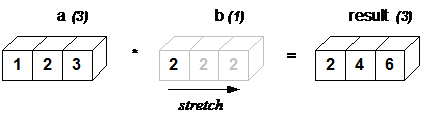\n",
"\n",
"**In above example, the scalar b is stretched to become an array of with the same shape as a so the shapes are compatible for element-by-element multiplication.**"
]
},
{
"cell_type": "markdown",
"metadata": {},
"source": [
"We can think of the scalar b being stretched during the arithmetic operation into an array with the same shape as a. The new elements in b, as shown in above figure, are simply copies of the original scalar. Although, the stretching analogy is only conceptual. \n",
"Numpy is smart enough to use the original scalar value without actually making copies so that broadcasting operations are as memory and computationally efficient as possible. Because Example 1 moves less memory, (b is a scalar, not an array) around during the multiplication, it is about 10% faster than Example 2 using the standard numpy on Windows 2000 with one million element arrays! "
]
},
{
"cell_type": "markdown",
"metadata": {},
"source": [
"## The Broadcasting Rule\n",
"\n",
"In order to broadcast, the size of the trailing axes for both arrays in an operation must either be the same size or \n",
"one of them must be **one**.\n",
"\n",
"Let us see some examples:\n",
"```\n",
"A(2-D array): 4 x 3\n",
"B(1-D array): 3\n",
"Result : 4 x 3\n",
"```\n",
"\n",
"```\n",
"A(4-D array): 7 x 1 x 6 x 1\n",
"B(3-D array): 3 x 1 x 5\n",
"Result : 7 x 3 x 6 x 5\n",
"```\n",
"\n",
"But this would be a mismatch:\n",
"```\n",
"A: 4 x 3\n",
"B: 4\n",
"```\n",
"Now, let us see an example where both arrays get stretched."
]
},
{
"cell_type": "code",
"execution_count": 139,
"metadata": {},
"outputs": [],
"source": [
"a = np.array([0.0, 10.0, 20.0, 30.0])\n",
"b = np.array([0.0, 1.0, 2.0])"
]
},
{
"cell_type": "code",
"execution_count": 140,
"metadata": {},
"outputs": [
{
"data": {
"text/plain": [
"(4,)"
]
},
"execution_count": 140,
"metadata": {},
"output_type": "execute_result"
}
],
"source": [
"a.shape"
]
},
{
"cell_type": "code",
"execution_count": 141,
"metadata": {},
"outputs": [],
"source": [
"a = a[:, np.newaxis]"
]
},
{
"cell_type": "code",
"execution_count": 143,
"metadata": {},
"outputs": [
{
"data": {
"text/plain": [
"(3,)"
]
},
"execution_count": 143,
"metadata": {},
"output_type": "execute_result"
}
],
"source": [
"b.shape"
]
},
{
"cell_type": "code",
"execution_count": 142,
"metadata": {},
"outputs": [
{
"data": {
"text/plain": [
"(4, 1)"
]
},
"execution_count": 142,
"metadata": {},
"output_type": "execute_result"
}
],
"source": [
"a.shape"
]
},
{
"cell_type": "code",
"execution_count": 138,
"metadata": {},
"outputs": [
{
"data": {
"text/plain": [
"array([[ 0., 1., 2.],\n",
" [10., 11., 12.],\n",
" [20., 21., 22.],\n",
" [30., 31., 32.]])"
]
},
"execution_count": 138,
"metadata": {},
"output_type": "execute_result"
}
],
"source": [
"a[:, np.newaxis] + b"
]
},
{
"cell_type": "markdown",
"metadata": {},
"source": [
"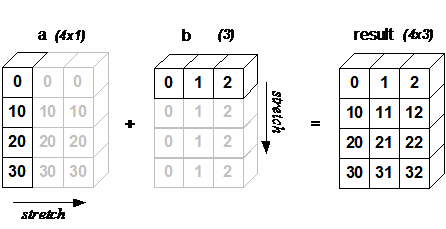\n",
"** In some cases, broadcasting stretches both arrays to form an output array larger than either of the initial arrays. **"
]
},
{
"cell_type": "markdown",
"metadata": {},
"source": [
"# Working with datetime\n",
"\n",
"\n",
"Numpy has core array data types which natively support datetime functionality. The data type is called “datetime64”, so named because “datetime” is already taken by the datetime library included in Python.\n",
"\n",
"Consider the example below for some examples:"
]
},
{
"cell_type": "code",
"execution_count": 144,
"metadata": {},
"outputs": [],
"source": [
"# creating a date\n",
"today = np.datetime64('2017-12-31')"
]
},
{
"cell_type": "code",
"execution_count": 145,
"metadata": {},
"outputs": [
{
"data": {
"text/plain": [
"numpy.datetime64('2017-12-31')"
]
},
"execution_count": 145,
"metadata": {},
"output_type": "execute_result"
}
],
"source": [
"today"
]
},
{
"cell_type": "code",
"execution_count": 146,
"metadata": {},
"outputs": [
{
"data": {
"text/plain": [
"numpy.datetime64('2017')"
]
},
"execution_count": 146,
"metadata": {},
"output_type": "execute_result"
}
],
"source": [
"# get year in numpy datetime object\n",
"np.datetime64(today, 'Y')"
]
},
{
"cell_type": "code",
"execution_count": 156,
"metadata": {},
"outputs": [],
"source": [
"# creating array of dates in a month\n",
"dates = np.arange('2017-12', '2018-01', dtype='datetime64[D]')"
]
},
{
"cell_type": "code",
"execution_count": 157,
"metadata": {},
"outputs": [
{
"data": {
"text/plain": [
"array(['2017-12-01', '2017-12-02', '2017-12-03', '2017-12-04',\n",
" '2017-12-05', '2017-12-06', '2017-12-07', '2017-12-08',\n",
" '2017-12-09', '2017-12-10', '2017-12-11', '2017-12-12',\n",
" '2017-12-13', '2017-12-14', '2017-12-15', '2017-12-16',\n",
" '2017-12-17', '2017-12-18', '2017-12-19', '2017-12-20',\n",
" '2017-12-21', '2017-12-22', '2017-12-23', '2017-12-24',\n",
" '2017-12-25', '2017-12-26', '2017-12-27', '2017-12-28',\n",
" '2017-12-29', '2017-12-30', '2017-12-31'], dtype='datetime64[D]')"
]
},
"execution_count": 157,
"metadata": {},
"output_type": "execute_result"
}
],
"source": [
"dates"
]
},
{
"cell_type": "code",
"execution_count": 158,
"metadata": {},
"outputs": [
{
"data": {
"text/plain": [
"True"
]
},
"execution_count": 158,
"metadata": {},
"output_type": "execute_result"
}
],
"source": [
"today in dates"
]
},
{
"cell_type": "code",
"execution_count": 159,
"metadata": {},
"outputs": [],
"source": [
"# arithmetic operation on dates\n",
"dur = np.datetime64('2018-05-22') - np.datetime64('2017-05-22')"
]
},
{
"cell_type": "code",
"execution_count": 160,
"metadata": {},
"outputs": [
{
"data": {
"text/plain": [
"numpy.timedelta64(365,'D')"
]
},
"execution_count": 160,
"metadata": {},
"output_type": "execute_result"
}
],
"source": [
"dur"
]
},
{
"cell_type": "code",
"execution_count": 161,
"metadata": {},
"outputs": [
{
"data": {
"text/plain": [
"numpy.timedelta64(52,'W')"
]
},
"execution_count": 161,
"metadata": {},
"output_type": "execute_result"
}
],
"source": [
"np.timedelta64(dur, 'W')"
]
},
{
"cell_type": "code",
"execution_count": 162,
"metadata": {},
"outputs": [],
"source": [
"# sorting dates\n",
"a = np.array(['2017-02-12', '2016-10-13', '2019-05-22'], dtype='datetime64')"
]
},
{
"cell_type": "code",
"execution_count": 163,
"metadata": {},
"outputs": [
{
"data": {
"text/plain": [
"array(['2016-10-13', '2017-02-12', '2019-05-22'], dtype='datetime64[D]')"
]
},
"execution_count": 163,
"metadata": {},
"output_type": "execute_result"
}
],
"source": [
"np.sort(a)"
]
},
{
"cell_type": "markdown",
"metadata": {},
"source": [
"# Linear algebra in NumPy\n",
"\n",
"\n",
"The **Linear Algebra** module of NumPy offers various methods to apply linear algebra on any numpy array.\n",
"\n",
"You can find:\n",
"- rank, determinant, trace, etc. of an array.\n",
"- eigen values of matrices\n",
"- matrix and vector products (dot, inner, outer,etc. product), matrix exponentiation\n",
"- solve linear or tensor equations\n",
"and much more!\n",
"\n",
"Now, let us assume that we want to solve this linear equation set:\n",
"```\n",
"x + 2*y = 8\n",
"3*x + 4*y = 18\n",
"```\n",
"This problem can be solved using **linalg.solve** method as shown in example below:"
]
},
{
"cell_type": "code",
"execution_count": 164,
"metadata": {},
"outputs": [
{
"data": {
"text/plain": [
"array([2., 3.])"
]
},
"execution_count": 164,
"metadata": {},
"output_type": "execute_result"
}
],
"source": [
"# coefficients\n",
"a = np.array([[1, 2], [3, 4]])\n",
"# constants\n",
"b = np.array([8, 18])\n",
"\n",
"np.linalg.solve(a, b)"
]
},
{
"cell_type": "markdown",
"metadata": {},
"source": [
"Consider the example below which explains how we can use numpy to do some matrix operations."
]
},
{
"cell_type": "code",
"execution_count": 165,
"metadata": {},
"outputs": [],
"source": [
"A = np.array([[6, 1, 1],\n",
" [4, -2, 5],\n",
" [2, 8, 7]])"
]
},
{
"cell_type": "code",
"execution_count": 191,
"metadata": {},
"outputs": [
{
"data": {
"text/plain": [
"array([[1, 2, 3],\n",
" [4, 5, 6],\n",
" [7, 8, 9]])"
]
},
"execution_count": 191,
"metadata": {},
"output_type": "execute_result"
}
],
"source": [
"np.append(np.array([[1, 2, 3], [4, 5, 6]]), np.array([[7, 8, 9]]), axis=0)"
]
},
{
"cell_type": "code",
"execution_count": 192,
"metadata": {},
"outputs": [
{
"data": {
"text/plain": [
"array([[ 6, 1, 1],\n",
" [ 4, -2, 5],\n",
" [ 2, 8, 7],\n",
" [ 1, 2, 3]])"
]
},
"execution_count": 192,
"metadata": {},
"output_type": "execute_result"
}
],
"source": [
"np.append(A,np.array([[1,2,3]]),axis=0)"
]
},
{
"cell_type": "code",
"execution_count": 170,
"metadata": {},
"outputs": [
{
"data": {
"text/plain": [
"3"
]
},
"execution_count": 170,
"metadata": {},
"output_type": "execute_result"
}
],
"source": [
"# rank of matrix\n",
"np.linalg.matrix_rank(A)"
]
},
{
"cell_type": "code",
"execution_count": 166,
"metadata": {},
"outputs": [
{
"data": {
"text/plain": [
"11"
]
},
"execution_count": 166,
"metadata": {},
"output_type": "execute_result"
}
],
"source": [
"# trace of matrix\n",
"np.trace(A)"
]
},
{
"cell_type": "code",
"execution_count": 167,
"metadata": {},
"outputs": [
{
"data": {
"text/plain": [
"-306.0"
]
},
"execution_count": 167,
"metadata": {},
"output_type": "execute_result"
}
],
"source": [
"# determinant of matrix\n",
"np.linalg.det(A)"
]
},
{
"cell_type": "code",
"execution_count": 168,
"metadata": {},
"outputs": [
{
"data": {
"text/plain": [
"array([[ 0.17647059, -0.00326797, -0.02287582],\n",
" [ 0.05882353, -0.13071895, 0.08496732],\n",
" [-0.11764706, 0.1503268 , 0.05228758]])"
]
},
"execution_count": 168,
"metadata": {},
"output_type": "execute_result"
}
],
"source": [
"# inverse of matrix\n",
"np.linalg.inv(A)"
]
},
{
"cell_type": "code",
"execution_count": 169,
"metadata": {},
"outputs": [
{
"data": {
"text/plain": [
"array([[336, 162, 228],\n",
" [406, 162, 469],\n",
" [698, 702, 905]])"
]
},
"execution_count": 169,
"metadata": {},
"output_type": "execute_result"
}
],
"source": [
"# matrix exponentiation\n",
"np.linalg.matrix_power(A, 3)"
]
},
{
"cell_type": "markdown",
"metadata": {},
"source": [
"## Saving and loading numpy arrays\n",
"\n",
"\n",
"The ``.npy`` format is the standard binary file format in NumPy for\n",
"persisting a **single** arbitrary NumPy array on disk. The format stores all\n",
"of the shape and dtype information necessary to reconstruct the array\n",
"correctly even on another machine with a different architecture.\n",
"The format is designed to be as simple as possible while achieving\n",
"its limited goals.\n",
"\n",
"The ``.npz`` format is the standard format for persisting **multiple** NumPy\n",
"arrays on disk. A ``.npz`` file is a zip file containing multiple ``.npy``\n",
"files, one for each array.\n",
"\n",
"- **np.save(filename, array)** : saves a single array in ``npy`` format.\n",
"\n",
"- **np.savez(filename, array_1[, array_2])** : saves multiple numpy arrays in ``npz`` format.\n",
"\n",
"- **np.load(filename)** : load a ``npy`` or ``npz`` format file."
]
},
{
"cell_type": "code",
"execution_count": 171,
"metadata": {},
"outputs": [],
"source": [
"a = np.array([[1,2,3],\n",
" [4,5,6]])\n",
"\n",
"b = np.array([[6,5,4],\n",
" [3,2,1]])"
]
},
{
"cell_type": "code",
"execution_count": 172,
"metadata": {},
"outputs": [],
"source": [
"np.save(\"a.npy\", a)"
]
},
{
"cell_type": "code",
"execution_count": 173,
"metadata": {},
"outputs": [],
"source": [
"arr = np.load(\"a.npy\")"
]
},
{
"cell_type": "code",
"execution_count": 175,
"metadata": {},
"outputs": [
{
"data": {
"text/plain": [
"array([[1, 2, 3],\n",
" [4, 5, 6]])"
]
},
"execution_count": 175,
"metadata": {},
"output_type": "execute_result"
}
],
"source": [
"arr"
]
},
{
"cell_type": "code",
"execution_count": 179,
"metadata": {},
"outputs": [],
"source": [
"np.savez(\"ab.npz\", x=a, y=b)"
]
},
{
"cell_type": "code",
"execution_count": 180,
"metadata": {},
"outputs": [],
"source": [
"X = np.load(\"ab.npz\")"
]
},
{
"cell_type": "code",
"execution_count": 182,
"metadata": {},
"outputs": [
{
"data": {
"text/plain": [
"array([[1, 2, 3],\n",
" [4, 5, 6]])"
]
},
"execution_count": 182,
"metadata": {},
"output_type": "execute_result"
}
],
"source": [
"X['x']"
]
},
{
"cell_type": "code",
"execution_count": 183,
"metadata": {},
"outputs": [
{
"data": {
"text/plain": [
"array([[6, 5, 4],\n",
" [3, 2, 1]])"
]
},
"execution_count": 183,
"metadata": {},
"output_type": "execute_result"
}
],
"source": [
"X['y']"
]
},
{
"cell_type": "markdown",
"metadata": {},
"source": [
"References:\n",
"- [broadcasting](http://scipy.github.io/old-wiki/pages/EricsBroadcastingDoc)\n",
"- [datetime in numpy](https://docs.scipy.org/doc/numpy/reference/arrays.datetime.html#arrays-dtypes-dateunits)\n",
"- [linaer algebra in numpy](https://docs.scipy.org/doc/numpy/reference/routines.linalg.html)"
]
},
{
"cell_type": "markdown",
"metadata": {},
"source": [
""
]
}
],
"metadata": {
"kernelspec": {
"display_name": "Python 3",
"language": "python",
"name": "python3"
},
"language_info": {
"codemirror_mode": {
"name": "ipython",
"version": 3
},
"file_extension": ".py",
"mimetype": "text/x-python",
"name": "python",
"nbconvert_exporter": "python",
"pygments_lexer": "ipython3",
"version": "3.6.3"
}
},
"nbformat": 4,
"nbformat_minor": 2
}