<!-- ⚠️⚠️ Do Not Delete This! bug_report_template ⚠️⚠️ --> <!-- Please read our Rules of Conduct: https://opensource.microsoft.com/codeofconduct/ --> <!-- 🕮 Read our guide about submitting issues: https://github.com/microsoft/vscode/wiki/Submitting-Bugs-and-Suggestions --> <!-- 🔎 Search existing issues to avoid creating duplicates. --> <!-- 🧪 Test using the latest Insiders build to see if your issue has already been fixed: https://code.visualstudio.com/insiders/ --> <!-- 💡 Instead of creating your report here, use 'Report Issue' from the 'Help' menu in VS Code to pre-fill useful information. --> <!-- 🔧 Launch with `code --disable-extensions` to check. --> <!-- 🪓 If you answered No above, use 'Help: Start Extension Bisect' from Command Palette to try to identify the cause. --> <!-- 📣 Issues caused by an extension need to be reported directly to the extension publisher. The 'Help > Report Issue' dialog can assist with this. --> - VS Code Version: version 1.76 - OS Version: Windows 22H2 Steps to Reproduce: 1. Start a debugging session, and click on the "Edit Condition..." button (the pencil). Ensure that the cursor is in a window with a short width.  2. Prompt appears. 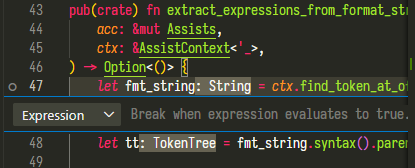 3. Expand window. The text appears to be cut off.  4. Supposed to look like this: 
Steps to Reproduce:
Start a debugging session, and click on the "Edit Condition..." button (the pencil). Ensure that the cursor is in a window with a short width.

Prompt appears.

Expand window. The text appears to be cut off.

Supposed to look like this:
