Based on https://ironpdf.com/how-to/java-pdf-to-image-tutorial/
Transforming PDF documents or pages into image formats like JPEG, PNG, or TIFF is a common requirement in the software industry. Occasionally, there might be a need to convert specific PDF pages into images for use in different contexts, and taking a screenshot may be the only quick solution available. Consider a scenario in a Java project where you need to load and transform a PDF page into image files. Using standard Java programming, this task can be quite challenging. For such purposes, we will utilize IronPDF for Java.
IronPDF for Java is a robust library designed for creating, processing, and managing PDF files. It is widely used by developers due to its comprehensive PDF manipulation capabilities, which include reading, generating, and modifying PDFs without Adobe Acrobat. IronPDF for Java offers features like custom headers and footers, digital signatures, attachments, password protection, and security. It also supports multithreading and asynchronous operations, making it suitable for use in Maven-based projects.
Let’s explore how to convert PDF pages to image formats such as JPEG, JPG, or PNG using Java.
Before beginning the conversion process, ensure the following requirements are met:
- Java must be installed on your machine and configured correctly in the environment variables. Follow this Java installation guide if you need to install Java.
- Install a robust Java IDE, such as Eclipse or IntelliJ. You can download Eclipse from Eclipse’s download page and IntelliJ from IntelliJ’s download page.
- Integrate Maven with your IDE. Check out this Maven installation tutorial for instructions.
Installing IronPDF for Java is straightforward. Here’s how you can set it up using JetBrains IntelliJ IDEA:
Create a new Maven project in IntelliJ IDEA.
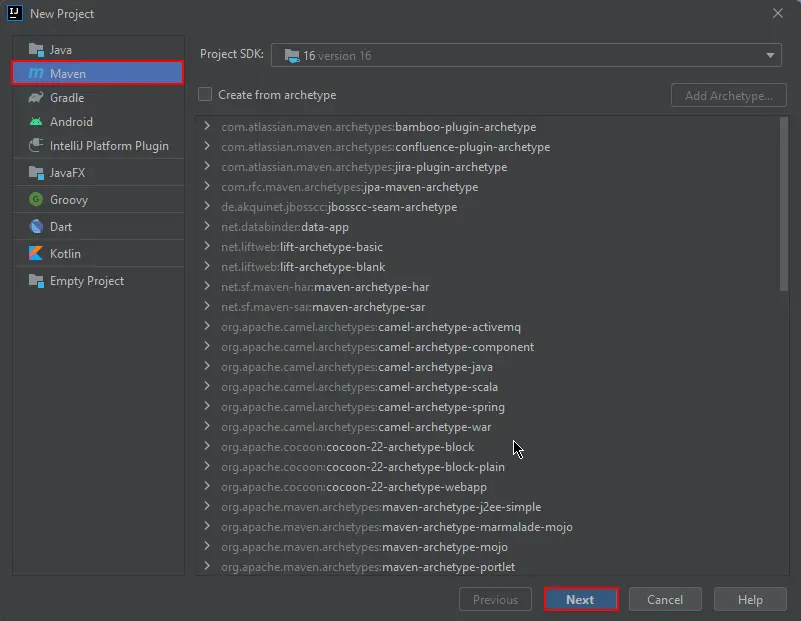
Enter your project’s name and finalize its creation.

This opens a new project with the pre-loaded pom.xml file, where you will add IronPDF's dependencies:
<dependencies>
    <dependency>
        <groupId>com.ironsoftware</groupId>
        <artifactId>ironpdf</artifactId>
        <version>2022.11.0</version>
    </dependency>
</dependencies>
Alternatively, download the JAR file from Maven Repository page for IronPDF.
Click the Maven dependencies icon in the IDE to begin the installation:

IronPDF for Java simplifies converting PDFs to image formats like JPEG with just a few code lines. The method toBufferedImages returns a list of BufferedImage objects corresponding each PDF page.
Below is an example demonstrating how to convert an entire PDF document into images. Just execute the following code:
import com.ironsoftware.ironpdf.PdfDocument;
import com.ironsoftware.ironpdf.edit.PageSelection;
import com.ironsoftware.ironpdf.image.ToImageOptions;
import javax.imageio.ImageIO;
import java.awt.image.BufferedImage;
import java.io.File;
import java.io.IOException;
import java.nio.file.Paths;
import java.util.List;

public class Main {
    public static void main(String[] args) throws IOException {
        // Load PDF file
        PdfDocument instance = PdfDocument.fromFile(Paths.get("business_plan.pdf"));

        // Convert pages to images
        List<BufferedImage> extractedImages = instance.toBufferedImages();

        // Image conversion settings
        ToImageOptions rasterOptions = new ToImageOptions();
        rasterOptions.setImageMaxHeight(800);
        rasterOptions.setImageMaxWidth(500);

        List<BufferedImage> sizedImages = instance.toBufferedImages(rasterOptions, PageSelection.allPages());

        int pageIndex = 1;
        // Save each image to a folder
        for (BufferedImage image : sizedImages) {
            ImageIO.write(image, "PNG", new File("assets/images/" + pageIndex++ + ".png"));
        }
    }
}
The images will be saved in a numbered sequence within the project’s assets folder.

IronPDF for Java can also convert HTML content from URLs directly to PDF and then to images. Here’s how to convert content from an online page into images:
import com.ironsoftware.ironpdf.PdfDocument;
import com.ironsoftware.ironpdf.edit.PageSelection;
import com.ironsoftware.ironpdf.image.ToImageOptions;
import javax.imageio.ImageIO;
import java.awt.image.BufferedImage;
import java.io.File;
import java.io.IOException;
import java.util.List;

public class Main {
    public static toBufferedImage(String[] args) throws IOException {
        // Render a webpage to PDF
        PdfDocument pdf = PdfDocument.renderUrlAsPdf("https://www.amazon.com/?tag=hp2-brobookmark-us-20");

        // Convert the PDF pages to images
        List<BufferedImage> images = pdf.toBufferedImages();

        // Setting image conversion options
        ToImageOptions options = new ToImageOptions();
        options.setImageMaxHeight(800);
        options.setImageMaxWidth(500);

        List<BufferedImage> resizedImages = pdf.toBufferedImages(options, PageSelection.allPages());

        int pageIndex = 1;
        // Save each image
        for (BufferedImage img : resizedImages) {
            ImageIO.write(img, "PNG", new File("assets/images/" + pageIndex++ + ".png"));
        }
    }
}
Adjust image resolution using ToImageOptions:
options.setImageMaxHeight(800);
options.setImageMaxWidth(500);This guide demonstrated how to transform PDFs into images using IronPDF for Java, allowing you to integrate image extraction from PDF content seamlessly in your Java applications. IronPDF supports various image formats and provides extensive control over image resolution.
For further information on IronPDF for Java, refer to the IronPDF Documentation for Java. For detailed examples of conversions, visit IronPDF PDF to Images Example.
IronPDF for Java is free for development and requires a license for commercial deployment. For licensing details, visit the IronPDF Java Licensing page.