Based on https://ironpdf.com/how-to/java-print-pdf-tutorial/
Handling PDF documents is a key capability for Java applications because it allows the creation and manipulation of PDF files in an environment-independent manner. The PDF format is essential for archiving and sharing documents, making it critical for Java applications that manage documents or document-centric processes.
Java provides various methods for generating and printing PDF documents. A popular method involves utilizing a library that offers robust functionality for PDF creation and manipulation. This guide will demonstrate the process of generating and printing PDF files in Java using the IronPDF library.
IronPDF is a Java library designed for generating, editing, and converting PDF documents. It builds on the capabilities of the IronPDF C# .NET library, which facilitates similar functionalities for the .NET environment.
With IronPDF, Java developers can manage PDF files effortlessly, abstracting away the intricacies of PDF internals. It supports essential PDF functionalities including the creation of new documents, content addition, text formatting, and the merging and splitting of PDF files.
The library also excels in converting HTML, CSS, and JavaScript into PDFs, simplifying the creation of PDFs from web content or HTML templates. Moreover, it facilitates the printing of these documents.
Before printing PDF files using Java, ensure you have:
- Eclipse IDE or another preferred Java IDE.
- A Maven project setup in your chosen IDE.
- A reliable internet connection for library installation.
To integrate IronPDF into a Maven project, insert the following dependency into the <dependencies> section of your pom.xml file:
<dependency>
    <groupId>com.ironsoftware</groupId>
    <artifactId>ironpdf</artifactId>
    <version>YOUR_VERSION_HERE</version>
</dependency>
Post addition, execute mvn install in the terminal or save your changes with Ctrl+S to download and install IronPDF.
Ensure you import IronPDF classes in your main App.java source file located in the src directory.
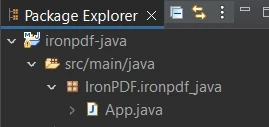
Package Explorer Tree for IronPDF for Java
Import the IronPDF package in "App.java" using the following statement:
import com.ironsoftware.ironpdf.*;IronPDF allows for loading PDFs via a file path or a byte array. For secured documents, a password parameter is also available.
Here’s how to load a PDF from the file system:
// Apply your IronPDF license key
License.setLicenseKey("Enter-Your-License");

// Load a PDF file
PdfDocument pdf = new PdfDocument(Paths.get("MyPdf.pdf"));IronPDF enables printing through two primary methods. The printWithoutDialog method allows printing directly using the default printer settings.
// Print a PDF using the default settings without displaying a print dialog
pdf.printWithoutDialog();For customized printing, the print method displays a print dialog, permitting user configuration of printing parameters such as the printer, paper size, and number of copies.

Print dialog displayed when using the print() method
The full source code for this guide is provided below:
package IronPDF.ironpdf_java;

// Import IronPDF Java package
import com.ironsoftware.ironpdf.*;
import java.awt.print.PrinterException;
import java.io.IOException;
import java.nio.file.Paths;

public class App {
    public static void main(String[] args) throws PrinterException, IOException {
        // Set your IronPDF license key
        License.setLicenseKey("Enter-Your-License");

        // Load and print a PDF document
        PdfDocument pdf = new PdfDocument(Paths.get("MyPdf.pdf"));

        // Print using the default settings without a dialog
        pdf.printWithoutDialog();

        // Open the print dialog for user interaction
        pdf.print();
    }
}
Further details on PDF Printing in Java with IronPDF are available online.
IronPDF provides a robust and easy-to-use interface for managing PDF tasks in Java applications. From generating to customizing PDFs, IronPDF simplifies processes for creating professional documents for printing or distribution. Ideal for generating invoices, reports, or various document types, IronPDF ensures quality and efficiency.
Explore IronPDF with a free trial for production testing. Starting prices for IronPDF are available from $liteLicense. Try IronPDF today and enhance your PDF handling capabilities in Java applications.