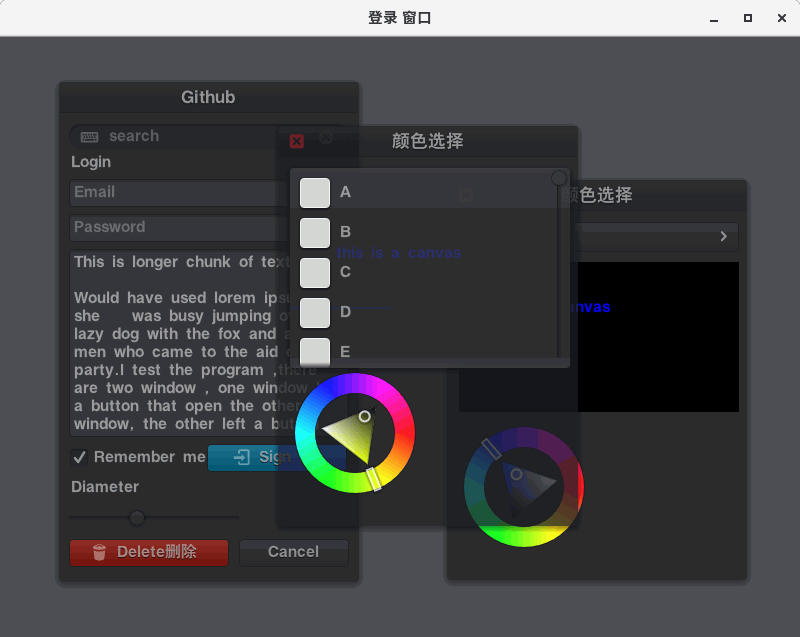
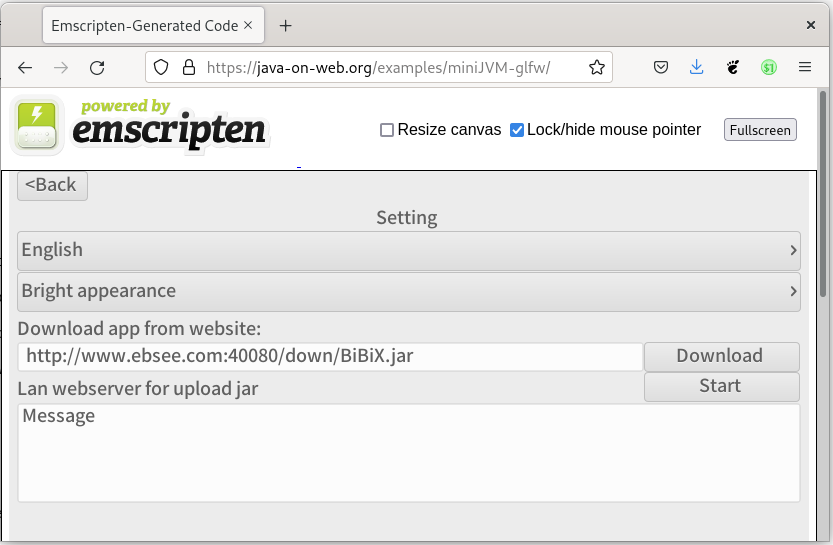
![](/doc/img/mini_jvm_64.png) # miniJVM Develop iOS and Android apps in Java with a cross‑platform, minimal Java Virtual Machine. Run the same Java code on mobile and desktop with small binaries and low memory footprint. [Features](#linkfeatures) [Architecture](#linkarch) [Build for iOS/Android](#linkbuildmobile) [Build for Windows/Linux/macOS](#linkbuilddesktop) [How to debug source](#linkdebug) [Using miniJVM in project](#linkembed) [Documentation](https://github.com/digitalgust/miniJVM/tree/master/doc/api.md) [License](#linklicense) ## Features * Builds on iOS / Android / mingw-w64 32|64-bit / MSVC 32|64-bit / macOS / Linux * No external dependencies * Minimal memory footprint * Small binaries; embeddable JVM * Minimal bootstrap class library — not a full JDK 8 implementation * Supports Java source compilation (Janino) * JIT support * Low-latency Java garbage collection * Remote debugging via JDWP * Option to translate MiniJVM classes to C to improve execution speed ## iOS/Android Platform Extended Features * OpenGL ES 3.0 * Swing‑like GUI library; HTML‑style XML layout * Audio/Video playback and capture * Take photos from camera or album * Save and load files on the device * API compatible with the desktop platform so apps run on desktop too ## MiniJVM on Web MiniJVM on the web, built by Starcommander. [Source](https://github.com/Starcommander/miniJVM) [Web demo](https://java-on-web.org/examples/) ## MiniJVM GUI Demos

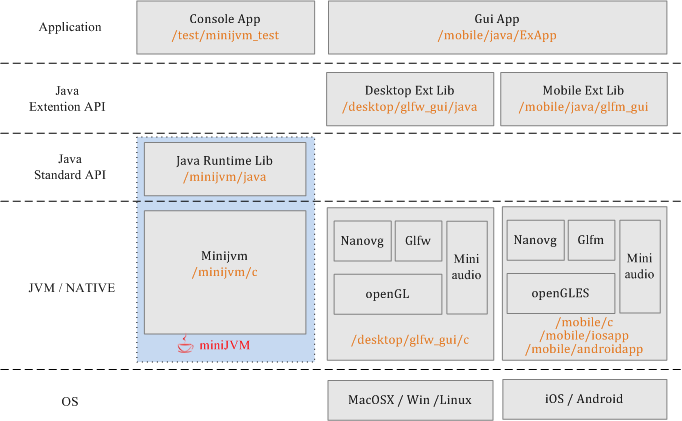
* Instant messaging app demo — [Source](https://github.com/digitalgust/BiBiX) * 3D game app demo — [Source](https://github.com/digitalgust/g3d) ## Architecture:
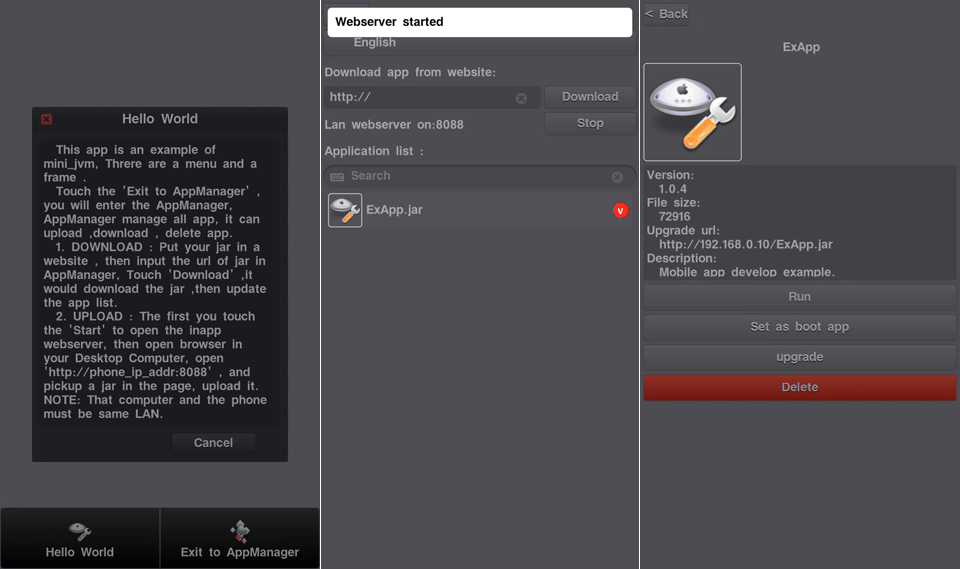
## Changelog: 2023.09 Rebound GLFW and GLFM graphics JNI bindings; moved GUI Java classes into the xgui package. 2022.11 Added documentation. 2021.03 Added j2c module — converts MiniJVM Java source to C and builds native applications for desktop and mobile. 2020.12 Added build scripts and released v2.1. 2020.10 Refactored source and removed binaries from the repository. 2020.10 Added HTTPS support. 2020.03 Added XML layout for the GUI system; fixed JDWP debugging for JetBrains IDEs. 2019.12 Bound cross‑platform AWTK UI system — see [awtk-minijvm](https://github.com/digitalgust/miniJVM/tree/master/desktop/awtk_gui). 2019.12 Enabled JIT based on the SLJIT project. 2019.10 JIT in development. 2018.12 Optimized performance. 2017.09 Project started. ## Build for iOS/Android Write Java code once and run it on iOS / Android / macOS / Windows / Linux. The essential JARs are not prebuilt; build them first. Preferred IDEs: Eclipse, NetBeans, or JetBrains IntelliJ IDEA. 1. Run **/binary/build_jar.sh** or **/binary/build_jar.bat** to generate JARs. Or > Build Maven project /minijvm/java; copy to **/mobile/assets/resfiles/minijvm_rt.jar** > Build Maven project /mobile/java/glfm_gui; copy to **/mobile/assets/resfiles/glfm_gui.jar** > Build Maven project /mobile/java/ExApp; copy to **/mobile/assets/resfiles/ExApp.jar** > Optionally modify **/mobile/java/ExApp/src/main/java/test/MyApp.java**; add resources to **/mobile/java/ExApp/src/main/resource/res/** (audio, images, etc.); configure **/mobile/java/ExApp/src/main/config.txt** for icon, version, boot class, etc. 2. In Xcode open **/mobile/iosapp**; set up your developer account in Signing & Capabilities; build and install to a device; verify the app before running (Settings → General → Device Management → {developer account} → Verify App → Trust). 3. In Android Studio open **/mobile/androidapp**; build and install to an Android device. 4. AppManager will run:
## Build for Windows/Linux/macOS 1. Run **/binary/build_jar.sh** or **/binary/build_jar.bat** to generate JARs. Or > Build Java bootstrap classes in **/minijvm/java**; Maven build the JAR and copy to /binary/lib/minijvm_rt.jar > Build GUI classes **/desktop/glfw_gui/java**; Maven build the JAR and copy to /binary/libex/glfw_gui.jar > Build console test case classes **/test/minijvm_test**; Maven build the JAR and copy to /binary/libex/minijvm_test.jar > Build GUI test app classes **/mobile/java/ExApp**; Maven build the JAR and copy to /binary/{platform}/apps/ExApp.jar 2. Run **/binary/build_mac_linux.sh**, **/binary/build_wini686.bat**, or **/binary/build_winx64.bat** to generate binaries. Or > Build the GUI JNI C dynamic library in /desktop/glfw_gui/c with CMake > Build MiniJVM in /minijvm/c with CMake 3. Run the test script /binary/{platform}/test.sh or test.bat ## How to debug source Almost all Java IDEs support remote debugging. The IDE connects to MiniJVM’s debug port over TCP and enters a debugging session. MiniJVM has two options: enable debugging, and suspend on start (wait for the IDE to attach before executing bytecode). Configure both options before initializing the VM. These options are defined in jvm.h: ``` struct _MiniJVM { ... s32 jdwp_enable;// 0: disable Java debug, 1: enable Java debug and disable JIT s32 jdwp_suspend_on_start; ... }; ``` 1. Enable MiniJVM debug mode; mini_jvm JDWP listens on port 8000. **Desktop**: Run mini_jvm with -Xdebug, or change the source before building. /minijvm/c/main.c: jvm->jdwp_enable = 1; **iOS/Android**: change the source before building. /mobile/c/glfmapp/main.c: refers.jvm->jdwp_enable = 1; For device debugging, check the device IP address in Settings → Wi‑Fi → (i). 2. Run the VM with jars eg: mini_jvm.exe -Xdebug -bootclasspath ../lib/minijvm_rt.jar -cp ../libex/glfw_gui.jar org.mini.glfw.GlfwMain 3. IDE open project , eg: /mobile/java/ExApp **IntelliJ IDEA**: Run → Edit Configurations → + Remote; Transport: Socket; Debugger mode: Attach; host/port of your mini_jvm, e.g. "127.0.0.1:5005" or "192.168.0.32:5005". **Eclipse**: configure similarly. **NetBeans**: Debug → Attach Debugger; Connector: SocketAttach; host/port of your mini_jvm, e.g. "localhost:5005"; Timeout: 10000. 4. Set breakpoints, pause the VM, and inspect variables. ## Project based miniJVM [Awtk-minijvm](https://github.com/zlgopen/awtk-minijvm): [AWTK](https://github.com/zlgopen/awtk) cross‑platform native UI bound to MiniJVM. [LWJGUI-Mobile](https://github.com/orange451/LWJGUI-Mobile): Java LWJGL UI library. [BiBiX](https://github.com/digitalgust/BiBiX): Java instant messenger. [MiniJVM web demo](https://java-on-web.org/examples/): MiniJVM web demo. ## miniJVM referenced project and technology [Oracle CLDC](http://www.oracle.com/technetwork/java/cldc-141990.html): CLDC API reference. [OpenJDK](https://openjdk.java.net/): Java API reference. [Miniz](https://github.com/richgel999/miniz): reading JAR files. [Glfm](https://github.com/brackeen/glfm): cross‑platform (Android/iOS) GUI. [Nanovg](https://github.com/memononen/nanovg): GUI rendering. [Stb](https://github.com/nothings/stb): GUI TrueType fonts and images. [Glad](https://github.com/Dav1dde/glad): OpenGL/GLES header replacement. [Glfw](https://github.com/glfw/glfw): cross‑platform desktop GUI. [Dirent](https://github.com/tronkko/dirent): Linux‑style file and directory access on Windows VC. [Tinycthread](https://github.com/tinycthread/tinycthread): cross‑platform threads. [JRegex](https://github.com/digitalgust/minijvm_third_lib/tree/master/jregex): Java String regex matching. [Janino](http://janino-compiler.github.io/janino/): compile Java source files. [MiniAudio](https://github.com/dr-soft/miniaudio): Java audio playback and capture. [Sljit](https://github.com/zherczeg/sljit): platform‑independent low‑level JIT compiler. [Mbedtls](https://github.com/ARMmbed/mbedtls): HTTPS support via mbedtls. [Avian](https://github.com/ReadyTalk/avian): Java API reference. ## Development IDE usage C / ObjC: JetBrains CLion, Xcode, Visual Studio Swift: Xcode Java: JetBrains IntelliJ IDEA, NetBeans Android: Android Studio ## Using miniJVM in project Copy C sources from **/minijvm/c** into your project, and copy the built minijvm_rt.jar into your project’s resource folder. ``` #include "jvm/jvm.h" int main(int argc, char **argv) { char *bootclasspath = "../../binary/lib/minijvm_rt.jar"; char *classpath = "../../binary/libex/minijvm_test.jar;./"; char *main_name = "test.Foo3"; s32 ret = 1; MiniJVM *jvm = jvm_create(); if (jvm != NULL) { jvm->jdwp_enable = 0; //value 1 for java remote debug enable jvm->jdwp_suspend_on_start = 0; jvm->max_heap_size = 25 * 1024 * 1024; // ret = jvm_init(jvm, bootclasspath, classpath); if (ret) { printf("[ERROR]minijvm init error.\n"); } else { ret = call_main(jvm, main_name, NULL); } jvm_destroy(jvm); } return ret; } ``` ## Third‑Party Libraries * ### Janino java compiler Project: [Janino](http://janino-compiler.github.io/janino/) Janino is a super-small, super-fast Java compiler. Janino can not only compile a set of source files to class files like javac, but also compile a Java expression, a block, a class body, one .java file or a set of .java files in memory, load the bytecode and execute it directly in the same JVM. Janino is not a full Java compiler; see [limitations](http://janino-compiler.github.io/janino/#limitations), for example: ``` List list=new ArrayList(); list.add("abc"); String s=(String)list.get(0);// cannot omit the (String) cast. ``` Download jars : [janino.jar](https://github.com/digitalgust/digitalgust.github.io/blob/main/lib/janino.jar?raw=true) [commons-compiler.jar](https://github.com/digitalgust/digitalgust.github.io/blob/main/lib/commons-compiler.jar?raw=true) ``` # compile /binary/res/BpDeepTest.java mini_jvm -bootclasspath ../lib/minijvm_rt.jar -cp ../libex/janino.jar:../libex/commons-compiler.jar org.codehaus.janino.Compiler ../res/BpDeepTest.java ``` * ### Luaj Project: [Luaj](https://github.com/luaj/luaj) MiniJVM adapted: [Luaj minijvm](https://github.com/digitalgust/minijvm_third_lib) Lightweight, fast, Java‑centric Lua interpreter written for JME and JSE, with string, table, package, math, io, os, debug, coroutine & luajava libraries, JSR‑223 bindings, all metatags, weak tables and unique direct Lua‑to‑Java‑bytecode compiling. Download JAR: [luaj.jar](https://github.com/digitalgust/digitalgust.github.io/blob/main/lib/luaj.jar?raw=true) ``` mini_jvm -bootclasspath ../lib/minijvm_rt.jar -cp ../libex/luaj.jar Sample ``` ## Screenshots
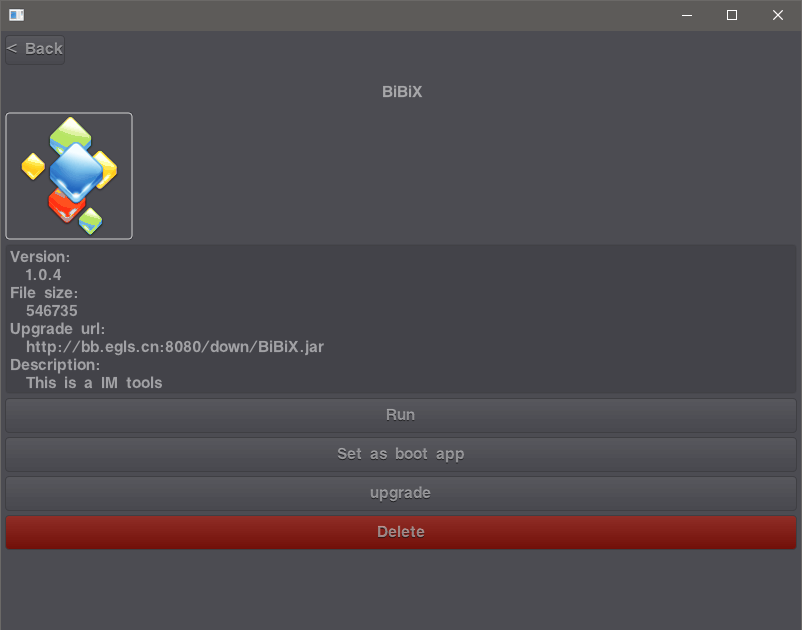
Windows mini_jvm GUI
macOS mini_jvm GUI
Linux mini_jvm GUI
Web mini_jvm GUI
## Directory Structure ``` . ├── binary miniJVM binaries for build (win32/win64/mac/linux) ├── desktop │ ├── awtk_gui open-source AWTK GUI JNI bindings │ └── glfw_gui desktop OpenGL, GLFW, miniaudio, native module ├── j2c tools to translate MiniJVM Java source to C │ ├── app │ └── translator ├── minijvm Core source │ ├── c MiniJVM C source │ └── java miniJVM runtime library ├── mobile │ ├── androidapp Android launcher │ ├── assets app resources (fonts, JARs, images, audio, etc.) │ ├── c mobile native libs: OpenGLES, GLFM framework, GUI JNI, glfmapp │ ├── iosapp iOS launcher │ └── java mobile Java lib, GUI, AppManager, example app ├── doc └── test miniJVM test cases ``` [< Back](#linkhome) Star History Chart ## License License: MIT Gust , digitalgust@163.com .