# Grid System
### HTML / CSS Layout
- Layout core
: Stacks from the top left (box model)
- How?
- block
- inline
- Methods to change the layout flow
- float
- position
- flex: flexible box
## flex
> Before `flex`, `float` and `position` had to be specified for layout
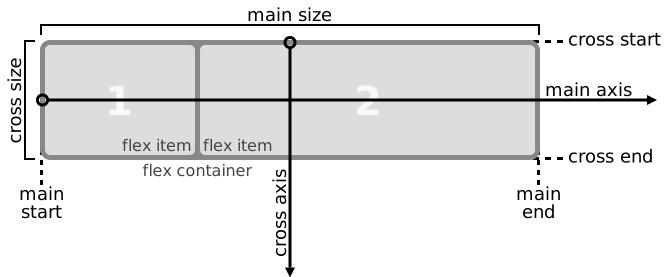
### Key Concepts of flex
- `container`
- `item`
```html
```
- #### Axes
- `main axis`
: Main axis
- Horizontal axis when `flex-direction: row;`
- Vertical axis when `flex-direction: column;`
- Vertical axis *going from bottom to top* when `flex-direction: column-reverse;`
- Horizontal axis *going from right to left* when `flex-direction: row-reverse;`
- `cross axis`
: Cross axis
### When Defining flex
1. All items are arranged based on the `main axis`
- The default is `row`
- If set to `row-reverse`, arrangement starts from the right end
2. All `items` are arranged based on row by default
- `flex-direction` : Default set to `row` value
3. All `items` fill the `cross axis`
- They fill the entire height
- Because `align-items: stretch;` is the default value
4. All `items` take up width equal to their own width or content area
- In some cases, it can be smaller than their specified width
- Because `flex-wrap: nowrap` is the default value
- ex) When the total width of all items is less than the container width
5. Each area occupies space equal to its content size / width
- It can be even smaller!
6. All areas fill the cross axis

### flex Properties
#### 1. flex-wrap
- Default value `nowrap`
- Forces everything into one line
- `wrap`
- Each item takes its own width and wraps to the next line when there's no room
- Prevents overflow!
- `wrap-reverse`
- Items wrap round to additional lines in reverse
#### 2. flex-grow
> `flex-grow` divides and distributes the remaining width by ratio
- Default value `0`
#### 3. flex-flow
> Shorthand property for `flex-direction` and `flex-wrap`
- Default value `row wrap`

- `row-reverse nowrap`

- `column wrap-reverse`

- `column wrap`

#### 4. justify-content
> Aligns based on the main axis
- Default value: `flex-start`
- `flex-start`
- `flex-end`
- `center`
- `space-around`
- `space-between`
- `space-evenly`
#### 5. align-items
> Aligns based on the cross axis
- `stretch`
: Default value
- `flex-start`
: Top alignment
- `flex-end`
: Bottom alignment
- `baseline`
: items are aligned such as their baselines
- `center`
: Center alignment

#### 6. align-content
> Sets the distribution of space between and around content items along a flexbox's cross-axis or a grid's block axis
*`align-content` has no effect when there is only one line of flex items!*
- Default value: `stretch`
- `flex-start`
- `flex-end`
- `center`
- `space-between`
- `space-around`

#### 7. order
> Can define the order of items
- Default value: `0`
- Can have negative values
#### 8. align-self
> Can specify alignment directly on an item
*flex allows `margin-top: auto`!*
#### Wrap-up
- justify - main axis
- align - cross axis
- content - multiple lines
- items - single line
- self - individual element