
Next-generation personal AI assistant powered by LLM, RAG and agent loops — ships as a single binary, no installation needed
Supporting computer-use, browser-use and coding agent

Live Demo · Playground · Docs · Discord
English | 中文
OpenAgent is an open-source personal AI assistant that brings together powerful LLMs, your own knowledge base, and autonomous agent loops — all in one self-hostable platform. Connect any model provider, build a RAG knowledge base from your documents, and let agents browse the web, run code, and call any MCP-compatible tool on your behalf.
| Usage Analytics | Activity Monitoring |
|---|---|
 |
 |
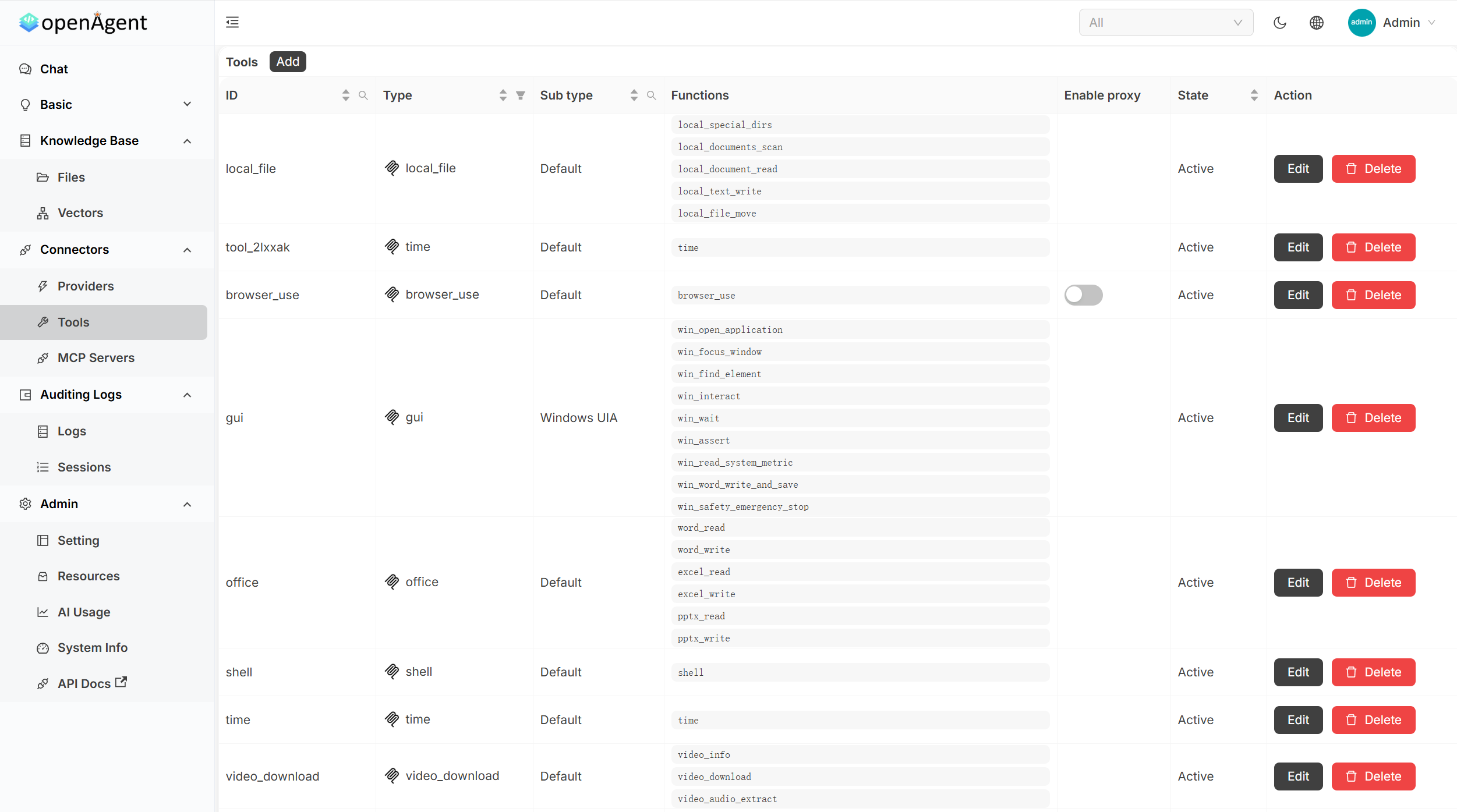
| Tool Management | Detailed Logs |
 |
 |
Pre-built binaries for Linux, macOS, and Windows (amd64 / arm64). The installer downloads the latest release and starts OpenAgent on port 14000.
macOS / Linux / WSL
curl -fsSL https://raw.githubusercontent.com/the-open-agent/openagent/master/scripts/install.sh | bashWindows (PowerShell)
irm https://raw.githubusercontent.com/the-open-agent/openagent/master/scripts/install.ps1 | iexWindows runs natively — no WSL, no Docker required.
Open http://localhost:14000 and you're in.
Optional env vars:
OPENAGENT_VERSION,INSTALL_DIR,BIN_DIR
Build from source
Prerequisites:
# Backend
go build

# Frontend
cd web && yarn install && yarn start
Docker
docker-compose upOpen http://localhost:14000 once the containers are running.
Connect every major LLM provider and switch between them per conversation — no code changes required.
OpenAI · Azure OpenAI · Anthropic Claude · Google Gemini · DeepSeek · Mistral · Grok · Qwen · Doubao · Moonshot · ChatGLM · Baichuan · Ernie · iFlytek · HuggingFace · Cohere · Amazon Bedrock · OpenRouter · Ollama · and more
| Capability | Description |
|---|---|
| Browser-Use | Drive a real browser — navigate, click, fill forms, scrape, and screenshot pages |
| Web Search & Fetch | Search the web and pull live page content into the agent's context |
| Shell Execution | Run shell commands and scripts directly from the agent loop |
| Office Automation | Read and write Word, Excel, and PowerPoint files |
| MCP Integration | Plug in any MCP-compatible server (SSE / Stdio / StreamableHTTP) and expose its tools to the agent |
| Transparent Tool Calls | See every tool invocation, its arguments, and its return value — step by step |
| Capability | Description |
|---|---|
| Document Ingestion | Upload PDFs, Word docs, Excel sheets, and more — chunked, embedded, and indexed automatically |
| Semantic Search | Retrieves the most relevant passages from your knowledge base before each LLM response |
| Pluggable Embeddings | OpenAI, Azure, Gemini, Qwen, Cohere, Jina, HuggingFace, local models, and more |
| Isolated Stores | Organise knowledge into separate stores; assign them per chat or per application |
| Capability | Description |
|---|---|
| Visual Workflow Builder | Compose multi-step pipelines with a BPMN-style drag-and-drop editor |
| Conditional & Parallel Execution | Branch on gateway conditions; run independent tasks concurrently |
| Task Scheduling | Trigger workflows or agent jobs on a recurring schedule |
| Usage Analytics | Track token consumption and cost per provider, model, and user |
| Capability | Description |
|---|---|
| Single Binary | One executable file — no installer, no runtime dependencies. Download and run instantly on any supported platform |
| Native Windows Support | Runs directly on Windows — no WSL, no Docker, no Linux subsystem required |
| Single Sign-On | OIDC / OAuth2 / LDAP / SAML via the built-in auth layer |
| Multi-tenancy | Isolated workspaces per user or organisation |
| REST API + Swagger UI | Every feature is accessible programmatically |
| Audit Logs | Full activity history for every action |
| File & Media Management | Built-in storage for files, images, and video content |
| Panel | What you get |
|---|---|
| Usage Statistics | Token & cost metrics per app, user, and model — with interactive charts and heatmaps |
| Activity Monitoring | Real-time system operations with success/error rates, operation-type breakdowns, and trends |
| Tool Management | Centralised CRUD for all agent tools: browser, shell, office, web search, and more |
| Request Logs | Full request/response payloads with JSON formatting, filtering, and debugging |
| Environment | URL | Notes |
|---|---|---|
| Live Preview | https://demo.openagentai.org | Read-only tour — no account needed |
| Playground | https://try.openagentai.org | Make changes freely — data resets every 5 minutes |
Full docs at https://www.openagentai.org
- Discord — discord.gg/5rPsrAzK7S · chat with maintainers and other users
- Issues & PRs — welcome! Please open an issue first to discuss larger changes