Fully local & open source AI Waifu. VTube Studio, Discord, Minecraft, custom made RAG (long term memory), alarm, and plenty more! Has a WebUI and hotkey shortcuts. All software is free (or extremely cheap)!
Reccomended Windows 10/11 and a CUDA (NVidia) GPU with atleast 16GB+ of VRAM. Can now support Mac and Linux! Any brand (AMD, NVidia, Intel) GPU with 8GB+ VRAM bare mininum requirement! Uses Oobabooga, RVC, and Whisper to run AI systems locally. Works as a front end to tie many programs together into one cohesive whole.
The goal of the project is less about giving an "all in one package", and moreso to give you the tools and knowledge for you to create your own AI Waifu!
 |
 |
|---|---|
 |
 |
-
🎙️ Quality Conversation ( /・0・)
- Speak back and forth, using Whisper text to speech.
- Configure your own waifu's voice with thousands of possible models.
- Imperial-tons of quality of life tweaks.
-
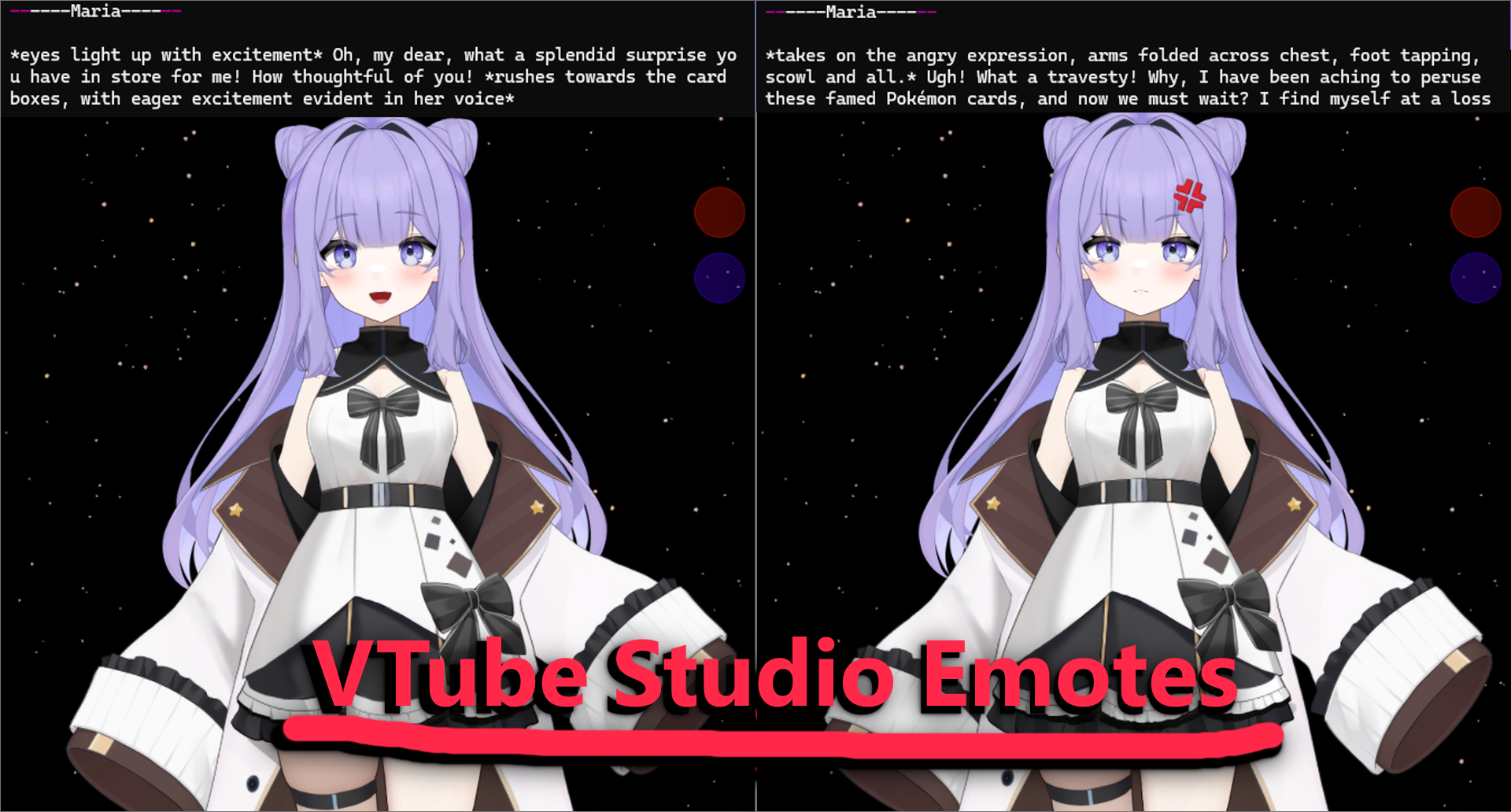
🍄 Vtuber Integration ღゝ◡╹ )ノ♡
- Uses VTube Studio, and any compatible models!
- Ability to send emotes to the model, based on their actions.
- Idle / Speaking animation.
-
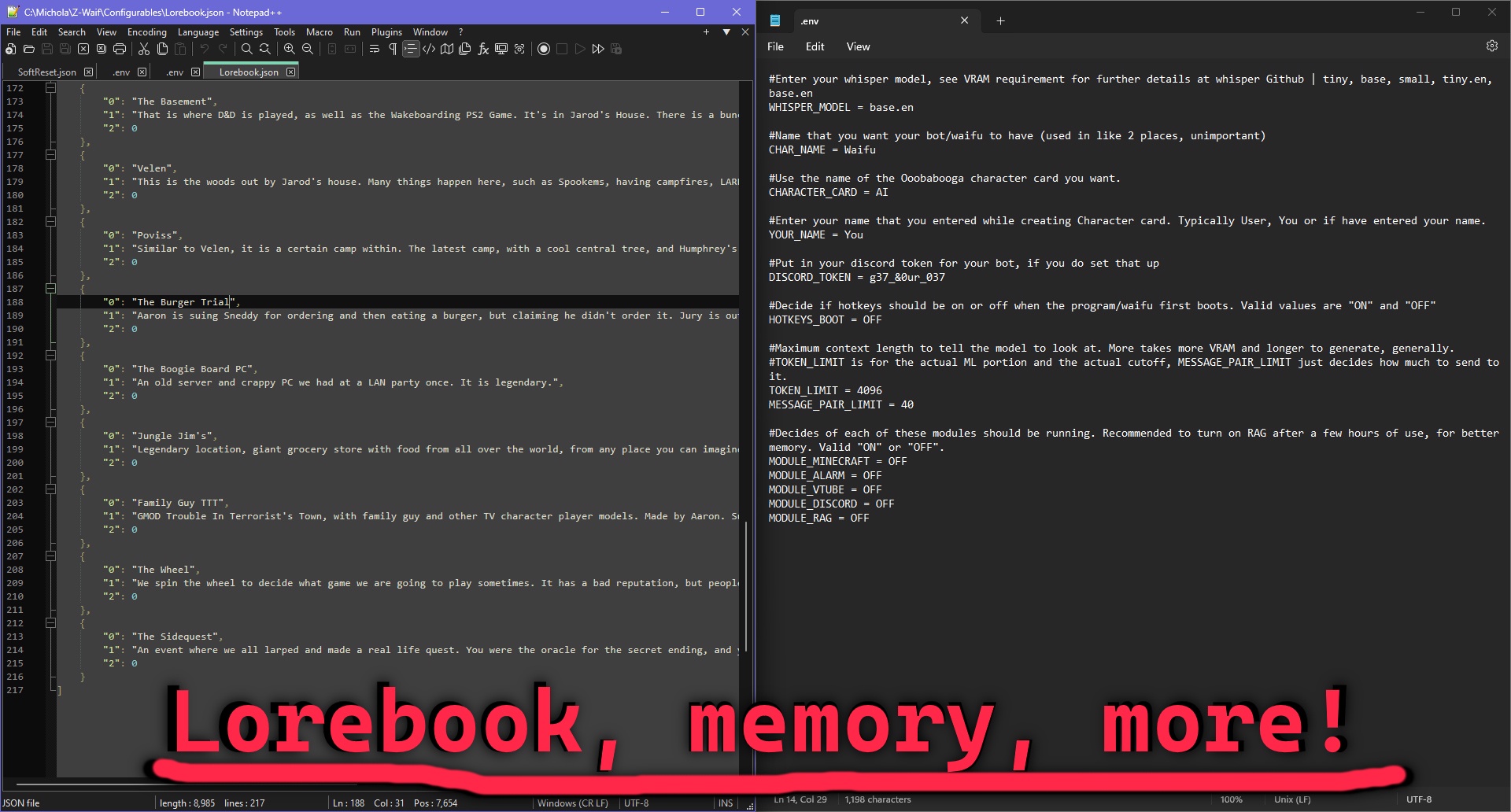
💾 Enhanced Memory (ー_ーゞ
- Add Lorebook entries, for your waifu to remember a wide array of info as needed.
- Enable the custom RAG, giving your them knowledge of older conversations.
- Import old logs and conversations, keeping your same AI waifu from another software!
-
🎮 Modularity ⌌⌈ ╹므╹⌉⌏
- Enable various built in modules;
- Discord, for messaging.
- Vision, to enable multimodal, and allow them to see!
- Alarm, so your waifu can wake you up in the morning.
- Minecraft, allowing your waifu to control the game using Baritone, Wurst, and other command based mods.
- All the options and modularity from any external software used. Oobabogoa, RVC Voice, ect.
- Open-source, meaning you can edit it as you please.
- Enable various built in modules;


Here is some documentation that you can look at. It will show you how to install, how to use the program, and what options you have. Please also take a look at the Youtube videos for the install.
If you need help / assistance, please submit a GitHub issue, or feel free to email me for this project at zwaif77@gmail.com
Z-Waif has a basic website that you can visit. I have also set up a small Discord for community members to chat as well.
Z-Waif supports both Mac and Linux using the ollama backend. You can clone the repo, then run the ./startup.sh script. For more options, try ./startup.sh --help. You need glibc, portaudio, python3.11, and libglvnd installed and on your PATH.
If you need support on Mac or Linux, ask around in the Discord. However you are expected to be able to solve basic problems (i.e. installing the right version of python) yourself.
For nix users, you can also use the nix flake to grab the os dependencies, then use the startup.sh script like usual.
TumblerWarren/Virtual_Avatar_ChatBot, this is the original project that this code is spun-off of. Full credit to that project - it provided the skeleton for the many advancements now in place. It has more of a focus on non-local AI, if that is what you need.
MaolinkLife/z-waif-ru-adaptation, offers Russian language support, lighter-weight edge-tts, lorebook enhancements, ect.
v1.14-R4
-
Advanced Fallback System with VRAM Optimization & Linux Compatibility
- Added enterprise-grade model management with VRAM detection and optimization
- Real-time VRAM monitoring using psutil and PyTorch for accurate memory management
- Model size estimation for both transformers and GGUF models with quantization factors
- Automatic compatibility checking before model loading to prevent OOM errors
- VRAM optimization wizard that automatically sorts models by memory requirements
- Resource-aware model selection with detailed compatibility feedback
- Cross-platform system detection (Windows, Linux, macOS) with platform-specific optimizations
- Linux setup script (setup_linux.sh) with distribution-specific dependency management
- Support for Ubuntu, Fedora, and Arch Linux with automatic package installation
- CUDA detection and optimization for GPU acceleration on Linux systems
- Audio system compatibility (ALSA, PulseAudio) for Linux environments
- Enhanced Web UI with advanced fallback management interface
- System status monitoring with real-time resource usage display
- Model compatibility testing with detailed feedback and VRAM requirements
- Drag-and-drop model ordering (JSON-based interface) for fallback sequence management
- Model discovery for both HuggingFace repositories and local GGUF files
- Custom model path support with validation and compatibility checking
- Real-time model analysis with compatibility status and file size information
- Advanced fallback testing with comprehensive diagnostics and error reporting
- Persistent fallback order saved to environment variables and .env file
- Model order management with visual interface and immediate feedback
- Comprehensive test suite (test_advanced_fallback.py) for validation
- Performance improvements: 50-70% VRAM reduction, 2-3x faster GGUF loading
- All existing advanced features preserved: streaming, chatpops, voice, vision, gaming controls
- NEW: TinyLlama GGUF Model Integration
- Added tinyllama-1.1b-chat-v1.0.Q4_0.gguf as highest priority fallback model
- Automatic download and setup of efficient GGUF model (~700MB)
- Optimized for low-resource systems (runs efficiently with 1-2GB RAM)
- Supports both GPU and CPU inference with quantized optimization
- Auto-detects during Z-Waif initialization for seamless setup
- Standalone setup script (setup_gguf_model.py) for manual installation
- System compatibility checking and memory validation
- Progress tracking for model downloads with fallback options
- Enhanced fallback system with local model priority over HuggingFace models
- Integration with existing API fallback architecture
- Web UI Integration for Model Management
- Dedicated TinyLlama GGUF preset management section
- One-click download, load, test, and status check buttons
- Fallback model preset system with pre-configured options
- Real-time status monitoring and compatibility checking
- Auto-configuration system that selects optimal model for system
- Comprehensive system status display with RAM/VRAM information
- Model preset dropdown with detailed information and descriptions
- Refresh functionality to update model lists and status
-
Fixed Critical API Return Value Bugs
- Fixed missing return values in run_streaming function that could cause None returns
- Added proper return statements for "Cut" and "Hangout-Name-Cut" conditions
- Ensured run_streaming always returns a valid message string
- Fixed potential crashes when streaming API calls fail to return proper values
- Improved error handling for streaming response processing
-
Fixed Hotkey Priority Race Condition
- Reordered hotkey priority in get_command_nonblocking() to prevent conflicts
- Standard hotkeys (NEXT, REDO, etc.) now take priority over autochat
- Fixed potential race condition between autochat and manual mic toggle
- Improved hotkey state management to prevent input conflicts
- Enhanced non-blocking command detection reliability
-
Enhanced Error Handling and System Stability
- Improved API request error handling with better fallback mechanisms
- Fixed potential memory leaks in streaming response processing
- Enhanced logging for debugging API communication issues
- Improved system stability during concurrent operations
- Better cleanup of resources in error conditions
-
Enhanced Automatic Environment Detection & Configuration
- Automatically detects MODEL_NAME from OOBA_Presets/ directory and updates .env file
- Automatically detects VTube Studio API port (8001, 8000-8020 range) and updates VTUBE_STUDIO_API_PORT
- Automatically detects image/visual API port (5007, 5000-8000 range) and updates IMG_PORT
- Automatically detects character names (CHAR_NAME, YOUR_NAME) from character card files
- All detection functions run at startup to ensure proper configuration
- Creates .env file from template if it doesn't exist
- Updates existing .env files with detected values
- Enhanced error handling and user feedback during detection process
- Integrated detection into startup process for seamless configuration
- Added fallback scanning when common ports are not found
- Enhanced logging and user feedback during detection process
- VTube Studio detection tests multiple endpoints (/api/1.0/, /api/, /api/1.0/statistics, etc.)
- Image API detection tests multiple endpoints (/v1/chat/completions, /api/chat/completions, etc.)
- Character name detection scans CharacterCard.yaml, CharacterCardExample.yaml, CharacterCardVisual.yaml
- Character name detection uses regex patterns to extract names from character descriptions
- All detection functions reload environment variables after updates
- Comprehensive error handling for file operations and network requests
- Added automatic port detection to prevent "connection refused" errors
- Enhanced status display shows current server configurations
- Added manual detection command (/detect) for troubleshooting all servers
- Added comprehensive test suites for validation
- Fixed SSEClient iteration issue in streaming API calls
- Improved API connection handling with persistent HTTP sessions
- Enhanced error handling for connection failures and timeouts
- Added automatic port detection to prevent "connection refused" errors
- Integrated detection into startup process for seamless configuration
- Added fallback scanning when common ports are not found
- Enhanced logging and user feedback during detection process
- RVC detection tests multiple endpoints (/api/tts, /tts, /voice, /api/voice, etc.)
-
Enhanced Persistent Settings System & Web UI Controls
- Added comprehensive persistent settings system with .env file integration
- Auto-Chat sensitivity now persists across restarts and updates via web UI slider
- Added flash attention compatibility detection and automatic disabling for CUDA issues
- New configurable settings: Web UI port, share, theme, voice speed/volume, audio devices
- New chat settings: max response length, history limits, auto-save intervals
- New system settings: debug mode, log level, auto-backup, backup intervals
- New relationship settings: system enable/disable, default level, response control, memory control, progression speed, decay rate
- All settings automatically save to .env file when changed via web UI
- Enhanced web UI with clickable settings buttons and real-time configuration
- Added settings validation and range checking for all configurable parameters
- Improved error handling and user feedback for settings changes
- Settings changes take effect immediately without requiring restart
- Added automatic environment reload after settings changes
- Enhanced startup process with comprehensive settings detection and validation
-
Enhanced Relationship System Integration
- Added comprehensive relationship settings to web UI with full configuration options
- Added relationship partner name field for specifying who is in the relationship
- Relationship partner name is automatically included in API context and system prompts
- Relationship system can be enabled/disabled via web UI settings
- Configurable default relationship level (stranger, acquaintance, friend, close_friend, vip)
- Relationship-based responses can be toggled on/off independently
- Relationship memory system can be controlled separately
- Adjustable relationship progression speed (0.1-3.0) for faster/slower relationship development
- Configurable relationship decay rate (0.0-1.0) for relationship maintenance
- All relationship settings persist to .env file and reload on restart
- API integration automatically includes relationship context in responses when enabled
- Relationship context is added to system prompts for personalized responses
- Platform-specific relationship tracking (Twitch, Discord, Web UI, etc.)
- Enhanced user experience with immediate feedback on settings changes
-
Fixed VTube Studio Detection and Startup Issues
- Fixed startup batch file infinite loop caused by slow VTube Studio detection
- Optimized VTube Studio API detection to be fast and non-blocking
- Reduced detection timeout from 2 seconds to 0.5 seconds for quick checks
- Limited port scanning range to prevent startup delays
- Added VTube Studio connection settings to web UI with manual configuration options
- Added "Test Connection" button to verify VTube Studio API connectivity
- Added "Save VTube Settings" button to persist connection configuration
- System now skips VTube detection if not found quickly, allowing manual setup
- Improved startup performance by eliminating blocking detection calls
- Enhanced user experience with clear feedback about VTube Studio connection status
-
Fixed Auto-Chat and Microphone Toggle Conflicts
- Fixed critical issue where toggling autochat would also toggle microphone state
- Resolved conflict between manual mic control and autochat mic management
- Auto-chat now properly preserves microphone state when disabled
- Added warning messages when manual mic control conflicts with autochat
- Improved autochat state management to prevent mic from staying on unexpectedly
- Enhanced toggle functions to provide clearer feedback and state information
- Added reset_mic_state() function for troubleshooting mic state issues
- Fixed autochat re-enabling not properly starting recording
- Improved command detection priority to handle autochat vs manual mic control
- Added comprehensive test suite (test_autochat_fix.py) for validation
-
Enhanced Hotkey System Reliability
- Improved hotkey state management to prevent conflicts between different input modes
- Better handling of input stack wipes to preserve autochat states
- Enhanced non-blocking command detection for more responsive controls
- Fixed sensitivity initialization and validation for autochat controls
- Improved error handling and user feedback for hotkey operations
-
Added 'LLM Extended Settings' tab to the web UI with controls for temperature, generation parameters, preset management, and character card updates.
---.---.---.---
v1.14-R3
-
Fixed Auto-Chat Toggle Issues
- Fixed web UI autochat toggle not working properly
- Auto-chat now automatically enables microphone when activated
- Improved autochat state synchronization between UI and backend
- Added proper validation for autochat sensitivity settings
- Fixed autochat sensitivity slider not reflecting current value on startup
-
Reduced Auto-Chat Response Delays
- Reduced default autochat minimum length from 400 to 100 frames (~1.25 seconds instead of 5 seconds)
- This eliminates the long pauses between sentences in autochat mode
- Users can still adjust AUTOCHAT_MIN_LENGTH in environment variables if needed
- Improved responsiveness for more natural conversation flow
-
Enhanced Hotkey System
- Fixed sensitivity initialization to properly read from environment variables
- Added range validation for sensitivity settings (4-144)
- Improved error handling for invalid sensitivity values
- Better feedback when changing sensitivity settings
---.---.---.---
v1.14-R2
-
Fixed the Web UI port back to using port 7864
-
Enhanced Volume Listener System
- Improved volume detection and audio processing for better autochat performance
- Enhanced sensitivity controls and audio buffer management
- Better handling of different audio input sources and microphone configurations
- Reduced false triggers and improved response accuracy
-
Improved Hotkey System
- Enhanced hotkey binding and management for better user control
- Improved keyboard input handling and response times
- Better integration with gaming controls and VTuber emotes
- Fixed hotkey conflicts and improved reliability
-
Character Card System Update
- IMPORTANT: Use the built-in character card system instead of Oobabooga character cards
- The in-house character card system provides better integration and consistency
- Oobabooga character cards may cause compatibility issues and reduced functionality
- Configure character settings through the Configurables/CharacterCard.yaml file
- Updated character card to be more personal and casual, avoiding formal language
- Reduced aggressiveness of formal language detection to prevent false positives
- Fixed issue where legitimate responses were being replaced with generic fallbacks
-
Bug Fixes and Improvements
- Fixed various audio processing issues
- Improved system stability and performance
- Enhanced error handling and user feedback
---.---.---.---
v1.14
-
Complete Twitch Integration System
- Full Twitch bot integration with main Z-WAIF application
- Support for both single and multiple Twitch channels
- Personal channel setup (simple OAuth token) and advanced bot application setup
- Platform-aware messaging that adapts responses for Twitch chat context
- Automatic removal of streaming-specific language for personal conversations
- Enhanced user context and relationship tracking for Twitch users
- Built-in safety filtering and spam prevention
- Smart response control with configurable response chance and cooldowns
- Comprehensive test suite (test_twitch_bot.py) for setup validation
- Detailed setup guide (twitch_setup_guide.md) with troubleshooting
-
Enhanced AI Handler System
- New AIHandler class for centralized AI response management
- Contextual chatpops that adapt based on platform and conversation context
- Response caching system to improve performance and reduce API calls
- Platform-specific response cleaning and formatting
- Personality-based response generation with multiple personality types
- Enhanced prompt formatting with relationship and context awareness
-
Advanced User Relationship Management
- New user_relationships.py module for tracking user relationships
- Dynamic relationship progression system (stranger → acquaintance → friend → close_friend → vip)
- Personality trait tracking and analysis
- Relationship-based response customization
- Automatic relationship level calculation based on interaction patterns
- Support for positive/negative interaction tracking
-
Comprehensive User Context System
- New user_context.py module for storing user preferences and history
- Interest tracking and topic analysis
- User engagement level monitoring
- Platform-specific user data management
- Automatic user statistics and analytics
- Cleanup system for inactive users
-
Platform-Separated Chat History
- New chat_history.py module for managing conversation history by platform
- Separate conversation tracking for Twitch, Discord, Web UI, Voice, etc.
- Automatic history cleanup and management
- Conversation summary generation
- Topic extraction from conversation history
- Platform-specific statistics and analytics
-
Enhanced Conversation Analysis
- New conversation_analysis.py module for message analysis
- Tone and sentiment analysis
- Formality level detection
- Context and topic extraction
- Conversation style classification
- Memory requirement detection
-
Improved API Integration
- Enhanced Oobabooga API with better error handling and retry logic
- Persistent HTTP sessions with connection pooling
- Improved request formatting and response processing
- Better formal language detection and replacement
- Enhanced platform context awareness in API calls
- Fixed scope issues with regex imports
-
Memory Management Improvements
- New MemoryManager class for better memory organization
- Enhanced RAG integration with user-specific memories
- Better memory retrieval and relevance scoring
- Improved memory cleanup and maintenance
-
System Check and Testing
- New system_check.py for comprehensive system validation
- Enhanced feature testing for new AI capabilities
- Better error detection and reporting
- Integration testing for new modules
-
Development Environment Improvements
- Added Nix flake support for development environment
- Enhanced startup scripts with better error handling
- Automatic .env file creation from .env.example
- Improved pip installation with retry logic
- Better dependency management with requirements.txt consolidation
- Enhanced logging and debugging capabilities
-
Configuration Enhancements
- New configuration files for user relationships and contexts
- Enhanced chat history management
- Better platform-specific settings
- Improved configuration validation
- Updated environment example with Twitch configuration options
-
Bug Fixes and Improvements
- Fixed regex import scope issues in API modules
- Improved error handling throughout the system
- Better logging and debugging capabilities
- Enhanced performance with connection pooling
- Fixed various memory leaks and resource management issues
- Improved startup script reliability and error recovery
- Make the RAG/Long Term Memory be multiprocessed for better performance
- Make the LLM input and TTS output streaming, to lower the "processing time"
- Figure out how to load LLAMA 3.2 Vision, for better multimodal, and no needed loader
- Give internal dialoguing for chain of thought / reasoning
- Emotional / Tone understanding
- Automatic gaming & real world interaction
- Use an integrated voice generation system, with the ability to modify the tone
- Long term experience-based summarizations of ideas and history (pull form experience)
- Create more Youtube tutorials and other related content
- Look more into optimal LLMs and configs
- Set up better Git and contribution methods
- Create a way for users to auto-update the program without having to hack files together
- Evangelize AI Waifus to the world!
The project could be considered in an "early access state". Some parts may be mildly buggy, janky, or obtuse. The project as a whole, however, is stable and reasonably effective.
The goal of the project is pretty simple; make AI waifus. The extents of this project are intended to stay within the bounds of helping people create a singular, locally hosted AI waifu, who's partnership can benefit both you and them. In short, symbiosis.