Run, review, and orchestrate AI coding agents from anywhere.
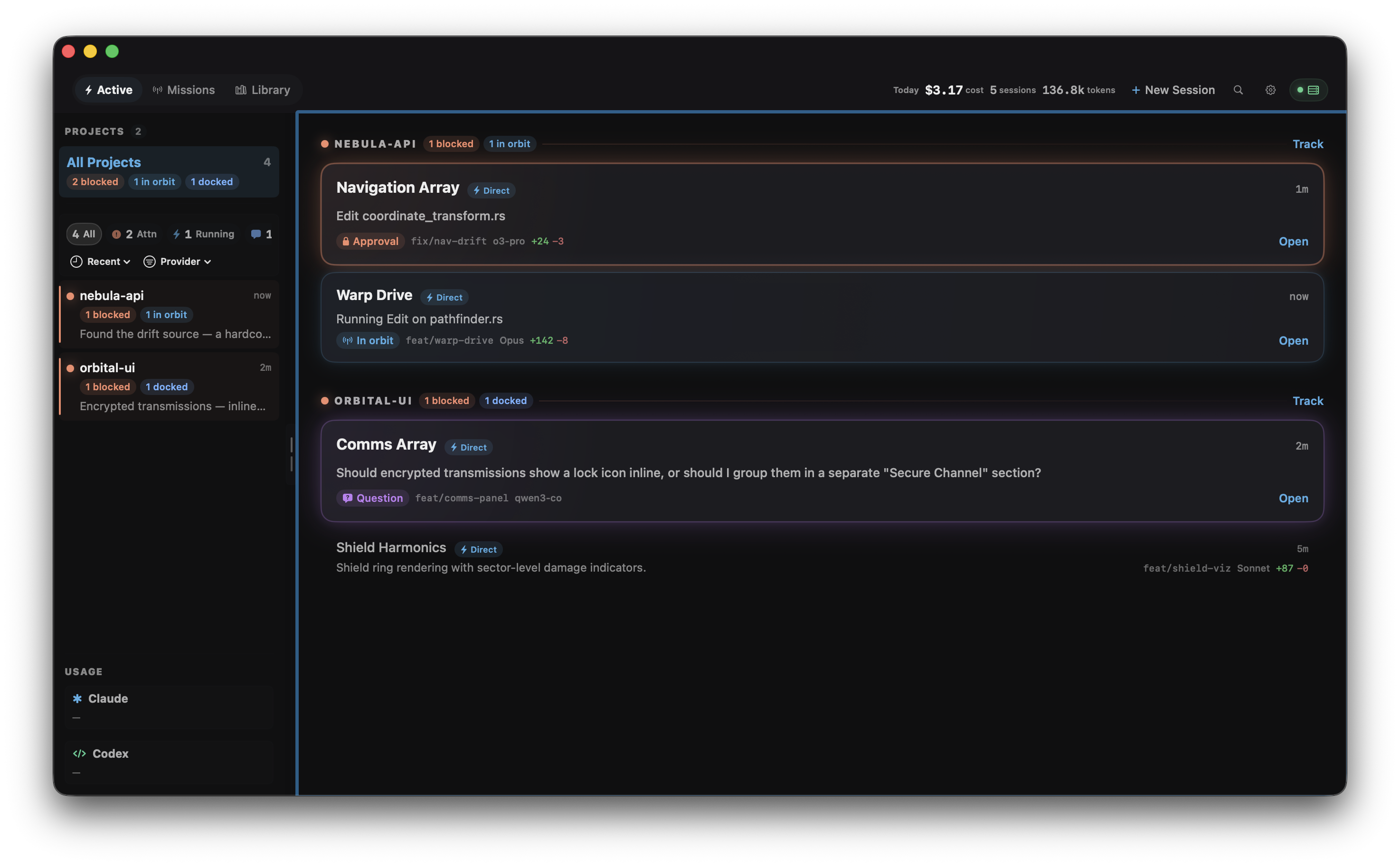
I don't write code anymore (pretty much) — agents do. My job is reviewing, managing, and providing guidance at the right time. But with multiple repos and a bunch of agents running across all of them, keeping track of it all was chaos. OrbitDock is how I wrangle that.
A Rust server sits at the center. It creates and runs both Claude Code and Codex sessions directly — Codex via embedded codex-core, Claude via the CLI. It also picks up existing Claude Code terminal sessions through hooks. Run a server on your laptop, your work machine, a VPS, wherever your agents are. The macOS and iOS apps connect to all of them at once, so you get one unified view no matter where your sessions are running or what device you're on.
Mission Control. Point it at a Linear project and agents start working issues on their
own. OrbitDock pulls eligible issues, creates per-issue git worktrees, picks the right
provider, and dispatches agents with a prompt template you control. Concurrency limits,
retry logic, provider failover — all configurable through a repo-local MISSION.md. A
dedicated dashboard shows the full pipeline. Hands-off orchestration until you need to
step in.
Bidirectional, not just passive. Hooks tell you what's happening. OrbitDock lets you act on it. Send messages, steer mid-turn, fork conversations, roll back turns — all from the app. You can also take over a passive hook-monitored session and convert it to full direct control without interrupting it.
Code review that feeds back. A magit-style diff view shows exactly what the agent changed. Add inline comments on specific lines, then send them as structured feedback. The agent gets your context and corrects course — no copy-pasting out of a terminal.
Both providers, one place. Claude Code and Codex from the same dashboard, same approval flow, same review canvas. Pick whichever agent fits the task and manage them the same way.
Approve from anywhere. Tool calls, permission requests, and questions don't wait for you to be at your desk. The iOS app puts approvals, diffs, and session status in your pocket. Unblock an agent from your phone and it keeps going.
Multi-server. Your laptop, your VPS, a Raspberry Pi in a drawer — connect all of them at once. Sessions from every endpoint merge into one dashboard so nothing slips through the cracks.
┌──────────────────────────────────────────────────────────────┐
│                   macOS / iOS / Web app                       │
│             (connects to all servers at once)                 │
└──────────┬───────────────────┬───────────────────┬───────────┘
           │                   │                   │
  ┌────────▼─────────┐ ┌──────▼───────┐ ┌─────────▼──────────┐
  │     Laptop        │ │     VPS      │ │   Raspberry Pi      │
  │                   │ │              │ │                     │
  │   Rust server     │ │  Rust server │ │    Rust server      │
  │       │           │ │      │       │ │        │            │
  │  Claude + Codex   │ │ Claude+Codex │ │   Claude+Codex      │
  │    sessions       │ │   sessions   │ │     sessions        │
  └───────────────────┘ └──────────────┘ └─────────────────────┘
Each server runs agents locally and the app merges everything into one dashboard. Mission Control can dispatch agents autonomously on any of them.
- Mission Control — Autonomous issue-driven orchestration — point at Linear and agents start working
- Run agents from anywhere — Create Claude and Codex sessions from Mac or iOS, no terminal needed
- Direct control — Send messages, steer mid-turn, approve tools, interrupt, fork, run shell commands
- Code review — Magit-style diffs with inline comments that steer the agent
- Approval triage — Diff previews, risk classification, keyboard shortcuts (y/n/!/N)
- Multi-server — Connect to local, remote, and cloud endpoints at once
- Usage tracking — Rate limit monitoring for Claude and Codex
- Live monitoring — Every session across every project, updating in real time
See FEATURES.md for the full list.
curl -fsSL https://raw.githubusercontent.com/Robdel12/OrbitDock/main/orbitdock-server/install.sh | bashThe installer sets up the binary, shell PATH, data directory, and database. It then asks whether
you want to install Claude hooks and whether you want OrbitDock running as a background service.
To update an existing install:
orbitdock upgradeThis checks GitHub Releases for the latest version, downloads the platform binary, verifies
the SHA256 checksum, and swaps it in place. Your previous binary is kept as orbitdock.bak
for rollback. Use orbitdock upgrade --check to see what's available without installing.
orbitdock status
orbitdock doctor
If you skipped the background service during install, start it manually:
orbitdock startdoctor runs a full diagnostic — database, hooks, encryption key, disk space, port availability,
and more. If something's wrong, it'll tell you.
Download from Releases and run it.
Want to try the latest iOS build without compiling it yourself? Join the OrbitDock TestFlight.
Or build from source:
git clone https://github.com/Robdel12/OrbitDock.git
cd OrbitDock
make build
You can also open OrbitDockNative/OrbitDock.xcodeproj in Xcode and hit Cmd+R.
The app auto-connects to the local server.
Codex — Open Settings → CODEX CLI → Sign in with ChatGPT (or use API key auth mode).
Claude Code — Install the Claude Code CLI and set an API key. OrbitDock picks it up automatically.
Click New in the top bar and pick Claude Session or Codex Session. Select a project directory, choose your model, and go.
Existing Claude Code terminal sessions show up automatically through hooks.
If something doesn't appear, run orbitdock doctor and check ~/.orbitdock/logs/server.log.
Running on a VPS, Raspberry Pi, NAS, or another machine:
# On the server
orbitdock remote-setup

# On your developer machine
orbitdock install-hooks --server-url https://your-server.example.com:4000
remote-setup guides secure exposure, creates a fresh auth token, and tells you the exact next commands
for pairing clients and forwarding hooks. For the app, add the same server URL and token in Settings → Servers.
See DEPLOYMENT.md for Cloudflare tunnels, TLS, reverse proxies, and Raspberry Pi notes.
- macOS 15.0+ (iOS 18.0+ for mobile)
- Codex — built in, authenticates with ChatGPT sign-in or API key
- Claude Code — requires the
claudeCLI installed with an API key - Xcode 16+ and Rust stable toolchain if building from source
- FEATURES.md — Full feature list with keyboard shortcuts
- DEPLOYMENT.md — Server deployment (remote, TLS, tunnels)
- CONTRIBUTING.md — Development setup and architecture
- orbitdock-server/README.md — Server CLI reference
- orbitdock-server/docs/API.md — HTTP and WebSocket contract