Front Ends
List of Available Android Launchers/Front-Ends
| Frontend | Price | Notes |
|---|---|---|
| AOSP Launcher | Free | Pre-Installed |
| ARC Browser | $7.49 | |
| Daijishō | Free | |
| Dig | Free / In-App Purchases | |
| Launchbox | Free / Subscription | |
| Lemuroid | Free | |
| Pegasus | Free | Pegasus Installer |
| RetroArch | Free | |
| Retroid Launcher | Free | Pre-Installed |
| RESET Collection | $4.99 |
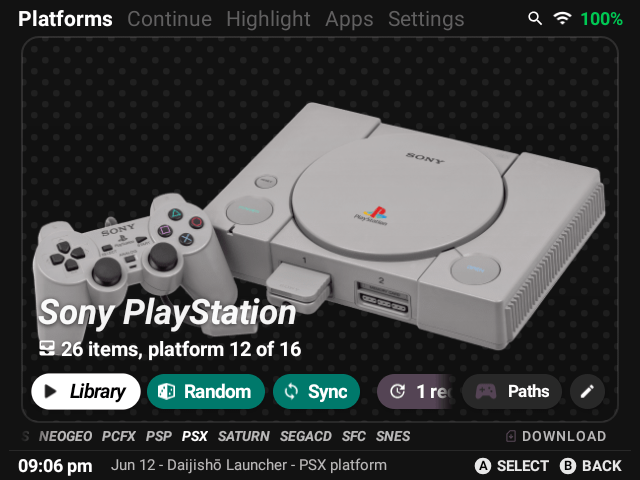
Daijishō is a retro launcher that let you manage your retro games libraries.
Preview Images
| Preview 1 | Preview 2 |
|---|---|
 |
 |
Add systems
-
Settings>Download Platforms> Select each system you want to add >Import -
Platforms> SelectPaths,Addand navigate to the systems folder >Finish -
Hit
Syncto let the front-end find and scrape your games
| #1 | #2 |
|---|---|
 |
 |
- To add systems not available through the download I'd recommend editing one of these JSON files and importing it through
Settings > More Settings > Import platform
Change default emulator
-
On the
Platformsclick 🖊️ >Player Settingsdrop down -
Select the emulator >
Save
| #1 | #2 |
|---|---|
 |
 |
Change emulator per game
-
Library> Swipe the bottom section to the right until you get toEdit Item -
Custom PlayerOn > Use Drop-down >Save
| #1 | #2 |
|---|---|
 |
 |
Wallpaper packs
-
Settings> Scroll down toAppearance>Download platform wallpapers pack -
Choose a pack > Download Pack
The Retroid Launcher is one of two preinstalled front-ends that you can use when loading up your Retroid Pocket 2 Plus.
You can do the following in the Retroid Launcher:
- Add systems, roms, and launch apps
- Use Retroid's RetroArch/Standalone preconfigured setup
- To use Retroid's preconfigured RetroArch/Standalone setup:
Retroid Launcher System Screen > Setup - To switch cover art with your own on the device: long press the game and select "Box Cover" and navigate to the
.png. - To add your own custom box art via computer place your
.pngsin the Internal storageRP3Launcher\Emulations\systemnamefolders. Make sure to exit and re-enter the Retroid Launcher for it to take effect.
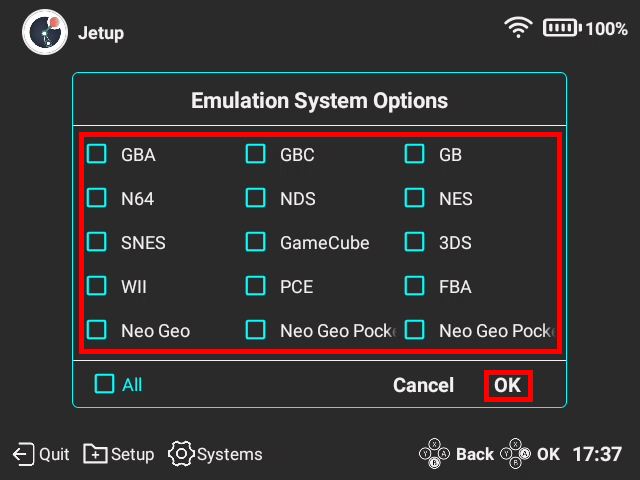
Add Systems dropdown
- Click
Systems> Select a system you wish to add > Ok
| Image |
|---|
 |
 |
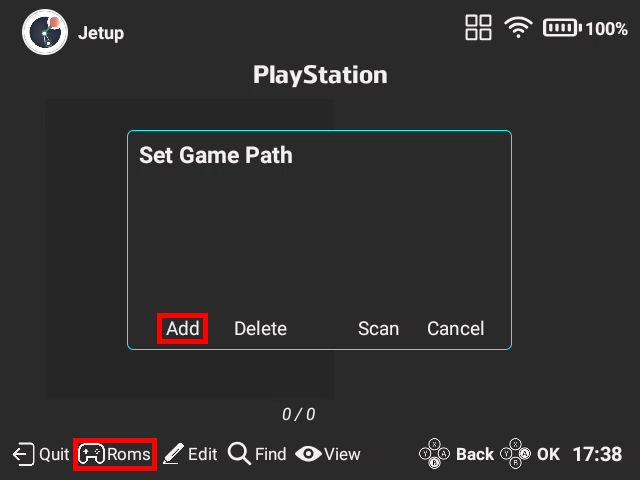
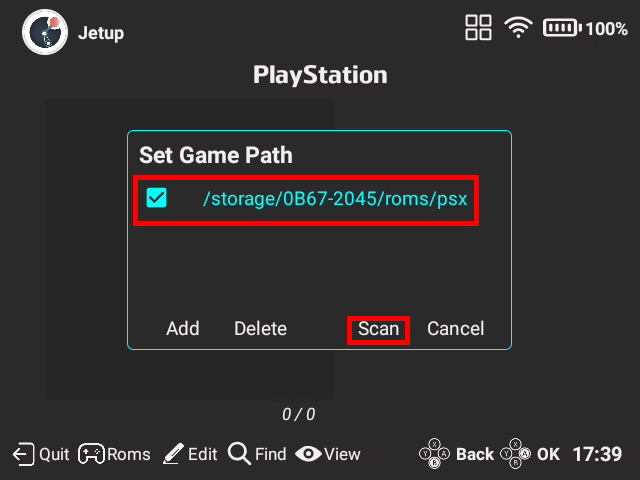
Add roms dropdown
- Select the system >
roms> select either internal storage or external > locate and select the systems roms folder >scan - The Retroid Launcher has tons of problems with numbered series you can edit the title by long pressing game >
Rename This Game
| Image |
|---|
 |
 |
 |
 |
 |
Change emulator dropdown
- Click
Edit> Select emulator for the dropdown > ClickSave - Read Launch Commands sections to learn how to add emulators/cores
| Image |
|---|
 |
 |
- Long press game > Set Favorite
- To switch to Favorite filter: Swipe left side of screen >
Favorite
- Long press system image > Move system image
- These are launch commands for the Retroid Launcher.
- To add: Retroid Launcher > Game list > Edit > New
- Unfinished
Retroid Launcher Commands Dropdown
AetherSX2 (PS2)
| Option | Command/Input |
|---|---|
| Name | AetherSX2 |
| Package | xyz.aethersx2.android |
| Activity | xyz.aethersx2.android.EmulationActivity |
| RetroArch Core | |
| Rom path key | bootPath |
| Data Type | */* |
Citra - Antutu (3DS)
| Option | Command/Input |
|---|---|
| Name | Citra Antutu |
| Package | com.antutu.ABenchMark |
| Activity | org.citra.emu.ui.EmulationActivity |
| RetroArch Core | |
| Rom path key | SelectedGame |
| Data Type |
Dolphin (GC/Wii)
| Option | Command/Input |
|---|---|
| Name | Dolphin |
| Package | org.dolphinemu.dolphinemu |
| Activity | org.dolphinemu.dolphinemu.ui.main.MainActivity |
| RetroArch Core | |
| Rom path key | AutoStartFile |
| Data Type |
Dolphin MMJ (GC/Wii)
| Option | Command/Input |
|---|---|
| Name | Dolphin MMJ |
| Package | org.mm.j |
| Activity | org.dolphinemu.dolphinemu.ui.main.MainActivity |
| RetroArch Core | |
| Rom path key | AutoStartFile |
| Data Type |
Dolphin MMJR2 (GC/Wii)
| Option | Command/Input |
|---|---|
| Name | Dolphin MMJR2 |
| Package | org.dolphinemu.handheld |
| Activity | org.dolphinemu.dolphinemu.ui.main.MainActivity |
| RetroArch Core | |
| Rom path key | AutoStartFile |
| Data Type |
DuckStation Standalone (PS1)
| Option | Command/Input |
|---|---|
| Name | DuckStation |
| Package | com.github.stenzek.duckstation |
| Activity | com.github.stenzek.duckstation.EmulationActivity |
| RetroArch Core | |
| Rom path key | bootPath |
| Data Type |
ePSXe (PS1)
| Option | Command/Input |
|---|---|
| Name | ePSXe |
| Package | com.epsxe.ePSXe |
| Activity | com.epsxe.ePSXe.ePSXe |
| RetroArch Core | |
| Rom path key | com.epsxe.ePSXe.isoName |
| Data Type |
FPSE (PS1)
| Option | Command/Input |
|---|---|
| Name | FPSE |
| Package | com.emulator.fpse |
| Activity | com.emulator.fpse.Main |
| RetroArch Core | |
| Rom path key | path |
| Data Type | */* |
FPSE64 (PS1)
| Option | Command/Input |
|---|---|
| Name | FPSE64 |
| Package | com.emulator.fpse64 |
| Activity | com.emulator.fpse64.Main |
| RetroArch Core | |
| Rom path key | path |
| Data Type | */* |
My Boy! Free (GBA)
| Option | Command/Input |
|---|---|
| Name | My Boy! Free |
| Package | com.fastemulator.gbafree |
| Activity | com.fastemulator.gba.EmulatorActivity |
| RetroArch Core | |
| Rom path key | |
| Data Type | application/x-gbc-rom |
My Boy! Pro (GBA)
| Option | Command/Input |
|---|---|
| Name | My Boy! Pro |
| Package | com.fastemulator.gba |
| Activity | com.fastemulator.gba.EmulatorActivity |
| RetroArch Core | |
| Rom path key | |
| Data Type | application/x-gbc-rom |
Pizza Boy Basic (GBA)
| Option | Command/Input |
|---|---|
| Name | Pizza Boy Pro |
| Package | it.dbtecno.pizzaboygba |
| Activity | it.dbtecno.pizzaboygba.MainActivity |
| RetroArch Core | |
| Rom path key | rom_uri |
| Data Type |
Pizza Boy Pro (GBA)
| Option | Command/Input |
|---|---|
| Name | Pizza Boy Pro |
| Package | it.dbtecno.pizzaboygbapro |
| Activity | it.dbtecno.pizzaboygbapro.MainActivity |
| RetroArch Core | |
| Rom path key | rom_uri |
| Data Type |
Redream (Dreamcast)
| Option | Command/Input |
|---|---|
| Name | Redream |
| Package | io.recompiled.redream |
| Activity | io.recompiled.redream.MainActivity |
| RetroArch Core | |
| Rom path key | |
| Data type | */* |
RetroArch
| Option | Command/Input |
|---|---|
| Name | RetroArch (Core Name) |
| Package | com.retroarch |
| Activity | com.retroarch.browser.retroactivity.RetroActivityFuture |
| RetroArch Core | corename_libretro_android.so |
| Rom path key | ROM |
| Data type |
RetroArch 32bit
| Option | Command/Input |
|---|---|
| Name | RetroArch 32bit (Core Name) |
| Package | com.retroarch.32bit |
| Activity | com.retroarch.browser.retroactivity.RetroActivityFuture |
| RetroArch Core | corename_libretro_android.so |
| Rom path key | ROM |
| Data type |
RetroArch AArch64
| Option | Command/Input |
|---|---|
| Name | RetroArch AArch 64 (Core Name) |
| Package | com.retroarch.aarch64 |
| Activity | com.retroarch.browser.retroactivity.RetroActivityFuture |
| RetroArch Core | corename_libretro_android.so |
| Rom path key | ROM |
| Data type |
Yaba Sanshiro 2 (Saturn)
| Option | Command/Input |
|---|---|
| Name | Yaba Sanshiro 2 |
| Package | org.devmiyax.yabasanshioro2 |
| Activity | org.uoyabause.android.Yabause |
| RetroArch Core | |
| Rom path key | org.uoyabause.android.FileNameEx |
| Data Type |
Yaba Sanshiro 2 Pro (Saturn)
| Option | Command/Input |
|---|---|
| Name | Yaba Sanshiro 2 Pro |
| Package | org.devmiyax.yabasanshioro2.pro |
| Activity | org.uoyabause.android.Yabause |
| RetroArch Core | |
| Rom path key | org.uoyabause.android.FileNameEx |
| Data Type |