list_offsets.asm file was used as a Temp file in this tutorial.
list_opcodes.asm file was used for inject Assembly codes.
- Used was sample.exe and sample.dll in this example.
-
1) Open OllyDbg
-
2) Drag & Drop an EXE file to OllyDbg (
File > Open) -
3) Run the program with
F9
While attaching in progress you will see
Runningtext on the bottom right corner
When attaching completed, you will see
Pausedtext on the bottom right corner
-
1) Now find a free space where you can add the
DLLyou want to inject. -
- Find
NOPSorDB 00or any Part of .EXE (if that has no important Code)
- Find
If you are already choose the part where you want to inject the DLL,
Copy the Offsetof that part to temp list file.

-
- Select several consecutive blank lines.
-
- Operate the Right Click -> Binary -> Edit (
CTRL + E)
- Operate the Right Click -> Binary -> Edit (
A MessageBox will appear with title :
Edit code at ...and type the name of the your DLL.
Press
OKbutton after typing the Name of the DLL
After pressing
OKbutton, you will see random characters.
Be careful of typing the Name of the DLL in "ASCII", because Assembly code is upper & lower case sensitive.
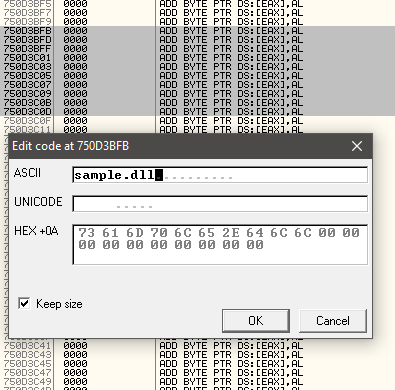
-
1) Press
CTRL + Aand the name will appear. -
2) Skip few lines after the type name of your DLL and press
Space Bar. -
3) Type
EntryPoint.
Copy the first paragraph's first line to clipboard with
Right Click -> Copy -> Clipboard( (1) in list_offests.asm)
Copy the second paragraph's first line to clipboard with
Right Click -> Copy -> Clipboard( (2) in list_offests.asm)

-
1) Find a free space somewhere above the codes you wrote.
-
2) After find a free space, you should select several consecutive blank lines.
-
3) Operate the
Right Click -> Binary -> Fill with NOP's
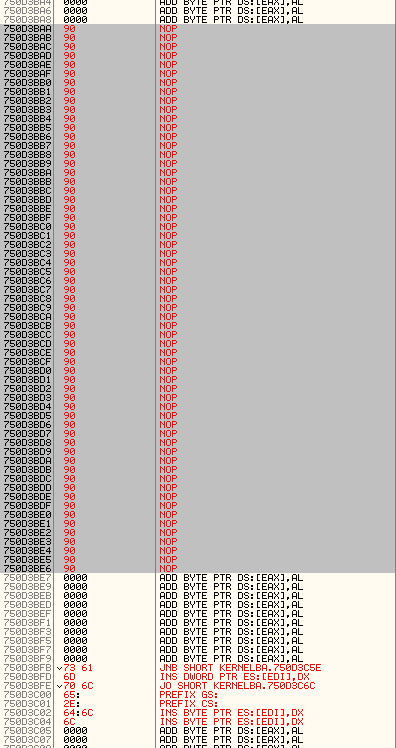
-
1) Select the first paragraph's first line again.
-
2) Operate the
Right Click -> Assemble -
3) Type
push 772A3163( (1) in list_offests.asm)
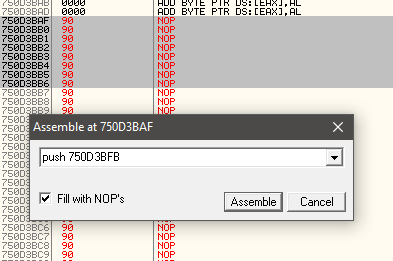
-
1) Select same line again and Now after that press
CTRL + Nand new window will appear. -
2) Find and Copy the Offset of the
LoadLibraryA -
3) Operate the
Right Click -> Copy to Clipboard -> Addess( (3) in list_offests.asm)
Please make sure copy the correct Line of LoadLibraryA Offset.
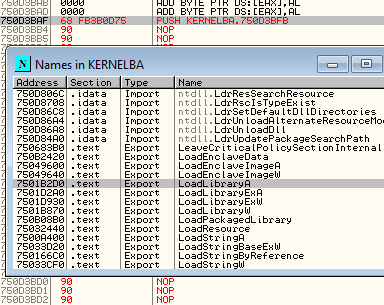
- 1) Type
call dword ptr ds:[7501B2D0]( (3) in list_offests.asm)
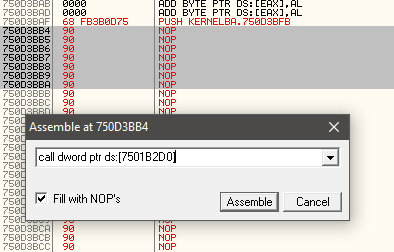
- 2) Type
push 750D3C0D( (2) in list_offests.asm)

- 3) Type
push eax

-
1) Operate the
CTRL + Nagain. -
2) Find GETPROCESSADDRESS
-
3) Operate the
Right Click -> Copy to Clipboard -> Address
- 1) Type
call dword ptr ds:[7501B980]( (4) in list_offests.asm)

-
- Type
push eax
- Type
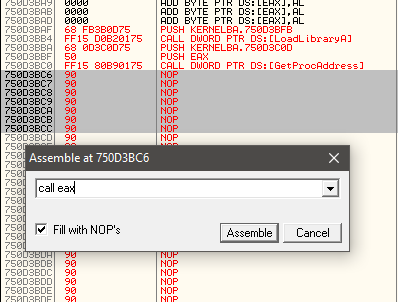
-
- Go to
originwithRight Click -> Go To -> Originand
- Go to

-
- Operate
Right Click -> Copy -> To Clipboard( (5) in list_offests.asm)
- Operate
-
- Return the codes again.
-
- Type
JMP 750308B2( (5) in list_offests.asm)
- Type
-
- Save the file.
Operate
Right Click -> Copy -> Select All
Operate
Copy to executable -> All Modificationsandcopy all
Operate
Right Click -> Save File
Return back to ASCII
sample.dllandRight Click -> Copy -> To clipboard
- 1) Open
PE Explorerand open the EXE file.
Change the Address of Entry Point to new EntryPoint.
-
2) Type
750D3BAF -
3) Click
GreenCheckBoxandOK, -
4) Operate
File > Save File Asand save the EXE
EntryPoint changed and DLL injected successfully. Thats All.