

One Click VTC ( install )
For all Stack Exchange sites as of 1.2, including metas. (Previously, was for Stack Overflow only.) If you vote to close (VTC) or flag to close a lot, you can use this userscript to choose a close reason immediately (and downvote too, if you want) in a single click, rather than have to navigate through the pop-up interface first (which can be tedious if done tens of times every day).
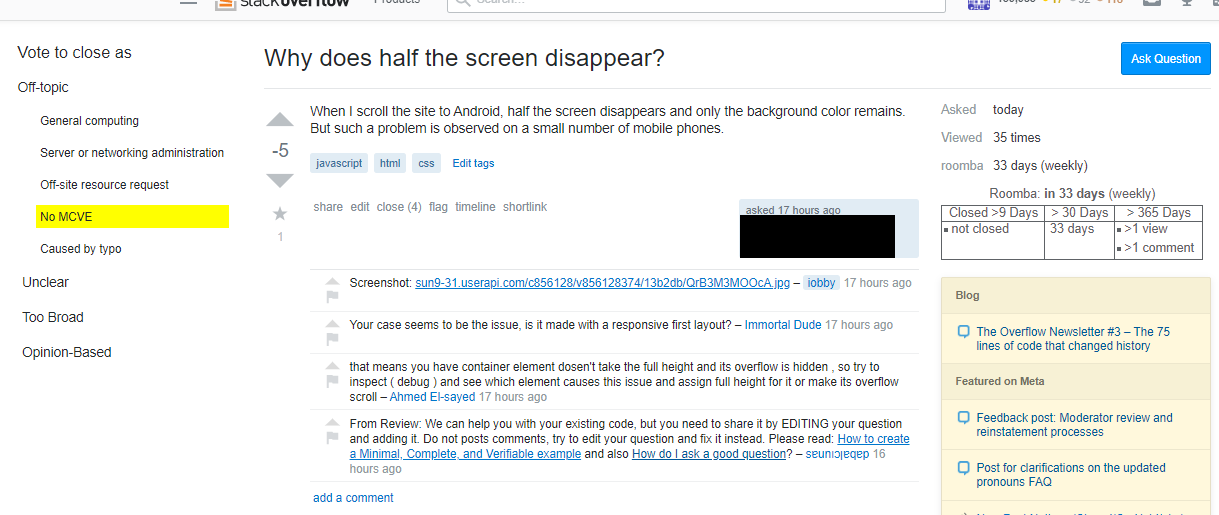
This is intended for those with reasonably wide screens, since the VTC reasons are put in a container to the left of the main page content. To increase space on the left, you can disable the left sidebar and/or install Right Content.
You'll still have to manually open the pop-up interface in order to VTC with a custom reason, or to vote for migration.
If you wish (or don't wish) to downvote while voting to close, you can bring up the settings to do so automatically by hovering over the userscript interface for a few seconds.
If downvoting is enabled, voting to close through the userscript interface will also cast a downvote when:
-
You haven't already voted (+ or -) on the post, AND
-
You click on the close reason text (yellow background), rather than on the button to the right of it
If downvoting is enabled, but you click the "OK" button to the right of the close reason text, no downvote will be cast while voting to close the question. (This is useful for borderline cases, or for when the question isn't bad, but isn't answerable in its current state.)
The site-specific close reason text in the userscript interface is taken from either the built-in reasons (for SO, Meta SO, Meta SE, and Code Review), or dynamically fetched from the site. The full close reason text will be visible if you hover over a choice, but the choice text needs to be short. In the case that the short reasons are fetched dynamically, you'll almost certainly want to edit them to be more understandable and concise, which can be done by right-clicking one of the site-specific rows and entering the desired reason text.
If a site changes its close reasons (by adding one, removing one, or by changing a description), you can make the userscript fetch the new close reasons by clicking the "Reset close reasons" button.