|
| 1 | +# Contributing |
| 2 | + |
| 3 | +[](http://commitizen.github.io/cz-cli/) |
| 4 | + |
| 5 | +When contributing to this repository, it is usually a good idea to first discuss the change you |
| 6 | +wish to make via issue, email, or any other method with the owners of this repository before |
| 7 | +making a change. This could potentially save a lot of wasted hours. |
| 8 | + |
| 9 | +Please note we have a code of conduct, please follow it in all your interactions with the project. |
| 10 | + |
| 11 | +## Development |
| 12 | + |
| 13 | +### Commit Message Format |
| 14 | + |
| 15 | +All commits on the this repository follow the |
| 16 | +[Conventional Changelog standard](https://github.com/conventional-changelog/conventional-changelog-eslint/blob/master/convention.md). |
| 17 | +It is a very simple format so you can still write commit messages by hand. However it is |
| 18 | +highly recommended developers install [Commitizen](https://commitizen.github.io/cz-cli/), |
| 19 | +it extends the git command and will make writing commit messages a breeze. This |
| 20 | +repository is configured with a local Commitizen configuration script. |
| 21 | + |
| 22 | +Getting Commitizen installed is usually trivial, just install it via npm. You will also |
| 23 | +need to install the cz-conventional-changelog adapter which this repository is configured |
| 24 | +to use. |
| 25 | + |
| 26 | +```bash |
| 27 | +npm install -g commitizen cz-conventional-changelog |
| 28 | +``` |
| 29 | + |
| 30 | +Below is an example of Commitizen in action. It replaces your usual `git commit` command |
| 31 | +with `git cz` instead. The new command takes all the same arguments however it leads you |
| 32 | +through an interactive process to generate the commit message. |
| 33 | + |
| 34 | +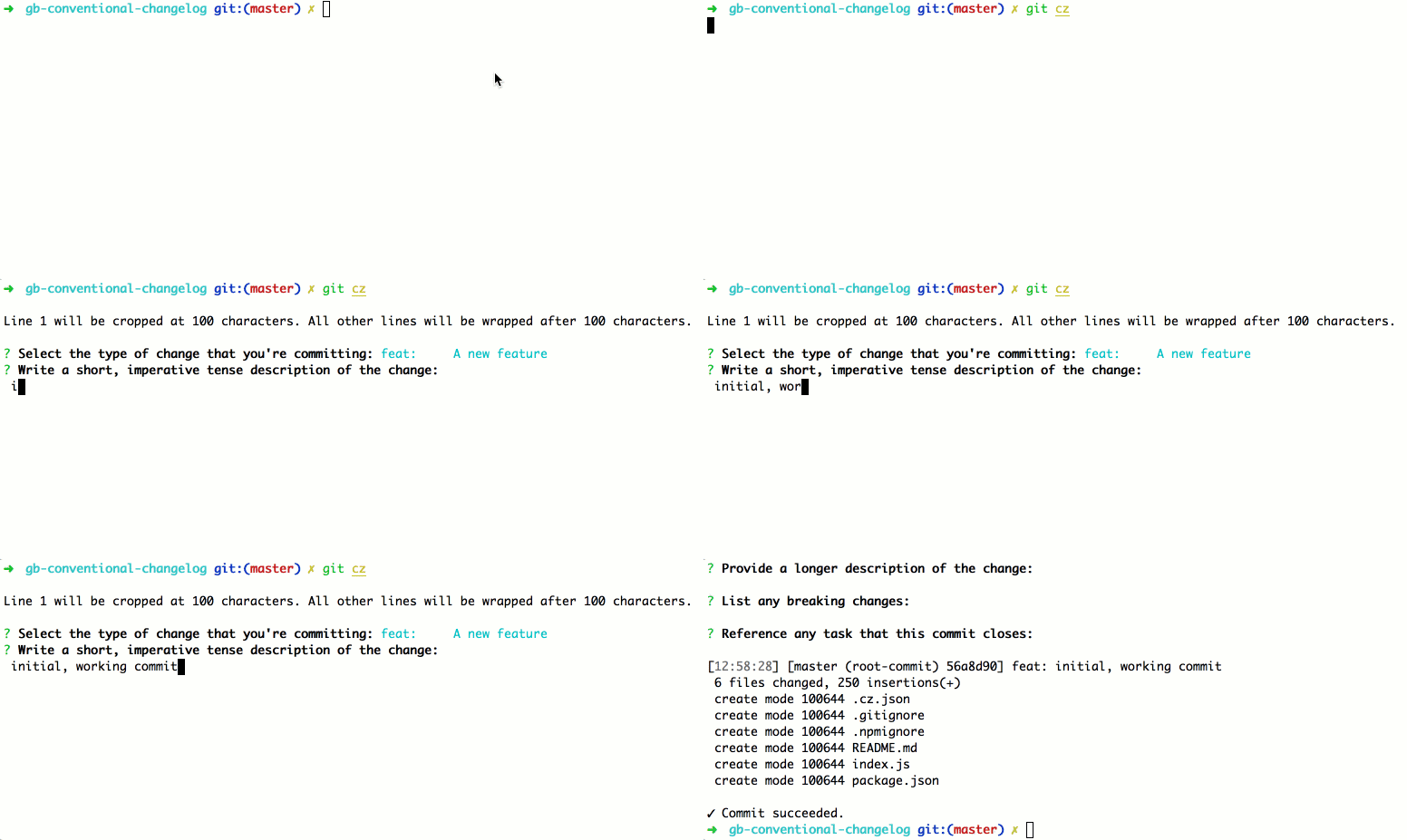 |
| 35 | + |
| 36 | +Commit messages are used to automatically generate our changelogs, and to ensure |
| 37 | +commits are searchable in a useful way. So please use the Commitizen tool and adhere to |
| 38 | +the commit message standard or else we cannot accept Pull Requests without editing |
| 39 | +them first. |
| 40 | + |
| 41 | +Below is an example of a properly formated commit message. |
| 42 | + |
| 43 | +``` |
| 44 | +chore(Commitizen): Made repository Commitizen friendly. |
| 45 | +
|
| 46 | +Added standard Commitizen configuration files to the repo along with all the custom rules. |
| 47 | +
|
| 48 | +ISSUES CLOSED: #31 |
| 49 | +``` |
| 50 | + |
| 51 | +### Pull Request Process |
| 52 | + |
| 53 | +1. Ensure that install or build dependencies do not appear in any commits in your code branch. |
| 54 | +2. Ensure all commit messages follow the [Conventional Changelog](https://github.com/conventional-changelog/conventional-changelog-eslint/blob/master/convention.md) |
| 55 | + standard explained earlier. |
| 56 | +4. Your pull request will either be approved or feedback will be given on what needs to be |
| 57 | + fixed to get approval. |
0 commit comments