<?xml version="1.0" encoding="UTF-8"?>
<feed xmlns="http://www.w3.org/2005/Atom" xmlns:thoughtbot="https://thoughtbot.com/feeds/" xmlns:feedpress="https://feed.press/xmlns" xmlns:media="http://search.yahoo.com/mrss/" xmlns:podcast="https://podcastindex.org/namespace/1.0">
  <feedpress:locale>en</feedpress:locale>
  <link rel="hub" href="https://feedpress.superfeedr.com/"/>
  <title>Giant Robots Smashing Into Other Giant Robots</title>
  <subtitle>Written by thoughtbot, your expert partner for design and development.
</subtitle>
  <id>https://robots.thoughtbot.com/</id>
  <link href="https://thoughtbot.com/blog"/>
  <link href="https://feed.thoughtbot.com/" rel="self"/>
  <updated>2026-05-04T00:00:00+00:00</updated>
  <author>
    <name>thoughtbot</name>
  </author>
  <entry>
    <title>Simple, affordable unsupervised agentic coding from my phone with Claude Code in Github Actions</title>
    <link rel="alternate" href="https://feed.thoughtbot.com/link/24077/17331339/creating-software-while-afk-with-github-workflows"/>
    <author>
      <name>Fritz Meissner</name>
    </author>
    <id>https://thoughtbot.com/blog/creating-software-while-afk-with-github-workflows</id>
    <published>2026-05-04T00:00:00+00:00</published>
    <updated>2026-05-01T15:47:03Z</updated>
    <content type="html"><![CDATA[<p>If you’re following the AI hype train, you’ll have heard serious software people talk about building software (without needing to code) while they take their kids to the park. This is obviously appealing, but it’s often discussed in ways that imply serious barriers to entry: the interviewee from Anthropic mentions that they get to use all the tokens they want for free, the AI-coding consultancy says that if you’re not spending $1,000 per day per developer you’re doing it wrong, discussions of a new agentic coding paradigm refer to people who switch between multiple top-end Claude Code Max plans.</p>

<p>Although these conversations are frequently intertwined, building software away from a desk doesn’t have to come with a 4-digit daily bill. I don’t have that sort of cash, but I’ve still been able to get in on the fun.</p>
<h3 id="the-20-30month-workflow">
  
    The $20-$30/month workflow
  
</h3>

<p>Here’s a workflow that I’ve been using for unsupervised AI coding on a side project which will never justify serious focus or budget:</p>

<ol>
<li>I type one or two lines into a new issue on the project Github repo (usually from my phone)</li>
<li>I add a label, <code>needs-elaboration</code> to the issue</li>
<li>Github starts up an <a href="https://docs.github.com/en/actions/get-started/understand-github-actions#workflows">actions workflow</a> that invokes Claude Code in the cloud to review the pre-existing code and write a plan for how to turn my few sentences into a reality</li>
<li>I review the plan and if I’m happy I add a <code>ready-for-dev</code> label</li>
<li>Github starts Claude Code to implement the issue and raise a pull request</li>
<li>I click on preview links that Vercel (this is a NextJS app) adds to the PR and inspect the results</li>
<li>If I’m happy I merge the PR and Vercel deploys to production</li>
<li>If I’m not happy I add a comment and an <code>agent-review</code> label and GOTO 5</li>
</ol>

<p>The total cost is $20 for my Claude Code Pro plan and $10 for a Github Pro Plan (educators and open source contributors can often get this for free). There are usage limits to both plans<sup id="fnref1"><a href="https://thoughtbot.com/blog#fn1">1</a></sup> but I mostly run out of ideas before I run out of limits. I’m not focused on making an agent work 24/7 while I’m doing other things; my only concern is that there is something new ready for me each time I have spare attention for this project.</p>

<p>In case it wasn’t clear, I’m not writing or even reading any of the code as part of this loop<sup id="fnref2"><a href="https://thoughtbot.com/blog#fn2">2</a></sup>. That would take focus that I can’t dedicate on a per-feature basis to this project.</p>
<h3 id="minimal-time-and-money-for-decent-results">
  
    Minimal time and money for decent results
  
</h3>

<p>This project wasn’t always an experiment in agentic coding. It was originally an exploration of JS web development with NextJS that I pursued during Friday <a href="https://thoughtbot.com/blog/investment-time">investment time</a> over a seven month period a few years back. This allows me to compare before and after, with striking results.</p>

<p>In the past month, with 10 minutes here and there on my phone, I’ve far exceeded what I did in the original seven months of Fridays:</p>

<ul>
<li>features that have never existed in any previous equivalent software (from myself and others in this niche hobby space)</li>
<li>huge improvements to UI including working mobile portrait mode and desktop modes</li>
<li>500+ tests and 77% coverage versus 0 tests and 0% coverage</li>
<li>optimisations that allowed me to downgrade my Vercel account to a free plan</li>
<li>GDPR-compliant analytics and error tracking</li>
<li>extending my integration with Google auth from test-mode (allow-listed users only) to production (anyone can sign up)</li>
</ul>

<p>Not bad for effort spent while out for a walk or on the London underground<sup id="fnref3"><a href="https://thoughtbot.com/blog#fn3">3</a></sup>.</p>
<h3 id="how-it-works-github-workflows-for-cloud-hosted-agentic-coding">
  
    How it works: Github workflows for cloud-hosted agentic coding
  
</h3>

<p>When I say “Github starts Claude Code in the cloud” it may not be clear exactly what I mean. Here’s an example of a workflow file from my project’s <code>.github/workflows</code> folder:</p>
<div class="highlight"><pre class="highlight plaintext"><code>name: Claude Issue Triage

on:
  issues:
    types: [labeled]

jobs:
  claude-triage:
    if: github.event.label.name == 'needs-elaboration'
    ...
    steps:
      - name: Checkout repository
      ...
      - name: Run Claude Code
        uses: anthropics/claude-code-action@v1.0.70
        with:
          claude_code_oauth_token: ${{ secrets.CLAUDE_CODE_OAUTH_TOKEN }}
          prompt: |
            GitHub issue #${{ github.event.issue.number }} ("${{ github.event.issue.title }}")
            requires your analysis...
        claude_args: "--max-turns 20 --dangerously-skip-permissions"
        show_full_output: "true"
</code></pre></div>
<p>Think of it like running a CI workflow in Github actions, except that instead of running against a branch or pull request, this workflow runs when an issue is labelled <code>needs-elaboration</code>. First it checks out the code, then it runs <a href="https://code.claude.com/docs/en/github-actions">Anthropic’s Claude Code action</a>. The action passes a fixed prompt to Claude Code plus metadata from the Github workflow (like the contents of the labelled issue).</p>

<p>It doesn’t have to be Claude Code, I could go with <a href="https://opencode.ai">Opencode</a> or the Copilot agent instead.</p>
<h3 id="notes-for-people-unfamiliar-with-unsupervised-agentic-coding">
  
    Notes for people unfamiliar with unsupervised agentic coding
  
</h3>

<p>If AI-coding terms like <a href="https://steve-yegge.medium.com/welcome-to-gas-town-4f25ee16dd04">gastown</a>, <a href="https://www.task-master.dev">taskmaster</a>, <a href="https://ghuntley.com/ralph/">ralph loops</a>, or <a href="https://stripe.dev/blog/minions-stripes-one-shot-end-to-end-coding-agents">minions</a> mean nothing to you, these notes about what becomes different when we stop intervening in agentic code may be helpful.</p>

<p>First of all, the <code>--dangerously-skip-permissions</code> option on Claude Code may look scary, but it’s standard practice for folks who want to run Claude Code without any human intervention. I am less worried about doing this in a random github actions runner in the cloud than I am running it on my local machine. My laptop remains safe for my day job.</p>

<p>In unsupervised agentic coding, there’s a <a href="https://github.com/ghuntley/how-to-ralph-wiggum?tab=readme-ov-file#-move-outside-the-loop">transition from “human in the loop” (approval of individual code changes that the agent makes) to “human on the loop”</a> where the agent’s output over time is assessed and its standard instructions are improved. I’m not telling Claude which code to modify or how. Instead, it decides and I have to live with the results until I can give it what is needed to solve a problem in a better way the next time. This is a lot like being a manager of human coders (at least one who does not want to be a bottleneck to team output).</p>

<p>Some of the code in this project is really bad, for example a 1500-line JSX file. I only noticed this because of how Claude was struggling to implement changes to this code. Ideally I would have noticed this earlier, but the path to recovery is fairly straightforward. I’ll tell Claude to identify pieces of the component that can be split into separate components and files and have it create new github issues that the agents themselves can plan and implement. This is just how I would work as a developer myself (my threshold for breaking the code down would be somewhat earlier than 1500 lines though).</p>

<p>I wouldn’t trade the progress I’ve made in this month for perfect code. There’s a lightbulb moment for every developer when they work on software that they themselves want to use: suddenly the choice to pursue higher quality code has to fight for development priority with wanting to use a new shiny feature. The delicate balance is in knowing that with too much tech debt (e.g. 1500 line components), the shiny features will take longer and longer to build until eventually “improve quality then build new feature” takes less time than just “build new feature”.</p>

<p>A crucial factor is that the number of lines of code is no longer linked to the time it took to produce them. I often start by asking for options to address a problem. Out of five options, three may be easily rejected. When there are two or more realistic options, I don’t need to reason about them in the abstract: I can have Claude build both and see how each of them feels. There is no opportunity cost choice between one option and another.</p>
<h3 id="validation-from-y-combinator">
  
    Validation from Y-Combinator
  
</h3>

<p>The AI coding scene moves fast. As I was writing the first draft of this post I was puzzled that I hadn’t seen anyone else discussing a workflow like this. Between then and now <a href="https://docs.twill.ai/overview">Twill.AI</a> announced a real product which seems like the same idea but with some professional features like more advanced sandboxing and integration with Slack, Whatsapp etc. that they’re betting are worth paying for.</p>
<h3 id="conclusion">
  
    Conclusion
  
</h3>

<p>Mine is a very low-stakes project which gives me freedom to experiment. There are serious gaps that I would need to close before applying this workflow to professional work, but I don’t think they’re insurmountable (certainly Twill.AI and many others are trying their best). I expect that over time I’ll be able to extend the agents’ work to close more and more gaps without breaking the bank. In the meantime, you can find me at the park with my daughter.</p>

<aside class="related-articles"><h2>If you enjoyed this post, you might also like:</h2>
<ul>
<li><a href="https://thoughtbot.com/blog/how-to-use-chatgpt-to-find-custom-software-consultants">How to Use ChatGPT to Find Custom Software Consultants</a></li>
<li><a href="https://thoughtbot.com/blog/debugging-why-your-specs-have-slowed-down">Debugging Why Your Specs Have Slowed Down</a></li>
<li><a href="https://thoughtbot.com/blog/from-idea-to-impact-the-role-of-rapid-prototyping-in-agetech">From idea to impact: The role of rapid prototyping in AgeTech</a></li>
</ul></aside>

<div class="footnotes">
<hr>
<ol>

<li id="fn1">
<p>Your actions will just stop running if either Claude or Github plans run out. There are time-based limits that refresh over different periods. Claude is based on tokens and I use their cheaper tier of models (Sonnet) to make the limit go further. Github Pro Plans include an actions-based limit of 3000 minutes per month. I use much less than 3000 minutes per month on my side project. Github has recently changed their pricing model, but it is mostly with regards to AI token pricing, and in this case I’m getting my tokens directly from Anthropic. <a href="https://thoughtbot.com/blog#fnref1">↩</a></p>
</li>

<li id="fn2">
<p>Before you worry about the safety of running code without reading: there is no backend, no personal information tracked, and all data is stored in a user’s browser or in their own Google Drive. Also note that I don’t read code per-feature <em>during</em> the loop, but I do get to look at the code as a whole over time. <a href="https://thoughtbot.com/blog#fnref2">↩</a></p>
</li>

<li id="fn3">
<p>A few weeks back I was watching people play a game that made me think of a new feature. I took out my phone to write an issue, then carried on watching. By the time I was home, the feature was ready in production. <a href="https://thoughtbot.com/blog#fnref3">↩</a></p>
</li>

</ol>
</div>
<img src="https://feed.thoughtbot.com/link/24077/17331339.gif" height="1" width="1"/>]]></content>
    <summary>Podcasts and the blogosphere are awash with people talking about building software while away from their desks, but often burning serious cash in the process. Here's a simple and cheap way to try this out for yourself.</summary>
    <thoughtbot:auto_social_share>true</thoughtbot:auto_social_share>
  </entry>
  <entry>
    <title>Your carousel might not be accessible: designing for reduced motion</title>
    <link rel="alternate" href="https://feed.thoughtbot.com/link/24077/17328934/your-carousel-might-not-be-accessible"/>
    <author>
      <name>Valeria Graffeo</name>
    </author>
    <id>https://thoughtbot.com/blog/your-carousel-might-not-be-accessible</id>
    <published>2026-05-01T00:00:00+00:00</published>
    <updated>2026-04-30T06:41:47Z</updated>
    <content type="html"><![CDATA[<p>On a website I worked on, I noticed some logos stacked vertically on the left
instead of being spread horizontally and evenly spaced, as I expected,
and as the design clearly suggested.</p>

<p>Opened an issue. Carefully listed browsers and versions.
I investigated like a careful end-user. Not like a developer solutionizing on
it, and looking at the code yet.
I thought I just found a bug while doing something else, I was not there to drop
everything and fix it on the spot.</p>

<p>Hard reload. Cleared cache. Tried again. Same problem. Oh well, it’s a bug.</p>

<p>A designer checked and told me it looked fine for them.
So… at that point I was puzzled. 🧐</p>

<p>Then it clicked.
I have <a href="https://developer.mozilla.org/en-US/docs/Web/CSS/Reference/At-rules/@media/prefers-reduced-motion">Reduce Motion</a>
enabled in my system settings.</p>

<p>So yeah, it wasn’t a bug… or was it just a different kind of bug?</p>

<p>That’s when it hit me: a scrolling set of logos, a carousel, isn’t inherently
accessible. And more importantly, when a user opts into reduced motion for
accessibility reasons, we need to ensure that the layout stays intact, and with
it, the meaning of the content.</p>

<p>A pretty common UI pattern like a carousel suddenly became… not so inclusive.</p>

<p>If you’d asked me yesterday whether a carousel of moving items is accessible
design, I would have said, “sure, why not?”</p>

<p>Today, I’d say: not entirely.
Not unless there’s a proper fallback, a static list of items that preserves
layout and still communicates the same information clearly.</p>

<p>Because accessibility isn’t just about turning things off.
It’s about making sure the experience still works when things change.</p>

<p>And the good news is, this is something we can account for.</p>
<div class="highlight"><pre class="highlight plaintext"><code>@media (prefers-reduced-motion: reduce) {
  /* provide a non-animated, stable layout */
}
</code></pre></div>
<p>A small detail, but one that can make the difference between something that
looks fine, and something that actually works for everyone.</p>

<aside class="related-articles"><h2>If you enjoyed this post, you might also like:</h2>
<ul>
<li><a href="https://thoughtbot.com/blog/better-grids-lessons-learned-from-design-for">Better Grids: Lessons Learned</a></li>
<li><a href="https://thoughtbot.com/blog/lazy-mans-responsive-web-design">Lazy Man’s Responsive Design</a></li>
<li><a href="https://thoughtbot.com/blog/design-101-stop-yelling">Design 101: Stop Yelling</a></li>
</ul></aside>
<img src="https://feed.thoughtbot.com/link/24077/17328934.gif" height="1" width="1"/>]]></content>
    <summary>Accessibility as the key factor for debugging, designing and developing a carousel with logos on a webpage.</summary>
    <thoughtbot:auto_social_share>true</thoughtbot:auto_social_share>
  </entry>
  <entry>
    <title>Reviewing Dependabot PRs is boring. Let Claude do it for you.</title>
    <link rel="alternate" href="https://feed.thoughtbot.com/link/24077/17328151/reviewing-dependabot-prs-is-boring-let-claude-do-it-for-you"/>
    <author>
      <name>Jose Blanco</name>
    </author>
    <id>https://thoughtbot.com/blog/reviewing-dependabot-prs-is-boring-let-claude-do-it-for-you</id>
    <published>2026-04-30T00:00:00+00:00</published>
    <updated>2026-04-29T15:13:56Z</updated>
    <content type="html"><![CDATA[<p>I’m not going to lie, when I start my day and I see 10 Dependabot PRs open
in the project, I just want to close the laptop and go for a walk. And I
have the feeling that, like me, many other developers feel the same way,
because I keep seeing Dependabot PRs sit open in projects for weeks. Nobody
wants to read the changelog, check the dependencies, look for breaking
changes, and still risk shipping a regression because they missed an
important line buried in the notes.</p>

<p>In the age of AI and automation, we can definitely get some help with this.
This is what my colleague <a href="https://thoughtbot.com/blog/authors/fritz-meissner">Fritz</a>
suggested. We were watching Dependabot PRs pile up and figured the real pain
point was that people were lacking the information they needed to merge with
confidence. So I used Claude’s <code>skill-creator</code> to build a
<a href="https://claude.com/skills">skill</a> that gives me exactly that:
a short summary of the changes, the risk, and a recommendation: can I merge,
or do I need to look more carefully myself?</p>
<h2 id="a-dependabot-pr-review-skill">
  
    A Dependabot PR review skill
  
</h2>

<p>You point the skill at a Dependabot PR or at the whole repo and it gives
you back the one thing the PR description never tells you: <em>should I merge
this, and if not, why not?</em></p>

<p>It works in two modes:</p>

<ul>
<li>
<strong>Single-PR mode</strong> — paste a Dependabot PR URL and you get a full review
for that one PR.</li>
<li>
<strong>Audit mode</strong> — ask it to “review all open dependabot PRs” and it
discovers every open Dependabot PR in the repo with <code>gh</code>, analyzes them
one by one, and produces a single triage report.</li>
</ul>

<p>For each PR, the skill does roughly what a careful human would do, just
faster and without getting bored:</p>

<ol>
<li>
<strong>Reads the PR diff</strong> to figure out the gem name, the old and new
version, and whether the bump is patch, minor, or major.</li>
<li>
<strong>Pulls the changelog</strong> between those two versions from GitHub
releases, <code>CHANGELOG.md</code>, or RubyGems and only keeps the parts that
matter: breaking changes, deprecations, security fixes, notable
behaviour changes. The release-notes-style noise gets stripped out.</li>
<li>
<strong>Greps the codebase</strong> to see where the gem is actually used. A bump
to a gem that lives in three test files is a very different story
from a bump to a gem that runs in your payment flow, and the skill
calls that out.</li>
<li>
<strong>Hands you a verdict</strong> in one of four buckets:

<ul>
<li>
<code>Merge</code> — safe, low risk</li>
<li>
<code>Verify</code> — looks safe but here are the specific things to check first</li>
<li>
<code>Investigate</code> — needs human judgment, here’s why</li>
<li>
<code>Hold</code> — there are breaking changes, you’ll need code work before
merging</li>
</ul>
</li>
</ol>

<p>In audit mode you get all of that as a summary table at the top: PR
number, gem, bump (<code>7.2.4 → 8.0.10</code>), type, age, verdict, and a “why”,
sorted worklist style: <code>Merge</code> first, then <code>Verify</code>, <code>Investigate</code>,
<code>Hold</code>.</p>
<h2 id="what-the-output-actually-looks-like">
  
    What the output actually looks like
  
</h2>

<p>Here’s a trimmed example of what audit mode prints back into the chat
for a repo with a handful of open Dependabot PRs:</p>
<div class="highlight"><pre class="highlight plaintext"><code>Found 5 open Dependabot PRs. Analyzing each now…

| #     | Gem            | Bump            | Type     | Age | Verdict     | Why                                  |
|-------|----------------|-----------------|----------|-----|-------------|--------------------------------------|
| #9170 | rubocop        | 1.65.0 → 1.68.0 | minor    | 12d | Merge       | dev-only, no breaking changes        |
| #9168 | sidekiq        | 7.2.4 → 7.3.1   | minor    | 6d  | Verify      | check Redis 6.2+ in production       |
| #9165 | aws-sdk-s3     | 1.143 → 1.150   | minor    | 21d | Verify      | new default checksum algorithm       |
| #9159 | devise         | 4.9.3 → 4.9.4   | patch    | 3d  | Merge       | patch, safe to merge                 |
| #9142 | rails          | 7.2.4 → 8.0.10  | major    | 30d | Hold        | breaking: deprecated Active Job APIs |
</code></pre></div>
<p>And then for each PR, a per-PR section with the changelog highlights,
the files in your codebase that touch that gem, and the reasoning behind
the verdict so you can scan the table for the easy wins.</p>
<h2 id="posting-the-review-back-to-the-pr">
  
    Posting the review back to the PR
  
</h2>

<p>The chat transcript is not where teams review code, so after the review
is done, the skill asks if you want to post it as a comment on the PR.
Nothing gets posted without an explicit yes.</p>

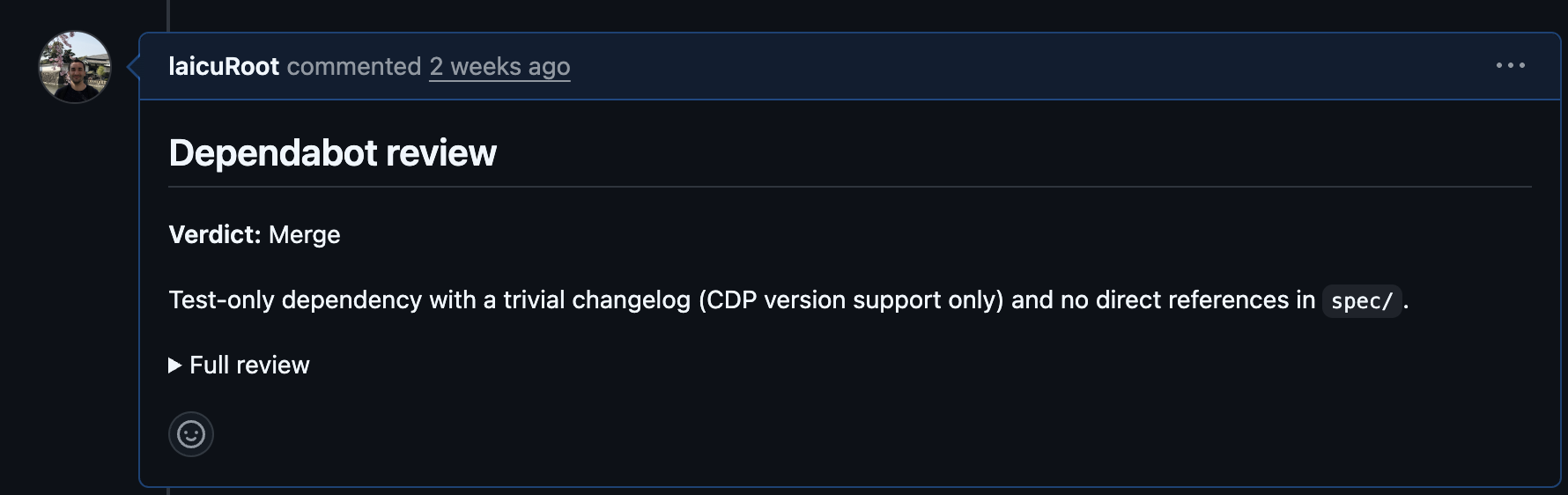
<p><img src="https://images.thoughtbot.com/xk062s3mpcx88di40bw992cvgs5b_image.png" alt="An example of the dependabot review comment in a PR"></p>

<p>The comment uses a collapsible <code>&lt;details&gt;</code> block, with the verdict and a
one-line reason above the fold so a teammate scrolling the timeline can
triage without expanding, and the full review tucked underneath. There’s
also an invisible marker in the comment, so if you re-run the audit a
week later, it can detect its own previous comments and skip PRs that
already have a review instead of spamming duplicates.</p>
<h2 id="give-it-a-try">
  
    Give it a try
  
</h2>

<p>Curious about the skill? Check it out <a href="https://github.com/thoughtbot/dependabot-review-thoughtbot">here</a>.
If you have any improvements or feedback, please open an issue or pull request. We love feedback!</p>

<aside class="related-articles"><h2>If you enjoyed this post, you might also like:</h2>
<ul>
<li><a href="https://thoughtbot.com/blog/internbot-chronicles-4-ci-test-metrics">Internbot Chronicles #4: CI &amp;amp; Test Metrics</a></li>
<li><a href="https://thoughtbot.com/blog/feature-branch-code-reviews">Feature branch code reviews</a></li>
<li><a href="https://thoughtbot.com/blog/introducing-copycopter">Introducing Copycopter: let your clients do the copy writing</a></li>
</ul></aside>
<img src="https://feed.thoughtbot.com/link/24077/17328151.gif" height="1" width="1"/>]]></content>
    <summary>A Claude skill to do the boring stuff for us.</summary>
    <thoughtbot:auto_social_share>true</thoughtbot:auto_social_share>
  </entry>
  <entry>
    <title>Retro-driven development</title>
    <link rel="alternate" href="https://feed.thoughtbot.com/link/24077/17326678/retro-driven-development"/>
    <author>
      <name>Rob Whittaker</name>
    </author>
    <id>https://thoughtbot.com/blog/retro-driven-development</id>
    <published>2026-04-28T00:00:00+00:00</published>
    <updated>2026-04-27T15:38:37Z</updated>
    <content type="html"><![CDATA[<p>Every session ends with a retro. This week, twenty-four
commits out of about a hundred and forty started with that
retro. Only a handful added anything new. I wasn’t building
the system anymore. It was refactoring itself.</p>

<p>It is Week Four.</p>
<h3 id="tuesday-four-commits-before-lunch">
  
    Tuesday: four commits before lunch
  
</h3>

<p>The 17th. Four refactor-from-retro commits before noon.
Reusing API connections across commands instead of
reconnecting each time. <code>/morning</code> filtering rules. Stale 1:1
prep dropped from the daily log. The system had been
running for three weeks, and friction points had
accumulated. I was working through them in fifteen-minute
bursts between meetings.</p>

<p>By the end of the day, I had added eight more commits. An
actionability check for <code>/context</code>. Top 7 priorities in
the daily log. A self-management outcome for my Fusion
goal. Retro after retro, feeding back into the commands.</p>
<h3 id="wednesday-picking-sides">
  
    Wednesday: picking sides
  
</h3>

<p>Wednesday ran hard. Nine refactor commits between meetings.</p>

<p>I read Sally Lait’s post on semantic calendar emoji and
colours. I copied her system straight into <code>/calendar</code>:</p>

<ul>
<li>🦚 Peacock (default): 1:1s, ad-hoc work</li>
<li>🫐 Blueberry: recurring group meetings</li>
<li>🌿 Sage: pairing, workshops, active work</li>
<li>🍌 Banana: internal socials, external community</li>
<li>✏️ Graphite: transit, food</li>
</ul>

<p>By evening, I’d refactored <code>/evening</code> to use Ruby instead
of Python. It was a small religious war. I picked the side
my team knows. The CLAUDE.md gained a preference note. This
sort of thing accumulates.</p>
<h3 id="thursday-the-anytime-problem">
  
    Thursday: the Anytime problem
  
</h3>

<p>The Anytime list from Things hit 75,000 characters. That’s
around 19,000 tokens. It triggered context compaction
mid-session. I noticed overdue items slipping through the
cracks.</p>

<p>I needed a filter. Not a prompt. A real script. I wrote
<code>bin/filter-anytime</code>.</p>
<div class="highlight"><pre class="highlight ruby"><code><span class="no">KEEP_FIELDS</span> <span class="o">=</span> <span class="sx">%w[Title UUID Tags Area Project Deadline Notes]</span>

<span class="n">items</span><span class="p">.</span><span class="nf">each</span> <span class="k">do</span> <span class="o">|</span><span class="n">raw</span><span class="o">|</span>
  <span class="n">status</span> <span class="o">=</span> <span class="n">raw</span><span class="p">[</span><span class="sr">/^Status:\s*(.+)/</span><span class="p">,</span> <span class="mi">1</span><span class="p">]</span>
  <span class="k">next</span> <span class="k">if</span> <span class="n">status</span> <span class="o">=~</span> <span class="sr">/completed|canceled/</span>

  <span class="k">if</span> <span class="n">tags</span><span class="p">.</span><span class="nf">include?</span><span class="p">(</span><span class="s2">"Waiting"</span><span class="p">)</span> <span class="o">&amp;&amp;</span> <span class="n">deadline_str</span>
    <span class="n">deadline</span> <span class="o">=</span> <span class="no">Date</span><span class="p">.</span><span class="nf">parse</span><span class="p">(</span><span class="n">deadline_str</span><span class="p">)</span> <span class="k">rescue</span> <span class="kp">nil</span>
    <span class="k">next</span> <span class="k">if</span> <span class="n">deadline</span> <span class="o">&amp;&amp;</span> <span class="n">deadline</span> <span class="o">&gt;=</span> <span class="n">today</span>
  <span class="k">end</span>

  <span class="nb">puts</span> <span class="n">raw</span>
<span class="k">end</span>
</code></pre></div>
<p>Fifty-five lines of Ruby. It runs before the agent sees the
list. The filter runs on rules. It doesn’t guess. Overdue
items stopped slipping.</p>

<p>Every session, the agent regenerates the filter. Not this
time. I wrote real code. Guessing has limits.</p>
<h3 id="monday-a-stretch-of-quiet-time">
  
    Monday: a stretch of quiet time
  
</h3>

<p>A quiet Monday morning. Six refactor commits in one
sitting. <code>/calendar</code>, <code>/inbox</code>, <code>/weekly</code>, <code>/context</code>. A
stretch of uninterrupted time before the week’s meetings
started.</p>

<p>That is when I realised the system had shifted. I wasn’t
grinding through tasks. I was editing the system that edits
my day. Maintenance, not task-grinding. The point of
building a system is to make it fade into the background.</p>
<h3 id="tuesday-the-cap">
  
    Tuesday: the cap
  
</h3>

<p>By the 24th, I noticed something else. My Anytime list
kept growing. Each session, I added new tasks from
retrospectives, meetings, and the inbox. The filter was
treating the symptom. The disease was that the input
exceeded the throughput.</p>

<p>I added a commitment cap.</p>
<div class="highlight"><pre class="highlight markdown"><code>Commitment cap: No more than 20 active next actions in
Things at any time across all areas (work and personal).
If /morning surfaces items that would exceed the cap,
flag it and ask what to defer before proceeding.
</code></pre></div>
<p><code>/morning</code> now blocks the Top 7 until I’ve deferred enough
items to sit under 20. The check is mechanical. I can’t
talk it into running anyway.</p>
<h3 id="what-i-learned">
  
    What I learned
  
</h3>

<p>The dominant mode this week wasn’t invention. It was
refactoring. Twenty-four commits out of about a hundred and
forty say “from retro” or “from feedback.” The system
improves by use, not by planning.</p>

<p>Retro-driven development. It works because the signal is
cheap and the fix is small. Notice a friction point. Name
it. In the next session, the command that caused the
friction receives a line of new guidance. No meetings. No
sprints. No planning.</p>

<p>The commitment cap came from one of those retros. So did
<code>bin/filter-anytime</code>. So did Sally Lait’s colour
conventions find their way into <code>/calendar</code>. Each started
as an irritation, ended as a line in a command file, and
changed how the next session ran.</p>
<h3 id="try-it">
  
    Try it
  
</h3>

<p>Retros don’t need to be long. End each session with one.
In the next session, fix what rubbed you the wrong way.
The system is yours.</p>

<aside class="related-articles"><h2>If you enjoyed this post, you might also like:</h2>
<ul>
<li><a href="https://thoughtbot.com/blog/theme-based-iterations">Theme-Based Iterations</a></li>
<li><a href="https://thoughtbot.com/blog/retrospective-fashionopoly">Retrospective: Fashionopoly</a></li>
<li><a href="https://thoughtbot.com/blog/this-week-in-open-source-11">This week in open source</a></li>
</ul></aside>
<img src="https://feed.thoughtbot.com/link/24077/17326678.gif" height="1" width="1"/>]]></content>
    <summary>Twenty-four refactor-from-retro commits in a week. How the management system started refactoring itself.</summary>
    <thoughtbot:auto_social_share>true</thoughtbot:auto_social_share>
  </entry>
</feed>