What is Linuxzoo?
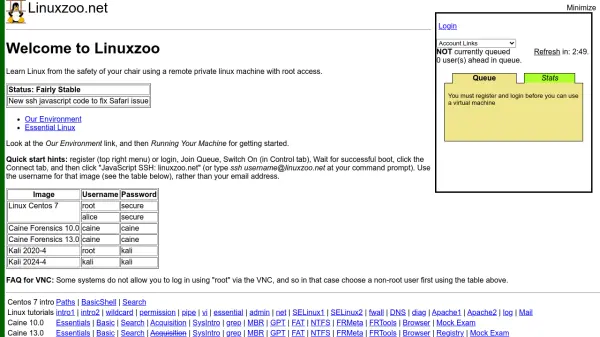
Linuxzoo is an educational platform designed to help users learn Linux operating systems in a safe, remote environment. It provides access to private Linux machines with root privileges, allowing for practical, hands-on experience without the need for local installation. The service supports various Linux distributions including CentOS, Caine Forensics, and Kali, each with specific usernames and passwords for secure access.
The platform includes step-by-step tutorials and guides covering essential Linux topics such as basic shell commands, file permissions, networking, system administration, and security features like SELinux and firewalls. Users can connect via JavaScript SSH or traditional SSH clients, making it accessible from any device with an internet connection. Linuxzoo is maintained by Edinburgh Napier University, ensuring a stable and educational-focused experience for beginners and advanced learners alike.
Features
- Remote Linux Machines: Access private Linux instances with root access for hands-on learning
- Multiple Distributions: Support for CentOS, Caine Forensics, and Kali Linux with specific login credentials
- Comprehensive Tutorials: Step-by-step guides covering basic to advanced Linux topics and administration
- Web-Based Access: Connect via JavaScript SSH or traditional SSH from any device with internet
- Educational Focus: Designed specifically for learning with structured paths and practice exercises
Use Cases
- Learning Linux fundamentals through practical exercises
- Practicing system administration tasks in a safe environment
- Studying cybersecurity and forensics with Kali and Caine distributions
- Preparing for Linux certification exams with mock tests
- Developing shell scripting and command-line skills without local setup
FAQs
-
How do I get started with Linuxzoo?
Register or login, join the queue, switch on your machine in the Control tab, wait for successful boot, then connect via the Connect tab using JavaScript SSH or traditional SSH. -
What Linux distributions are available on Linuxzoo?
Linuxzoo offers CentOS 7, Caine Forensics 10.0 and 13.0, and Kali 2020-4 and 2024-4, each with specific usernames and passwords for access. -
Can I access Linuxzoo from any device?
Yes, Linuxzoo can be accessed from any device with an internet connection and a web browser or SSH client, using either JavaScript SSH or traditional SSH methods. -
Is root access provided on all distributions?
Root access is available for most distributions, but some systems may require using a non-root user first for VNC login, as indicated in the username table. -
What topics are covered in the Linux tutorials?
Tutorials cover essential Linux topics including basic shell commands, file permissions, piping, vi editor, system administration, networking, SELinux, firewalls, DNS, and web server configuration.