# CSS

[CSS](https://developer.mozilla.org/en-US/docs/Web/CSS) is the design language of the internet. With this feature, you can copy CSS from anywhere and paste it into Webstudio, which will parse it and populate the various fields in the Style Panel.

## How to paste CSS

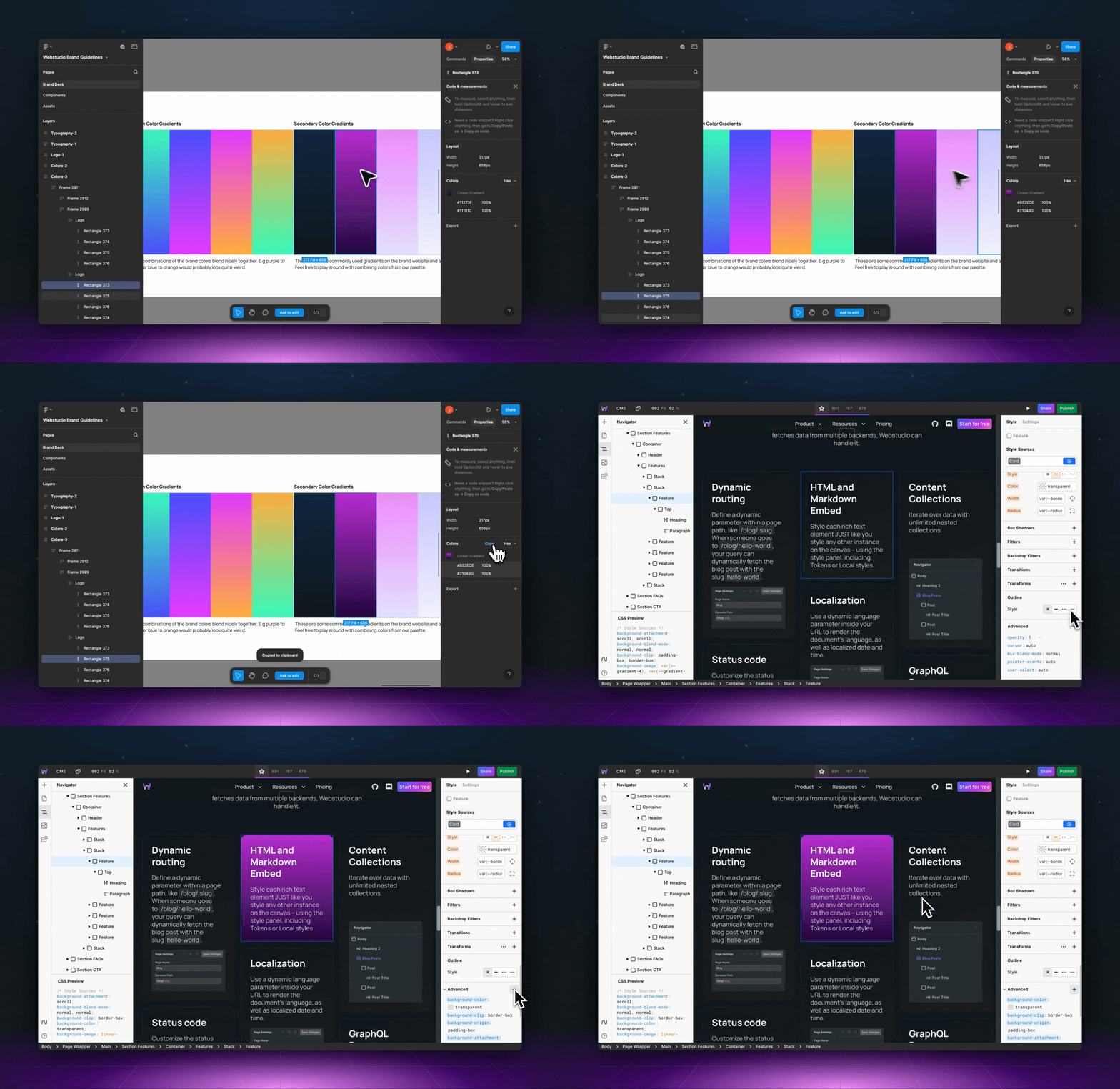
<figure><img src="https://330243581-files.gitbook.io/~/files/v0/b/gitbook-x-prod.appspot.com/o/spaces%2FTep4EGj6hSC54ozHujyK%2Fuploads%2Fgit-blob-c72eda4521be3f39de23a978c4f55bb8d2b1d472%2Fcss-paste.gif?alt=media" alt="pasting css from Figma into Webstudio"><figcaption></figcaption></figure>

1. Copy CSS declaration(s) such as `background: blue;`.
2. In Webstudio, go to the Style Panel > Advanced > and click "+".
3. Paste the CSS and press enter.

That's it.

The styles are parsed and displayed in their respective fields (they will also be shown in the Advanced section).

## Use cases

1. **Design tools like** [**Figma**](https://figma.com/) **and** [**Penpot**](https://penpot.app/) provide CSS, making copying and pasting individual layer styles into Webstudio easier.
2. **Third-party libraries like** [**Open Props**](https://open-props.style/) provide expertly crafted CSS variables, allowing you to import them via paste.
3. **Custom stylesheets** containing Design Systems and other declarations can be imported.
4. Inspect your website with [**DevTools**](https://developer.chrome.com/docs/devtools) and copy the CSS.
5. Online tutorials, [CodePen](https://codepen.io/), ChatGPT, and many other sources provide CSS.

## Pasting CSS declarations

When pasting into the Style Panel, Webstudio accepts CSS declarations (e.g., `background: blue;`). Selectors are not needed because Webstudio applies styles directly to the selected instance.

## Pasting HTML with CSS

When you paste HTML that includes `<style>` blocks, Webstudio extracts the CSS rules and converts class-based selectors into [design tokens](https://docs.webstudio.is/university/foundations/design-tokens). Each class becomes a reusable token, and styles are applied to the matching elements.

### Supported selectors

* **Class selectors** — `.card { padding: 16px; }` creates a token named "card"
* **Compound selectors** — `.card.featured { border: 1px solid gold; }` creates a combined token
* **Descendant selectors** — `.card .title { font-size: 24px; }` applies styles to `.title` elements inside `.card`
* **Child selectors** — `.card > .header { display: flex; }` applies styles to direct `.header` children of `.card`
* **Pseudo-states** — `.button:hover { opacity: 0.8; }` applies styles to the hover state
* **Media queries** — `@media (min-width: 768px) { .card { ... } }` creates breakpoint-specific styles, including nested `@media` rules

Non-class selectors (tag selectors, ID selectors, attribute selectors) are applied as inline styles where possible.

If a nested selector references elements not present in the pasted HTML, Webstudio shows a notification listing the skipped selectors.

## Tailwind CSS support

You can paste HTML with Tailwind CSS classes, and Webstudio will automatically convert the Tailwind utility classes into native Webstudio styles.

### How it works

1. Copy HTML containing Tailwind classes (e.g., `<div class="flex items-center gap-4 p-6 bg-white rounded-lg">`)
2. Paste into Webstudio
3. Webstudio creates the component structure and applies the equivalent styles

This is especially useful when:

* Using AI tools that generate Tailwind-based HTML
* Migrating from Tailwind projects
* Using Tailwind component libraries as a starting point

## Related

* [Markdown](https://docs.webstudio.is/university/foundations/copy-paste/markdown) – Paste Markdown to create components automatically
* [Webflow](https://docs.webstudio.is/university/foundations/copy-paste/webflow) – Copy Webflow components into Webstudio
* [Shortcuts](https://docs.webstudio.is/university/foundations/shortcuts) – Keyboard shortcuts for faster workflows
* [Commands and search](https://docs.webstudio.is/university/foundations/commands-and-search) – Quick access to commands and settings
* [Anatomy of the Webstudio builder](https://docs.webstudio.is/university/foundations/anatomy-of-the-webstudio-builder) – Overview of the Webstudio interface