# Finder Feature
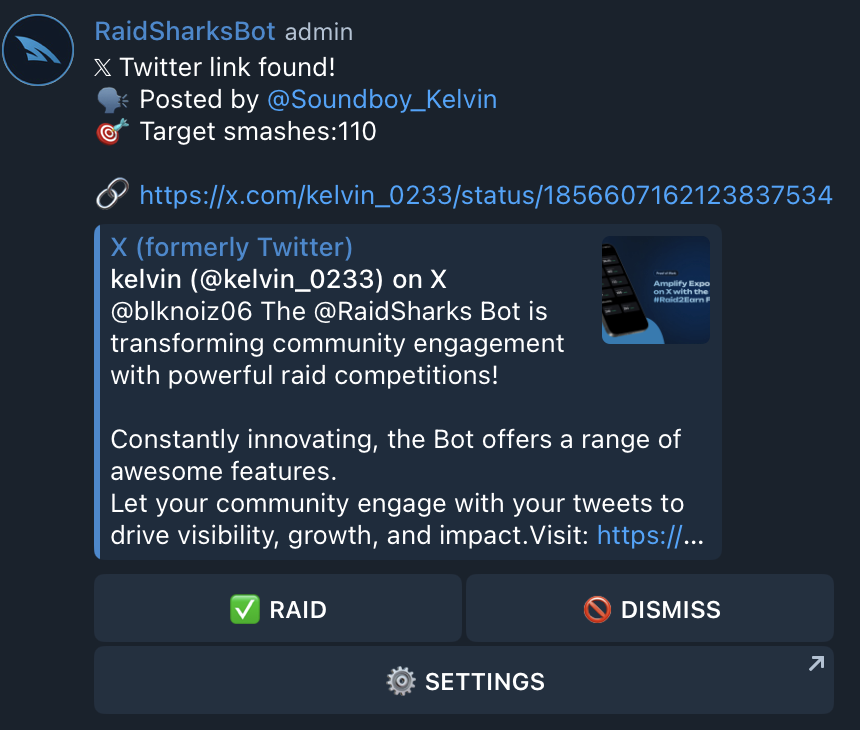
Activating this function will make the bot react to any Twitter (X) link which is thrown in your chat.\
\
As soon as the bot finds a link, it will prompt a message containing two buttons which are only available for admins.\
It lets you decide to "Raid" or to "Dismiss" a tweet with a single click of a button.
Finder message
It also shows which Telegram user provided the tweet and the current set target.
{% hint style="info" %}
If admins decide to raid a provided tweet, RaidSharksBot will save this information to its internal database. \
\
This data will be available to admins through [csv export](https://docs.raidsharksbot.com/leaderboard/leaderboard-export-csv) of leaderboard data.\
\
You can use this data to reward people who provided good content which was raided.
{% endhint %}
1. Bring up settings menu according to ["Access Settings UI"](https://docs.raidsharksbot.com/raid-settings/access-settings-ui).
2. Turn Finder ON or OFF using the toggle switch
{% hint style="warning" %}
Finder reacts to all Twitter (X) links thrown into the chat. Your admins have to make sure that they check the quality of the tweet before raiding them.
{% endhint %}