About DGA Security
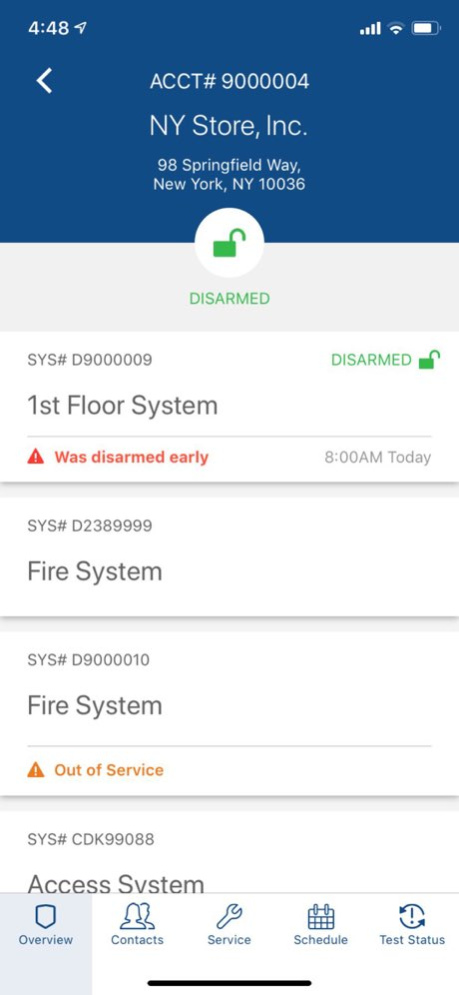
Manage your DGA security systems from anywhere, anytime. With the DGA Mobile App in your back pocket, it’s easy to view the current status of all the DGA-secured locations, change arm/disarm schedules, manage contacts and...
Manage your DGA security systems from anywhere, anytime. With the DGA Mobile App in your back pocket, it’s easy to view the current status of all the DGA-secured locations, change arm/disarm schedules, manage contacts and Emergency Call Lists, schedule service requests, run system activity reports, and more. This is another way DGA keeps you connected and in control.
Version History Bug fixes and improvements 3.5 Jan 29 - Added Spanish language support Users can now access the full application experience in Spanish by selecting it in the language settings. - On/Off test history visualization From within the System Activity panel, users can now access the On/Off test history for their systems - Bug fixes and improvements 3.4 11/20/2025 - Enhanced Security Improved backend security measures when updating V-Codes to ensure greater data protection. - Bug Fixes Resolved an issue where incorrect statuses were appearing in the Arming History. Fixed a bug causing duplicate site entries on some user accounts. Addressed an issue that was preventing the successful deletion of contacts. - Improved Analytics Enhanced internal analytics to support more efficient debugging and issue resolution 3.3 08/07/2025 We’ve added a faster and more secure way to log in. • Biometric Login Support – You can now use Face ID or Touch ID to access your account, making sign-in quicker and more secure than ever. • General performance improvements and minor bug fixes. 3.2 06/17/2025 Bug fixes and improvements. 3.1 05/08/2025 Bug fixes and improvements. 3.0 04/28/2025 DGA Mobile Release Notes (v2.0): We've been working on improving the app experience. In this release, we've made improvements for scheduling Service Tickets, updating Schedules, and extending Tests. 2.0 06/06/2022 What’s New · Alphabetized the list of “Related Locations” shown when adding/editing a contact. · Changed the URL for the Forgot Password link from https://beta.mydga.com/recover to https://connect.dga.com/recover. · Embedded external links into the app · Changed phone type abbreviations Bug Fix · A minor bug fixed for the Alarm Activity Dispatched and Alarm Activity No Dispatch reports. 1.4 04/10/2020 Privacy Policy added to menu 1.3 04/30/2019 · Enhanced app security with two-factor authentication · General UX improvements on the app login screen. · Non-critical bug fixes. 1.2 04/25/2019 Reports now show reports for all accounts. 1.1 09/26/2018 1.0 04/23/2018
Previous Versions
Here you can find the changelog of DGA Security since it was posted on our website on 2023-09-05 23:17:26.
The latest version is 3.5 and it was updated on 2026-06-23 17:27:52. See below the changes in each version.
DGA Security version 3.5
Updated At: 2026-06-02
Changes: Version History Bug fixes and improvements 3.5 Jan 29 - Added Spanish language support
Users can now access the full application experience in Spanish by selecting it in the language settings.
- On/Off test history visualization
From within the System Activity panel, users can now access the On/Off test history for their systems
- Bug fixes and improvements 3.4 11/20/2025 - Enhanced Security
Improved backend security measures when updating V-Codes to ensure greater data protection.
- Bug Fixes
Resolved an issue where incorrect statuses were appearing in the Arming History.
Fixed a bug causing duplicate site entries on some user accounts.
Addressed an issue that was preventing the successful deletion of contacts.
- Improved Analytics
Enhanced internal analytics to support more efficient debugging and issue resolution 3.3 08/07/2025 We’ve added a faster and more secure way to log in.
• Biometric Login Support – You can now use Face ID or Touch ID to access your account, making sign-in quicker and more secure than ever.
• General performance improvements and minor bug fixes. 3.2 06/17/2025 Bug fixes and improvements. 3.1 05/08/2025 Bug fixes and improvements. 3.0 04/28/2025 DGA Mobile Release Notes (v2.0):
We've been working on improving the app experience.
In this release, we've made improvements for scheduling Service Tickets, updating Schedules, and extending Tests. 2.0 06/06/2022 What’s New
· Alphabetized the list of “Related Locations” shown when adding/editing a contact.
· Changed the URL for the Forgot Password link from https://beta.mydga.com/recover to https://connect.dga.com/recover.
· Embedded external links into the app
· Changed phone type abbreviations
Bug Fix
· A minor bug fixed for the Alarm Activity Dispatched and Alarm Activity No Dispatch reports. 1.4 04/10/2020 Privacy Policy added to menu 1.3 04/30/2019 · Enhanced app security with two-factor authentication
· General UX improvements on the app login screen.
· Non-critical bug fixes. 1.2 04/25/2019 Reports now show reports for all accounts. 1.1 09/26/2018 1.0 04/23/2018
DGA Security version 3.5
Updated At: 2026-01-29
Changes: Bug fixes and improvements
DGA Security version 3.3
Updated At: 2025-08-07
Changes: Aug 7, 2025
Version 3.3
- Enhanced Security
Improved backend security measures when updating V-Codes to ensure greater data protection.
- Bug Fixes
Resolved an issue where incorrect statuses were appearing in the Arming History.
Fixed a bug causing duplicate site entries on some user accounts.
Addressed an issue that was preventing the successful deletion of contacts.
- Improved Analytics
Enhanced internal analytics to support more efficient debugging and issue resolution
DGA Security version 3.2
Updated At: 2025-06-17
Changes: Jun 17, 2025
Version 3.2
We’ve added a faster and more secure way to log in.
• Biometric Login Support – You can now use Face ID or Touch ID to access your account, making sign-in quicker and more secure than ever.
• General performance improvements and minor bug fixes.
DGA Security version 3.1
Updated At: 2025-05-08
Changes: May 8, 2025
Version 3.1
Bug fixes and improvements.
DGA Security version 3.0
Updated At: 2025-04-28
Changes: Apr 28, 2025
Version 3.0
Bug fixes and improvements.
DGA Security version 2.0
Updated At: 2022-06-06
Changes: Jun 6, 2022
Version 2.0
DGA Mobile Release Notes (v2.0):
We've been working on improving the app experience.
In this release, we've made improvements for scheduling Service Tickets, updating Schedules, and extending Tests.
Disclaimer
Official App Store Link
We do not host DGA Security on our servers. We did not scan it for viruses, adware, spyware or other type of malware. This app is hosted by Apple and passed their terms and conditions to be listed there. We recommend caution when installing it.
The App Store link for DGA Security is provided to you by apps112.com without any warranties, representations or guarantees of any kind, so access it at your own risk.
If you have questions regarding this particular app contact the publisher directly. For questions about the functionalities of apps112.com contact us.