
For a person with a limb difference (e.g., someone missing an arm or hand), receiving a custom 3D-printed assistive device is a life-changing moment.
But for people living in remote communities or developing countries without access to local specialists, the very first step creates an immediate barrier: The measurement photos.
To design a custom-fit assistive device, accessibility experts require precise photos of the user's residual limb (i.e. their disabled limb) alongside a ruler for scale.
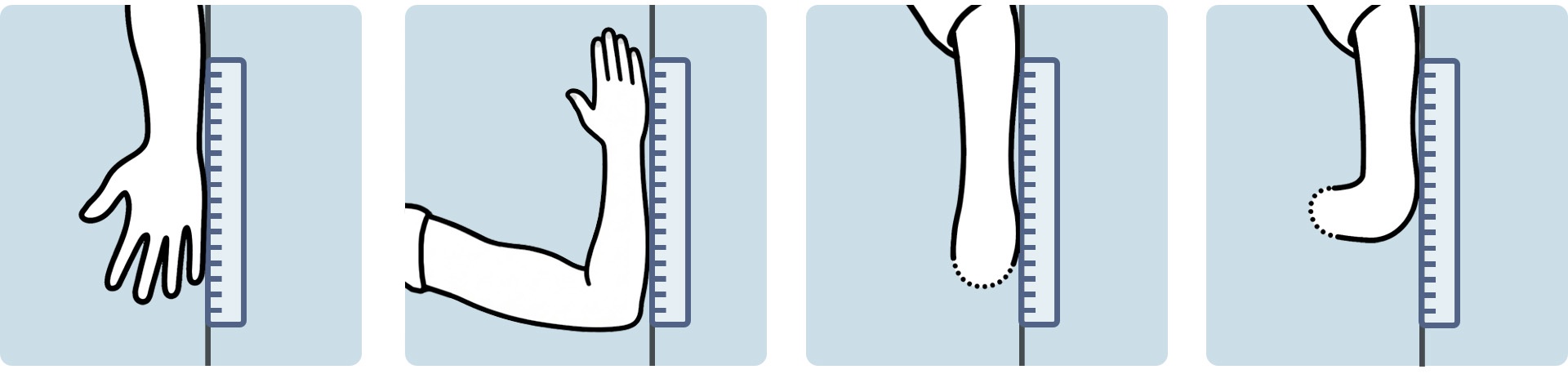
While simple in theory, in practice this is a major friction point for disabled users and accessibility specialists alike:
Loss of independence: Capturing these photos is often physically impossible for disabled users to perform alone, forcing them to rely on others just to start the process.
Perspective errors: If the camera isn't positioned directly above the limb, measurements can become distorted, rendering the resulting 3D print unusable.
Unclear requirements: The current process relies on static PDF documents. These can be difficult to interpret visually and hard to translate for non-English speakers, creating a significant barrier for international users.
Missing or incorrect data: Users may sometimes forget key requirements, such as including the ruler for scale, or positioning their limb correctly.
This results in a cycle of "email ping-pong." Accessibility experts spend hundreds of hours reviewing bad photos and coaching users on how to retake them. What could be a 5-minute process often stretches out over weeks, delaying the delivery life-changing assistive devices.

The Access3D AI Capture App solves this problem by transforming the user's smartphone into an intelligent, AI-powered photography assistant. By replacing static PDF instructions with an interactive AI agent, we empower users to capture measurement photos independently and efficiently.

Gemini 3 acts as an instant quality control engineer by analysing photos against strict criteria.
If a photo fails the check, the AI provides specific, constructive feedback on how to fix it, preventing invalid data from reaching the accessibility specialists.

Criteria includes:
- Is a ruler present?
- Is the limb positioned as described?
- Is the limb fully in frame?
- Is the angle from directly above?
- Is the photo clear and not blurry?
- Is the lighting sufficient?

This is our core innovation powered by Gemini Live.
For users who aren't confident with taking photos, the AI photo assistant will coach them in real-time to assist with taking the best photo possible.

- Spatial Reasoning: The AI understands the user's camera feed to judge perspective, alignment, and other key criteria in real-time.
- Voice Guidance: Using Gemini's native audio generation, the AI speaks to the user. E.g. "Move your phone slightly to the left...", "I can't see the ruler...", "Make sure you take the photo from directly above...".
- Natural Voice: Gemini's natural-sounding voice capability provides helpful guidance in a truly helpful and unintrusive way.
This feature allows whoever is taking the photo, whether that is the user or an assistant, to be confident that their measurement photos are precise and accurate on their first attempt.

We replaced the old unintuitive PDF instruction guide with an easy to understand step-by-step wizard.
This new process is much easier to understand and ensures no necessary steps can be missed.

Users are guided through the process one bite-sized task at a time:
- Step 1: Welcome screen and user requirements.
- Step 2: Residual limb selection.
- Step 3: Photos explanation.
- Step 4: Instruction 1: Camera angle.
- Step 5: Instruction 2: Ruler alignment.
- Step 6: Instruction 3: Arm position.
- Step 7: Photo 1: Hand (Palm Up).
- Step 8: Photo 2: Arm (90° Bend).
- Step 9: Photo 3: Residual Limb (Straight).
- Step 10: Photo 4: Residual Limb (90° Bend).
- Step 11: Review and Save.

When all photos are captured and validated, the app compiles them into a standardised high-resolution PDF. This ensures the measurement photos can be easily saved and shared with accessibility experts.
For easy archival and backup, the user can choose to email themselves a copy of their compiled PDF document.

We also closed the loop by allowing for the user to send their measurement photos directly to Free3DHands, a charity dedicated to manufacturing free assistive devices. This feature eliminates the confusion of file attachments and ensures the accessibility specialists receive the highest possible quality photos.
Standardising this process ensures that accessibility experts receive the correct information in a standard format, every time.

Accessibility is global. By leveraging Gemini's natural language capabilities, the application instructions and the Live Photo Assistant's voice guidance can be translated on the fly, breaking down language barriers for users in non-English speaking regions.

The Access 3D AI Capture App is a photography tool designed to guide users in capturing precise, standardised images of their limbs. This streamlined process allows accessibility specialists to stop wasting their time by troubleshooting bad photos and focus entirely on designing life-changing assistive devices.
To be 100% clear: this app does not provide medical advice.

The Access3D AI Capture App integrates the Gemini 3 API for photo verification and the Gemini Live API (2.5 Flash Native Audio Preview) for real-time coaching. This approach handles the conflicting requirements of precision and speed.
Photo Verification with Gemini 3
We use Gemini 3 Flash Preview (gemini-3-flash-preview) to enforce strict photo requirements.
The model runs server-side via a Next.js API route. It receives base64 images and a dynamic prompt that changes based on the specific step ID (e.g., requesting a specific elbow angle). We enforce Structured JSON output, allowing the app to programmatically accept or reject photos based on the model's boolean logic.
Standard vision models often misidentify atypical anatomy as errors. We utilised Gemini 3's superior reasoning to implement complex rules, ensuring it validates limbs correctly while still rejecting bad photos. This integration removes the need for human review, giving users immediate, reliable confirmation that their photos are usable for assistive device 3D modeling.
AI Photo Assistant with Gemini Live
We use Gemini 2.5 Flash Native Audio (gemini-2.5-flash-native-audio-preview) to guide users in real-time to take the best possible measurement photos.
A custom React hook connects directly to the Gemini WebSocket. It streams downscaled video frames (512px) and uses a custom Web Audio API pipeline to decode and queue the raw PCM audio chunks for smooth playback.
The primary challenge was latency; a user needs instant feedback when attempting to take a photo with the AI Photo Assistant mode. By establishing a direct pulse (one frame every 2.5s), we achieved a balance where the AI can verbally monitor technical variables (lighting, blur, framing) and provide guidance without overwhelming the connection.


The Access 3D AI Capture App does more than just take pictures. It standardises the intake process for assistive device fabrication. By guaranteeing high-quality input data, we empower organizations like Free3DHands to scale their operations and focus on what they do best: designing and printing devices that change lives.
While this version of the app is configured for the specific requirements of the Free3DHands charity, the core framework is agnostic. The wizard steps, reference diagrams, and AI validation logic can be easily reconfigured for other organisations or different types of prosthetics. This tool proves that we can use AI to solve physical accessibility challenges.
What's next?
We have laid the foundation, but there is more to do to make this tool truly universal.
Different Flows for Different Disabilities We plan to expand the application to support unique workflows tailored to specific physical needs. By creating different instructions and interaction models, we can ensure the app is usable by a wider range of people with varying limb differences and mobility constraints.
Improved Photo Assistant AI We aim to refine the Gemini Live integration. This will allow the Live Assistant to handle more complex edge cases and provide even more accurate guidance to the user.
Repurposing for Non-Accessibility Contexts The core technology - an AI that understands geometry and coaches you to take better photos - has potential far beyond this specific project. We envision repurposing this "AI Photographer" framework for any context where standardised, high-quality photos are critical, including completely non-accessibility related use cases.

Log in or sign up for Devpost to join the conversation.