Zum Inhalt springen
WordPress.org

Deutsch

  • Themes
  • Plugins
  • News
  • Support
  • Über
    • Learn WordPress
    • Documentation (en)
    • Foren
    • Developers (en)
    • WordPress.tv
  • Meetups
  • Mitmachen
  • FAQ
  • Hol dir WordPress
Hol dir WordPress
WordPress.org

Plugin Directory

hideShowPassword

  • Ein Plugin einreichen
  • Meine Favoriten
  • Anmelden
  • Ein Plugin einreichen
  • Meine Favoriten
  • Anmelden

Dieses Plugin ist nicht mit den jüngsten 3 Hauptversionen von WordPress getestet worden. Es wird möglicherweise nicht mehr gewartet oder unterstützt und kann Kompatibilitätsprobleme haben, wenn es mit neueren Versionen von WordPress verwendet wird.

hideShowPassword

Von Barry Ceelen
Herunterladen
  • Details
  • Rezensionen
  • Installation
  • Entwicklung
Support

Beschreibung

Lets you easily show or hide the contents of the password field on the WordPress login screen. Uses the excellent hideShowPassword jQuery plugin by the equally excellent Cloud Four.

Suggested reading: „a compendium of why and how to show passwords and what’s coming next“ by Luke Wroblewski.

Optionen

A settings section is added to the ‚General Settings‘ page. You can select between toggling password visibility via an icon in the password field (default) or via a checkbox below the password field.

Übersetzungen

The default setting of toggling the password via an icon in the password field does not require translation as no text will be visible to the user. If you select the option of toggling the password via a checkbox, the following translations are included:

  • Niederländisch
  • Deutsch

GitHub

Fork me on GitHub.

Screenshots

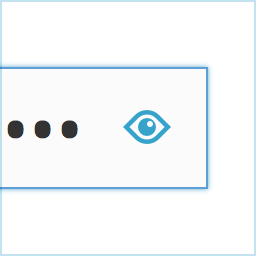
  • Adds an icon to the password field on the login screen.
  • Show your password by clicking the icon.
  • Alternatively, toggle the password via a checkbox labeled „Show Password“.

Installation

  1. Install hideShowPassword either via the Plugins Add New Screen, or by uploading the files to your server
  2. Aktiviere das Plugin in WordPress über das Menü ‚Plugins‘

FAQ

Installation Instructions
  1. Install hideShowPassword either via the Plugins Add New Screen, or by uploading the files to your server
  2. Aktiviere das Plugin in WordPress über das Menü ‚Plugins‘

Rezensionen

Woocommerce Admin Only?

flyingkites 3. Februar 2022
Seems to only work on the admin login. Does not work on the site login for Woocommerce.

Password protected pages

josanto48 9. Januar 2020
Is there any way to use it on password protected pages?

Indispensable

lhberg 5. August 2019
is it possible to motivate you to update the plugin for WP 5.x compatibility by sending you some bucks for the coffee you’ll need? If yes, please provide a donation link on the plugin page! Thanks, Lukas

It Works!

the masked cat 11. April 2018
I am using WP 4.9.5 and this old buddy still works.
Alle 6 Rezensionen lesen

Mitwirkende und Entwickler

„hideShowPassword“ ist Open-Source-Software. Folgende Menschen haben an diesem Plugin mitgewirkt:

Mitwirkende
  • Barry Ceelen

„hideShowPassword“ wurde in 1 Sprache übersetzt. Danke an die Übersetzer für ihre Mitwirkung.

Übersetze „hideShowPassword“ in deine Sprache.

Interessiert an der Entwicklung?

Durchstöbere den Code, sieh dir das SVN Repository an oder abonniere das Entwicklungsprotokoll per RSS.

Änderungsprotokoll

2.0.1

  • For WordPress version 4.3 and up, Dashicons is used for the toggle icon.

2.0.0

  • Adds the option of toggling password visibility via a checkbox below the password field
  • Update hideShowPassword.js to version 2.0.4

1.0.4

  • Update hideShowPassword.js to version 2.0.3, fixes #11, #13

1.0.3

  • Update hideShowPassword.js to version 2.0.1, fixes #10

1.0.2

  • Update hideShowPassword.js to version 1.0.3, set touchSupport to true

1.0.1

  • Hide default Internet Explorer 10 control for toggling password visibility

1.0.0

  • Erstversion

Meta

  • Version 2.0.1
  • Zuletzt aktualisiert vor 8 Jahren
  • Aktive Installationen 500+
  • WordPress-Version 3.5.1 oder höher
  • Getestet bis 4.9.28
  • Sprachen

    English (US) und Swedish.

    Übersetze in deine Sprache

  • Schlagwörter
    loginpasswordshow passwordtoggle
  • Erweiterte Ansicht

Bewertungen

4.5 von 5 Sternen.
  • 4 5-Sterne-Rezensionen 5 Sterne 4
  • 1 4-Sterne-Rezension 4 Sterne 1
  • 1 3-Sterne-Rezension 3 Sterne 1
  • 0 2-Sterne-Rezensionen 2 Sterne 0
  • 0 1-Sterne-Rezensionen 1 Stern 0

Meine Rezension hinzufügen

Alle Rezensionen anzeigen

Mitwirkende

  • Barry Ceelen

Support

Möchtest du etwas mitteilen? Brauchst du Unterstützung?

Support-Forum anzeigen

  • Über
  • News
  • Hosting (engl.)
  • Datenschutz
  • Showcase (engl.)
  • Themes
  • Plugins
  • Vorlagen
  • Learn
  • Support
  • Entwicklung (engl.)
  • WordPress.tv ↗
  • Mitwirken (engl.)
  • Veranstaltungen
  • Spenden (engl.) ↗
  • Five for the Future (engl.)
  • WordPress.com ↗
  • Matt (engl.) ↗
  • bbPress (engl.) ↗
  • BuddyPress (engl.) ↗
WordPress.org
WordPress.org

Deutsch

  • Das X-Konto (früher Twitter) von WordPress.org besuchen
  • Das Bluesky-Konto von WordPress.org besuchen
  • Das Mastodon-Konto von WordPress.org besuchen
  • Das Threads-Konto von WordPress.org besuchen
  • Die Facebook-Seite von WordPress.org besuchen
  • Das Instagram-Konto von WordPress.org besuchen
  • Das LinkedIn-Konto von WordPress.org besuchen
  • Das TikTok-Konto von WordPress.org besuchen
  • Den YouTube-Kanal von WordPress.org besuchen
  • Das Tumblr-Konto von WordPress.org besuchen
Code ist Poesie.