<?xml version="1.0" encoding="UTF-8"?><feed
	xmlns="http://www.w3.org/2005/Atom"
	xmlns:thr="http://purl.org/syndication/thread/1.0"
	xml:lang="en-US"
	>
	<title type="text">Build Studio</title>
	<subtitle type="text">Calgary Web Design</subtitle>

	<updated>2024-08-28T18:55:39Z</updated>

	<link rel="alternate" type="text/html" href="https://buildstudio.ca/" />
	<id>https://buildstudio.ca/feed/atom/</id>
	<link rel="self" type="application/atom+xml" href="https://buildstudio.ca/feed/atom/" />

	<!--Built on the Build Studio Framework-->
<icon>https://buildstudio.ca/wp-content/uploads/2021/01/cropped-apple-touch-icon-1-32x32.png</icon>
	<entry>
		<author>
			<name>Russ Fee</name>
					</author>

		<title type="html"><![CDATA[Landing Pages vs. Full Sites]]></title>
		<link rel="alternate" type="text/html" href="https://buildstudio.ca/landing-pages-vs-full-sites/" />

		<id>https://buildstudio.ca/?p=3549</id>
		<updated>2024-08-28T18:55:39Z</updated>
		<published>2024-08-28T18:53:01Z</published>
		<category scheme="https://buildstudio.ca/" term="Business" />
		<summary type="html"><![CDATA[<p><img width="1280" height="500" src="https://buildstudio.ca/wp-content/uploads/2024/08/landingPageMan.jpg" class="attachment-post-thumbnail size-post-thumbnail wp-post-image" alt="" decoding="async" fetchpriority="high" srcset="https://buildstudio.ca/wp-content/uploads/2024/08/landingPageMan.jpg 1280w, https://buildstudio.ca/wp-content/uploads/2024/08/landingPageMan-300x117.jpg 300w, https://buildstudio.ca/wp-content/uploads/2024/08/landingPageMan-1024x400.jpg 1024w, https://buildstudio.ca/wp-content/uploads/2024/08/landingPageMan-768x300.jpg 768w" sizes="(max-width: 1280px) 100vw, 1280px" /></p>
<p>What if a website is just too damn much? Every now and then we have a client that doesn’t require an entire site as their needs are a bit different from others. For such people, a simple landing page is all they need. But what are they? It’s easy to imagine them as a homepage stripped of everything else, but the truth is they serve very different purposes.</p>
<h3>WHEN TO USE A LANDING PAGE</h3>
<p>Landing pages are typically useful when you have a singular focus. Perhaps the focus is on running an ad campaign, a special offer, or pushing people towards a product.</p>
<p>Some use landing pages as placeholders for their full site, but more and more we see landing pages being deployed with very little concern for a future site at all. They end up being the thing users land on (get it?) after clicking a Google ad or tapping one of those cool Instagram products. These pages aren’t necessarily meant to immerse you in the philosophy of the company or provide a list of the people on their board of directors. You’ve gone there wanting one thing, they know it, and the landing page is going to give it to you. That’s it.</p>
<h3>HOME PAGES VS. LANDING PAGES</h3>
<p>As part of a bigger unit, a home page is best thought of as a directory of sorts for the rest of the site. Each section will be delineated and will function to send users to a different part of the site.</p>
<p>Up top you’ll find a navigation menu so you can jump around the site. The banner will probably tell you what the company does and have a button that lets you learn more. The services section will educate you on the wide breadth of offerings. Surely there will be some imagery of people (just like you! Weird!) using the product or benefitting from the product or service. Next maybe we’ve got a blog so you can see some use cases or learn more about what’s going on. Maybe there’s a social media section next so you can make sure you never miss a critical meme. You’ll want to know you’re dealing with actual people, so let’s toss a team page in there for good measure, and we’ll tie it all up with a footer that repeats the menu and gives contact info. The whole thing will probably be tied together with a sleek, minimalist design so that you can tell this company is efficient and knows their stuff.</p>
<p>A typical landing page is quite a bit less scattershot than this. Again, the focus comes down to a single goal rather than a collection of them. Here’s the product you just saw next to a giant button that says “BUY.” That’s about all you need.</p>
<p>When I first started making landing pages for a client in the Search Engine Optimization space, I was actually jarred by how little attention there was to actual Search Engine Optimization. To him, the ad that gets the person to the landing page is the search engine stuff, by the time the user hits the landing page, the job is to get out of the way and let the thing happen.</p>
<h3>KEYS TO A SUCCESSFUL LANDING PAGE</h3>
<p>So we know what a landing page won’t have (or at least what it will have less of), so what will it have instead? As you’ve probably guessed, the goal here is clarity, simplicity, and ease of use.</p>
<p>For this to work we need tighter than usual copy. This isn’t the time to let the CEO wax poetic about their dedication to quality, how they aren’t happy until you’re happy, or any of the other things that are purposefully hard to quantify. The user has landed here not by happenstance, but because they clicked something with intention; it’s time to get to the point.</p>
<p>Visuals will need to be crisp and obvious, but we won’t have as much room for nuance. This thing is to be streamlined and quick, so don’t wag your design tail in anybody’s face for too long.</p>
<p>It’s always important to have a clear call to action, but it’s doubly important here. Often when we meet with clients about calls to action on home pages of full sites, it can be hard to narrow it down to fewer than 3 things because a full site is trying to do so much. With a landing page though, you get one kick at the can, so make it count. This shouldn’t be too hard because the landing page by definition has a singular goal, so that’s your call to action.</p>
<h3>MISTAKES WITH LANDING PAGES</h3>
<p>This might be tricky to write without just inverting the previous section, because that’s pretty much what we’re definitely going to do.</p>
<p>The enemy of landing pages is complexity and volume. It’s hard as a business owner or employee to keep things concise because you’re excited and there’s so much to talk about. This isn’t the time for that though. That’s for your blog, and blog you should! But today we’re talking about a singular goal shot from a cannon.</p>
<p>I touched on design in a previous paragraph, and it begs repeating: this isn’t the time to get cute. Design it well, of course, but this isn’t the time for swooping animations and eye-catching videos. Remember, this is a different animal than your everyday web visitor. They came here to get in and get out, so make sure you’re not standing in the way of them doing that.</p>
<h3>REAL-WORLD EXAMPLES OF LANDING PAGES IN ACTION</h3>
<div style="display: flex; align-items: flex-start; margin-bottom: 20px;">
<div style="flex: 1; margin-right: 20px;">
<h5 style="margin-bottom: 10px;">Coco Village</h5>
<p style="margin: 0;">Coco Village does a great job of presenting what is essentially a sales brochure as a web page. You don't have to dig too hard here to see there's a sale, and you sure don't have to dig much harder to see the products. Two paragraphs adorn the bottom to tell you who they are, but beyond that, this is just a sales brochure (and a good one at that).</p>
</p></div>
<p>    <a href="https://buildstudio.ca/wp-content/uploads/2024/08/Coco-Village-1.png" style="flex-shrink: 0;"><br />
        <img class="alignnone" src="https://buildstudio.ca/wp-content/uploads/2024/08/Coco-Village-square-300x250.jpg" alt="" width="300" height="250" /><br />
    </a>
</div>
<div style="display: flex; align-items: flex-start; margin-bottom: 20px;">
<div style="flex: 1; margin-right: 20px;">
<h5 style="margin-bottom: 10px;">Netflix</h5>
<p style="margin: 0;">There's plenty to learn about with Netflix, but this landing page isn't geared to someone who wants to know it all. It's a quick and effective page that outlines the 3 biggest features of the platform. The top questions new subscribers ask are found below in a collapsible accordion, so everything stays nice and compact.</p>
</p></div>
<p>    <a href="https://buildstudio.ca/wp-content/uploads/2024/08/Netflix-1.png" style="flex-shrink: 0;"><br />
        <img class="alignnone" src="https://buildstudio.ca/wp-content/uploads/2024/08/Netflix-1-square-300x250.jpg" alt="" width="300" height="250" /><br />
    </a>
</div>
<div style="display: flex; align-items: flex-start; margin-bottom: 20px;">
<div style="flex: 1; margin-right: 20px;">
<h5 style="margin-bottom: 10px;">CD Baby</h5>
<p style="margin: 0;">CD Baby goes closer to an actual site in that they hit all the hits: what they do, what they cost, and how they can help. The difference is that no one section gets more than paragraph, so we get a brilliant top-down view of what the company does.</p>
</p></div>
<p>    <a href="https://buildstudio.ca/wp-content/uploads/2024/08/CDbaby-1.png" style="flex-shrink: 0;"><br />
        <img class="alignnone" src="https://buildstudio.ca/wp-content/uploads/2024/08/CDbaby-1-square-300x250.jpg" alt="" width="300" height="250" /><br />
    </a>
</div>
<h3>CONCLUSION</h3>
<p>This certainly isn’t meant to persuade anybody that a landing page is somehow superior to a full site (that would make me a curiously deficient website creator). The point is that depending on your situation, sometimes a landing page will do, and sometimes a full site will do.</p>
<p>If you find yourself pushing a singular product or wanting to make a splash with some form of campaign, a landing page might just do the trick.</p>
<p>As always, if you feel unsure if it’s time to make a landing page or a site, drop us a line and we’ll help you chart a path.</p>
<p>The post <a href="https://buildstudio.ca/landing-pages-vs-full-sites/">Landing Pages vs. Full Sites</a> appeared first on <a href="https://buildstudio.ca">Build Studio</a>.</p>
]]></summary>

					<content type="html" xml:base="https://buildstudio.ca/landing-pages-vs-full-sites/"><![CDATA[<p><img width="1280" height="500" src="https://buildstudio.ca/wp-content/uploads/2024/08/landingPageMan.jpg" class="attachment-post-thumbnail size-post-thumbnail wp-post-image" alt="" decoding="async" loading="lazy" srcset="https://buildstudio.ca/wp-content/uploads/2024/08/landingPageMan.jpg 1280w, https://buildstudio.ca/wp-content/uploads/2024/08/landingPageMan-300x117.jpg 300w, https://buildstudio.ca/wp-content/uploads/2024/08/landingPageMan-1024x400.jpg 1024w, https://buildstudio.ca/wp-content/uploads/2024/08/landingPageMan-768x300.jpg 768w" sizes="auto, (max-width: 1280px) 100vw, 1280px" /></p>What if a website is just too damn much? Every now and then we have a client that doesn’t require an entire site as their needs are a bit different from others. For such people, a simple landing page is all they need. But what are they? It’s easy to imagine them as a homepage stripped of everything else, but the truth is they serve very different purposes.
<h3>WHEN TO USE A LANDING PAGE</h3>
Landing pages are typically useful when you have a singular focus. Perhaps the focus is on running an ad campaign, a special offer, or pushing people towards a product.

Some use landing pages as placeholders for their full site, but more and more we see landing pages being deployed with very little concern for a future site at all. They end up being the thing users land on (get it?) after clicking a Google ad or tapping one of those cool Instagram products. These pages aren’t necessarily meant to immerse you in the philosophy of the company or provide a list of the people on their board of directors. You’ve gone there wanting one thing, they know it, and the landing page is going to give it to you. That’s it.
<h3>HOME PAGES VS. LANDING PAGES</h3>
As part of a bigger unit, a home page is best thought of as a directory of sorts for the rest of the site. Each section will be delineated and will function to send users to a different part of the site.

Up top you’ll find a navigation menu so you can jump around the site. The banner will probably tell you what the company does and have a button that lets you learn more. The services section will educate you on the wide breadth of offerings. Surely there will be some imagery of people (just like you! Weird!) using the product or benefitting from the product or service. Next maybe we’ve got a blog so you can see some use cases or learn more about what’s going on. Maybe there’s a social media section next so you can make sure you never miss a critical meme. You’ll want to know you’re dealing with actual people, so let’s toss a team page in there for good measure, and we’ll tie it all up with a footer that repeats the menu and gives contact info. The whole thing will probably be tied together with a sleek, minimalist design so that you can tell this company is efficient and knows their stuff.

A typical landing page is quite a bit less scattershot than this. Again, the focus comes down to a single goal rather than a collection of them. Here’s the product you just saw next to a giant button that says “BUY.” That’s about all you need.

When I first started making landing pages for a client in the Search Engine Optimization space, I was actually jarred by how little attention there was to actual Search Engine Optimization. To him, the ad that gets the person to the landing page is the search engine stuff, by the time the user hits the landing page, the job is to get out of the way and let the thing happen.
<h3>KEYS TO A SUCCESSFUL LANDING PAGE</h3>
So we know what a landing page won’t have (or at least what it will have less of), so what will it have instead? As you’ve probably guessed, the goal here is clarity, simplicity, and ease of use.

For this to work we need tighter than usual copy. This isn’t the time to let the CEO wax poetic about their dedication to quality, how they aren’t happy until you’re happy, or any of the other things that are purposefully hard to quantify. The user has landed here not by happenstance, but because they clicked something with intention; it’s time to get to the point.

Visuals will need to be crisp and obvious, but we won’t have as much room for nuance. This thing is to be streamlined and quick, so don’t wag your design tail in anybody’s face for too long.

It’s always important to have a clear call to action, but it’s doubly important here. Often when we meet with clients about calls to action on home pages of full sites, it can be hard to narrow it down to fewer than 3 things because a full site is trying to do so much. With a landing page though, you get one kick at the can, so make it count. This shouldn’t be too hard because the landing page by definition has a singular goal, so that’s your call to action.
<h3>MISTAKES WITH LANDING PAGES</h3>
This might be tricky to write without just inverting the previous section, because that’s pretty much what we’re definitely going to do.

The enemy of landing pages is complexity and volume. It’s hard as a business owner or employee to keep things concise because you’re excited and there’s so much to talk about. This isn’t the time for that though. That’s for your blog, and blog you should! But today we’re talking about a singular goal shot from a cannon.

I touched on design in a previous paragraph, and it begs repeating: this isn’t the time to get cute. Design it well, of course, but this isn’t the time for swooping animations and eye-catching videos. Remember, this is a different animal than your everyday web visitor. They came here to get in and get out, so make sure you’re not standing in the way of them doing that.
<h3>REAL-WORLD EXAMPLES OF LANDING PAGES IN ACTION</h3>
<div style="display: flex; align-items: flex-start; margin-bottom: 20px;">
    <div style="flex: 1; margin-right: 20px;">
        <h5 style="margin-bottom: 10px;">Coco Village</h5>
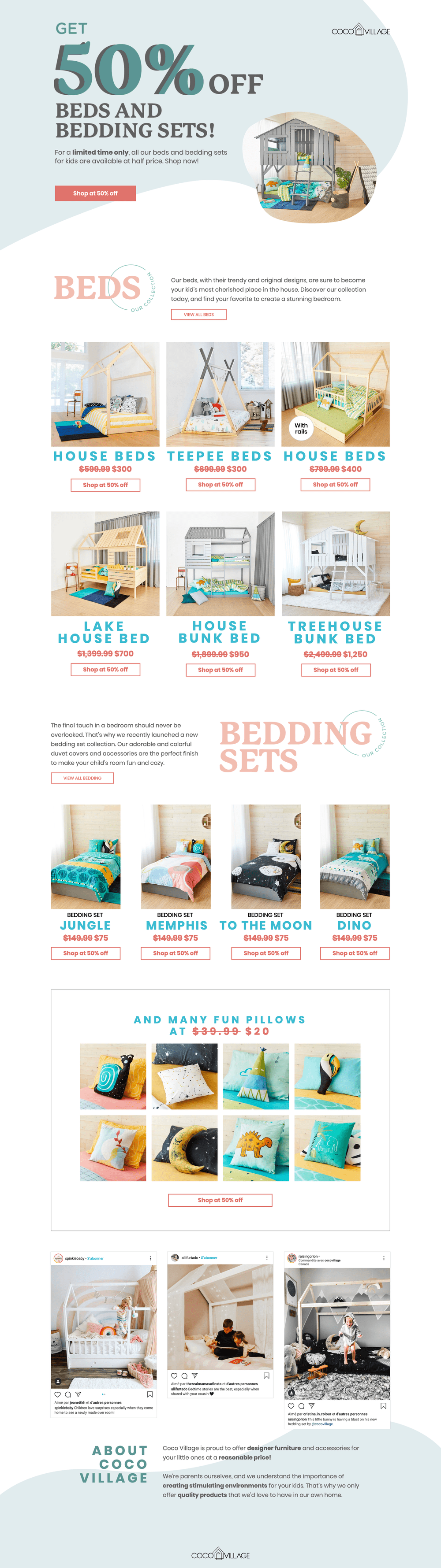
        <p style="margin: 0;">Coco Village does a great job of presenting what is essentially a sales brochure as a web page. You don't have to dig too hard here to see there's a sale, and you sure don't have to dig much harder to see the products. Two paragraphs adorn the bottom to tell you who they are, but beyond that, this is just a sales brochure (and a good one at that).</p>
    </div>
    <a href="https://buildstudio.ca/wp-content/uploads/2024/08/Coco-Village-1.png" style="flex-shrink: 0;">
        <img class="alignnone" src="https://buildstudio.ca/wp-content/uploads/2024/08/Coco-Village-square-300x250.jpg" alt="" width="300" height="250" />
    </a>
</div>

<div style="display: flex; align-items: flex-start; margin-bottom: 20px;">
    <div style="flex: 1; margin-right: 20px;">
        <h5 style="margin-bottom: 10px;">Netflix</h5>
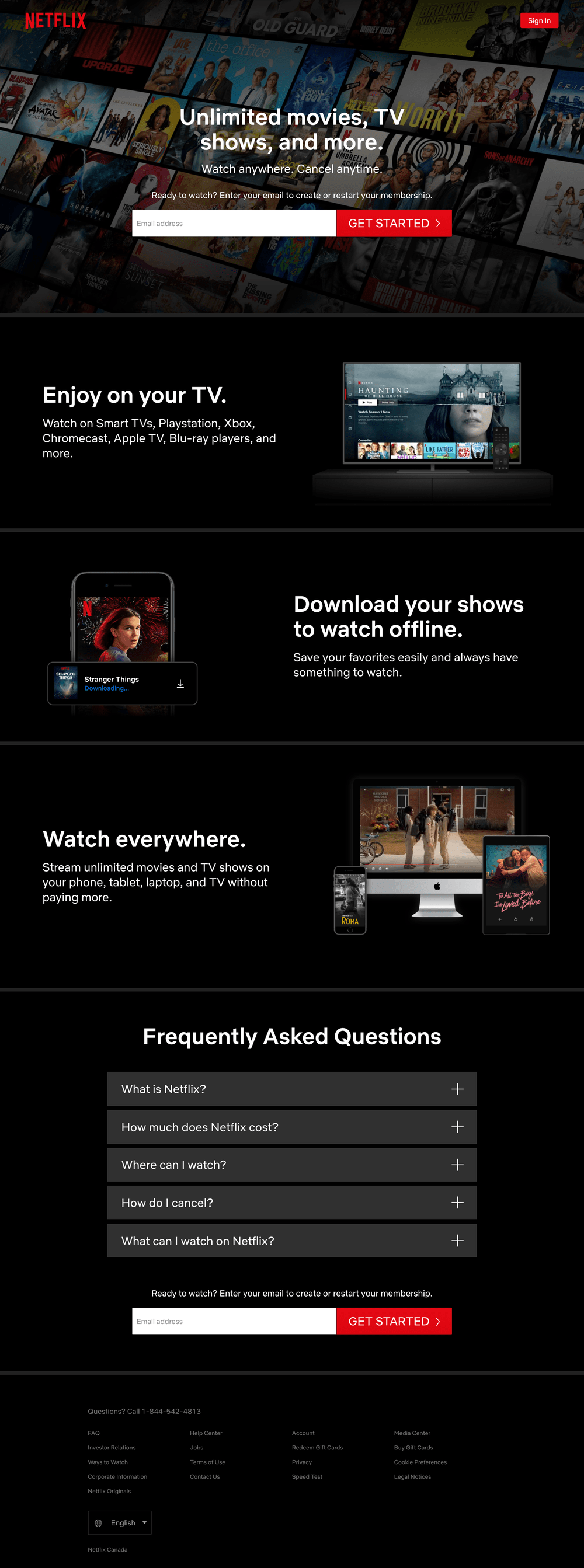
        <p style="margin: 0;">There's plenty to learn about with Netflix, but this landing page isn't geared to someone who wants to know it all. It's a quick and effective page that outlines the 3 biggest features of the platform. The top questions new subscribers ask are found below in a collapsible accordion, so everything stays nice and compact.</p>
    </div>
    <a href="https://buildstudio.ca/wp-content/uploads/2024/08/Netflix-1.png" style="flex-shrink: 0;">
        <img class="alignnone" src="https://buildstudio.ca/wp-content/uploads/2024/08/Netflix-1-square-300x250.jpg" alt="" width="300" height="250" />
    </a>
</div>

<div style="display: flex; align-items: flex-start; margin-bottom: 20px;">
    <div style="flex: 1; margin-right: 20px;">
        <h5 style="margin-bottom: 10px;">CD Baby</h5>
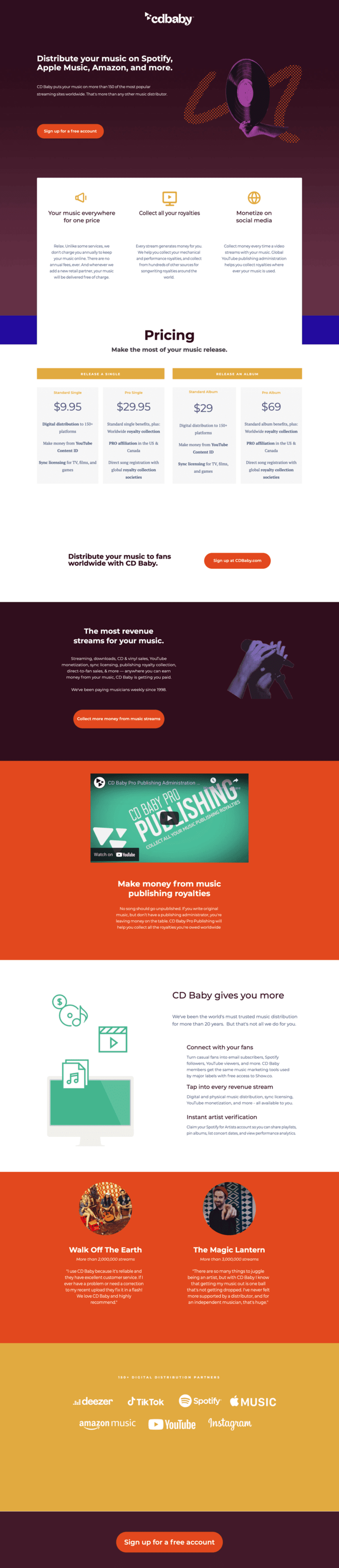
        <p style="margin: 0;">CD Baby goes closer to an actual site in that they hit all the hits: what they do, what they cost, and how they can help. The difference is that no one section gets more than paragraph, so we get a brilliant top-down view of what the company does.</p>
    </div>
    <a href="https://buildstudio.ca/wp-content/uploads/2024/08/CDbaby-1.png" style="flex-shrink: 0;">
        <img class="alignnone" src="https://buildstudio.ca/wp-content/uploads/2024/08/CDbaby-1-square-300x250.jpg" alt="" width="300" height="250" />
    </a>
</div>
<h3>CONCLUSION</h3>
This certainly isn’t meant to persuade anybody that a landing page is somehow superior to a full site (that would make me a curiously deficient website creator). The point is that depending on your situation, sometimes a landing page will do, and sometimes a full site will do.

If you find yourself pushing a singular product or wanting to make a splash with some form of campaign, a landing page might just do the trick.

As always, if you feel unsure if it’s time to make a landing page or a site, drop us a line and we’ll help you chart a path.<p>The post <a href="https://buildstudio.ca/landing-pages-vs-full-sites/">Landing Pages vs. Full Sites</a> appeared first on <a href="https://buildstudio.ca">Build Studio</a>.</p>
]]></content>
		
					<link rel="replies" type="text/html" href="https://buildstudio.ca/landing-pages-vs-full-sites/#comments" thr:count="0" />
			<link rel="replies" type="application/atom+xml" href="https://buildstudio.ca/landing-pages-vs-full-sites/feed/atom/" thr:count="0" />
			<thr:total>0</thr:total>
			</entry>
		<entry>
		<author>
			<name>Russ Fee</name>
					</author>

		<title type="html"><![CDATA[The Importance of Web Speed]]></title>
		<link rel="alternate" type="text/html" href="https://buildstudio.ca/the-importance-of-web-speed/" />

		<id>https://buildstudio.ca/?p=3540</id>
		<updated>2024-08-06T18:06:09Z</updated>
		<published>2024-07-24T21:02:20Z</published>
		<category scheme="https://buildstudio.ca/" term="Business" /><category scheme="https://buildstudio.ca/" term="Wordpress" />
		<summary type="html"><![CDATA[<p><img width="1280" height="500" src="https://buildstudio.ca/wp-content/uploads/2024/07/web-speed.jpg" class="attachment-post-thumbnail size-post-thumbnail wp-post-image" alt="" decoding="async" loading="lazy" srcset="https://buildstudio.ca/wp-content/uploads/2024/07/web-speed.jpg 1280w, https://buildstudio.ca/wp-content/uploads/2024/07/web-speed-300x117.jpg 300w, https://buildstudio.ca/wp-content/uploads/2024/07/web-speed-1024x400.jpg 1024w, https://buildstudio.ca/wp-content/uploads/2024/07/web-speed-768x300.jpg 768w" sizes="auto, (max-width: 1280px) 100vw, 1280px" /></p>
<p>Whenever we meet with clients, a few things are always a safe bet. It should look clean and fresh, probably a bit like Apple. It should also be intuitive, also a bit like Apple. Come to think of it, most people just want to be Apple. As the person making your site though, I can report that one factor is often overlooked: speed. We’ll look deeper into why speed matters so much, but the TL;DR version is that you want speed because Google says so.</p>
<h3>Google wants speed because it wants your users happy</h3>
<p>When it comes to making Google happy, it’s a two-sided coin. On one side, their algorithm is complicated and never 100% known, but on the other, it can mostly be broken down to one simple rule: “make the user happy.”</p>
<p>For that reason, the things that Google cares about are that mobile users are having a good experience, colour-blind users are having a good experience, and people who need quick answers are having a good experience. And what creates a great experience that few will ever complain about? Speed.</p>
<p>As everyone pivoted to spending more time on mobile internet, connection speeds dropped, as did happiness with bloated (yet often beautiful) websites. Around 2010, Google declared that they were going to war with slow websites. If you didn’t adapt, the algorithm would leave you behind.</p>
<p>By 2020, Google had introduced Core Web Vitals, a set of metrics focusing on key aspects of user experience: loading (Largest Contentful Paint), interactivity (First Input Delay), and visual stability (Cumulative Layout Shift). These metrics are now crucial indicators of a site's performance and significantly influence its ranking on Google's search engine results pages. Ensuring your website meets these standards not only boosts your ranking but also enhances overall user satisfaction.</p>
<h3>People do not have the time</h3>
<p>While Google ranking is top of mind for most people, the simple act of having a page load too slowly is enough to lose customers even after you’ve managed to get their eyes.</p>
<p>Statistics on when people leave a website that’s moving too slowly tend to strike fear into the hearts of business and web people alike. Even though we behave exactly the same as everybody else, seeing the raw numbers can be jarring. According to research by Google, as page load time goes from one second to ten seconds, the probability of a mobile site visitor leaving increases by 123%. Moreover, studies show that 53% of mobile site visits are abandoned if pages take longer than three seconds to load.</p>
<p>Beyond simple matters of frustration, a fast-loading speed is also psychologically pleasing to people. It means you and your business are a finely tuned machine that knows what’s up. Don’t believe me? Pay attention to that knot in your stomach the next time you go to purchase something from a site and it takes three seconds to load your cart, causing you to break out into a flop sweat.</p>
<h3>So where do we begin with speed?</h3>
<h5>Images</h5>
<p>There are many ways to have a fast site, or speed up your existing one. The main culprit on most of the slow sites we encounter is images. Not that images are a problem, but it’s when people upload images to their sites without adjusting them first.</p>
<p>As internet speeds have gotten better and phones have become more powerful, your average image these days is monstrously large compared to the overall recommended size of a single web page. To give you an idea, a standard photo taken on a two-year-old iPhone is about 2.5 MB, while the recommended size of an entire page according to Google is 500 KB. If we added a single image from an iPhone to a webpage without adjusting it first, it would be—on its own—five times bigger than the recommended size for the entire page.</p>
<p>Your friendly neighbourhood web professional can help with tools that will automatically shrink your images on upload if you’d like, or you can use tools such as <a href="https://tinypng.com/">TinyPNG</a> or <a href="https://www.adobe.com/ca/products/photoshop.html">Photoshop</a> to adjust them before they hit your site.</p>
<h5>Caching</h5>
<p>Caching is like the barista that knows your order and has it ready for you before you even walk through the door. It keeps a lot of your site in memory and serves it up immediately to users. Again, this is a tool your web person can help with, or you can find handy plugins online to help you.</p>
<p>One word of caution though, sometimes caching works a little too well. If you ever find yourself scratching your head over changes that aren’t showing, 75% of the time it’s caching <em>every</em> time.</p>
<h5>Hosting</h5>
<p>The siren call of cheap hosting is a strong one. I’ve heard it myself, and as somebody who’s made the mistake too many times to admit, I recommend you stay strong against its charms. While the difference between a cheap host and a pricey host can be a few hundred dollars a year, cheap hosting has a way of making you pay in other ways (sanity, life meaning, and ability to sleep among them).</p>
<p>A good (read: pricey) host will focus on things like speed and stability, which, if you’re doing anything remotely serious, will matter above all else. I know. I hate paying them too. It’s a bad feeling you just have to move on from.</p>
<h5>Good Code</h5>
<p>It wouldn’t be a blog post without some base-level pandering, would it? As the world of building websites changes to a more user-friendly landscape, we have themes that allow people to make more and more complicated layouts. While this is outstanding, many of the themes can end up being a giant Swiss Army knife of code. This versatility, unfortunately, can come at the cost of size and speed.</p>
<p>That’s not to say you can’t benefit from this brave new world, it’s just that it needs to be set up properly with the strong tools and practices.</p>
<h3>How do I know if my site is slow?</h3>
<p>A common tool used in the industry is a website known as <a href="https://gtmetrix.com/">GTMetrix</a>. It will do a base-level scan of a page on your site and report back with a score alongside a laundry list of potential fixes. As you work your way through the list, you can run new scans to see the score climb ever higher.</p>
<h3>Conclusion</h3>
<p>While the importance of speed can at times be a frustrating bummer to those of us making the sites, the end goal is noble: we want our users to have a good time on our sites. With a touch of forethought and a little help, building a site that meets speed standards is not an out-of-reach goal for anybody.</p>
<p>Get your images small, use a great host that will help with caching, reach out for help when needed, and you’ll be all set. And of course, if you find yourself lost and without help, <a href="https://buildstudio.ca/contact/">we’re always a click away</a>.</p>
<p>The post <a href="https://buildstudio.ca/the-importance-of-web-speed/">The Importance of Web Speed</a> appeared first on <a href="https://buildstudio.ca">Build Studio</a>.</p>
]]></summary>

					<content type="html" xml:base="https://buildstudio.ca/the-importance-of-web-speed/"><![CDATA[<p><img width="1280" height="500" src="https://buildstudio.ca/wp-content/uploads/2024/07/web-speed.jpg" class="attachment-post-thumbnail size-post-thumbnail wp-post-image" alt="" decoding="async" loading="lazy" srcset="https://buildstudio.ca/wp-content/uploads/2024/07/web-speed.jpg 1280w, https://buildstudio.ca/wp-content/uploads/2024/07/web-speed-300x117.jpg 300w, https://buildstudio.ca/wp-content/uploads/2024/07/web-speed-1024x400.jpg 1024w, https://buildstudio.ca/wp-content/uploads/2024/07/web-speed-768x300.jpg 768w" sizes="auto, (max-width: 1280px) 100vw, 1280px" /></p>Whenever we meet with clients, a few things are always a safe bet. It should look clean and fresh, probably a bit like Apple. It should also be intuitive, also a bit like Apple. Come to think of it, most people just want to be Apple. As the person making your site though, I can report that one factor is often overlooked: speed. We’ll look deeper into why speed matters so much, but the TL;DR version is that you want speed because Google says so.
<h3>Google wants speed because it wants your users happy</h3>
When it comes to making Google happy, it’s a two-sided coin. On one side, their algorithm is complicated and never 100% known, but on the other, it can mostly be broken down to one simple rule: “make the user happy.”

For that reason, the things that Google cares about are that mobile users are having a good experience, colour-blind users are having a good experience, and people who need quick answers are having a good experience. And what creates a great experience that few will ever complain about? Speed.

As everyone pivoted to spending more time on mobile internet, connection speeds dropped, as did happiness with bloated (yet often beautiful) websites. Around 2010, Google declared that they were going to war with slow websites. If you didn’t adapt, the algorithm would leave you behind.

By 2020, Google had introduced Core Web Vitals, a set of metrics focusing on key aspects of user experience: loading (Largest Contentful Paint), interactivity (First Input Delay), and visual stability (Cumulative Layout Shift). These metrics are now crucial indicators of a site's performance and significantly influence its ranking on Google's search engine results pages. Ensuring your website meets these standards not only boosts your ranking but also enhances overall user satisfaction.
<h3>People do not have the time</h3>
While Google ranking is top of mind for most people, the simple act of having a page load too slowly is enough to lose customers even after you’ve managed to get their eyes.

Statistics on when people leave a website that’s moving too slowly tend to strike fear into the hearts of business and web people alike. Even though we behave exactly the same as everybody else, seeing the raw numbers can be jarring. According to research by Google, as page load time goes from one second to ten seconds, the probability of a mobile site visitor leaving increases by 123%. Moreover, studies show that 53% of mobile site visits are abandoned if pages take longer than three seconds to load.

Beyond simple matters of frustration, a fast-loading speed is also psychologically pleasing to people. It means you and your business are a finely tuned machine that knows what’s up. Don’t believe me? Pay attention to that knot in your stomach the next time you go to purchase something from a site and it takes three seconds to load your cart, causing you to break out into a flop sweat.
<h3>So where do we begin with speed?</h3>
<h5>Images</h5>
There are many ways to have a fast site, or speed up your existing one. The main culprit on most of the slow sites we encounter is images. Not that images are a problem, but it’s when people upload images to their sites without adjusting them first.

As internet speeds have gotten better and phones have become more powerful, your average image these days is monstrously large compared to the overall recommended size of a single web page. To give you an idea, a standard photo taken on a two-year-old iPhone is about 2.5 MB, while the recommended size of an entire page according to Google is 500 KB. If we added a single image from an iPhone to a webpage without adjusting it first, it would be—on its own—five times bigger than the recommended size for the entire page.

Your friendly neighbourhood web professional can help with tools that will automatically shrink your images on upload if you’d like, or you can use tools such as <a href="https://tinypng.com/">TinyPNG</a> or <a href="https://www.adobe.com/ca/products/photoshop.html">Photoshop</a> to adjust them before they hit your site.
<h5>Caching</h5>
Caching is like the barista that knows your order and has it ready for you before you even walk through the door. It keeps a lot of your site in memory and serves it up immediately to users. Again, this is a tool your web person can help with, or you can find handy plugins online to help you.

One word of caution though, sometimes caching works a little too well. If you ever find yourself scratching your head over changes that aren’t showing, 75% of the time it’s caching <em>every</em> time.
<h5>Hosting</h5>
The siren call of cheap hosting is a strong one. I’ve heard it myself, and as somebody who’s made the mistake too many times to admit, I recommend you stay strong against its charms. While the difference between a cheap host and a pricey host can be a few hundred dollars a year, cheap hosting has a way of making you pay in other ways (sanity, life meaning, and ability to sleep among them).

A good (read: pricey) host will focus on things like speed and stability, which, if you’re doing anything remotely serious, will matter above all else. I know. I hate paying them too. It’s a bad feeling you just have to move on from.
<h5>Good Code</h5>
It wouldn’t be a blog post without some base-level pandering, would it? As the world of building websites changes to a more user-friendly landscape, we have themes that allow people to make more and more complicated layouts. While this is outstanding, many of the themes can end up being a giant Swiss Army knife of code. This versatility, unfortunately, can come at the cost of size and speed.

That’s not to say you can’t benefit from this brave new world, it’s just that it needs to be set up properly with the strong tools and practices.
<h3>How do I know if my site is slow?</h3>
A common tool used in the industry is a website known as <a href="https://gtmetrix.com/">GTMetrix</a>. It will do a base-level scan of a page on your site and report back with a score alongside a laundry list of potential fixes. As you work your way through the list, you can run new scans to see the score climb ever higher.
<h3>Conclusion</h3>
While the importance of speed can at times be a frustrating bummer to those of us making the sites, the end goal is noble: we want our users to have a good time on our sites. With a touch of forethought and a little help, building a site that meets speed standards is not an out-of-reach goal for anybody.

Get your images small, use a great host that will help with caching, reach out for help when needed, and you’ll be all set. And of course, if you find yourself lost and without help, <a href="https://buildstudio.ca/contact/">we’re always a click away</a>.<p>The post <a href="https://buildstudio.ca/the-importance-of-web-speed/">The Importance of Web Speed</a> appeared first on <a href="https://buildstudio.ca">Build Studio</a>.</p>
]]></content>
		
					<link rel="replies" type="text/html" href="https://buildstudio.ca/the-importance-of-web-speed/#comments" thr:count="0" />
			<link rel="replies" type="application/atom+xml" href="https://buildstudio.ca/the-importance-of-web-speed/feed/atom/" thr:count="0" />
			<thr:total>0</thr:total>
			</entry>
		<entry>
		<author>
			<name>Russ Fee</name>
					</author>

		<title type="html"><![CDATA[What Makes a Good Appliance Repair Website?]]></title>
		<link rel="alternate" type="text/html" href="https://buildstudio.ca/what-makes-a-good-appliance-repair-website/" />

		<id>https://buildstudio.ca/?p=3499</id>
		<updated>2023-01-31T23:28:10Z</updated>
		<published>2023-01-23T20:10:56Z</published>
		<category scheme="https://buildstudio.ca/" term="Business" /><category scheme="https://buildstudio.ca/" term="Wordpress" />
		<summary type="html"><![CDATA[<p><img width="1280" height="500" src="https://buildstudio.ca/wp-content/uploads/2023/01/john-schnobrich-FlPc9_VocJ4-unsplash-crop.jpg" class="attachment-post-thumbnail size-post-thumbnail wp-post-image" alt="" decoding="async" loading="lazy" srcset="https://buildstudio.ca/wp-content/uploads/2023/01/john-schnobrich-FlPc9_VocJ4-unsplash-crop.jpg 1280w, https://buildstudio.ca/wp-content/uploads/2023/01/john-schnobrich-FlPc9_VocJ4-unsplash-crop-300x117.jpg 300w, https://buildstudio.ca/wp-content/uploads/2023/01/john-schnobrich-FlPc9_VocJ4-unsplash-crop-1024x400.jpg 1024w, https://buildstudio.ca/wp-content/uploads/2023/01/john-schnobrich-FlPc9_VocJ4-unsplash-crop-768x300.jpg 768w" sizes="auto, (max-width: 1280px) 100vw, 1280px" /></p>
<p><span data-preserver-spaces="true">Recently I had the misfortune of being the un-proud owner of a broken dishwasher. This sort of thing typically sets off a chain of unhelpful thoughts and behaviours as the stress of a broken appliance sets up shop directly in the centre of my mind. So I needed an appliance repair website, and I needed one quickly.</span></p>
<p><span data-preserver-spaces="true">I Googled around to find a good repair option. Unfortunately, most sites were lacking–an unsurprising fact given that I’m intimately aware how difficult it can be to make a good one.</span></p>
<p><span data-preserver-spaces="true">One site however stuck out as very well done, and I’ve decided to poach my favourite bits for you so that you can improve your site. This site is specific to appliance repair, but the principles work across most service websites.</span></p>
<h3><span data-preserver-spaces="true">Primary focus on the most important thing</span></h3>
<p><span data-preserver-spaces="true">When it comes to appliance repair websites, the essential feature to get right is contact info. Of all the factors to get right, this one is a low bar that most clear. Whether they do it well is something we’ll get to in a moment, but on a basic level, most sites did an admirable job of giving me a way to contact them.</span></p>
<p><span data-preserver-spaces="true">Regarding posting contact info, what did the best site do that the others did not? They nailed the following things:</span></p>
<h5><span data-preserver-spaces="true">Direct the Eyes by Creating a hierarchy</span></h5>
<p><span data-preserver-spaces="true">When we create any webpage, we get to decide where the user’s eyes go. We do this by establishing a visual hierarchy. The most critical thing sticks out like a sore thumb by design, and everything else gets a bit more subtle.</span></p>
<p><span data-preserver-spaces="true">What's most important factor on your site will vary, but contact info is king in this case. It would easily be lost in the shuffle if it was alongside ten paragraphs of over-explained mission statements, random text bolding, and empty promises.</span></p>
<p><span data-preserver-spaces="true">The best site kept the number of words to a minimum. For example, the entire homepage only had four full paragraphs on it. What remains is a page that has just enough information to be helpful but not so wordy that it drowned out the contact info.</span></p>
<h5><span data-preserver-spaces="true">Using Colour to Draw attention</span></h5>
<p><span data-preserver-spaces="true">They also utilized colour well. The site had an undeniable blue and green colour scheme, but the contact information sat in a bright orange box. Sometimes visual designers will break consistency on purpose to ensure that your eye detects something is unique, and it travels directly to that area.</span></p>
<p>For example, if I wanted to provide users with three pricing options, but I wanted attention drawn to one option more than the others, I could colour it differently. For example:</p>
<p><img class="aligncenter wp-image-3508 size-medium" src="https://buildstudio.ca/wp-content/uploads/2023/01/A-Non-Designers-Guide-to-Visual-Hierarchy-5-Best-Practices-and-8-Examples-2-300x145.png" alt="A pricing table with one option clearly coloured differently to draw attention." width="300" height="145" /></p>
<p><span data-preserver-spaces="true">What makes this trick work is by using it modestly. But unfortunately, too many companies get hung up on announcing everything as incredibly important, creating a visual mess that gives the opposite impression.</span></p>
<h5><span data-preserver-spaces="true">Various Forms of Contact</span></h5>
<p><span data-preserver-spaces="true">If you work with enough web users over time, you become aware of one significant fact: people are complicated. What makes total sense for one group will make zero for another. As such, opinions on how to contact a company are all over the map. Some want a phone number because they need to talk to a person, and some want an email form so they don’t have to leave the website. In contrast, others want an email address to take care of business in their email client.</span></p>
<p><span data-preserver-spaces="true">The solution is to go scorched earth and offer all primary forms of communication. Have a link to your contact form, an email address, a phone number, and, if the situation is available, a chat widget. Keep in mind mileage might vary on this one. Depending on your unique business and visitors, it might make sense for you to have all forms of contact or fewer. You’ll have to find what works best for you.</span></p>
<h3><span data-preserver-spaces="true">Find a theme and stick to it</span></h3>
<p><span data-preserver-spaces="true">A website is a piece of marketing; like any ad you create, it needs to evoke a feeling. What feeling do you want your website to produce in a customer? Some sites I visited went with displaying their technical expertise or affordability. The one I ultimately landed on doubled down hard on reliability. That’s not to say yours has to also, but whatever you choose, make it your theme.</span></p>
<p><span data-preserver-spaces="true">The confident message was incredibly reassuring for a person like me who gets a little frantic when things break. Key to this point is that the tone existed across the entire site. The content was written reassuringly, the colours were emotionally appropriate, and the imagery was of happy, stress-free people enjoying their appliance that now works (and cleverly, allowing me to highlight that I could be one of them shortly).</span></p>
<p><span data-preserver-spaces="true">That last one is important. Remember, much like any ad, you want to evoke the end feeling your business will give people. A car ad might want to spotlight a feeling of freedom, while a restaurant might lean hard into social connection or satisfaction. In this case, it’s relief. Shiny happy people playing with their kids or relaxing, and not elbow-deep in manuals and frustration.</span></p>
<h3><span data-preserver-spaces="true">Don’t just sell, provide value</span></h3>
<p><span data-preserver-spaces="true">Most companies are very protective of their knowledge, which makes sense–they sell it after all. But do you want to be like most companies, or do you want to stand out? The truth is (especially in appliance repair) the information you might want to hold back is probably already readily available, especially in appliance repair. For example, people aren’t contacting you to troubleshoot their oven. If that's what they were after, they can already do that using one of the thousands of available youtube videos or blog posts. Instead, people contact you because they don’t want to do that.</span></p>
<p><span data-preserver-spaces="true">What I loved about the site I found was that each of its service pages (split up by appliance) had a reasonably sized Frequently Asked Questions section. It functioned for a few reasons:</span></p>
<ul>
<li><span data-preserver-spaces="true">It allowed them to answer simple questions that they’re highly likely to get but never amount to a sale, so they save themselves some time.</span></li>
<li><span data-preserver-spaces="true">It allowed them to list some of the problems they can solve and how much it’s likely to cost, establishing themselves as experts and managing expectations.</span></li>
<li><span data-preserver-spaces="true">It built trust with the user because some value was offered up, seemingly as a gesture of goodwill.</span></li>
</ul>
<p><span data-preserver-spaces="true">By giving a bit of information away, they came across as competent and trustworthy– priceless qualities for a service business to hold.</span></p>
<h3><span data-preserver-spaces="true">Booking</span></h3>
<p><span data-preserver-spaces="true">The site I ultimately chose had a wonderfully helpful tool on their site that let me book using a calendar that allowed me to see right away when I could expect this problem to be solved. Without this, it's difficult to know how long I may have to wait for a visit.</span></p>
<p><span data-preserver-spaces="true">I selected a day and a time, which was passed on to their office. This form works great for all involved because the person who manages the booking can call me and confirm. They didn’t have to waste time going over details because I’d already included them when I booked.</span></p>
<p><span data-preserver-spaces="true">In keeping with the theme we touched on in the contact section, remember that some people will want to talk to a person. In contrast, others would walk across hot coals to avoid such an experience. By offering an online booking option, the net is wide, and you can catch customers of either type.</span></p>
<p><span data-preserver-spaces="true">To get a better idea of what’s out there in terms of booking options for your WordPress site, </span><a class="editor-rtfLink" href="https://www.wpbeginner.com/plugins/5-best-wordpress-appointment-and-booking-plugins/" target="_blank" rel="noopener"><span data-preserver-spaces="true">here are some ideas</span></a><span data-preserver-spaces="true">.</span></p>
<h3><span data-preserver-spaces="true">Testimonials</span></h3>
<p><span data-preserver-spaces="true">Testimonials are another low-hanging fruit that many other sites did manage to utilize, but only sometimes well. Yes, you should be featuring happy clients' stories, but why stop there? You can also link off to your Google listing, which has not only ratings by customers but (if you’re active there) also some public communication between you and the clients.</span></p>
<p><span data-preserver-spaces="true">In addition to providing the testimonials, the site I landed on also made offering a testimonial dead easy. They provided a form to send them a story, links, and instructions on giving a review elsewhere.</span></p>
<p><span data-preserver-spaces="true">Some essential tips on providing testimonials on your site are:</span></p>
<ul>
<li><span data-preserver-spaces="true">Keep them legitimate. Fake reviews always feel off and are simple to spot</span></li>
<li><span data-preserver-spaces="true">Don’t be shy to ask for specifics. Remind your clients to mention the problem, how it was handled, and the end result in their review.</span></li>
<li><span data-preserver-spaces="true">Use a plugin or widget that refreshes your testimonials automatically so the user sees a different review on each page load</span></li>
<li><span data-preserver-spaces="true">consider where your testimonial should go on your site. Aside from a dedicated page, a popular spot is in the footer, so it’s not directly in anybody’s face but remains present across your entire site.</span></li>
</ul>
<h3><span data-preserver-spaces="true">It doesn’t stop at the site</span></h3>
<p><span data-preserver-spaces="true">Whatever experience you set out to have your website provide for a customer, make sure that your on-site visits embody the same qualities. When my repair appointment ultimately did happen, the guy who showed up was very much like the site itself: clear, courteous, overly helpful, and motivated to help me get back to life.</span></p>
<p><span data-preserver-spaces="true">He wore shoe coverings to protect my floors, explained with extreme clarity what was going on despite knowing full well I was out of my element, offered his card with his direct line should anything go wrong once he left, and payment was made seamlessly from his phone.</span></p>
<h3><span data-preserver-spaces="true">In Conclusion</span></h3>
<p><span data-preserver-spaces="true">Your website is similar to any other piece of marketing. It needs to send a clear message, make your potential customers feel something, and give them the means to solve their problems.</span></p>
<p><span data-preserver-spaces="true">The site I ultimately landed on kept the visual clutter to a minimum, made it easy to contact them, stuck to a singular message, provided great value, established themselves as experts, offered up some proof of their work, and when the time came to show themselves, they walked the walk.</span></p>
<p><span data-preserver-spaces="true">Follow these basic rules and your website can do much the same.</span></p>
<p><span data-preserver-spaces="true">If you need help with your website, don’t hesitate to </span><a class="editor-rtfLink" href="https://buildstudio.ca/contact/" target="_blank" rel="noopener"><span data-preserver-spaces="true">reach out to us</span></a><span data-preserver-spaces="true"> for a chat, and we’ll see what we can do.</span></p>
<p>The post <a href="https://buildstudio.ca/what-makes-a-good-appliance-repair-website/">What Makes a Good Appliance Repair Website?</a> appeared first on <a href="https://buildstudio.ca">Build Studio</a>.</p>
]]></summary>

					<content type="html" xml:base="https://buildstudio.ca/what-makes-a-good-appliance-repair-website/"><![CDATA[<p><img width="1280" height="500" src="https://buildstudio.ca/wp-content/uploads/2023/01/john-schnobrich-FlPc9_VocJ4-unsplash-crop.jpg" class="attachment-post-thumbnail size-post-thumbnail wp-post-image" alt="" decoding="async" loading="lazy" srcset="https://buildstudio.ca/wp-content/uploads/2023/01/john-schnobrich-FlPc9_VocJ4-unsplash-crop.jpg 1280w, https://buildstudio.ca/wp-content/uploads/2023/01/john-schnobrich-FlPc9_VocJ4-unsplash-crop-300x117.jpg 300w, https://buildstudio.ca/wp-content/uploads/2023/01/john-schnobrich-FlPc9_VocJ4-unsplash-crop-1024x400.jpg 1024w, https://buildstudio.ca/wp-content/uploads/2023/01/john-schnobrich-FlPc9_VocJ4-unsplash-crop-768x300.jpg 768w" sizes="auto, (max-width: 1280px) 100vw, 1280px" /></p><span data-preserver-spaces="true">Recently I had the misfortune of being the un-proud owner of a broken dishwasher. This sort of thing typically sets off a chain of unhelpful thoughts and behaviours as the stress of a broken appliance sets up shop directly in the centre of my mind. So I needed an appliance repair website, and I needed one quickly.</span>

<span data-preserver-spaces="true">I Googled around to find a good repair option. Unfortunately, most sites were lacking–an unsurprising fact given that I’m intimately aware how difficult it can be to make a good one.</span>

<span data-preserver-spaces="true">One site however stuck out as very well done, and I’ve decided to poach my favourite bits for you so that you can improve your site. This site is specific to appliance repair, but the principles work across most service websites.</span>
<h3><span data-preserver-spaces="true">Primary focus on the most important thing</span></h3>
<span data-preserver-spaces="true">When it comes to appliance repair websites, the essential feature to get right is contact info. Of all the factors to get right, this one is a low bar that most clear. Whether they do it well is something we’ll get to in a moment, but on a basic level, most sites did an admirable job of giving me a way to contact them.</span>

<span data-preserver-spaces="true">Regarding posting contact info, what did the best site do that the others did not? They nailed the following things:</span>
<h5><span data-preserver-spaces="true">Direct the Eyes by Creating a hierarchy</span></h5>
<span data-preserver-spaces="true">When we create any webpage, we get to decide where the user’s eyes go. We do this by establishing a visual hierarchy. The most critical thing sticks out like a sore thumb by design, and everything else gets a bit more subtle.</span>

<span data-preserver-spaces="true">What's most important factor on your site will vary, but contact info is king in this case. It would easily be lost in the shuffle if it was alongside ten paragraphs of over-explained mission statements, random text bolding, and empty promises.</span>

<span data-preserver-spaces="true">The best site kept the number of words to a minimum. For example, the entire homepage only had four full paragraphs on it. What remains is a page that has just enough information to be helpful but not so wordy that it drowned out the contact info.</span>
<h5><span data-preserver-spaces="true">Using Colour to Draw attention</span></h5>
<span data-preserver-spaces="true">They also utilized colour well. The site had an undeniable blue and green colour scheme, but the contact information sat in a bright orange box. Sometimes visual designers will break consistency on purpose to ensure that your eye detects something is unique, and it travels directly to that area.</span>

For example, if I wanted to provide users with three pricing options, but I wanted attention drawn to one option more than the others, I could colour it differently. For example:

<img class="aligncenter wp-image-3508 size-medium" src="https://buildstudio.ca/wp-content/uploads/2023/01/A-Non-Designers-Guide-to-Visual-Hierarchy-5-Best-Practices-and-8-Examples-2-300x145.png" alt="A pricing table with one option clearly coloured differently to draw attention." width="300" height="145" />

<span data-preserver-spaces="true">What makes this trick work is by using it modestly. But unfortunately, too many companies get hung up on announcing everything as incredibly important, creating a visual mess that gives the opposite impression.</span>
<h5><span data-preserver-spaces="true">Various Forms of Contact</span></h5>
<span data-preserver-spaces="true">If you work with enough web users over time, you become aware of one significant fact: people are complicated. What makes total sense for one group will make zero for another. As such, opinions on how to contact a company are all over the map. Some want a phone number because they need to talk to a person, and some want an email form so they don’t have to leave the website. In contrast, others want an email address to take care of business in their email client.</span>

<span data-preserver-spaces="true">The solution is to go scorched earth and offer all primary forms of communication. Have a link to your contact form, an email address, a phone number, and, if the situation is available, a chat widget. Keep in mind mileage might vary on this one. Depending on your unique business and visitors, it might make sense for you to have all forms of contact or fewer. You’ll have to find what works best for you.</span>
<h3><span data-preserver-spaces="true">Find a theme and stick to it</span></h3>
<span data-preserver-spaces="true">A website is a piece of marketing; like any ad you create, it needs to evoke a feeling. What feeling do you want your website to produce in a customer? Some sites I visited went with displaying their technical expertise or affordability. The one I ultimately landed on doubled down hard on reliability. That’s not to say yours has to also, but whatever you choose, make it your theme.</span>

<span data-preserver-spaces="true">The confident message was incredibly reassuring for a person like me who gets a little frantic when things break. Key to this point is that the tone existed across the entire site. The content was written reassuringly, the colours were emotionally appropriate, and the imagery was of happy, stress-free people enjoying their appliance that now works (and cleverly, allowing me to highlight that I could be one of them shortly).</span>

<span data-preserver-spaces="true">That last one is important. Remember, much like any ad, you want to evoke the end feeling your business will give people. A car ad might want to spotlight a feeling of freedom, while a restaurant might lean hard into social connection or satisfaction. In this case, it’s relief. Shiny happy people playing with their kids or relaxing, and not elbow-deep in manuals and frustration.</span>
<h3><span data-preserver-spaces="true">Don’t just sell, provide value</span></h3>
<span data-preserver-spaces="true">Most companies are very protective of their knowledge, which makes sense–they sell it after all. But do you want to be like most companies, or do you want to stand out? The truth is (especially in appliance repair) the information you might want to hold back is probably already readily available, especially in appliance repair. For example, people aren’t contacting you to troubleshoot their oven. If that's what they were after, they can already do that using one of the thousands of available youtube videos or blog posts. Instead, people contact you because they don’t want to do that.</span>

<span data-preserver-spaces="true">What I loved about the site I found was that each of its service pages (split up by appliance) had a reasonably sized Frequently Asked Questions section. It functioned for a few reasons:</span>
<ul>
 	<li><span data-preserver-spaces="true">It allowed them to answer simple questions that they’re highly likely to get but never amount to a sale, so they save themselves some time.</span></li>
 	<li><span data-preserver-spaces="true">It allowed them to list some of the problems they can solve and how much it’s likely to cost, establishing themselves as experts and managing expectations.</span></li>
 	<li><span data-preserver-spaces="true">It built trust with the user because some value was offered up, seemingly as a gesture of goodwill.</span></li>
</ul>
<span data-preserver-spaces="true">By giving a bit of information away, they came across as competent and trustworthy– priceless qualities for a service business to hold.</span>
<h3><span data-preserver-spaces="true">Booking</span></h3>
<span data-preserver-spaces="true">The site I ultimately chose had a wonderfully helpful tool on their site that let me book using a calendar that allowed me to see right away when I could expect this problem to be solved. Without this, it's difficult to know how long I may have to wait for a visit.</span>

<span data-preserver-spaces="true">I selected a day and a time, which was passed on to their office. This form works great for all involved because the person who manages the booking can call me and confirm. They didn’t have to waste time going over details because I’d already included them when I booked.</span>

<span data-preserver-spaces="true">In keeping with the theme we touched on in the contact section, remember that some people will want to talk to a person. In contrast, others would walk across hot coals to avoid such an experience. By offering an online booking option, the net is wide, and you can catch customers of either type.</span>

<span data-preserver-spaces="true">To get a better idea of what’s out there in terms of booking options for your WordPress site, </span><a class="editor-rtfLink" href="https://www.wpbeginner.com/plugins/5-best-wordpress-appointment-and-booking-plugins/" target="_blank" rel="noopener"><span data-preserver-spaces="true">here are some ideas</span></a><span data-preserver-spaces="true">.</span>
<h3><span data-preserver-spaces="true">Testimonials</span></h3>
<span data-preserver-spaces="true">Testimonials are another low-hanging fruit that many other sites did manage to utilize, but only sometimes well. Yes, you should be featuring happy clients' stories, but why stop there? You can also link off to your Google listing, which has not only ratings by customers but (if you’re active there) also some public communication between you and the clients.</span>

<span data-preserver-spaces="true">In addition to providing the testimonials, the site I landed on also made offering a testimonial dead easy. They provided a form to send them a story, links, and instructions on giving a review elsewhere.</span>

<span data-preserver-spaces="true">Some essential tips on providing testimonials on your site are:</span>
<ul>
 	<li><span data-preserver-spaces="true">Keep them legitimate. Fake reviews always feel off and are simple to spot</span></li>
 	<li><span data-preserver-spaces="true">Don’t be shy to ask for specifics. Remind your clients to mention the problem, how it was handled, and the end result in their review.</span></li>
 	<li><span data-preserver-spaces="true">Use a plugin or widget that refreshes your testimonials automatically so the user sees a different review on each page load</span></li>
 	<li><span data-preserver-spaces="true">consider where your testimonial should go on your site. Aside from a dedicated page, a popular spot is in the footer, so it’s not directly in anybody’s face but remains present across your entire site.</span></li>
</ul>
<h3><span data-preserver-spaces="true">It doesn’t stop at the site</span></h3>
<span data-preserver-spaces="true">Whatever experience you set out to have your website provide for a customer, make sure that your on-site visits embody the same qualities. When my repair appointment ultimately did happen, the guy who showed up was very much like the site itself: clear, courteous, overly helpful, and motivated to help me get back to life.</span>

<span data-preserver-spaces="true">He wore shoe coverings to protect my floors, explained with extreme clarity what was going on despite knowing full well I was out of my element, offered his card with his direct line should anything go wrong once he left, and payment was made seamlessly from his phone.</span>
<h3><span data-preserver-spaces="true">In Conclusion</span></h3>
<span data-preserver-spaces="true">Your website is similar to any other piece of marketing. It needs to send a clear message, make your potential customers feel something, and give them the means to solve their problems.</span>

<span data-preserver-spaces="true">The site I ultimately landed on kept the visual clutter to a minimum, made it easy to contact them, stuck to a singular message, provided great value, established themselves as experts, offered up some proof of their work, and when the time came to show themselves, they walked the walk.</span>

<span data-preserver-spaces="true">Follow these basic rules and your website can do much the same.</span>

<span data-preserver-spaces="true">If you need help with your website, don’t hesitate to </span><a class="editor-rtfLink" href="https://buildstudio.ca/contact/" target="_blank" rel="noopener"><span data-preserver-spaces="true">reach out to us</span></a><span data-preserver-spaces="true"> for a chat, and we’ll see what we can do.</span><p>The post <a href="https://buildstudio.ca/what-makes-a-good-appliance-repair-website/">What Makes a Good Appliance Repair Website?</a> appeared first on <a href="https://buildstudio.ca">Build Studio</a>.</p>
]]></content>
		
					<link rel="replies" type="text/html" href="https://buildstudio.ca/what-makes-a-good-appliance-repair-website/#comments" thr:count="0" />
			<link rel="replies" type="application/atom+xml" href="https://buildstudio.ca/what-makes-a-good-appliance-repair-website/feed/atom/" thr:count="0" />
			<thr:total>0</thr:total>
			</entry>
		<entry>
		<author>
			<name>Russ Fee</name>
					</author>

		<title type="html"><![CDATA[We’re Focusing on the Wrong Problems &#8211; What Golf Can Teach Us About Making Websites]]></title>
		<link rel="alternate" type="text/html" href="https://buildstudio.ca/focusing-wrong-problems-golf-can-teach-us-making-websites/" />

		<id>http://buildstudio.ca/?p=2908</id>
		<updated>2021-03-07T16:51:00Z</updated>
		<published>2020-08-30T22:16:09Z</published>
		<category scheme="https://buildstudio.ca/" term="Business" /><category scheme="https://buildstudio.ca/" term="Freelance" /><category scheme="https://buildstudio.ca/" term="Wordpress" />
		<summary type="html"><![CDATA[<p><img width="1567" height="1175" src="https://buildstudio.ca/wp-content/uploads/2017/08/photo-golf.jpeg" class="attachment-post-thumbnail size-post-thumbnail wp-post-image" alt="Calgary Golf Course" decoding="async" loading="lazy" srcset="https://buildstudio.ca/wp-content/uploads/2017/08/photo-golf.jpeg 1567w, https://buildstudio.ca/wp-content/uploads/2017/08/photo-golf-300x225.jpeg 300w, https://buildstudio.ca/wp-content/uploads/2017/08/photo-golf-1024x768.jpeg 1024w, https://buildstudio.ca/wp-content/uploads/2017/08/photo-golf-768x576.jpeg 768w, https://buildstudio.ca/wp-content/uploads/2017/08/photo-golf-1536x1152.jpeg 1536w" sizes="auto, (max-width: 1567px) 100vw, 1567px" /></p>
<p>The game of golf has undergone some spectacular technological advances. We can measure distances using GPS, the balls are more consistent, and shiny new drivers launch the ball further than ever before. Despite this, there is an uncomfortable truth: <a href="http://golftips.golfweek.com/average-golf-score-1916.html">the majority of golfers aren’t getting better</a>. How can this be? Perhaps it’s because the equipment isn't the greatest problem, it's merely the easiest problem to solve. At the end of that beautifully crafted golf club is still a silly human, and <em>that's</em> where the trouble starts.</p>
<p>Many golfers suffer a disconnect between what will make them better and what they <em>think</em> will make them better. Many claim to be great at the more boring aspects of the game (putting, for instance). According to many instructors however, <a href="http://www.nytimes.com/2005/05/24/sports/golf/golf-club-prices-are-up-scores-are-not-down.html?mcubz=1">this is often not the case</a>. The oddity here is that these findings are nothing new. This isn't a dark secret in the golf world – in fact it's commonly known.</p>
<p>So even after identifying the core problem with golf scores, many aren’t willing to address it. We don’t solve the problem that matters – we solve the problem that is easiest and offers the best feeling. Unfortunately, this problematic thinking is everywhere in our lives, and the business of building websites is no exception.</p>
<h3>When you're just a website builder</h3>
<p>We often think of ourselves as “website builders”, and that can have implications when we deconstruct how difficult building a website actually is. As the tools get better and better, the job of creating a website gets a bit easier. When I first began working in this field, Adobe Dreamweaver was going to make the job of the web professional obsolete within 5 years. When Square Space and Wix came out they were going to kill off the need in the same way. Today it’s builder themes that are the next big thing. The commonality between them all is they are solving the simplest problem that faces us, while not touching on the greatest complexity – the human component.</p>
<p>To apply our golf analogy, technologies like Dreamweaver and services like Squarespace and Wix are the shiny new drivers. They promise to deliver results that feel great – and they do – but the scores aren't changing. Websites still suffer from many of the same issues that have always plagued them because we're not focusing on the people.</p>
<h3>What's hard?</h3>
<p>The problems that the shiny drivers can’t solve for us happen to be the barriers to successful web projects. So what’s hard?</p>
<h4>Communication</h4>
<p>When the client says they want a “web store”, do you have the same thing in mind? Did you ask the right questions to understand what they expect it to be able to do not only on launch, but in 2 years when they’re offerings have expanded 10 fold?</p>
<h4>Timeline Management</h4>
<p>Does your client know how long that last minute request is going to take? More importantly, do you?</p>
<h4>Budget Management</h4>
<p>If you don’t have a good handle on your timeline, you’ll most definitely screw either yourself or the client. Whichever ends up happening, it’s a poor strategy.</p>
<h4>More Communication</h4>
<p>How many delays are the result of people unaware they’re causing a holdup? The number of problems we can solve with a simple check-in email or phone call is incredible. Managing people is scary, unpredictable, and necessary.</p>
<h4>Making a website for everybody</h4>
<p>Most sites fail at even making a site that appeals to anybody. A successful site should appeal not only to the customers it serves, but also to the people tasked with updating and maintaining it. All too often we hear from potential clients about their current site, saying “it’s a great site, but we haven’t updated it months/years because the person in charge of it moved on and we don’t know how to do it.”.</p>
<h4>Can it look good when the real content arrives?</h4>
<p>If content isn't ready at the design stage, the designer will use filler content and it will look amazing. They will ensure the paragraphs are all equal length, the photos are beautiful and sized to fit. You may not think this is a bad thing, but what happens when the final content arrives and not all those things apply?</p>
<h3>These are not tool problems</h3>
<p>These are people problems. There are tools that can help you with the above, but none of them will do the heavy lifting for you. <a href="https://asana.com" target="_blank" rel="noopener">Asana</a> can help keep you organized and communicating, <a href="http://try.hrv.st/3-440381" target="_blank" rel="noopener">Harvest</a> can help you track your time. Despite that, neither of those protect you from the fact that you still need to give them the attention they deserve. This is why I pause slightly before I tell someone I build websites. In truth, building the website is often the easiest part of the entire process. It’s your ability to problem solve, handle restrictions, communicate well, and develop strategy that determines how well we execute a site.</p>
<p>--</p>
<p><em>This post was originally written by Russ Fee of <a href="https://fscreative.ca/" target="_blank" rel="noopener">FS Creative</a> in August 2017. Some of the content has been updated to reflect updates to our processes and tools.</em></p>
<p>The post <a href="https://buildstudio.ca/focusing-wrong-problems-golf-can-teach-us-making-websites/">We’re Focusing on the Wrong Problems &#8211; What Golf Can Teach Us About Making Websites</a> appeared first on <a href="https://buildstudio.ca">Build Studio</a>.</p>
]]></summary>

					<content type="html" xml:base="https://buildstudio.ca/focusing-wrong-problems-golf-can-teach-us-making-websites/"><![CDATA[<p><img width="1567" height="1175" src="https://buildstudio.ca/wp-content/uploads/2017/08/photo-golf.jpeg" class="attachment-post-thumbnail size-post-thumbnail wp-post-image" alt="Calgary Golf Course" decoding="async" loading="lazy" srcset="https://buildstudio.ca/wp-content/uploads/2017/08/photo-golf.jpeg 1567w, https://buildstudio.ca/wp-content/uploads/2017/08/photo-golf-300x225.jpeg 300w, https://buildstudio.ca/wp-content/uploads/2017/08/photo-golf-1024x768.jpeg 1024w, https://buildstudio.ca/wp-content/uploads/2017/08/photo-golf-768x576.jpeg 768w, https://buildstudio.ca/wp-content/uploads/2017/08/photo-golf-1536x1152.jpeg 1536w" sizes="auto, (max-width: 1567px) 100vw, 1567px" /></p>The game of golf has undergone some spectacular technological advances. We can measure distances using GPS, the balls are more consistent, and shiny new drivers launch the ball further than ever before. Despite this, there is an uncomfortable truth: <a href="http://golftips.golfweek.com/average-golf-score-1916.html">the majority of golfers aren’t getting better</a>. How can this be? Perhaps it’s because the equipment isn't the greatest problem, it's merely the easiest problem to solve. At the end of that beautifully crafted golf club is still a silly human, and <em>that's</em> where the trouble starts.

Many golfers suffer a disconnect between what will make them better and what they <em>think</em> will make them better. Many claim to be great at the more boring aspects of the game (putting, for instance). According to many instructors however, <a href="http://www.nytimes.com/2005/05/24/sports/golf/golf-club-prices-are-up-scores-are-not-down.html?mcubz=1">this is often not the case</a>. The oddity here is that these findings are nothing new. This isn't a dark secret in the golf world – in fact it's commonly known.

So even after identifying the core problem with golf scores, many aren’t willing to address it. We don’t solve the problem that matters – we solve the problem that is easiest and offers the best feeling. Unfortunately, this problematic thinking is everywhere in our lives, and the business of building websites is no exception.
<h3>When you're just a website builder</h3>
We often think of ourselves as “website builders”, and that can have implications when we deconstruct how difficult building a website actually is. As the tools get better and better, the job of creating a website gets a bit easier. When I first began working in this field, Adobe Dreamweaver was going to make the job of the web professional obsolete within 5 years. When Square Space and Wix came out they were going to kill off the need in the same way. Today it’s builder themes that are the next big thing. The commonality between them all is they are solving the simplest problem that faces us, while not touching on the greatest complexity – the human component.

To apply our golf analogy, technologies like Dreamweaver and services like Squarespace and Wix are the shiny new drivers. They promise to deliver results that feel great – and they do – but the scores aren't changing. Websites still suffer from many of the same issues that have always plagued them because we're not focusing on the people.
<h3>What's hard?</h3>
The problems that the shiny drivers can’t solve for us happen to be the barriers to successful web projects. So what’s hard?
<h4>Communication</h4>
When the client says they want a “web store”, do you have the same thing in mind? Did you ask the right questions to understand what they expect it to be able to do not only on launch, but in 2 years when they’re offerings have expanded 10 fold?
<h4>Timeline Management</h4>
Does your client know how long that last minute request is going to take? More importantly, do you?
<h4>Budget Management</h4>
If you don’t have a good handle on your timeline, you’ll most definitely screw either yourself or the client. Whichever ends up happening, it’s a poor strategy.
<h4>More Communication</h4>
How many delays are the result of people unaware they’re causing a holdup? The number of problems we can solve with a simple check-in email or phone call is incredible. Managing people is scary, unpredictable, and necessary.
<h4>Making a website for everybody</h4>
Most sites fail at even making a site that appeals to anybody. A successful site should appeal not only to the customers it serves, but also to the people tasked with updating and maintaining it. All too often we hear from potential clients about their current site, saying “it’s a great site, but we haven’t updated it months/years because the person in charge of it moved on and we don’t know how to do it.”.
<h4>Can it look good when the real content arrives?</h4>
If content isn't ready at the design stage, the designer will use filler content and it will look amazing. They will ensure the paragraphs are all equal length, the photos are beautiful and sized to fit. You may not think this is a bad thing, but what happens when the final content arrives and not all those things apply?
<h3>These are not tool problems</h3>
These are people problems. There are tools that can help you with the above, but none of them will do the heavy lifting for you. <a href="https://asana.com" target="_blank" rel="noopener">Asana</a> can help keep you organized and communicating, <a href="http://try.hrv.st/3-440381" target="_blank" rel="noopener">Harvest</a> can help you track your time. Despite that, neither of those protect you from the fact that you still need to give them the attention they deserve. This is why I pause slightly before I tell someone I build websites. In truth, building the website is often the easiest part of the entire process. It’s your ability to problem solve, handle restrictions, communicate well, and develop strategy that determines how well we execute a site.

--

<em>This post was originally written by Russ Fee of <a href="https://fscreative.ca/" target="_blank" rel="noopener">FS Creative</a> in August 2017. Some of the content has been updated to reflect updates to our processes and tools.</em><p>The post <a href="https://buildstudio.ca/focusing-wrong-problems-golf-can-teach-us-making-websites/">We’re Focusing on the Wrong Problems &#8211; What Golf Can Teach Us About Making Websites</a> appeared first on <a href="https://buildstudio.ca">Build Studio</a>.</p>
]]></content>
		
					<link rel="replies" type="text/html" href="https://buildstudio.ca/focusing-wrong-problems-golf-can-teach-us-making-websites/#comments" thr:count="0" />
			<link rel="replies" type="application/atom+xml" href="https://buildstudio.ca/focusing-wrong-problems-golf-can-teach-us-making-websites/feed/atom/" thr:count="0" />
			<thr:total>0</thr:total>
			</entry>
		<entry>
		<author>
			<name>Russ Fee</name>
					</author>

		<title type="html"><![CDATA[The Cost of Cheap]]></title>
		<link rel="alternate" type="text/html" href="https://buildstudio.ca/the-cost-of-cheap/" />

		<id>http://buildstudio.ca/?p=1150</id>
		<updated>2021-03-07T16:41:41Z</updated>
		<published>2020-06-18T18:13:02Z</published>
		<category scheme="https://buildstudio.ca/" term="Business" /><category scheme="https://buildstudio.ca/" term="Wordpress" />
		<summary type="html"><![CDATA[<p><img width="1500" height="1000" src="https://buildstudio.ca/wp-content/uploads/2016/04/photo-wireframes.jpeg" class="attachment-post-thumbnail size-post-thumbnail wp-post-image" alt="Calgary Website Wireframes" decoding="async" loading="lazy" srcset="https://buildstudio.ca/wp-content/uploads/2016/04/photo-wireframes.jpeg 1500w, https://buildstudio.ca/wp-content/uploads/2016/04/photo-wireframes-300x200.jpeg 300w, https://buildstudio.ca/wp-content/uploads/2016/04/photo-wireframes-1024x683.jpeg 1024w, https://buildstudio.ca/wp-content/uploads/2016/04/photo-wireframes-768x512.jpeg 768w, https://buildstudio.ca/wp-content/uploads/2016/04/photo-wireframes-600x400.jpeg 600w" sizes="auto, (max-width: 1500px) 100vw, 1500px" /></p>
<p>If somebody offered you a car for $500, you’d be quite right to question whether what you’re getting is actually a bargain. It might have 4 wheels, some doors and it may move forwards <em>and</em> backwards, but you’d still have a couple questions. The raw materials alone probably cost more, so something is clearly missing. A cheap website isn't much different.</p>
<p>We find ourselves in a time when making websites has never been easier. At our disposal are countless free services or low-cost templates, and if either of those fail there’s that nice lady in your office who has a son who’ll whip up a site for little more than positive reinforcement.</p>
<p>So why go with a professional? I’ve been told more than once that “anybody can make a website”, so why go with a more expensive choice?</p>
<h3>You’re Paying For My Mistakes</h3>
<p>More accurately, you’re paying for the mistakes I made yesterday. Making mistakes is an absolutely critical step in becoming good at anything, and if you ask professionals they'll admit to making some <em>unspeakable</em> errors. If you hire somebody without experience, guess whose site they're going to make theirs on?</p>
<p>I have a friend that will help with any home renovation project. Part of it is that he’s a genuinely good person, but the other part is something he’ll repeat often: “we’re going to make a lot of mistakes today, and I’d rather make them in your home so I don’t have to make them in mine down the road”. That's a frighteningly honest thing to hear from a man holding a sledgehammer, but you have to admire how smart it is. I don't blame you for asking why I'd let that man into my house. At the same time though, you can't blame me for asking why you'd let somebody do the same to your business.</p>
<h3>How a Cheap Site is Built</h3>
<p>Cheap sites are built by cutting corners. Some times the corner-cutting is intentional to keep costs low, and other times the developer quoted way too low and the corner-cutting comes when they're angry and exhausted.</p>
<p>The easiest way to keep cost low is to have a set process that can churn out a product in very little time. That's fantastic when the goal is getting a site quickly, but that's ignoring the fact that launch speed is just one factor of many in a successful website.</p>
<p>Were you properly trained in how to use it? Is it easy to update what you need to update? Was it even designed and built with you in mind? Was there adequate user testing performed before launch to ensure users are able find what they’re looking for? What happens to the site after launch? I’ve made cheap websites in my day (we all have), and unfortunately the result is generally the same. The bargain price doesn't include post-launch support or training, it wasn’t designed with you in mind because it’s easier to make things fast than make them easy to use, and if suddenly you realize something is broken on mobile you’re totally on your own. Now you're stuck in an unenviable position. Instead of investing money into your site, you're now investing time and sanity (and likely more money).</p>
<h3>It Doesn't Take Much to Turn People Away</h3>
<p>Everybody has given up on a website in frustration. Maybe the information is difficult to find or the products are difficult to purchase. The truth is it doesn’t take much to turn people away. If a user becomes frustrated, it's a sign that an important aspect of your site wasn't given the attention it deserves.</p>
<p>I’ve always maintained you should treat your website the way you treat your storefront. How it looks, feels, and operates reflects directly on you. It gives your first-time customers an idea of the kind of job you’re going to perform. Having a website that looks like it was given a half-effort will only convince people that you’re the type who thinks half-efforts are acceptable.</p>
<h3>So Are Cheap Websites Always a Bad Idea?</h3>
<p>Not at all! It's important to note that there is a time and place for them. If you have zero budget and the site isn't connected to a business venture, then a cheap website can be perfect. I've recommended them for friends who need travel blogs or wedding information sites in the past and the results have been beyond acceptable. Those types of sites were very personal or were for single occasions. They can have quirks or imperfections and it isn't going to be a disaster.</p>
<h3>In The End...</h3>
<p>Whether it costs time, effort, stress, or actual revenue, more often than not taking the road of least expense can end up costing far more than a site done well. There are few things more disheartening than meeting with a client who’s ready to pay for a proper site only after burning through several bargain sites.</p>
<p>If you’re on the market for a company to help you build a site, do your homework and be sure to contact clients that have worked with them in the past. Are they happy? How was the overall experience? Have they seen tangible results? Be sure to ask these questions before moving ahead to ensure success.</p>
<p>--</p>
<p><em>This post was originally written by Russ Fee of <a href="https://fscreative.ca" target="_blank" rel="noopener">FS Creative</a> in April 2016.</em></p>
<p>The post <a href="https://buildstudio.ca/the-cost-of-cheap/">The Cost of Cheap</a> appeared first on <a href="https://buildstudio.ca">Build Studio</a>.</p>
]]></summary>

					<content type="html" xml:base="https://buildstudio.ca/the-cost-of-cheap/"><![CDATA[<p><img width="1500" height="1000" src="https://buildstudio.ca/wp-content/uploads/2016/04/photo-wireframes.jpeg" class="attachment-post-thumbnail size-post-thumbnail wp-post-image" alt="Calgary Website Wireframes" decoding="async" loading="lazy" srcset="https://buildstudio.ca/wp-content/uploads/2016/04/photo-wireframes.jpeg 1500w, https://buildstudio.ca/wp-content/uploads/2016/04/photo-wireframes-300x200.jpeg 300w, https://buildstudio.ca/wp-content/uploads/2016/04/photo-wireframes-1024x683.jpeg 1024w, https://buildstudio.ca/wp-content/uploads/2016/04/photo-wireframes-768x512.jpeg 768w, https://buildstudio.ca/wp-content/uploads/2016/04/photo-wireframes-600x400.jpeg 600w" sizes="auto, (max-width: 1500px) 100vw, 1500px" /></p>If somebody offered you a car for $500, you’d be quite right to question whether what you’re getting is actually a bargain. It might have 4 wheels, some doors and it may move forwards <em>and</em> backwards, but you’d still have a couple questions. The raw materials alone probably cost more, so something is clearly missing. A cheap website isn't much different.

We find ourselves in a time when making websites has never been easier. At our disposal are countless free services or low-cost templates, and if either of those fail there’s that nice lady in your office who has a son who’ll whip up a site for little more than positive reinforcement.

So why go with a professional? I’ve been told more than once that “anybody can make a website”, so why go with a more expensive choice?
<h3>You’re Paying For My Mistakes</h3>
More accurately, you’re paying for the mistakes I made yesterday. Making mistakes is an absolutely critical step in becoming good at anything, and if you ask professionals they'll admit to making some <em>unspeakable</em> errors. If you hire somebody without experience, guess whose site they're going to make theirs on?

I have a friend that will help with any home renovation project. Part of it is that he’s a genuinely good person, but the other part is something he’ll repeat often: “we’re going to make a lot of mistakes today, and I’d rather make them in your home so I don’t have to make them in mine down the road”. That's a frighteningly honest thing to hear from a man holding a sledgehammer, but you have to admire how smart it is. I don't blame you for asking why I'd let that man into my house. At the same time though, you can't blame me for asking why you'd let somebody do the same to your business.
<h3>How a Cheap Site is Built</h3>
Cheap sites are built by cutting corners. Some times the corner-cutting is intentional to keep costs low, and other times the developer quoted way too low and the corner-cutting comes when they're angry and exhausted.

The easiest way to keep cost low is to have a set process that can churn out a product in very little time. That's fantastic when the goal is getting a site quickly, but that's ignoring the fact that launch speed is just one factor of many in a successful website.

Were you properly trained in how to use it? Is it easy to update what you need to update? Was it even designed and built with you in mind? Was there adequate user testing performed before launch to ensure users are able find what they’re looking for? What happens to the site after launch? I’ve made cheap websites in my day (we all have), and unfortunately the result is generally the same. The bargain price doesn't include post-launch support or training, it wasn’t designed with you in mind because it’s easier to make things fast than make them easy to use, and if suddenly you realize something is broken on mobile you’re totally on your own. Now you're stuck in an unenviable position. Instead of investing money into your site, you're now investing time and sanity (and likely more money).
<h3>It Doesn't Take Much to Turn People Away</h3>
Everybody has given up on a website in frustration. Maybe the information is difficult to find or the products are difficult to purchase. The truth is it doesn’t take much to turn people away. If a user becomes frustrated, it's a sign that an important aspect of your site wasn't given the attention it deserves.

I’ve always maintained you should treat your website the way you treat your storefront. How it looks, feels, and operates reflects directly on you. It gives your first-time customers an idea of the kind of job you’re going to perform. Having a website that looks like it was given a half-effort will only convince people that you’re the type who thinks half-efforts are acceptable.
<h3>So Are Cheap Websites Always a Bad Idea?</h3>
Not at all! It's important to note that there is a time and place for them. If you have zero budget and the site isn't connected to a business venture, then a cheap website can be perfect. I've recommended them for friends who need travel blogs or wedding information sites in the past and the results have been beyond acceptable. Those types of sites were very personal or were for single occasions. They can have quirks or imperfections and it isn't going to be a disaster.
<h3>In The End...</h3>
Whether it costs time, effort, stress, or actual revenue, more often than not taking the road of least expense can end up costing far more than a site done well. There are few things more disheartening than meeting with a client who’s ready to pay for a proper site only after burning through several bargain sites.

If you’re on the market for a company to help you build a site, do your homework and be sure to contact clients that have worked with them in the past. Are they happy? How was the overall experience? Have they seen tangible results? Be sure to ask these questions before moving ahead to ensure success.

--

<em>This post was originally written by Russ Fee of <a href="https://fscreative.ca" target="_blank" rel="noopener">FS Creative</a> in April 2016.</em><p>The post <a href="https://buildstudio.ca/the-cost-of-cheap/">The Cost of Cheap</a> appeared first on <a href="https://buildstudio.ca">Build Studio</a>.</p>
]]></content>
		
					<link rel="replies" type="text/html" href="https://buildstudio.ca/the-cost-of-cheap/#comments" thr:count="1" />
			<link rel="replies" type="application/atom+xml" href="https://buildstudio.ca/the-cost-of-cheap/feed/atom/" thr:count="1" />
			<thr:total>1</thr:total>
			</entry>
		<entry>
		<author>
			<name>Kevin Brennan</name>
					</author>

		<title type="html"><![CDATA[Give Your Customers the Price]]></title>
		<link rel="alternate" type="text/html" href="https://buildstudio.ca/give-your-customers-the-price/" />

		<id>http://buildstudio.ca/?p=938</id>
		<updated>2021-03-07T04:52:58Z</updated>
		<published>2020-04-02T11:01:31Z</published>
		<category scheme="https://buildstudio.ca/" term="Business" /><category scheme="https://buildstudio.ca/" term="Design" /><category scheme="https://buildstudio.ca/" term="Freelance" />
		<summary type="html"><![CDATA[<p><img width="50" height="50" src="https://buildstudio.ca/wp-content/uploads/2012/08/pricetag-50x50.jpg" class="attachment-post-thumbnail size-post-thumbnail wp-post-image" alt="Blank tag on wooden background" decoding="async" loading="lazy" /></p>
<p>My wife and I recently went through the initial process of building a home. We love the <a title="McKenzie Towne" href="http://mckenzietowne-connect.com/" target="_blank" rel="noopener noreferrer">neighbourhood we're currently in</a> but wanted to build a house with all the features missing from our current home. After placing a hold on the lot, deciding on a style and getting our mortgage in order, we sat down with the developer to review options.</p>
<p>To no surprise, what was presented in the marketing was a far cry from what you'll actually end up paying for your home.</p>
<p>We were given the base price and then needed a calculator to keep up with all the add-ons. Do you want a few more meters of green space? $20,000. Do you want to upgrade the bargin cabinets that come standard? $10,000. Do you hate 'popcorn' ceilings? $500 to get rid of them.</p>
<blockquote><p>When Build puts together an estimate for a customer, we want to make sure all the costs are laid out and easily understood. You tell us what you want and we’ll tell you what it will cost. It’s not going to be higher and it’s probably not going to be lower.</p></blockquote>
<p>All told, if we didn't want the standard, lower quality finishes, we were going to pay for it.</p>
<p>This didn't surprise us. We should have to pay for quality. What annoyed us was how the home builder hid these costs from us until after we were already in love the home and dead-set on building. Thankfully, cooler heads prevailed (my wife's) and we withdrew the deposit on our lot and decided to wait to build our dream home.</p>
<p>This got me to thinking about pricing in design and development.</p>
<p>When Build puts together an estimate for a customer, we want to make sure all the costs are laid out and easily understood. You tell us what you want and we'll tell you what it will cost. It's not going to be higher and it's probably not going to be lower.</p>
<p>Like home builders, if what you want is above and beyond the standard, it will cost more. However, we'll lay those costs out to you in the estimate and explain why there are additional costs. We'll also include suggestions for items you may not have included in your project outline that we suggest all self-maintained websites have. Things like <a title="Google Analytics" href="http://www.google.com/analytics/" target="_blank" rel="noopener noreferrer">web analytics</a> and a <a title="Wordpress" href="http://www.wordpress.org" target="_blank" rel="noopener noreferrer">content management system</a>.</p>
<p>We aspire to be transparent and forthcoming with our pricing. Surprises piss us off and I'm sure they do our clients as well. Dropping an additional cost bomb on them will likely mean they won't be returning for repeat business or referring you.</p>
<p>Don't give your customers a reason to distrust the numbers presented to them. Be clear and up-front. But most importantly, show them the numbers.</p>
<p><em>This post was updated from an early post dated August 14, 2012</em></p>
<p>The post <a href="https://buildstudio.ca/give-your-customers-the-price/">Give Your Customers the Price</a> appeared first on <a href="https://buildstudio.ca">Build Studio</a>.</p>
]]></summary>

					<content type="html" xml:base="https://buildstudio.ca/give-your-customers-the-price/"><![CDATA[<p><img width="50" height="50" src="https://buildstudio.ca/wp-content/uploads/2012/08/pricetag-50x50.jpg" class="attachment-post-thumbnail size-post-thumbnail wp-post-image" alt="Blank tag on wooden background" decoding="async" loading="lazy" /></p>My wife and I recently went through the initial process of building a home. We love the <a title="McKenzie Towne" href="http://mckenzietowne-connect.com/" target="_blank" rel="noopener noreferrer">neighbourhood we're currently in</a> but wanted to build a house with all the features missing from our current home. After placing a hold on the lot, deciding on a style and getting our mortgage in order, we sat down with the developer to review options.

To no surprise, what was presented in the marketing was a far cry from what you'll actually end up paying for your home.

We were given the base price and then needed a calculator to keep up with all the add-ons. Do you want a few more meters of green space? $20,000. Do you want to upgrade the bargin cabinets that come standard? $10,000. Do you hate 'popcorn' ceilings? $500 to get rid of them.
<blockquote>When Build puts together an estimate for a customer, we want to make sure all the costs are laid out and easily understood. You tell us what you want and we’ll tell you what it will cost. It’s not going to be higher and it’s probably not going to be lower.</blockquote>
All told, if we didn't want the standard, lower quality finishes, we were going to pay for it.

This didn't surprise us. We should have to pay for quality. What annoyed us was how the home builder hid these costs from us until after we were already in love the home and dead-set on building. Thankfully, cooler heads prevailed (my wife's) and we withdrew the deposit on our lot and decided to wait to build our dream home.

This got me to thinking about pricing in design and development.

When Build puts together an estimate for a customer, we want to make sure all the costs are laid out and easily understood. You tell us what you want and we'll tell you what it will cost. It's not going to be higher and it's probably not going to be lower.

Like home builders, if what you want is above and beyond the standard, it will cost more. However, we'll lay those costs out to you in the estimate and explain why there are additional costs. We'll also include suggestions for items you may not have included in your project outline that we suggest all self-maintained websites have. Things like <a title="Google Analytics" href="http://www.google.com/analytics/" target="_blank" rel="noopener noreferrer">web analytics</a> and a <a title="Wordpress" href="http://www.wordpress.org" target="_blank" rel="noopener noreferrer">content management system</a>.

We aspire to be transparent and forthcoming with our pricing. Surprises piss us off and I'm sure they do our clients as well. Dropping an additional cost bomb on them will likely mean they won't be returning for repeat business or referring you.

Don't give your customers a reason to distrust the numbers presented to them. Be clear and up-front. But most importantly, show them the numbers.

<em>This post was updated from an early post dated August 14, 2012</em><p>The post <a href="https://buildstudio.ca/give-your-customers-the-price/">Give Your Customers the Price</a> appeared first on <a href="https://buildstudio.ca">Build Studio</a>.</p>
]]></content>
		
					<link rel="replies" type="text/html" href="https://buildstudio.ca/give-your-customers-the-price/#comments" thr:count="0" />
			<link rel="replies" type="application/atom+xml" href="https://buildstudio.ca/give-your-customers-the-price/feed/atom/" thr:count="0" />
			<thr:total>0</thr:total>
			</entry>
		<entry>
		<author>
			<name>Russ Fee</name>
					</author>

		<title type="html"><![CDATA[5 Things to Know Before Starting a Web Project]]></title>
		<link rel="alternate" type="text/html" href="https://buildstudio.ca/5-things-know-starting-web-project/" />

		<id>http://buildstudio.ca/?p=2615</id>
		<updated>2021-03-07T17:31:34Z</updated>
		<published>2020-03-10T02:59:46Z</published>
		<category scheme="https://buildstudio.ca/" term="Business" /><category scheme="https://buildstudio.ca/" term="Design" />
		<summary type="html"><![CDATA[<p><img width="1506" height="1000" src="https://buildstudio.ca/wp-content/uploads/2016/03/photo-calgary-website-project-management.png" class="attachment-post-thumbnail size-post-thumbnail wp-post-image" alt="Calgary Website Project Management" decoding="async" loading="lazy" srcset="https://buildstudio.ca/wp-content/uploads/2016/03/photo-calgary-website-project-management.png 1506w, https://buildstudio.ca/wp-content/uploads/2016/03/photo-calgary-website-project-management-300x199.png 300w, https://buildstudio.ca/wp-content/uploads/2016/03/photo-calgary-website-project-management-1024x680.png 1024w, https://buildstudio.ca/wp-content/uploads/2016/03/photo-calgary-website-project-management-768x510.png 768w" sizes="auto, (max-width: 1506px) 100vw, 1506px" /></p>
<p>If you’ve never been involved in the creation of a website before, there are some paths that can lead to delays or bloated budgets. We’ve identified what we feel are the biggest pitfalls and how to avoid them.</p>
<h3>1. You’re Likely Underestimating How Long Content Will Take</h3>
<p>In the majority of sites we make, the client wants to create the content. The most common reason for this is the client feels they are the only one capable of doing it. They often miss one very important point though: the person on the receiving end of this decision is likely already very busy with their job. Even if that individual is an excellent writer, it is a process that demands great time, attention, and respect. It’s important to note that a command of the written language is just one tool of many that are required to produce good web copy.</p>
<p>For many businesses asking an employee (or yourself) to carve out an extra hour each day for a week would be a huge request. Now consider the fact that depending on the site, content could take many, <i>many</i> times that. Once you factor in the reasonable chance of writers block, multiple revisions, exploratory emails, and maybe a spattering of procrastination, then perhaps you see why at times the act of writing content can throw a project off its timeline by <i>months</i>.</p>
<p>When we provide a timeline to a client, we can generally nail it down tightly. We’ve been making sites long enough that we’re able to narrow down how long a given task will take to the minute. Once something as important as content is removed from our to-do list however, we lose our ability to forecast almost completely.</p>
<p>Our advice? Don’t provide your own content. If you’re on a tight timeline, the single best thing you can do to keep things on track is to include copywriting in your budget and let us help you. Of course I’m the guy selling the website, so I won’t fault you for being skeptical. I will promise you this though: ask 10 people who make websites what their #1 reason for missing deadlines is, and you’ll get 1 answer.</p>
<h3>2. If the Content Comes After the Design, Your Site Will Suffer</h3>
<p>Most of the time when a company wants to get going on a site, they want to get going on it yesterday. We’ll ask for content to be done first, but in almost all cases we’re told that won’t be feasible and we’ll just have to design in tandem. There’s one very important hitch though that most don’t realize: the content you start off with in your head is rarely the same as the content that is produced. Be it time constraints or the inspiration that comes during the writing process, things have a way of changing.</p>
<p>In the past we’ve dedicated a large portion of the design budget to building an elaborate area with super cool functionality, only to find out 2 weeks before launch that the content didn’t come together and that section won’t be used anymore. That’s an opportunity where the client could have saved a boatload of money. What’s more is that if a new layout needs to be created for that content, there are now restraints on how that layout can be built, which could result in a less than ideal solution or added cost.</p>
<p>Our advice? Sit down with whomever is building your site and lay out a content plan. If they’re providing the content, facilitate a meeting with the copywriter as soon as possible. If you’re writing the content, look at the sitemap together and go over best practices and what will be required for each page (eg. “this page will require a tagline in the banner, 6 product images and 2 sentences for each product).</p>
<h3>3. There are Important Principles of Design That May Run Contrary to Your Preferences</h3>
<p>At the beginning of every project, we outline what the main goal should be (generating more money, more attention etc.). From that point forward every decision is made with that goal in mind.</p>
<p>Preferences come in all shapes and sizes. Some are harmless (I love green), while others can flatline a site goal (I love tons of crazy fonts). It’s important to know the difference, and it’s important to know that your web developer loves you and isn’t just a big meanie. Sometimes when we speak up against your preferences, it’s coming from a place of research and love (but mostly research).</p>
<p>Our advice? If your designer disagrees with something you want, ask why. They should be able to back up their opinion with a solid reason that relates back to the overall goal.</p>
<h3>4. Getting on the First Page of Google is Likely Harder Than You Realize</h3>
<p>If getting onto the first page of Google for a given search term was easy, absolutely everybody would be there – and that would be one hell of a first page. Google takes many factors into consideration when it ranks sites, and they aren’t like flipping switches. It looks at whether your content is good enough to be shared, if your site displays well on mobile, if the images are properly tagged for blind people, etc. You’ll note that by doing this, Google is rewarding sites for being useful to users. Google’s mission with rankings is to serve the best site to the user, so sometimes it’s a lot easier to focus on making the best site possible and letting the search results happen organically.</p>
<p>If that doesn’t sound appealing and you want to dive deeper into the world of Search Engine Optimization, it’s important to start by recognizing one key point: there is no silver bullet, and even the plain old bullets you’ll have to use probably won’t be easy or cheap. As mentioned above, SEO isn’t a switch you flip, it’s an ongoing process that can require months of attention, testing, and tweaking to see a result. Remember some companies take their SEO so seriously that they spend as much as they did on their entire website <i>every few months</i>.</p>
<p>Our advice? Go into the project with some realistic expectations. Realize that to go beyond SEO basics could involve a financial and time investment that you may not have.</p>
<h3>5. The Contract is Far More Useful Than Boring</h3>
<p>Many people treat the project contract like a user licence agreement on a computer. They flip through it at increasing speed until they get to the part that tells them it’s over. The contract is actually a pretty spectacular document that should be referenced by both parties throughout the process. It includes timelines and deliverables for everybody, and it’s an excellent way to keep things on track. While we always provide a weekly summary of our projects, it’s always good to have a north star.</p>
<p>Our advice? Set up a time when the contract comes in to go through the contract together. That way if you require any clarification or notice an omission you can ask as you go.</p>
<h3>Wrap-Up</h3>
<p>The best advice we can offer is to spend a solid block of time with whomever is building your site and become acquainted with their process. Ask them what their pitfalls are, and how best to avoid them. While you may not be able to accommodate everything, you should be able to find a middle-ground that will ensure your project releases on time and on budget.</p>
<p>The post <a href="https://buildstudio.ca/5-things-know-starting-web-project/">5 Things to Know Before Starting a Web Project</a> appeared first on <a href="https://buildstudio.ca">Build Studio</a>.</p>
]]></summary>

					<content type="html" xml:base="https://buildstudio.ca/5-things-know-starting-web-project/"><![CDATA[<p><img width="1506" height="1000" src="https://buildstudio.ca/wp-content/uploads/2016/03/photo-calgary-website-project-management.png" class="attachment-post-thumbnail size-post-thumbnail wp-post-image" alt="Calgary Website Project Management" decoding="async" loading="lazy" srcset="https://buildstudio.ca/wp-content/uploads/2016/03/photo-calgary-website-project-management.png 1506w, https://buildstudio.ca/wp-content/uploads/2016/03/photo-calgary-website-project-management-300x199.png 300w, https://buildstudio.ca/wp-content/uploads/2016/03/photo-calgary-website-project-management-1024x680.png 1024w, https://buildstudio.ca/wp-content/uploads/2016/03/photo-calgary-website-project-management-768x510.png 768w" sizes="auto, (max-width: 1506px) 100vw, 1506px" /></p>If you’ve never been involved in the creation of a website before, there are some paths that can lead to delays or bloated budgets. We’ve identified what we feel are the biggest pitfalls and how to avoid them.
<h3>1. You’re Likely Underestimating How Long Content Will Take</h3>
In the majority of sites we make, the client wants to create the content. The most common reason for this is the client feels they are the only one capable of doing it. They often miss one very important point though: the person on the receiving end of this decision is likely already very busy with their job. Even if that individual is an excellent writer, it is a process that demands great time, attention, and respect. It’s important to note that a command of the written language is just one tool of many that are required to produce good web copy.

For many businesses asking an employee (or yourself) to carve out an extra hour each day for a week would be a huge request. Now consider the fact that depending on the site, content could take many, <i>many</i> times that. Once you factor in the reasonable chance of writers block, multiple revisions, exploratory emails, and maybe a spattering of procrastination, then perhaps you see why at times the act of writing content can throw a project off its timeline by <i>months</i>.

When we provide a timeline to a client, we can generally nail it down tightly. We’ve been making sites long enough that we’re able to narrow down how long a given task will take to the minute. Once something as important as content is removed from our to-do list however, we lose our ability to forecast almost completely.

Our advice? Don’t provide your own content. If you’re on a tight timeline, the single best thing you can do to keep things on track is to include copywriting in your budget and let us help you. Of course I’m the guy selling the website, so I won’t fault you for being skeptical. I will promise you this though: ask 10 people who make websites what their #1 reason for missing deadlines is, and you’ll get 1 answer.
<h3>2. If the Content Comes After the Design, Your Site Will Suffer</h3>
Most of the time when a company wants to get going on a site, they want to get going on it yesterday. We’ll ask for content to be done first, but in almost all cases we’re told that won’t be feasible and we’ll just have to design in tandem. There’s one very important hitch though that most don’t realize: the content you start off with in your head is rarely the same as the content that is produced. Be it time constraints or the inspiration that comes during the writing process, things have a way of changing.

In the past we’ve dedicated a large portion of the design budget to building an elaborate area with super cool functionality, only to find out 2 weeks before launch that the content didn’t come together and that section won’t be used anymore. That’s an opportunity where the client could have saved a boatload of money. What’s more is that if a new layout needs to be created for that content, there are now restraints on how that layout can be built, which could result in a less than ideal solution or added cost.

Our advice? Sit down with whomever is building your site and lay out a content plan. If they’re providing the content, facilitate a meeting with the copywriter as soon as possible. If you’re writing the content, look at the sitemap together and go over best practices and what will be required for each page (eg. “this page will require a tagline in the banner, 6 product images and 2 sentences for each product).
<h3>3. There are Important Principles of Design That May Run Contrary to Your Preferences</h3>
At the beginning of every project, we outline what the main goal should be (generating more money, more attention etc.). From that point forward every decision is made with that goal in mind.

Preferences come in all shapes and sizes. Some are harmless (I love green), while others can flatline a site goal (I love tons of crazy fonts). It’s important to know the difference, and it’s important to know that your web developer loves you and isn’t just a big meanie. Sometimes when we speak up against your preferences, it’s coming from a place of research and love (but mostly research).

Our advice? If your designer disagrees with something you want, ask why. They should be able to back up their opinion with a solid reason that relates back to the overall goal.
<h3>4. Getting on the First Page of Google is Likely Harder Than You Realize</h3>
If getting onto the first page of Google for a given search term was easy, absolutely everybody would be there – and that would be one hell of a first page. Google takes many factors into consideration when it ranks sites, and they aren’t like flipping switches. It looks at whether your content is good enough to be shared, if your site displays well on mobile, if the images are properly tagged for blind people, etc. You’ll note that by doing this, Google is rewarding sites for being useful to users. Google’s mission with rankings is to serve the best site to the user, so sometimes it’s a lot easier to focus on making the best site possible and letting the search results happen organically.

If that doesn’t sound appealing and you want to dive deeper into the world of Search Engine Optimization, it’s important to start by recognizing one key point: there is no silver bullet, and even the plain old bullets you’ll have to use probably won’t be easy or cheap. As mentioned above, SEO isn’t a switch you flip, it’s an ongoing process that can require months of attention, testing, and tweaking to see a result. Remember some companies take their SEO so seriously that they spend as much as they did on their entire website <i>every few months</i>.

Our advice? Go into the project with some realistic expectations. Realize that to go beyond SEO basics could involve a financial and time investment that you may not have.
<h3>5. The Contract is Far More Useful Than Boring</h3>
Many people treat the project contract like a user licence agreement on a computer. They flip through it at increasing speed until they get to the part that tells them it’s over. The contract is actually a pretty spectacular document that should be referenced by both parties throughout the process. It includes timelines and deliverables for everybody, and it’s an excellent way to keep things on track. While we always provide a weekly summary of our projects, it’s always good to have a north star.

Our advice? Set up a time when the contract comes in to go through the contract together. That way if you require any clarification or notice an omission you can ask as you go.
<h3>Wrap-Up</h3>
The best advice we can offer is to spend a solid block of time with whomever is building your site and become acquainted with their process. Ask them what their pitfalls are, and how best to avoid them. While you may not be able to accommodate everything, you should be able to find a middle-ground that will ensure your project releases on time and on budget.<p>The post <a href="https://buildstudio.ca/5-things-know-starting-web-project/">5 Things to Know Before Starting a Web Project</a> appeared first on <a href="https://buildstudio.ca">Build Studio</a>.</p>
]]></content>
		
					<link rel="replies" type="text/html" href="https://buildstudio.ca/5-things-know-starting-web-project/#comments" thr:count="0" />
			<link rel="replies" type="application/atom+xml" href="https://buildstudio.ca/5-things-know-starting-web-project/feed/atom/" thr:count="0" />
			<thr:total>0</thr:total>
			</entry>
		<entry>
		<author>
			<name>Tim Hamilton</name>
					</author>

		<title type="html"><![CDATA[Your Role in the Design Process]]></title>
		<link rel="alternate" type="text/html" href="https://buildstudio.ca/role-actual-design-process/" />

		<id>http://buildstudio.ca/?p=2375</id>
		<updated>2021-03-07T17:32:13Z</updated>
		<published>2020-02-08T15:38:24Z</published>
		<category scheme="https://buildstudio.ca/" term="Business" /><category scheme="https://buildstudio.ca/" term="Design" />
		<summary type="html"><![CDATA[<p><img width="1500" height="1000" src="https://buildstudio.ca/wp-content/uploads/2015/02/photo-website-design-process.jpeg" class="attachment-post-thumbnail size-post-thumbnail wp-post-image" alt="Calgary Website Design Process" decoding="async" loading="lazy" srcset="https://buildstudio.ca/wp-content/uploads/2015/02/photo-website-design-process.jpeg 1500w, https://buildstudio.ca/wp-content/uploads/2015/02/photo-website-design-process-300x200.jpeg 300w, https://buildstudio.ca/wp-content/uploads/2015/02/photo-website-design-process-1024x683.jpeg 1024w, https://buildstudio.ca/wp-content/uploads/2015/02/photo-website-design-process-768x512.jpeg 768w, https://buildstudio.ca/wp-content/uploads/2015/02/photo-website-design-process-600x400.jpeg 600w" sizes="auto, (max-width: 1500px) 100vw, 1500px" /></p>
<p>Last month, we talked a little bit about some basic questions to ask yourself and prospective candidates when you're hiring a web designer. Now you've got yourself a designer, you're all (hopefully) excited about collaborating on an excellent project. How do you interact effectively to keep stress to a minimum and ensure the chances for success?</p>
<h3>Define your goals.</h3>
<p>Before you kick things off - and ideally, this was a topic of discussion during your hiring process - you need to take some time to formulate a strong goal for your website, and communicate that to your designer. In my experience, the thing that most often weakens an end product is a lack of clearly defined goals from the beginning. This is your mantra for the duration of the project and beyond. It can be simple: "I want visitors to sign up for my mailing list." "I want them to see that we have a new product." "I want to push our online store and start funneling sales to that." Good. These are all solid goals that begin to give your website focus and your designer a starting point.</p>
<p>Directly tied to this goal is a clear definition of success. That should be based on an objective metric. You know you want visitors to sign up for your mailing list, but how many new signups would mean success? (Keep it honest and realistic - if you had 5 visitors a day before the project, it's probably not realistic to expect that your new site will bring in 50,000 visitors a day.) This is vital. If you're not directly tying your website to a goal (that is, if you're just getting a website because you want a website) you're setting yourself up to fail.</p>
<h3>Your feedback is key.</h3>
<p>You'll get to a point (ideally multiple points) when your designer will have taken your discussions together and distilled them down into a design, or some stage of a design. As you consider your feedback, keep those goals you've defined above in mind. Those goals enable you to judge the success of the project and each piece of it based on some fairly objective standards.</p>
<p>Feedback is a tricky thing, whether you’re in a design project or anywhere else. Use your feedback as an opportunity to have a conversation with your designer about his/her decisions. That is, don’t be afraid to ask questions such as, “why did you pick this color?” or “what led you to place Section A above Section B?” If you can, do your best to separate your personal tastes (such as “I don’t really care for yellow”) from the execution of the project’s goals. (Now, if your personal tastes happen to coincide with the project’s goals, that’s great - but don’t confuse the two. Remember that the ultimate goal is to attract visitors and conversions.)</p>
<p>Also, do your best to keep your feedback descriptive, as opposed to prescriptive. While you should always be honest and collaborative with your him/her, don’t forget that you hired him/her to solve design problems so that you don’t have to. You’ll get your best work from a designer when you present problems for him/her to solve (e.g. “I’m worried users will get lost on this page”) as opposed to deciding on solutions for him/her to execute (remember, that’s the work you’re paying for!).</p>
<p>Noted designer Mike Monteiro of Mule Design (in San Francisco) recently wrote <a href="http://www.abookapart.com/products/youre-my-favorite-client">a book called <em>You're My Favorite Client</em></a>. In this book, he discusses the entire process of working with a designer, from hiring to launch (and beyond). If you're looking at hiring a designer for almost any size project, I highly recommend picking it up.</p>
<p>--</p>
<p><em>This post was originally written by <a href="https://dribbble.com/TimHamiltonYVR" target="_blank" rel="noopener">Tim Hamilton</a>, a Chicago-based graphic designer in February 2015. </em></p>
<p>The post <a href="https://buildstudio.ca/role-actual-design-process/">Your Role in the Design Process</a> appeared first on <a href="https://buildstudio.ca">Build Studio</a>.</p>
]]></summary>

					<content type="html" xml:base="https://buildstudio.ca/role-actual-design-process/"><![CDATA[<p><img width="1500" height="1000" src="https://buildstudio.ca/wp-content/uploads/2015/02/photo-website-design-process.jpeg" class="attachment-post-thumbnail size-post-thumbnail wp-post-image" alt="Calgary Website Design Process" decoding="async" loading="lazy" srcset="https://buildstudio.ca/wp-content/uploads/2015/02/photo-website-design-process.jpeg 1500w, https://buildstudio.ca/wp-content/uploads/2015/02/photo-website-design-process-300x200.jpeg 300w, https://buildstudio.ca/wp-content/uploads/2015/02/photo-website-design-process-1024x683.jpeg 1024w, https://buildstudio.ca/wp-content/uploads/2015/02/photo-website-design-process-768x512.jpeg 768w, https://buildstudio.ca/wp-content/uploads/2015/02/photo-website-design-process-600x400.jpeg 600w" sizes="auto, (max-width: 1500px) 100vw, 1500px" /></p>Last month, we talked a little bit about some basic questions to ask yourself and prospective candidates when you're hiring a web designer. Now you've got yourself a designer, you're all (hopefully) excited about collaborating on an excellent project. How do you interact effectively to keep stress to a minimum and ensure the chances for success?
<h3>Define your goals.</h3>
Before you kick things off - and ideally, this was a topic of discussion during your hiring process - you need to take some time to formulate a strong goal for your website, and communicate that to your designer. In my experience, the thing that most often weakens an end product is a lack of clearly defined goals from the beginning. This is your mantra for the duration of the project and beyond. It can be simple: "I want visitors to sign up for my mailing list." "I want them to see that we have a new product." "I want to push our online store and start funneling sales to that." Good. These are all solid goals that begin to give your website focus and your designer a starting point.

Directly tied to this goal is a clear definition of success. That should be based on an objective metric. You know you want visitors to sign up for your mailing list, but how many new signups would mean success? (Keep it honest and realistic - if you had 5 visitors a day before the project, it's probably not realistic to expect that your new site will bring in 50,000 visitors a day.) This is vital. If you're not directly tying your website to a goal (that is, if you're just getting a website because you want a website) you're setting yourself up to fail.
<h3>Your feedback is key.</h3>
You'll get to a point (ideally multiple points) when your designer will have taken your discussions together and distilled them down into a design, or some stage of a design. As you consider your feedback, keep those goals you've defined above in mind. Those goals enable you to judge the success of the project and each piece of it based on some fairly objective standards.

Feedback is a tricky thing, whether you’re in a design project or anywhere else. Use your feedback as an opportunity to have a conversation with your designer about his/her decisions. That is, don’t be afraid to ask questions such as, “why did you pick this color?” or “what led you to place Section A above Section B?” If you can, do your best to separate your personal tastes (such as “I don’t really care for yellow”) from the execution of the project’s goals. (Now, if your personal tastes happen to coincide with the project’s goals, that’s great - but don’t confuse the two. Remember that the ultimate goal is to attract visitors and conversions.)

Also, do your best to keep your feedback descriptive, as opposed to prescriptive. While you should always be honest and collaborative with your him/her, don’t forget that you hired him/her to solve design problems so that you don’t have to. You’ll get your best work from a designer when you present problems for him/her to solve (e.g. “I’m worried users will get lost on this page”) as opposed to deciding on solutions for him/her to execute (remember, that’s the work you’re paying for!).

Noted designer Mike Monteiro of Mule Design (in San Francisco) recently wrote <a href="http://www.abookapart.com/products/youre-my-favorite-client">a book called <em>You're My Favorite Client</em></a>. In this book, he discusses the entire process of working with a designer, from hiring to launch (and beyond). If you're looking at hiring a designer for almost any size project, I highly recommend picking it up.

--

<em>This post was originally written by <a href="https://dribbble.com/TimHamiltonYVR" target="_blank" rel="noopener">Tim Hamilton</a>, a Chicago-based graphic designer in February 2015. </em><p>The post <a href="https://buildstudio.ca/role-actual-design-process/">Your Role in the Design Process</a> appeared first on <a href="https://buildstudio.ca">Build Studio</a>.</p>
]]></content>
		
					<link rel="replies" type="text/html" href="https://buildstudio.ca/role-actual-design-process/#comments" thr:count="0" />
			<link rel="replies" type="application/atom+xml" href="https://buildstudio.ca/role-actual-design-process/feed/atom/" thr:count="0" />
			<thr:total>0</thr:total>
			</entry>
		<entry>
		<author>
			<name>Tim Hamilton</name>
					</author>

		<title type="html"><![CDATA[Hiring a Designer]]></title>
		<link rel="alternate" type="text/html" href="https://buildstudio.ca/hiring-a-calgary-designer/" />

		<id>http://buildstudio.ca/?p=2324</id>
		<updated>2021-03-07T17:20:56Z</updated>
		<published>2020-01-08T00:46:36Z</published>
		<category scheme="https://buildstudio.ca/" term="Business" /><category scheme="https://buildstudio.ca/" term="Design" />
		<summary type="html"><![CDATA[<p><img width="1492" height="1001" src="https://buildstudio.ca/wp-content/uploads/2015/01/photo-calgary-graphic-design.jpg" class="attachment-post-thumbnail size-post-thumbnail wp-post-image" alt="Calgary Graphic Design" decoding="async" loading="lazy" srcset="https://buildstudio.ca/wp-content/uploads/2015/01/photo-calgary-graphic-design.jpg 1492w, https://buildstudio.ca/wp-content/uploads/2015/01/photo-calgary-graphic-design-300x201.jpg 300w, https://buildstudio.ca/wp-content/uploads/2015/01/photo-calgary-graphic-design-1024x687.jpg 1024w, https://buildstudio.ca/wp-content/uploads/2015/01/photo-calgary-graphic-design-768x515.jpg 768w" sizes="auto, (max-width: 1492px) 100vw, 1492px" /></p>
<p>This is the first part of a series on the designer-client relationship, specifically from the client’s point of view. When you’re picking a designer, there are a ton of choices out there. A quick Google search of “Calgary web designer” will give you literally hundreds - or more - choices of people and agencies to do business with, in our city alone. How do you decide which one can deliver what you need, and how can you effectively work with a designer to be sure that you’re satisfied with the final product?</p>
<p>Remember that this isn’t a throwaway decision. You’re hiring someone to design what could very likely be the first impression a potential client has of you, whether it’s a website, an identity system, or a set of posters. If you can, schedule a face-to-face meeting with a potential designer to get an idea of the following: how she works, what kind and quality of work she can do, and whether you feel you can have a successful working relationship with her. (We’ll look at these three points briefly.) A half-hour over a cup of coffee should do the trick.</p>
<h3>How involved do you want to be?</h3>
<p>First, you’ll want to know how a designer works, and whether that matches the kind of working relationship you want to have with him. Do you want to work with one person, who’s going to produce everything, or do you want to work with a project manager, who will be in turn directing a team to handle your work? (The latter will likely be more expensive.) Do you want a designer who’s going to take all of your content, disappear for a couple of weeks, and then re-emerge with a fully-formed, ready-to-launch website? On the other end of the spectrum, do you want someone who’s going to check in with you every day to get feedback on even the smallest items? (Just a quick caveat - the closeness of your working relationship will likely directly depend on your budget.)</p>
<h3>Can they design what you need?</h3>
<p>Don’t forget that some designers will be more suited to doing the type of work that you require than others. Don’t be afraid to ask for examples of previous work that would reflect his potential to do successful work for you. For example, if you’re the director of an arts festival, but your potential designer specializes in websites for lawyers and bankruptcy consultants, there may be a conflict between his particular skill set and your vision for the project. (In other words, don’t be surprised if his first draft looks like a website for a lawyer.) As much as possible, don’t let your project hinge on a guess or a hope, but more on a provable track record for producing the kind of work that you’ll require.</p>
<h3>Do you like them?</h3>
<p>Finally, you'll want to get an idea of whether you can have a successful working relationship with her. If your designer is worth her salt, she won’t be afraid to tell you when you’re wrong, and to explain why they produced the kind of work they did. Remember that this could be a fairly long-term relationship, depending on the project, and if you get a bad vibe from her on the first meeting, you may be off to a rocky start.</p>
<p>You might be saying to yourself, “Gosh, Tim, this sounds a lot like I’m conducting a job interview here.” Essentially, you’re right. You’re trying to find someone with whom you can exchange money for services, and you’re working together towards a common goal that will be beneficial for your organization.</p>
<p>--</p>
<p><em>This post was originally written by <a href="https://dribbble.com/TimHamiltonYVR" target="_blank" rel="noopener">Tim Hamilton</a>, a Chicago-based graphic designer in January 2015. </em></p>
<p>The post <a href="https://buildstudio.ca/hiring-a-calgary-designer/">Hiring a Designer</a> appeared first on <a href="https://buildstudio.ca">Build Studio</a>.</p>
]]></summary>

					<content type="html" xml:base="https://buildstudio.ca/hiring-a-calgary-designer/"><![CDATA[<p><img width="1492" height="1001" src="https://buildstudio.ca/wp-content/uploads/2015/01/photo-calgary-graphic-design.jpg" class="attachment-post-thumbnail size-post-thumbnail wp-post-image" alt="Calgary Graphic Design" decoding="async" loading="lazy" srcset="https://buildstudio.ca/wp-content/uploads/2015/01/photo-calgary-graphic-design.jpg 1492w, https://buildstudio.ca/wp-content/uploads/2015/01/photo-calgary-graphic-design-300x201.jpg 300w, https://buildstudio.ca/wp-content/uploads/2015/01/photo-calgary-graphic-design-1024x687.jpg 1024w, https://buildstudio.ca/wp-content/uploads/2015/01/photo-calgary-graphic-design-768x515.jpg 768w" sizes="auto, (max-width: 1492px) 100vw, 1492px" /></p>This is the first part of a series on the designer-client relationship, specifically from the client’s point of view. When you’re picking a designer, there are a ton of choices out there. A quick Google search of “Calgary web designer” will give you literally hundreds - or more - choices of people and agencies to do business with, in our city alone. How do you decide which one can deliver what you need, and how can you effectively work with a designer to be sure that you’re satisfied with the final product?

Remember that this isn’t a throwaway decision. You’re hiring someone to design what could very likely be the first impression a potential client has of you, whether it’s a website, an identity system, or a set of posters. If you can, schedule a face-to-face meeting with a potential designer to get an idea of the following: how she works, what kind and quality of work she can do, and whether you feel you can have a successful working relationship with her. (We’ll look at these three points briefly.) A half-hour over a cup of coffee should do the trick.
<h3>How involved do you want to be?</h3>
First, you’ll want to know how a designer works, and whether that matches the kind of working relationship you want to have with him. Do you want to work with one person, who’s going to produce everything, or do you want to work with a project manager, who will be in turn directing a team to handle your work? (The latter will likely be more expensive.) Do you want a designer who’s going to take all of your content, disappear for a couple of weeks, and then re-emerge with a fully-formed, ready-to-launch website? On the other end of the spectrum, do you want someone who’s going to check in with you every day to get feedback on even the smallest items? (Just a quick caveat - the closeness of your working relationship will likely directly depend on your budget.)
<h3>Can they design what you need?</h3>
Don’t forget that some designers will be more suited to doing the type of work that you require than others. Don’t be afraid to ask for examples of previous work that would reflect his potential to do successful work for you. For example, if you’re the director of an arts festival, but your potential designer specializes in websites for lawyers and bankruptcy consultants, there may be a conflict between his particular skill set and your vision for the project. (In other words, don’t be surprised if his first draft looks like a website for a lawyer.) As much as possible, don’t let your project hinge on a guess or a hope, but more on a provable track record for producing the kind of work that you’ll require.
<h3>Do you like them?</h3>
Finally, you'll want to get an idea of whether you can have a successful working relationship with her. If your designer is worth her salt, she won’t be afraid to tell you when you’re wrong, and to explain why they produced the kind of work they did. Remember that this could be a fairly long-term relationship, depending on the project, and if you get a bad vibe from her on the first meeting, you may be off to a rocky start.

You might be saying to yourself, “Gosh, Tim, this sounds a lot like I’m conducting a job interview here.” Essentially, you’re right. You’re trying to find someone with whom you can exchange money for services, and you’re working together towards a common goal that will be beneficial for your organization.

--

<em>This post was originally written by <a href="https://dribbble.com/TimHamiltonYVR" target="_blank" rel="noopener">Tim Hamilton</a>, a Chicago-based graphic designer in January 2015. </em><p>The post <a href="https://buildstudio.ca/hiring-a-calgary-designer/">Hiring a Designer</a> appeared first on <a href="https://buildstudio.ca">Build Studio</a>.</p>
]]></content>
		
					<link rel="replies" type="text/html" href="https://buildstudio.ca/hiring-a-calgary-designer/#comments" thr:count="0" />
			<link rel="replies" type="application/atom+xml" href="https://buildstudio.ca/hiring-a-calgary-designer/feed/atom/" thr:count="0" />
			<thr:total>0</thr:total>
			</entry>
		<entry>
		<author>
			<name>Russ Fee</name>
					</author>

		<title type="html"><![CDATA[4 Social Media Mistakes Made by Companies]]></title>
		<link rel="alternate" type="text/html" href="https://buildstudio.ca/4-social-media-mistakes-made-by-companies/" />

		<id>http://buildstudio.ca/?p=790</id>
		<updated>2021-03-07T17:30:21Z</updated>
		<published>2019-12-13T00:17:59Z</published>
		<category scheme="https://buildstudio.ca/" term="Social Media" /><category scheme="https://buildstudio.ca/" term="Twitter" /><category scheme="https://buildstudio.ca/" term="Branding" />
		<summary type="html"><![CDATA[<p><img width="1491" height="837" src="https://buildstudio.ca/wp-content/uploads/2011/12/photo-calgary-social-media.jpeg" class="attachment-post-thumbnail size-post-thumbnail wp-post-image" alt="Calgary Social Media" decoding="async" loading="lazy" srcset="https://buildstudio.ca/wp-content/uploads/2011/12/photo-calgary-social-media.jpeg 1491w, https://buildstudio.ca/wp-content/uploads/2011/12/photo-calgary-social-media-300x168.jpeg 300w, https://buildstudio.ca/wp-content/uploads/2011/12/photo-calgary-social-media-1024x575.jpeg 1024w, https://buildstudio.ca/wp-content/uploads/2011/12/photo-calgary-social-media-768x431.jpeg 768w" sizes="auto, (max-width: 1491px) 100vw, 1491px" /></p>
<p>Social media can be an incredible benefit to your business but it can also be a bumpy road if you stumble into some bad habits. Being aware of what works and what tends not to work in social media can be the secret weapon your business needs to reach more clients.</p>
<h3>1. Getting angry</h3>
<p>People are going to talk about your brand in social media and you don’t even need to be an active participant in something like <a href="https://twitter.com">Twitter</a> or Facebook for this to happen. People talk about the good and bad experiences they have on social media, and unfortunately it is likely somebody is going to say something negative about you or your company at some point.</p>
<p>The internet is a funny place. The removal of face to face interaction allows people to be far more aggressive than they normally would. This can produce results both good and bad. On one hand you may receive some harsh criticism that otherwise isn’t warranted or called for, but on the other you may receive some knowledge of a problem in your business that people are too nice to say to your face. Regardless of the type of criticism, it’s important to look at every critique as a way to strengthen your brand.</p>
<p>Your business is your baby, and it hurts when somebody says something negative about it. You will be angry. You will want to retaliate. You will want to find everything this individual has ever loved and burn it to the ground. This would be a bad decision.</p>
<p>The thing about social media is that it’s social (for a concept so basic a surprising number of people forget this). Everybody can see how you react to negative experiences, and if your reaction makes you look petty, cruel or angry it’s a reflection of your entire business.</p>
<p>Take a breath (or a walk if it’s <em>really</em> bad). Respond to overly harsh criticism from a place of calm and offer an apology if it’s warranted. You’d be floored by the number of people who take to social media spewing fire when all they really want is to be recognized and apologized to. Sometimes you simply will not be able to appease someone, and that’s ok. What’s important is that you need to approach the problem in a tranquil, understanding and professional manner. People will see that and in most cases it will benefit you in the long run. You may lose one customer but you could lose many more by throwing a tantrum.</p>
<h3>2. Solving problems privately</h3>
<p>For many the desire to solve an unpleasant situation one-on-one will be strong. Even though it may be difficult, there are many benefits to clearing the air in plain view of the public.</p>
<p>For starters, if you take the conversation to a private place such as email, it gives the impression that you don’t solve problems or care. You could have made an angry customer your most loyal fan, but to the casual observer it appears you didn’t responded to the complaint in the first place. Nobody expects a business to be absolutely perfect, but they do expect that if something goes wrong a solution or explanation is forthcoming.</p>
<p>Secondly, it lets people know how you handle situations and that you take them very seriously. A company that is willing to admit they were wrong or are willing to attempt an appeasement is a company I want to give my business to. It’s a big cold world out there, and sometimes a little warmth is all that’s needed to separate you from numerous faceless companies vying for your customers attention.</p>
<h3>3. Not using social media in the first place</h3>
<p>As mentioned earlier, it doesn’t matter if you’re in the social media realm or not, people are going to talk about your business (both good and bad). You have an opportunity to win back scorned customers, generate a natural buzz about your business and create lasting bonds with people that equate to a consistent stream of revenue for you.</p>
<p>Whatever field you may be in, there is a high likelihood that it’s competitive. Don’t ever underestimate the value of making a positive connection with a customer (even a very basic one). If somebody mentions a good experience with you, a simple “glad we were able to help, please let me know if there’s anything else you need!” could be the difference between a single one-way interaction and a customer for life.</p>
<p>On the other end of the scale is the un-answered negative comment. As mentioned in the previous section, it is not only harmful to the angry individual, but also to the general audience who might see a complaint go unanswered. For the individual who made the comment the sting is a little more intense. Not only did they feel angry enough to post something negative about you, but now they’re being ignored. Double burn. Much as the positive interaction in the paragraph above turns somebody into a lifelong customer, this negative interaction could turn somebody into an disease for your company as they tell friends about how bad their experience was with you.</p>
<h3>4. Using social media as a news wire</h3>
<p>Many companies will use something like Twitter or <a href="https://facebook.com" target="_blank" rel="noopener">Facebook</a> to post news about their organization. I think that’s great, but a lot of the time it’s <em>all</em> they’ll post. If you’re just churning out news then you should at least be commended for dipping your toes in the online pool, but don’t underestimate the value of the ‘social’ in social media (it’s only half the name, but it’s the most important half).</p>
<p>Social media gives you the opportunity to form real connections and bonds, but you won’t do that if you’re just a conveyor belt of news. You come off as mechanical and not something that people feel comfortable talking to. I’ve hesitated to ask a company a question in the past based solely off the fact that I’d never seen them post anything that wasn’t a news release. Don’t be that company.</p>
<p>That’s not to say you shouldn’t post your news. Of course you should, it’s an important part of your business! It’s just that it isn’t your <em>entire</em> business. By making relationships with your customers and displaying yourself as a living, breathing person with feelings and pants, you make others more receptive when you do send out news.</p>
<h3>In conclusion</h3>
<p>Interaction online can feel like a tricky thing to grasp at times, however it's important to remember that regardless of being online or face-to-face one single fact remains unchanged: people like giving money to those they find positive and trustworthy. It's easier to rip a strip off a rude customer, it's easier to ignore problems, it's easier to sit on the sidelines and it's easier to find the path of least resistance. These things may give you weekends off, but they won't give you new or returning customers. So many focus on building their businesses, but how many focus on building the relationships that keep their businesses moving forward? If you engage with your audience, own up to mistakes, and show the human side of your business, the relationships will follow.</p>
<p>--</p>
<p><em>This post was originally written by Russ Fee of <a href="https://fscreative.ca" target="_blank" rel="noopener">FS Creative</a> in December 2011. It has been updated to reflect new processes and tools.</em></p>
<p>The post <a href="https://buildstudio.ca/4-social-media-mistakes-made-by-companies/">4 Social Media Mistakes Made by Companies</a> appeared first on <a href="https://buildstudio.ca">Build Studio</a>.</p>
]]></summary>

					<content type="html" xml:base="https://buildstudio.ca/4-social-media-mistakes-made-by-companies/"><![CDATA[<p><img width="1491" height="837" src="https://buildstudio.ca/wp-content/uploads/2011/12/photo-calgary-social-media.jpeg" class="attachment-post-thumbnail size-post-thumbnail wp-post-image" alt="Calgary Social Media" decoding="async" loading="lazy" srcset="https://buildstudio.ca/wp-content/uploads/2011/12/photo-calgary-social-media.jpeg 1491w, https://buildstudio.ca/wp-content/uploads/2011/12/photo-calgary-social-media-300x168.jpeg 300w, https://buildstudio.ca/wp-content/uploads/2011/12/photo-calgary-social-media-1024x575.jpeg 1024w, https://buildstudio.ca/wp-content/uploads/2011/12/photo-calgary-social-media-768x431.jpeg 768w" sizes="auto, (max-width: 1491px) 100vw, 1491px" /></p>Social media can be an incredible benefit to your business but it can also be a bumpy road if you stumble into some bad habits. Being aware of what works and what tends not to work in social media can be the secret weapon your business needs to reach more clients.
<h3>1. Getting angry</h3>
People are going to talk about your brand in social media and you don’t even need to be an active participant in something like <a href="https://twitter.com">Twitter</a> or Facebook for this to happen. People talk about the good and bad experiences they have on social media, and unfortunately it is likely somebody is going to say something negative about you or your company at some point.

The internet is a funny place. The removal of face to face interaction allows people to be far more aggressive than they normally would. This can produce results both good and bad. On one hand you may receive some harsh criticism that otherwise isn’t warranted or called for, but on the other you may receive some knowledge of a problem in your business that people are too nice to say to your face. Regardless of the type of criticism, it’s important to look at every critique as a way to strengthen your brand.

Your business is your baby, and it hurts when somebody says something negative about it. You will be angry. You will want to retaliate. You will want to find everything this individual has ever loved and burn it to the ground. This would be a bad decision.

The thing about social media is that it’s social (for a concept so basic a surprising number of people forget this). Everybody can see how you react to negative experiences, and if your reaction makes you look petty, cruel or angry it’s a reflection of your entire business.

Take a breath (or a walk if it’s <em>really</em> bad). Respond to overly harsh criticism from a place of calm and offer an apology if it’s warranted. You’d be floored by the number of people who take to social media spewing fire when all they really want is to be recognized and apologized to. Sometimes you simply will not be able to appease someone, and that’s ok. What’s important is that you need to approach the problem in a tranquil, understanding and professional manner. People will see that and in most cases it will benefit you in the long run. You may lose one customer but you could lose many more by throwing a tantrum.
<h3>2. Solving problems privately</h3>
For many the desire to solve an unpleasant situation one-on-one will be strong. Even though it may be difficult, there are many benefits to clearing the air in plain view of the public.

For starters, if you take the conversation to a private place such as email, it gives the impression that you don’t solve problems or care. You could have made an angry customer your most loyal fan, but to the casual observer it appears you didn’t responded to the complaint in the first place. Nobody expects a business to be absolutely perfect, but they do expect that if something goes wrong a solution or explanation is forthcoming.

Secondly, it lets people know how you handle situations and that you take them very seriously. A company that is willing to admit they were wrong or are willing to attempt an appeasement is a company I want to give my business to. It’s a big cold world out there, and sometimes a little warmth is all that’s needed to separate you from numerous faceless companies vying for your customers attention.
<h3>3. Not using social media in the first place</h3>
As mentioned earlier, it doesn’t matter if you’re in the social media realm or not, people are going to talk about your business (both good and bad). You have an opportunity to win back scorned customers, generate a natural buzz about your business and create lasting bonds with people that equate to a consistent stream of revenue for you.

Whatever field you may be in, there is a high likelihood that it’s competitive. Don’t ever underestimate the value of making a positive connection with a customer (even a very basic one). If somebody mentions a good experience with you, a simple “glad we were able to help, please let me know if there’s anything else you need!” could be the difference between a single one-way interaction and a customer for life.

On the other end of the scale is the un-answered negative comment. As mentioned in the previous section, it is not only harmful to the angry individual, but also to the general audience who might see a complaint go unanswered. For the individual who made the comment the sting is a little more intense. Not only did they feel angry enough to post something negative about you, but now they’re being ignored. Double burn. Much as the positive interaction in the paragraph above turns somebody into a lifelong customer, this negative interaction could turn somebody into an disease for your company as they tell friends about how bad their experience was with you.
<h3>4. Using social media as a news wire</h3>
Many companies will use something like Twitter or <a href="https://facebook.com" target="_blank" rel="noopener">Facebook</a> to post news about their organization. I think that’s great, but a lot of the time it’s <em>all</em> they’ll post. If you’re just churning out news then you should at least be commended for dipping your toes in the online pool, but don’t underestimate the value of the ‘social’ in social media (it’s only half the name, but it’s the most important half).

Social media gives you the opportunity to form real connections and bonds, but you won’t do that if you’re just a conveyor belt of news. You come off as mechanical and not something that people feel comfortable talking to. I’ve hesitated to ask a company a question in the past based solely off the fact that I’d never seen them post anything that wasn’t a news release. Don’t be that company.

That’s not to say you shouldn’t post your news. Of course you should, it’s an important part of your business! It’s just that it isn’t your <em>entire</em> business. By making relationships with your customers and displaying yourself as a living, breathing person with feelings and pants, you make others more receptive when you do send out news.
<h3>In conclusion</h3>
Interaction online can feel like a tricky thing to grasp at times, however it's important to remember that regardless of being online or face-to-face one single fact remains unchanged: people like giving money to those they find positive and trustworthy. It's easier to rip a strip off a rude customer, it's easier to ignore problems, it's easier to sit on the sidelines and it's easier to find the path of least resistance. These things may give you weekends off, but they won't give you new or returning customers. So many focus on building their businesses, but how many focus on building the relationships that keep their businesses moving forward? If you engage with your audience, own up to mistakes, and show the human side of your business, the relationships will follow.

--

<em>This post was originally written by Russ Fee of <a href="https://fscreative.ca" target="_blank" rel="noopener">FS Creative</a> in December 2011. It has been updated to reflect new processes and tools.</em><p>The post <a href="https://buildstudio.ca/4-social-media-mistakes-made-by-companies/">4 Social Media Mistakes Made by Companies</a> appeared first on <a href="https://buildstudio.ca">Build Studio</a>.</p>
]]></content>
		
					<link rel="replies" type="text/html" href="https://buildstudio.ca/4-social-media-mistakes-made-by-companies/#comments" thr:count="1" />
			<link rel="replies" type="application/atom+xml" href="https://buildstudio.ca/4-social-media-mistakes-made-by-companies/feed/atom/" thr:count="1" />
			<thr:total>1</thr:total>
			</entry>
	</feed>