JTextPane JEditorPane StyledDocument
JEditorPaneで改行を表示
Section titled “JEditorPaneで改行を表示”
JTextPaneで全角スペースやタブを可視化
Section titled “JTextPaneで全角スペースやタブを可視化”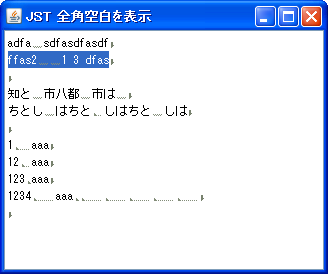
JEditorPaneで長い行を折り返さない
Section titled “JEditorPaneで長い行を折り返さない”
JTextPaneでキーワードのSyntaxHighlight
Section titled “JTextPaneでキーワードのSyntaxHighlight”
JTextPaneで最終行に移動
Section titled “JTextPaneで最終行に移動”
JTextPaneでタブサイズを設定
Section titled “JTextPaneでタブサイズを設定”
JTextPaneに修飾した文字列を挿入
Section titled “JTextPaneに修飾した文字列を挿入”
JEditorPaneのHTMLEditorKitにCSSを適用
Section titled “JEditorPaneのHTMLEditorKitにCSSを適用”
JEditorPaneやJTextPaneに行間を設定する
Section titled “JEditorPaneやJTextPaneに行間を設定する”
JEditorPaneにリンクを追加
Section titled “JEditorPaneにリンクを追加”
JEditorPaneのHTMLタグにToolTipTextを設定する
Section titled “JEditorPaneのHTMLタグにToolTipTextを設定する”
JTextPaneに追加するコンポーネントのベースラインを揃える
Section titled “JTextPaneに追加するコンポーネントのベースラインを揃える”
JEditorPaneのStyleSheetを使ってlistbulletを画像に変更
Section titled “JEditorPaneのStyleSheetを使ってlistbulletを画像に変更”
EditorPaneListStyle
JEditorPaneのHTMLEditorKitからStyleSheetを取得し、list-style-imageを使ってListbulletを変更します。
JTextPaneを一行に制限してスタイル可能なJTextFieldとして使用する
Section titled “JTextPaneを一行に制限してスタイル可能なJTextFieldとして使用する”
JEditorPaneのHTMLDocumentからIDでElementを取得する
Section titled “JEditorPaneのHTMLDocumentからIDでElementを取得する”
JEditorPaneで選択色を半透明化
Section titled “JEditorPaneで選択色を半透明化”
SelectionColor
JEditorPaneで選択色を半透明化し、HighlightPainterによるハイライトやCSSでの背景色変更と組み合わせた場合の描画のテストを行います。
JTextPaneで検索結果のハイライト表示と文字色変更を同時に行う
Section titled “JTextPaneで検索結果のハイライト表示と文字色変更を同時に行う”
HighlightTextForeground
Highlighter.HighlightPainterを使用したハイライト表示では文字色が変更不可なので、JTextPaneにStyleを設定してこれを同時に適用します。
JEditorPaneに読み込んだHTMLを画像に変換する
Section titled “JEditorPaneに読み込んだHTMLを画像に変換する”
JTextPaneにTabSetを設定してTabStopの文字列揃えをテストする
Section titled “JTextPaneにTabSetを設定してTabStopの文字列揃えをテストする”
JTextPaneにJSeparatorを追加する
Section titled “JTextPaneにJSeparatorを追加する”
JEditorPaneに設定したフォントをHTMLテキストに適用する
Section titled “JEditorPaneに設定したフォントをHTMLテキストに適用する”
HonorDisplayProperties
HTMLEditorKitでbodyタグにデフォルトで指定されている文字サイズではなく、JEditorPaneに設定したフォントをHTMLテキストで使用します。
JTextPaneに入力した文字をアイコンに変換する
Section titled “JTextPaneに入力した文字をアイコンに変換する”
JEditorPaneのHTMLDocumentに要素を追加する
Section titled “JEditorPaneのHTMLDocumentに要素を追加する”
JEditorPaneに表示したリンク上にカーソルが乗ったとき文字色を変更する
Section titled “JEditorPaneに表示したリンク上にカーソルが乗ったとき文字色を変更する”
JListのセルレンダラーとして設定したJEditorPaneからHyperlinkEventを取得する
Section titled “JListのセルレンダラーとして設定したJEditorPaneからHyperlinkEventを取得する”
ListCellHyperlinkListener
JListのセルレンダラーとして使用しているJEditorPaneに複数リンクを表示し、マウスクリックイベントを転送してHyperlinkEventが発生するように設定します。
JTextFieldを編集不可のJTextPaneに追加する
Section titled “JTextFieldを編集不可のJTextPaneに追加する”
JEditorPaneに配置したImgタグのvertical-alignを変更する
Section titled “JEditorPaneに配置したImgタグのvertical-alignを変更する”
JEditorPaneにソースコードをシンタックスハイライトして表示する
Section titled “JEditorPaneにソースコードをシンタックスハイライトして表示する”
SyntaxHighlightingEditorPane
JEditorPaneのHTMLEditorKitにStyleSheetを設定して、ソースコードをシンタックスハイライト表示します。
JEditorPaneで選択した文字列の色反転を無効化
Section titled “JEditorPaneで選択した文字列の色反転を無効化”
JEditorPaneに表示されたフォームからの送信データを取得する
Section titled “JEditorPaneに表示されたフォームからの送信データを取得する”
JEditorPaneのミニマップを表示する
Section titled “JEditorPaneのミニマップを表示する”
JEditorPaneで選択ハイライトの描画範囲を変更する
Section titled “JEditorPaneで選択ハイライトの描画範囲を変更する”
JEditorPane内のリンク参照位置までスクロールする
Section titled “JEditorPane内のリンク参照位置までスクロールする”
JEditorPaneのスクロールに連動してJTreeのノードを選択する
Section titled “JEditorPaneのスクロールに連動してJTreeのノードを選択する”
JTextPane内の文字に適用されているスタイル情報を取得する
Section titled “JTextPane内の文字に適用されているスタイル情報を取得する”
JEditorPaneのHTMLレンダリングでw3c準拠の長さ単位を使用する
Section titled “JEditorPaneのHTMLレンダリングでw3c準拠の長さ単位を使用する”
JTextPaneで中央揃え、行折返し可能なリストセルエディタを作成する
Section titled “JTextPaneで中央揃え、行折返し可能なリストセルエディタを作成する”
HTMLEditorKitを適用したJEditorPaneのフォームにコンポーネントを表示する
Section titled “HTMLEditorKitを適用したJEditorPaneのフォームにコンポーネントを表示する”
FormViewInputComponent
HTMLEditorKitを適用したJEditorPaneのフォームにinputやselectタグで表示可能なコンポーネントをテストします。
JTextPaneのStyledDocumentからhtmlテキストを生成する
Section titled “JTextPaneのStyledDocumentからhtmlテキストを生成する”
JTextComponentの文字列選択ハイライトのすべての角を丸めて半透明で描画する
Section titled “JTextComponentの文字列選択ハイライトのすべての角を丸めて半透明で描画する”
TranslucentRoundedSelection
JTextAreaやJEditorPaneなどのJTextComponentが使用するCaretに文字列選択ハイライトのすべての角を丸め、かつ半透明で描画するHighlightPainterを使用するよう設定します。
JEditorPaneのStyleSheetをLight・Darkテーマに合わせて切り替える
Section titled “JEditorPaneのStyleSheetをLight・Darkテーマに合わせて切り替える”
JPasswordFieldの可視化で数字の色のみ変更する
Section titled “JPasswordFieldの可視化で数字の色のみ変更する”
DigitColoredPasswordField
JPasswordFieldに入力されたパスワードを可視化したとき、数値のみ色を変更して字形が似たアルファベットとの判別を簡単にします。