JInternalFrame JLayeredPane JDesktopPane
JInternalFrameをModalにする
Section titled “JInternalFrameをModalにする”
JInternalFrameを半透明にする
Section titled “JInternalFrameを半透明にする”
SynthでJInternalFrameを半透明にする
Section titled “SynthでJInternalFrameを半透明にする”
JComponentをマウスで移動、リサイズ
Section titled “JComponentをマウスで移動、リサイズ”
JDesktopPaneにJInternalFrameを吸着させる
Section titled “JDesktopPaneにJInternalFrameを吸着させる”
JInternalFrameを固定
Section titled “JInternalFrameを固定”
DesktopManagerでアイコンの再配置
Section titled “DesktopManagerでアイコンの再配置”
JLayeredPaneに付箋風のウィンドウを表示する
Section titled “JLayeredPaneに付箋風のウィンドウを表示する”
JInternalFrameを一番手前に表示
Section titled “JInternalFrameを一番手前に表示”
JInternalFrameを閉じる
Section titled “JInternalFrameを閉じる”
JInternalFrameをJFrameとして表示する
Section titled “JInternalFrameをJFrameとして表示する”
Borderの右下にJComponentを配置
Section titled “Borderの右下にJComponentを配置”
JRootPaneの背景として画像を表示
Section titled “JRootPaneの背景として画像を表示”
JRootPaneにリサイズのための装飾を設定する
Section titled “JRootPaneにリサイズのための装飾を設定する”
JInternalFrame間でのドラッグ&ドロップによるJTableの行入れ替え
Section titled “JInternalFrame間でのドラッグ&ドロップによるJTableの行入れ替え”
JInternalFrameのタイトルバーに表示されるアイコンを変更する
Section titled “JInternalFrameのタイトルバーに表示されるアイコンを変更する”
JDesktopPane内のJInternalFrameをJTabbedPaneのタブと入れ替える
Section titled “JDesktopPane内のJInternalFrameをJTabbedPaneのタブと入れ替える”
SwapInternalFramesWithTabs
JDesktopPaneとJTabbedPaneをCardLayoutで切り替えるとき、その内部のJInternalFrameとタブもすべて入れ替えます。
JInternalFrameをアイコン化した場合のサイズを変更する
Section titled “JInternalFrameをアイコン化した場合のサイズを変更する”
JDesktopPaneにTaskBarを配置してJInternalFrameの一覧を表示する
Section titled “JDesktopPaneにTaskBarを配置してJInternalFrameの一覧を表示する”
JInternalFrameの縁の装飾を変更してパレット化する
Section titled “JInternalFrameの縁の装飾を変更してパレット化する”
JInternalFrameの最大化、最大化からの復元イベントを取得する
Section titled “JInternalFrameの最大化、最大化からの復元イベントを取得する”
MetalLookAndFeelのJInternalFrameタイトルバーでBumpsを非表示にする
Section titled “MetalLookAndFeelのJInternalFrameタイトルバーでBumpsを非表示にする”
JInternalFrameのタイトル文字列幅を取得し、その値でJDesktopIconの幅を調整する
Section titled “JInternalFrameのタイトル文字列幅を取得し、その値でJDesktopIconの幅を調整する”
JInternalFrameのタイトルを左寄せに変更する
Section titled “JInternalFrameのタイトルを左寄せに変更する”
JInternalFrameをキー入力で移動、リサイズする
Section titled “JInternalFrameをキー入力で移動、リサイズする”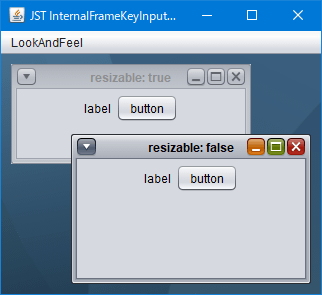
MetalThemeを変更してJInternalFrameのタイトル文字色を変更する
Section titled “MetalThemeを変更してJInternalFrameのタイトル文字色を変更する”
JDesktopPaneに適用するドラッグスタイルを変更する
Section titled “JDesktopPaneに適用するドラッグスタイルを変更する”
JDesktopPaneに配置されたすべてのJInternalFrameの表示状態を切り替える
Section titled “JDesktopPaneに配置されたすべてのJInternalFrameの表示状態を切り替える”
JInternalFrameにJPopupMenuを設定してタイトルを変更する
Section titled “JInternalFrameにJPopupMenuを設定してタイトルを変更する”
EditInternalFrameTitle
JInternalFrameのタイトルをタイトルバーやアイコン化された状態のJDesktopIconからJPopupMenuを開いて変更します。
JInternalFrameのタイトルを右ダブルクリックしても最大化しないよう設定する
Section titled “JInternalFrameのタイトルを右ダブルクリックしても最大化しないよう設定する”
JDesktopPane内のJInternalFrameがカーソルキーで移動可能な範囲を変更する
Section titled “JDesktopPane内のJInternalFrameがカーソルキーで移動可能な範囲を変更する”
JInternalFrameがマウスドラッグで移動中はそのフレームを半透明に変更する
Section titled “JInternalFrameがマウスドラッグで移動中はそのフレームを半透明に変更する”
JInternalFrameのリサイズ中に表示されるアウトラインを点線に変更する
Section titled “JInternalFrameのリサイズ中に表示されるアウトラインを点線に変更する”
JInternalFrameのタイトルパネルをフレーム原点から描画する
Section titled “JInternalFrameのタイトルパネルをフレーム原点から描画する”
InternalFrameLayoutTitlePaneAtOrigin
JInternalFrameのタイトルパネルをフレーム原点から描画するかBorderを考慮した配置にするかを切り替えます。
JInternalFrameのTitleButtonでJToolTipを表示するかを切り替える
Section titled “JInternalFrameのTitleButtonでJToolTipを表示するかを切り替える”
InternalFrameTitleButtonToolTipsOn
JInternalFrameのタイトルバーに配置された閉じる、最大化、最小化JButtonでJToolTipの表示・非表示を切り替えます。
JInternalFrameのTitlePaneの高さを変更
Section titled “JInternalFrameのTitlePaneの高さを変更”
JToggleButtonでドットインジケーターを作成する
Section titled “JToggleButtonでドットインジケーターを作成する”
DotNavigationSlideshow
JToggleButtonでドットインジケーターを作成してページ下部に配置し、マウスクリックなどでスクロールアニメーション付きの画面遷移を実行します。
