TreeCellEditor
Make only the leaf nodes in JTree editable
Section titled “Make only the leaf nodes in JTree editable”
LeafTreeCellEditor
This configures JTree so that node label editing is only possible for leaf nodes.
Restrict JTree node editing to JPopupMenu only
Section titled “Restrict JTree node editing to JPopupMenu only”
StartEditingPopupMenu
This restricts JTree node editing to only via JPopupMenu, rather than mouse clicks.
Convert JTree leaf nodes to JCheckBoxes
Section titled “Convert JTree leaf nodes to JCheckBoxes”
Display directory structure with JTree with JCheckBox
Section titled “Display directory structure with JTree with JCheckBox”
FileSystemTreeWithCheckBox
This displays the directory structure using a JTree with editable JCheckBoxes added to the nodes.
Add a JCheckBox to all nodes in the JTree
Section titled “Add a JCheckBox to all nodes in the JTree”
Use JCheckBox in JList cells
Section titled “Use JCheckBox in JList cells”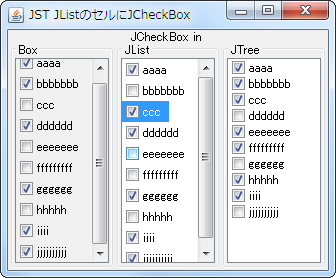
Committed JTree node editing
Section titled “Committed JTree node editing”
InvokesStopCellEditing
This setting determines whether changes are automatically saved if an interruption occurs while editing a JTree node.
Use JPanel, which contains JComboBox and other elements, in the JTree cell editor
Section titled “Use JPanel, which contains JComboBox and other elements, in the JTree cell editor”
ComboBoxCellEditor
We will use JPanel, which contains JComboBox and other elements, as the cell editor and cell renderer for JTree.
Change the icon displayed while editing a JTree node
Section titled “Change the icon displayed while editing a JTree node”
TreeCellEditorNodeIcon
This changes the node icon displayed when editing a JTree node begins.
Place multiple clickable JButtons on a JTree node
Section titled “Place multiple clickable JButtons on a JTree node”
MultipleButtonsInTreeNode
Set up a JPanel containing multiple clickable JButtons to serve as the cell editor for JTree.
Investigate whether input events on JTree’s TreeNode satisfy the conditions for starting editing
Section titled “Investigate whether input events on JTree’s TreeNode satisfy the conditions for starting editing”
EditableTreePath
The JTree node editor determines whether editing can begin by obtaining its status from TreePath or MouseEvent.