TableRowSorter RowFilter
Sorting JTables with TableRowSorter
Section titled “Sorting JTables with TableRowSorter”
TableRowSorter
This code uses TableRowSorter, introduced in JDK6, to sort the rows of a JTable in descending or ascending order.
The sort order of TableRowSorter can be changed to ascending, descending, or default by clicking the header
Section titled “The sort order of TableRowSorter can be changed to ascending, descending, or default by clicking the header”
TriStateSorting
This code configures the TableRowSorter, introduced in JDK6, to switch between ascending, descending, and initial sorting by clicking the header, as shown in TableSorter.java.
Filter rows in a JTable using RowFilter
Section titled “Filter rows in a JTable using RowFilter”
RowFilter
We will use the TableRowSorter introduced in JDK6 and set a RowFilter to filter rows.
Pagination of JTables using RowFilter
Section titled “Pagination of JTables using RowFilter”
TablePagination
This code uses RowFilter, introduced in JDK 6, to split and display rows in a pagination-like manner within a JTable.
Selection state after sorting a JTable
Section titled “Selection state after sorting a JTable”
UpdateSelectionOnSort
This test examines how the previous selection state changes when a JTable is sorted using RowSorter, which was introduced in JDK 1.6.
Remove the RowFilter from the JTable and then sort
Section titled “Remove the RowFilter from the JTable and then sort”
ResetRowFilter
The displayed rows are updated by temporarily removing the RowFilter of the JTable, sorting the table, and then reapplying the filter.
Column cell color while sorting in JTable
Section titled “Column cell color while sorting in JTable”
SortColumnColor
The background color of the cells is changed to indicate which column the data is sorted by.
Display unsorted summary rows in a JTable
Section titled “Display unsorted summary rows in a JTable”
FixedSummaryRow
Even when sorting the rows in a JTable, the summary will always be displayed in the last row.
Clear the SortKeys in TableRowSorter
Section titled “Clear the SortKeys in TableRowSorter”
ClearSortingState
This code clears the row sorting in TableRowSorter, introduced in JDK6, by Shift+clicking on the table header.
JTable column fixing and sorting
Section titled “JTable column fixing and sorting”
FixedColumnTableSorting
This example demonstrates sorting rows in a JTable with fixed columns using TableRowSorter, a feature introduced in JDK 6.
Change the sort icon for JTable
Section titled “Change the sort icon for JTable”
TableSortIcon
This will hide the sort icon in the JTable or change it to a different image.
Make the RowSorter of a JTable non-sortable with filtering enabled
Section titled “Make the RowSorter of a JTable non-sortable with filtering enabled”
FilterWithoutSorting
Create a TableRowSorter that allows filtering but does not allow sorting.
Add JPopupMenu to JTableHeader and sort
Section titled “Add JPopupMenu to JTableHeader and sort”
Sort files and directories separately in JTable
Section titled “Sort files and directories separately in JTable”
FileDirectoryComparator
Use JTable to group files and directories, sort them separately, and configure it so that the directory group is always at the top.
Set the column that JTable sorts by default
Section titled “Set the column that JTable sorts by default”
DefaultSortingColumn
This sets the columns and direction in which JTable sorts by default.
Highlight the search results in the JTable using RowFilter and Highlighter
Section titled “Highlight the search results in the JTable using RowFilter and Highlighter”
TableHighlightRegexFilter
In a JTable, we will display search results using regular expressions with RowFilter and Highlighter.
Display JTable sorting with multiple keys in the header
Section titled “Display JTable sorting with multiple keys in the header”
MultisortHeaderRenderer
The sort status of the JTable using multiple keys will be displayed separately in the header.
JTable pagination and sequential loading with SwingWorker
Section titled “JTable pagination and sequential loading with SwingWorker”
PageInputForPagination
This example uses JTable with RowFilter for pagination and SwingWorker for sequential loading.
The JTable model is sorted when it is updated
Section titled “The JTable model is sorted when it is updated”
SortsOnUpdates
Configure the JTable model to sort when it is updated, and test state changes such as value changes and row additions.
The SortKey of the JTable is persisted, and the sort state is saved and restored
Section titled “The SortKey of the JTable is persisted, and the sort state is saved and restored”
SortKeyPersistence
This configures the JTable to persist its SortKey, allowing its sort state to be saved and restored in an XML file.
Filter the dates set in the JTable cells using RegexFilter
Section titled “Filter the dates set in the JTable cells using RegexFilter”
RegexDateFilter
We will test filtering dates set in JTable cells using RegexFilter and other methods.
Create a filter to display only the checked rows in one JTable in another JTable
Section titled “Create a filter to display only the checked rows in one JTable in another JTable”
CheckBoxRowFilter
This creates a RowFilter that displays a row in another JTable if a JCheckBox placed in each row of the JTable is selected.
In JTables, cells with the same content are displayed as blank to represent grouping
Section titled “In JTables, cells with the same content are displayed as blank to represent grouping”
RowGroupInTable
In a JTable, cells with the same content as the cell directly above them are displayed as blank to represent row grouping.
Always place empty strings at the end when sorting JTables
Section titled “Always place empty strings at the end when sorting JTables”
EmptiesLastTableRowSorter
This sets up a Comparator that will always be at the end of the JTable, regardless of whether the empty strings are sorted in ascending or descending order.
Set a RowFilter in the JTable to perform filtering of LocalData
Section titled “Set a RowFilter in the JTable to perform filtering of LocalData”
LocalDateFilter
Create a calendar by adding LocalData to a JTable column, and then set a RowFilter to filter the dates within a specified period.
Display the sort icon in the JTableHeader, right-aligned to the header cell
Section titled “Display the sort icon in the JTableHeader, right-aligned to the header cell”
TableHeaderRightAlignSortArrow
This changes the display position of the sort icon in the JTableHeader from to the right of the title string to right-aligned to the header cell.
Display the sort icon for the JTableHeader in the upper left corner of the header cell
Section titled “Display the sort icon for the JTableHeader in the upper left corner of the header cell”
SortIconLayoutHeaderRenderer
This sets the sort icon for any column in a JTableHeader to be displayed in the upper left corner of the header cell using the table tag.
Sort rows in a JTable using multiple criteria
Section titled “Sort rows in a JTable using multiple criteria”
StandingsTablesComparator
Perform a composite sort by setting up a Comparator that uses multiple sort keys in the columns of a JTable.
Specify the column to sort by in the detailed view of JFileChooser
Section titled “Specify the column to sort by in the detailed view of JFileChooser”
FileChooserSortKeys
This specifies the column that the JTable used for detailed view in JFileChooser will sort by by default.
Use JButton as the cell renderer for JTableHeader
Section titled “Use JButton as the cell renderer for JTableHeader”
ButtonTableHeaderRenderer
A JButton is applied as the cell renderer to draw the column cells of the JTableHeader.
Execute JTable sorting by keyboard input
Section titled “Execute JTable sorting by keyboard input”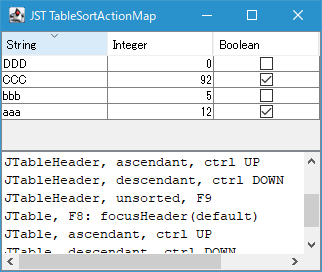
TableSortActionMap
This setting allows sorting via keyboard input rather than mouse clicks when a JTable or JTableHeader has focus.
JTable row filtering is performed using the comparison method specified by RowFilter.ComparisonType
Section titled “JTable row filtering is performed using the comparison method specified by RowFilter.ComparisonType”
RowFilterComparisonType
This sets the JTable row filtering to be performed using the inequality and equality comparisons specified by RowFilter.ComparisonType.
Highlight the sort status of the Table Column
Section titled “Highlight the sort status of the Table Column”
SortingHeaderColumnPainter
This setting allows you to change the background color of a TableColumn while it's being sorted in a JTable to highlight it.