JTextPane JEditorPane StyledDocument
Display line breaks in JEditorPane
Section titled “Display line breaks in JEditorPane”
ParagraphMark
This adds a shape to indicate a line break at the end of a paragraph in JEditorPane.
Visualize full-width spaces and tabs with JTextPane
Section titled “Visualize full-width spaces and tabs with JTextPane”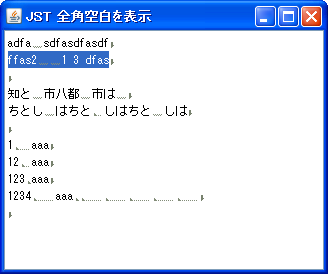
WhitespaceMark
This feature visualizes full-width spaces and tabs within a string displayed in JTextPane.
Do not wrap long lines in JEditorPane
Section titled “Do not wrap long lines in JEditorPane”
NoWrapTextPane
In JEditorPane and JTextPane, configure them so that lines do not wrap at the viewport width.
Keyword SyntaxHighlight in JTextPane
Section titled “Keyword SyntaxHighlight in JTextPane”
Move to the last line in JTextPane
Section titled “Move to the last line in JTextPane”
Setting tab size in JTextPane
Section titled “Setting tab size in JTextPane”
TabSize
This sets the number of characters that tab stops expand to as a paragraph attribute used by the StyledDocument of JTextPane.
Insert a modified string into a JTextPane
Section titled “Insert a modified string into a JTextPane”
StyleConstants
This inserts styled text into a JTextPane and displays it in a log-like format.
Applying CSS to JEditorPane’s HTMLEditorKit
Section titled “Applying CSS to JEditorPane’s HTMLEditorKit”
Setting line spacing in JEditorPane and JTextPane
Section titled “Setting line spacing in JEditorPane and JTextPane”
Add a link to JEditorPane
Section titled “Add a link to JEditorPane”
HyperlinkListener
Click events and other events for links added to the JEditorPane are handled using HyperlinkListener.
Setting ToolTipText in JEditorPane HTML tags
Section titled “Setting ToolTipText in JEditorPane HTML tags”
ElementAttribute
This explains how to configure JEditorPane to display the title attribute of div and span tags as a tooltip.
Align the baseline of the components to be added to JTextPane
Section titled “Align the baseline of the components to be added to JTextPane”
InsertComponentBaseline
This sets the baseline of the component added to the JTextPane to align with other text elements.
Change the listbullet to an image using JEditorPane’s StyleSheet
Section titled “Change the listbullet to an image using JEditorPane’s StyleSheet”
EditorPaneListStyle
We retrieve the StyleSheet from JEditorPane's HTMLEditorKit and modify the Listbullet using list-style-image.
Use a JTextPane as a styleable JTextField by limiting it to one line
Section titled “Use a JTextPane as a styleable JTextField by limiting it to one line”
OneLineTextPane
This method limits the number of lines in a JTextPane to one, allowing it to be used as a JTextField with customizable styling options such as text color.
Retrieve an element from an HTMLDocument in JEditorPane using its ID
Section titled “Retrieve an element from an HTMLDocument in JEditorPane using its ID”
HTMLAttributeID
This program searches the HTMLDocument set in JEditorPane and retrieves the element with the id attribute.
Make the selected color semi-transparent in JEditorPane
Section titled “Make the selected color semi-transparent in JEditorPane”
SelectionColor
This test demonstrates how the rendering looks when a selected color is made semi-transparent in JEditorPane and combined with highlighting using HighlightPainter and background color changes using CSS.
Simultaneously highlight search results and change text color using JTextPane
Section titled “Simultaneously highlight search results and change text color using JTextPane”
HighlightTextForeground
Since the text color cannot be changed when using Highlighter.HighlightPainter for highlighting, we set a Style for JTextPane and apply it simultaneously.
Convert HTML imported into JEditorPane into an image
Section titled “Convert HTML imported into JEditorPane into an image”
LoadsSynchronously
I will test a method to load HTML with images into JEditorPane and take a screenshot of the entire page once rendering is complete.
Test the text alignment of TabStops by setting TabSet in JTextPane
Section titled “Test the text alignment of TabStops by setting TabSet in JTextPane”
TabSet
We will set the paragraph attribute of a JTextPane to TabSet and test the alignment of text using TabStop.
Add JSeparator to JTextPane
Section titled “Add JSeparator to JTextPane”
SeparatorOnTextPane
Add elements such as hr, JSeparator, or a JLabel with a MatteBorder to the JTextPane as separators.
Apply the font set in JEditorPane to HTML text
Section titled “Apply the font set in JEditorPane to HTML text”
HonorDisplayProperties
Instead of using the default font size specified for the body tag in HTMLEditorKit, the font set in JEditorPane will be used for the HTML text.
Convert text entered in JTextPane into icons
Section titled “Convert text entered in JTextPane into icons”
SmyliyIconStyle
This function converts text entered into JTextPane into emoticon icons and displays them.
Adding elements to an HTMLDocument in JEditorPane
Section titled “Adding elements to an HTMLDocument in JEditorPane”
InsertHtmlText
This code retrieves a table element from the HTMLDocument in JEditorPane and adds child elements such as tr elements to it.
Change the text color when the cursor hovers over a link displayed in JEditorPane
Section titled “Change the text color when the cursor hovers over a link displayed in JEditorPane”
HyperlinkHoverEffect
We set up a HyperlinkListener to achieve an effect similar to the hover pseudo-class.
Retrieving HyperlinkEvents from a JEditorPane configured as a cell renderer for a JList
Section titled “Retrieving HyperlinkEvents from a JEditorPane configured as a cell renderer for a JList”
ListCellHyperlinkListener
We will display multiple links in the JEditorPane used as the cell renderer for JList, and configure it to forward mouse click events to generate HyperlinkEvents.
Add a JTextField to a non-editable JTextPane
Section titled “Add a JTextField to a non-editable JTextPane”
TextFieldOnReadOnlyTextPane
This adds a JTextField to a JTextPane that has been made blank and non-editable.
Change the vertical-align of an Img tag placed in JEditorPane
Section titled “Change the vertical-align of an Img tag placed in JEditorPane”
HTMLImgBaseline
This changes the vertical-align of the Img tag placed in JEditorPane to baseline alignment.
Display source code with syntax highlighting in JEditorPane
Section titled “Display source code with syntax highlighting in JEditorPane”
SyntaxHighlightingEditorPane
We'll configure a StyleSheet in JEditorPane's HTMLEditorKit to display syntax highlighting for source code.
Disable color inversion of selected text in JEditorPane
Section titled “Disable color inversion of selected text in JEditorPane”
SelectedTextColor
This disables the ability to change the color of selected text in JEditorPane by setting the color used for rendering the selected text to null.
Retrieve data submitted from a form displayed in JEditorPane
Section titled “Retrieve data submitted from a form displayed in JEditorPane”
FormSubmitEvent
This function retrieves the form submission data displayed in JEditorPane and decodes the percent-encoded string.
Display the JEditorPane minimap
Section titled “Display the JEditorPane minimap”
MiniMap
A minimap for JEditorPane is created using an ImageIcon, and this is then overlaid on a JScrollPane using a LayoutManager.
Changing the drawing range of selection highlights in JEditorPane
Section titled “Changing the drawing range of selection highlights in JEditorPane”
WholeLineHighlightPainter
This modifies the Caret of JEditorPane so that selection highlighting is displayed even on paragraphs containing only line breaks.
Scroll to the link reference location within the JEditorPane
Section titled “Scroll to the link reference location within the JEditorPane”
ScrollToReference
Scroll down to the location where the anchor tags of links placed within the HTMLDocument in JEditorPane are displayed.
Select JTree nodes in conjunction with scrolling in JEditorPane
Section titled “Select JTree nodes in conjunction with scrolling in JEditorPane”
Scrollspy
This function searches for and selects a JTree node with the same name as the link that becomes visible in conjunction with scrolling in JEditorPane.
Retrieve style information applied to text within a JTextPane
Section titled “Retrieve style information applied to text within a JTextPane”
CharacterAttributes
Retrieves the set of style attributes applied to the character located at the Caret position in the JTextPane.
Using W3C-compliant length units in JEditorPane’s HTML rendering
Section titled “Using W3C-compliant length units in JEditorPane’s HTML rendering”
W3CLengthUnits
JEditorPane's HTML rendering displays absolute units specified for font size and other parameters in W3C-compliant lengths.
Create a list cell editor with center alignment and line wrapping capabilities using JTextPane
Section titled “Create a list cell editor with center alignment and line wrapping capabilities using JTextPane”
CenteredMultiRowCellEditor
Create a center-aligned, line-wrapping editor using JTextPane, add it to a JFrame, and use it to edit list cells.
Displaying components in a JEditorPane form with HTMLEditorKit applied
Section titled “Displaying components in a JEditorPane form with HTMLEditorKit applied”
FormViewInputComponent
This tests components that can be displayed using input and select tags in a JEditorPane form with HTMLEditorKit applied.
Generate HTML text from a StyledDocument in JTextPane
Section titled “Generate HTML text from a StyledDocument in JTextPane”
MinimalHTMLWriter
The StyledDocument obtained from JTextPane is converted using MinimalHTMLWriter to generate HTML text.
Round all corners and make the selected text highlight of a JTextComponent semi-transparent
Section titled “Round all corners and make the selected text highlight of a JTextComponent semi-transparent”
TranslucentRoundedSelection
This sets the Caret used by JTextComponents such as JTextArea and JEditorPane to use HighlightPainter, which rounds all corners of the selected text highlight and renders it semi-transparent.
Switch the JEditorPane StyleSheet to match the Light or Dark theme
Section titled “Switch the JEditorPane StyleSheet to match the Light or Dark theme”
DarkMode
This setting configures JEditorPane's StyleSheet to switch depending on whether the system theme is Light or Dark when the program starts.
Change only the color of numbers when visualizing JPasswordField
Section titled “Change only the color of numbers when visualizing JPasswordField”
DigitColoredPasswordField
When the password entered in JPasswordField is visualized, only the numbers are color-coded to make it easier to distinguish them from similar-looking letters.