JProgressBar ProgressMonitor
Display a JProgressBar in a JTable cell
Section titled “Display a JProgressBar in a JTable cell”
Display JProgressBar in JTabbedPane tabs
Section titled “Display JProgressBar in JTabbedPane tabs”
TabWithProgressBar
A JProgressBar is placed on a tab in JTabbedPane to display the progress.
Displaying a modal SplashScreen with a JProgressBar using JDialog
Section titled “Displaying a modal SplashScreen with a JProgressBar using JDialog”
ProgressSplashScreen
This displays a modal SplashScreen with a JProgressBar using JDialog.
Interrupting and displaying the progress of processes using SwingWorker
Section titled “Interrupting and displaying the progress of processes using SwingWorker”
SwingWorker
We'll use the new SwingWorker in JDK6 to handle tasks like interrupting processing and updating the progress display.
Recursive search of files
Section titled “Recursive search of files”
RecursiveFileSearch
This program recursively searches for files within the specified directory and displays the progress using a JProgressBar.
Create an animated icon using Timer
Section titled “Create an animated icon using Timer”
Display the progress of the process with ProgressMonitor
Section titled “Display the progress of the process with ProgressMonitor”
Using multiple JProgressBars with SwingWorker
Section titled “Using multiple JProgressBars with SwingWorker”
TwoProgressBars
We will use two JProgressBars to display progress within a single SwingWorker.
Pausing and resuming SwingWorker
Section titled “Pausing and resuming SwingWorker”
Display JProgressBar within JComboBox
Section titled “Display JProgressBar within JComboBox”
Change the alignment of the progress text in JProgressBar
Section titled “Change the alignment of the progress text in JProgressBar”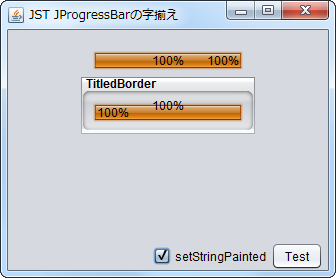
ProgressStringAlignment
This will change the progress text of the JProgressBar to a JLabel and modify the alignment and other settings.
NimbusLookAndFeel Color Palette
Section titled “NimbusLookAndFeel Color Palette”
Set UI in JProgressBar and change the indicator color
Section titled “Set UI in JProgressBar and change the indicator color”
GradientPalletProgressBar
The JProgressBar indicator color changes according to the progress, using a color selected from the palette.
Waiting time before ProgressMonitor displays a dialog
Section titled “Waiting time before ProgressMonitor displays a dialog”
MillisToDecideToPopup
This setting determines the waiting time before the ProgressMonitor dialog box appears.
Display the download status of a text file using ProgressMonitorInputStream
Section titled “Display the download status of a text file using ProgressMonitorInputStream”
ProgressMonitorInputStream
Use ProgressMonitorInputStream to display the download progress of a text file.
Drawing the progress text of a JProgressBar on a JLayer
Section titled “Drawing the progress text of a JProgressBar on a JLayer”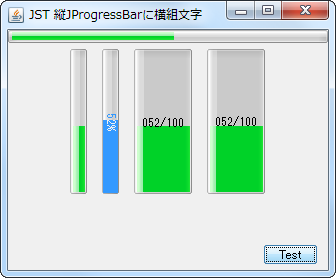
ProgressStringLayer
Expand the width of the vertical JProgressBar and display its progress text horizontally without rotation on a JLayer.
Change the hue of JProgressBar using JLayer
Section titled “Change the hue of JProgressBar using JLayer”
Set the uncertain progress cycle time for JProgressBar
Section titled “Set the uncertain progress cycle time for JProgressBar”
IndeterminateCycleTime
This setting configures the cycle time and other parameters used in the JProgressBar's uncertain progress animation.
Display a JProgressBar in a JTree node
Section titled “Display a JProgressBar in a JTree node”
TreeNodeProgressBar
Set up a TreeCellRenderer on the JTree node to display a JProgressBar.
Use a JProgressBar with a progress string set in a TableCellRenderer
Section titled “Use a JProgressBar with a progress string set in a TableCellRenderer”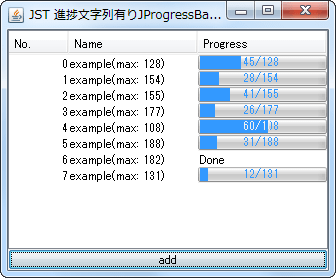
StringPaintedCellProgressBar
Set JProgressBar as the TableCellRenderer for the JTable to display the progress string.
Displaying JProgressBar progress in a circular format
Section titled “Displaying JProgressBar progress in a circular format”
Modify the indeterminate state animation in NimbusLookAndFeel for JProgressBar
Section titled “Modify the indeterminate state animation in NimbusLookAndFeel for JProgressBar”
IndeterminateRegionPainter
If you are using JProgressBar with NimbusLookAndFeel, this will change its indeterminate state animation.
Change the animation pattern of JProgressBar in its uncertain state
Section titled “Change the animation pattern of JProgressBar in its uncertain state”
StripedProgressBar
This changes the animation pattern used when JProgressBar is in an indeterminate state.
Change the progress status and progress text color of JProgressBar
Section titled “Change the progress status and progress text color of JProgressBar”
ProgressBarSelectionColor
This changes the color of the progress indicator in the JProgressBar, and the color of the progress text when the indicator is filled with progress.
Change the progress direction of the JProgressBar from right to left
Section titled “Change the progress direction of the JProgressBar from right to left”
InvertedProgressBar
This modifies the JProgressBar indicator so that it increases in the opposite direction to normal.
Change the JProgressBar’s indeterminate mode animation to one direction
Section titled “Change the JProgressBar’s indeterminate mode animation to one direction”
IndeterminateAnimation
This changes the indeterminate mode animation of a JProgressBar with MetalLookAndFeel applied from a bounce to a unidirectional repeat from left to right.
Execute SwingWorker thread by thread in sequence
Section titled “Execute SwingWorker thread by thread in sequence”
SingleThreadExecutor
This executes each SwingWorker task that manipulates the JProgressBar placed in the JTable cells, one by one, in sequence.
Create a speedometer by changing the shape of the JProgressBar to a donut-shaped semicircle
Section titled “Create a speedometer by changing the shape of the JProgressBar to a donut-shaped semicircle”
SemicircleGauge
We will create a speedometer that changes the shape of the JProgressBar to a donut-shaped semicircle and changes the gauge color according to its value.
Change whether the progress string rotates when the JProgressBar is vertically oriented
Section titled “Change whether the progress string rotates when the JProgressBar is vertically oriented”
VerticalProgressBarRotateText
This setting changes whether the progress string is rotated when a JProgressBar with NimbusLookAndFeel configured is vertically oriented.
Change the title of the progress dialog that displays ProgressMonitor
Section titled “Change the title of the progress dialog that displays ProgressMonitor”
ProgressMonitorProgressText
Use UIManager to change the title string of the progress dialog that displays ProgressMonitor.
Display an uncertain progress status JProgressBar in a JTable cell
Section titled “Display an uncertain progress status JProgressBar in a JTable cell”
TableCellOfIndeterminateProgressBar
This code applies a JProgressBar to the cells of a JTable, which displays an animation indicating an uncertain progress state for a set period of time.
Place the JSlider and the text input field on top of each other
Section titled “Place the JSlider and the text input field on top of each other”
CompactSlider
This creates a numeric input component by layering a JSlider and a JFormattedTextField using an OverlayLayout.
Display the page scroll distance using JProgressBar
Section titled “Display the page scroll distance using JProgressBar”
ScrollIndicator
Create a progress indicator using JProgressBar to show the distance the page has been scrolled, and add it to the header of a JScrollPane.