Animation
Create an animated icon using Timer
Section titled “Create an animated icon using Timer”
Frame rendering processing in AnimatedGIF
Section titled “Frame rendering processing in AnimatedGIF”
AnimatedGif
This tests an animated GIF file that can be used with JLabels and other applications.
JList cell animation
Section titled “JList cell animation”
TrayIcon animation
Section titled “TrayIcon animation”
Cursor animation
Section titled “Cursor animation”
AnimatedCursor
A looping animation of the mouse pointer is created by switching the Cursor using a Timer.
JToolTip animation
Section titled “JToolTip animation”
AnimatedToolTip
This tests how to animate an icon in an internal JLabel when a JToolTip is displayed.
Border animation
Section titled “Border animation”
Scroll text in an electronic display style using GlyphVector
Section titled “Scroll text in an electronic display style using GlyphVector”
ScrollingMessage
We create a GlyphVector and make it scroll like an electronic display board.
Rotate the font
Section titled “Rotate the font”
TransformedShape
The outline of the characters is obtained from the font, and its center is set as the anchor point for rotation.
Make the JLabel’s text blink
Section titled “Make the JLabel’s text blink”
Crossfade image switching
Section titled “Crossfade image switching”
Displaying images with a fade animation
Section titled “Displaying images with a fade animation”
Display image with wipe animation
Section titled “Display image with wipe animation”
Switch the display using RandomDissolve
Section titled “Switch the display using RandomDissolve”
Using enums as the model for JComboBox
Section titled “Using enums as the model for JComboBox”
Line movement using SmoothScroll in JTextArea
Section titled “Line movement using SmoothScroll in JTextArea”
SmoothScroll
This code uses a smooth scrolling animation to move to any line in the JTextArea.
Displaying images in a Lightbox-like style using GlassPane
Section titled “Displaying images in a Lightbox-like style using GlassPane”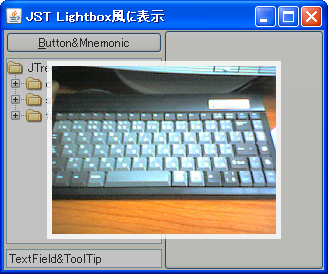
LightboxLikeDisplay
Using GlassPane, we'll display images with a lightbox-like animation.
JTable row addition and deletion animation
Section titled “JTable row addition and deletion animation”
SlideTableRows
Adding or deleting rows in a JTable is highlighted with a slide animation.
Use LayoutManager to perform panel unfolding animations
Section titled “Use LayoutManager to perform panel unfolding animations”
LayoutAnimation
We will create a LayoutManager that uses animation to unfold and collapse panels.
A JTextArea slides in as a caption on top of the image
Section titled “A JTextArea slides in as a caption on top of the image”
Displaying an AnimatedGIF in a JTable cell
Section titled “Displaying an AnimatedGIF in a JTable cell”
AnimatedIconInTableCell
By setting an ImageObserver to an ImageIcon, the AnimatedGIF animation will be performed within the JTable cell.
Displaying an AnimatedGIF in a JComboBox
Section titled “Displaying an AnimatedGIF in a JComboBox”
AnimatedIconInComboBox
This displays an animated GIF in a JComboBox and its dropdown list.
Switching display on a grid basis using GridLayout and JScrollPane
Section titled “Switching display on a grid basis using GridLayout and JScrollPane”
GridScrollAnimation
We add components to a JPanel using GridLayout, place them in a JScrollPane, and then display them in grid units and switch between them using scroll animations.
Stop the animation of the AnimatedGIF displayed in the JLabel
Section titled “Stop the animation of the AnimatedGIF displayed in the JLabel”
Extract frame images from an animated GIF
Section titled “Extract frame images from an animated GIF”
ExtractFramesFromAnimatedGif
This extracts the image from each frame of an animated GIF.
Release the ImageIcon resources and play the AnimatedGIF from the beginning
Section titled “Release the ImageIcon resources and play the AnimatedGIF from the beginning”
RestartAnimatedGif
The AnimatedGIF resource set for components such as JButton will be released and playback will start from the beginning.
Change the number of timers used
Section titled “Change the number of timers used”
TimerAction
Test the functionality by changing the number of java.swing.Timers used in the panel tile animation.
Modify the indeterminate state animation in NimbusLookAndFeel for JProgressBar
Section titled “Modify the indeterminate state animation in NimbusLookAndFeel for JProgressBar”
IndeterminateRegionPainter
If you are using JProgressBar with NimbusLookAndFeel, this will change its indeterminate state animation.
Change the animation pattern of JProgressBar in its uncertain state
Section titled “Change the animation pattern of JProgressBar in its uncertain state”
StripedProgressBar
This changes the animation pattern used when JProgressBar is in an indeterminate state.
Display a JWindow as a slide-in on the desktop
Section titled “Display a JWindow as a slide-in on the desktop”
SlideInNotificationWindow
A JWindow with a JOptionPane added will be displayed on the desktop using a slide-in animation.
Switch the display state of a dialog box placed on top of a component with animation
Section titled “Switch the display state of a dialog box placed on top of a component with animation”
OverlayBorderLayout
We'll create a layout manager that animates the position of a search dialog box placed on top of a component, and toggle its visibility using keyboard input.
Displaying an AnimatedGIF in a JTree TreeNode
Section titled “Displaying an AnimatedGIF in a JTree TreeNode”
AnimatedTreeNode
Configure an ImageObserver so that the AnimatedGIF ImageIcon set in the JTree node can be animated.
Generate an Animated GIF file using ImageIO
Section titled “Generate an Animated GIF file using ImageIO”
CreateAnimatedGif
We will use ImageIO to generate an animated GIF and then export it as an image file.
Change the JProgressBar’s indeterminate mode animation to one direction
Section titled “Change the JProgressBar’s indeterminate mode animation to one direction”
IndeterminateAnimation
This changes the indeterminate mode animation of a JProgressBar with MetalLookAndFeel applied from a bounce to a unidirectional repeat from left to right.
The JButton’s hover effect is represented by a circular radial gradient
Section titled “The JButton’s hover effect is represented by a circular radial gradient”
RadialGradientButton
This will execute a circular radial gradient animation as a hover effect for the JButton.
Expand the width of the JScrollBar when the mouse cursor hovers over it
Section titled “Expand the width of the JScrollBar when the mouse cursor hovers over it”
ChangeScrollBarWidthOnHover
The JLayer is used to capture when the mouse cursor enters or leaves the JScrollBar, and then expands or shrinks its width.
Move the shape along the PathIterator obtained from the Shape
Section titled “Move the shape along the PathIterator obtained from the Shape”
MotionPathAnimation
This program draws an animation on a JPanel that shows a shape moving along a PathIterator obtained from the Shape.
When the JTextField gains focus, the top right and left edges of the border are drawn sequentially
Section titled “When the JTextField gains focus, the top right and left edges of the border are drawn sequentially”
FocusBorderAnimation
When a JTextField gains keyboard focus, it starts a border animation that draws straight lines along its top right and left edges in sequence.
Rotate and display the Animated GIF
Section titled “Rotate and display the Animated GIF”
RotateAnimatedGifImageIcon
This tests a method for rotating and displaying an ImageIcon generated from an AnimatedGIF.
Use a Timer to draw the hands of an analog clock on a JPanel
Section titled “Use a Timer to draw the hands of an analog clock on a JPanel”
AnalogClock
We use javax.swing.Timer to get the current time and draw the hands of an analog clock on a JPanel.
A semi-transparent ellipse is drawn when scrolling by mouse dragging outside the JScrollPane’s boundaries
Section titled “A semi-transparent ellipse is drawn when scrolling by mouse dragging outside the JScrollPane’s boundaries”
OverscrollEdgeEffect
When an event is detected where the mouse is dragged outside the JScrollPane's boundaries, a JLayer is used to draw a semi-transparent ellipse at the edge of the JViewport to indicate that it cannot be moved any further.
A hexahedron wireframe is projected onto a JPanel and drawn, then rotated in space by dragging with the mouse
Section titled “A hexahedron wireframe is projected onto a JPanel and drawn, then rotated in space by dragging with the mouse”
PerspectiveCube
A hexahedron wireframe is drawn on the JPanel using projection transformation, and each vertex can be transformed and rotated in space by dragging with the mouse.
Display an uncertain progress status JProgressBar in a JTable cell
Section titled “Display an uncertain progress status JProgressBar in a JTable cell”
TableCellOfIndeterminateProgressBar
This code applies a JProgressBar to the cells of a JTable, which displays an animation indicating an uncertain progress state for a set period of time.
Implement node expansion and collapse animations in JTree
Section titled “Implement node expansion and collapse animations in JTree”
TreeNodeExpandCollapseAnimations
This program performs an animation that increases or decreases the height of child nodes when expanding or collapsing JTree nodes.
Fade out a JWindow with a transparency animation
Section titled “Fade out a JWindow with a transparency animation”
FadingOutWindow
The transparency of the JWindow is changed using a Timer, and it is set to disappear with a fade-out effect.
Display an animation where a dashed line moves along the edge of the selected cell area in the JTable
Section titled “Display an animation where a dashed line moves along the edge of the selected cell area in the JTable”
DashedBorderAnimationForSelectedCells
The movement animation of the JTable is drawn by alternately switching between dashed lines with different dashed phases around the entire edge of the selected cell area.
Highlight the location where tabs are added in JTabbedPane
Section titled “Highlight the location where tabs are added in JTabbedPane”
TabOrScrollButtonHighlightAnimation
This setting enables the addition of a tab to JTabbedPane by highlighting the tab area, or the scroll button if the area is hidden, with an animation to indicate the tab's position.
Set a rotation animation expand/collapse icon for JToggleButton
Section titled “Set a rotation animation expand/collapse icon for JToggleButton”
RotatingAnimationToggleIcon
This JToggleButton sets up an expand/collapse icon that rotates 90 degrees clockwise with animation when selected, and rotates -90 degrees back to its original 0 degrees when deselected.
Create a dot indicator with JToggleButton
Section titled “Create a dot indicator with JToggleButton”
DotNavigationSlideshow
Create a dot indicator with JToggleButton and place it at the bottom of the page, and perform a screen transition with a scroll animation when the mouse is clicked, etc.
Add an expandable and collapsible side menu to JLayeredPane
Section titled “Add an expandable and collapsible side menu to JLayeredPane”
Drawer
Add the side menu created in JPanel to the modal layer of the JLayeredPane, and animate its expansion and collapse.
Create a flip clock that uses AffineTransform to simulate 3D rotation of numeric panels
Section titled “Create a flip clock that uses AffineTransform to simulate 3D rotation of numeric panels”
FlipClock
Create a flip clock by displaying two-digit numbers for hours, minutes, and seconds split vertically on a JPanel, and then using AffineTransform to scale them down vertically to simulate the rotation of the panels.
Create an avatar group with a layout where the left and right JButtons overlap
Section titled “Create an avatar group with a layout where the left and right JButtons overlap”
Avatars
Set circular clipped icons on the JButtons, and create an avatar group where these overlap horizontally by default and expand horizontally on mouseover.
Execute a count-up animation for numbers arranged vertically within a JComponent
Section titled “Execute a count-up animation for numbers arranged vertically within a JComponent”
AnimatedCounter
Create a wheel component within a JComponent where the numbers rotate vertically, and combine this with each digit to create a counter component.
Apply a shimmer effect to the text in a JLabel
Section titled “Apply a shimmer effect to the text in a JLabel”
ShimmerLabel
Draw the text in a JLabel using a LinearGradientPaint with an animation that creates a moving glow.
Pseudo-3D Cube Page Transition Effect on JPanel
Section titled “Pseudo-3D Cube Page Transition Effect on JPanel”
CubeTransition
Creates a pseudo-3D cube rotation effect on a JPanel for page transitions
Create a split button that can be expanded and collapsed by setting a JLayer on a JButton
Section titled “Create a split button that can be expanded and collapsed by setting a JLayer on a JButton”
ExpandableSplitButton
Create a split button by setting a JLayer on a JButton that controls the start and end of the expand/collapse animation and assigns actions to each clicked area.