Java 11 and E(fx)clipse JavaFX plugin on Eclipse 4.9: An error has occurred – see the log file

I can’t get my Eclipse 2018-09 (4.9) running with Java 11 and E(fx)clipse JavaFX plugin.

I run the typical Help -> Install new software procedure for E(fx)clipse, but after restart, Eclipse fully crashes: I can’t even open Eclipse anymore for a new workspace!

When I try to run Eclipse, I get a dialog:

“An error has occurred. See the log file C:\workspace\.metadata\.log”

I’ve put a copy of that log file on my Github.

Well, I could run a hello world JavaFX application using this manual library setup, but I’d really like to get E(fx)clipse running in order to get the Eclipse menu options and functionality. So how to solve that? Thanks.

Solution:

In Eclipse e(fx)clipse the support for Java 11 has just been implemented and is just available since version 3.4.1, but according to your log you have version 3.3.0.201809010600.

See Eclipse bug 539739

OnActivityResult not getting called

In Activity A, I want to open a dialog (CustomDialog). Inside CustomDialog, it has a button to open a camera. But the onActivityResult not getting called after I pick an image from gallery. No toast is getting displayed.

Activity A

private void openDialog() {
        CustomDialog alert = new CustomDialog();
        alert.showDialog(this);
    }

CustomDialog

public class CustomDialog extends Activity{

    Activity activity;
    ImageView imageView;

    public void showDialog(Activity activity) {
        this.activity = activity;
        final Dialog dialog = new Dialog(activity);
        dialog.requestWindowFeature(Window.FEATURE_NO_TITLE);
        dialog.setCancelable(false);
        dialog.setContentView(R.layout.custom_dialog);
        dialog.getWindow().setBackgroundDrawableResource(android.R.color.transparent);
        dialog.setCanceledOnTouchOutside(true);

        imageView = (ImageView) dialog.findViewById(R.id.logoApp);

        Button galleryBtn = (Button) dialog.findViewById(R.id.galleryBtn);

        galleryBtn.setOnClickListener(new View.OnClickListener() {
            @Override
            public void onClick(View v) {
                galleryIntent();
            }
        });
        dialog.show();
    }

    private void galleryIntent() {
        Intent intent = new Intent();
        intent.setType("image/*");
        intent.setAction(Intent.ACTION_GET_CONTENT);//
        activity.startActivityForResult(Intent.createChooser(intent, "Select File"), 1);
    }

    @Override
    public void onActivityResult(int requestCode, int resultCode, Intent data) {
        super.onActivityResult(requestCode, resultCode, data);
        Toast.makeText(activity,"sdddddsss",Toast.LENGTH_LONG).show();
        super.onActivityResult(requestCode, resultCode, data);
        if (resultCode == Activity.RESULT_OK) {
            if (requestCode == 1) {
                onSelectFromGalleryResult(data);
            }else{
              // ...
            }
        }
    }

    @SuppressWarnings("deprecation")
    private void onSelectFromGalleryResult(Intent data) {
        Bitmap bm=null;
        if (data != null) {
            try {
                bm = MediaStore.Images.Media.getBitmap(getApplicationContext().getContentResolver(), data.getData());
            } catch (IOException e) {
                e.printStackTrace();
            }
        }
        imageView.setImageBitmap(bm);
    }
}

I follow this http://www.theappguruz.com/blog/android-take-photo-camera-gallery-code-sample

Solution:

When you show dialog in Activity A, you set reference to Activity A as param:
alert.showDialog(this);
Then inside CustomDialog, you save this reference as activity variable:

public void showDialog(Activity activity) {
this.activity = activity;
...}

This means, that this.activity is instance of Activity A. Later in your galleryIntent(), you start activity for result like this:

private void galleryIntent() {
...
activity.startActivityForResult(Intent.createChooser(intent, "Select File"), 1);
}

This means that onActivityResult will be called in Activity A, not your Custom dialog, because you’ve used activity variable.

You have 2 options for fix:

1) replace activity.startActivityForResult with CustomDialog.this.startActivityForResult

2) move your onActivityResult code from CustomDialog into Activity A

Run jar with dependencies from the command line

Java can run jar files from the command line like this:

java -jar foobar.jar

However, if foobar.jar depends on baz.jar, the above will throw an exception as soon as any of the classes in baz.jar is invoked, as the JVM has no way to know where to look for these.

However, the man page (OpenJDK 8 on Linux) states that:

When you use the -jar option, the specified JAR file is the source of all user classes, and other class path settings are ignored.

If repackaging is not an option, is there a way to run a jar file with dependencies from the command line?

Solution:

When you use java -jar, dependencies are not specified on the command line.
You have 2 ways to add jars to the class path:

  1. Call java with the main class and add jar files, including your foobar.jar, on the command line:

    java -cp foobar.jar:baz.jar com.mycompany.MainClass
    
  2. Include dependencies in foobar.jar‘s manifest file (and then run java -jar)

    Class-Path: baz.jar
    

Can't override a method in Java

I don’t usually post something this simple, but this issue kept me scratching my head for while.

I’m trying to override a method in a subclass, but I get the following error message:

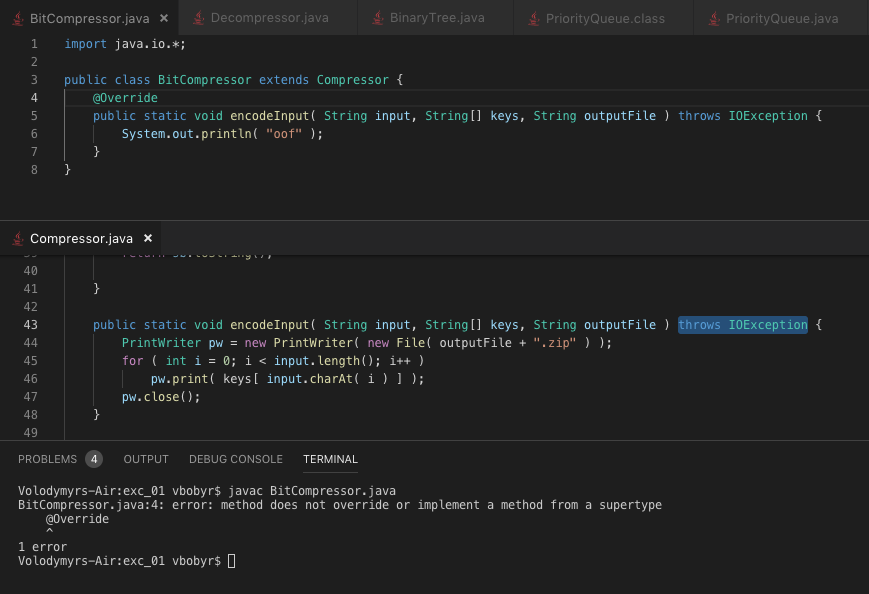
enter image description here

My BitCompressor.java iextends Compressor.java and attempts to override its encodeInput(...) method, but when I compile, I get the following error: error: method does not override or implement a method from a supertype

The screenshot above shows the original method (middle), the subclass trying to override that method (top) and the error (bottom).

Any ideas? Thank you.

Solution:

Remove the static keyword. You cant override a static method

To override a method it needs to be a normal instance method with visibility by the super class (ie public, protected or possibly package private) and not be marked final.

Every non-static method in Java is by default a virtual method except for final and private methods. These virtual methods are polymorphic and allow overriding.

Java Spring Scheduler Lock

I have been trying to send notifications to my customers once. I’m using kubernetes and I create multiple spring boot applications because I have 2 replicas. This is all fine but when the scheduler runs, each one of them can send notifications. I have looked a little bit at quartz but the config seems to be a little complicated. Is there an easy way to do so?

@Scheduled(fixedDelayString = "300000")
public void sendFlowerNotification() {
  //Code
}

Solution:

You can also use dlock to execute a scheduled task only once over multiple nodes. You can simply do something like below.

@Scheduled(fixedDelayString = "300000")
@TryLock(name = "flowerNotification", owner = POD_NAME, lockFor = THREE_MINUTES)
public void sendFlowerNotifications() {
  List<Notification> notifications = notificationService.getNotifications();
  for(Notification notification: notifications){
    sendNotification(notification);
  }
}

You can send the POD_NAME to spring as an environment variable. dlock would automatically handle it.

 env:
 - name: POD_NAME
   valueFrom:
     fieldRef:
       fieldPath: metadata.name

See the article about using it.

Why is this my attempt of spawning endless Threads stops at 4?

I have this simple code in Java 8:

class ThreadTest {
    void threadTest() {
        new Thread(this::threadTest).start();
        System.out.println(Thread.activeCount());
    }

    public static void main(String[] args) {
        new ThreadTest().threadTest();
    }
}

and I was pretty much expecting to see very large numbers getting printed. All I see in the console is:

4
4
4
4
4
4
4
4
4

I said maybe I am not able to see others for whatever reason and modified the code as below:

class ThreadTest {
    void threadTest() {
        new Thread(this::threadTest).start();
        if (Thread.activeCount() > 4) {
            System.out.println(Thread.activeCount());
        }
    }

    public static void main(String[] args) {
        new ThreadTest().threadTest();
    }
}

and now nothing gets printed.

What am I missing here?

Solution:

Once your thread reaches the end of its execution (in your case, the end of the threadTest() method), it is no longer an active thread.

If you add an excessively long Thread.sleep in your method, you will see this active thread count increase further.

Creating an immutable list from an existing list using streams

There is a list of Person objects.

List<Person> persons = generatePersons();

An unmodifiableList is created with it.

List<Person> unmodifiableList = Collections.unmodifiableList(persons);

I understand that unmodifiableList doesn’t support add/remove/set operations. At the same time it is not immutable since it has a reference to an existing modifiable list persons and whenever changes are made to the persons list, the changes are reflected in unmodifiableList too.

An immutable list is created this way.

List<Person> immutableList = Collections.unmodifiableList(new ArrayList<>(persons));

This creates an immutable list since a conversion constructor is being used. No add/remove/set ops can be performed on immutableList nor any change in the original list persons would reflect in immutableList.
Let’s make an assumption that Person objects are immutable too.

Now, I want to create these two lists using streams.

The first one, I have created using:

List<Person> unmodifiablePersons = persons.stream()
.collect(Collectors.collectingAndThen(Collectors.toList(), Collections::unmodifiableList));

I am lost at creating equivalent of immutableList through streams.

How can I do that?

Edit:

I added a new Person object to the original list persons and printed the size of persons list and unmodifiablePersons. Both give me the same size.
So, changes are being reflected to unmodifiablePersonsand hence it is not immutable yet. Am I missing something here?

Edit 2

Silly. Should have gone through the docs. unmodifiablePersons is indeed an immutable list. Also, the new Person object was added before the unmodifiablePersons was created and hence the above observation. Super silly.

Solution:

Well in your first case someone has access to List<Person> unmodifiableList and can edit it, but when you collect no one has access to that List generated by Collectors.toList – so you are good.

What you are probably missing is that Collectors::toList will create a new List – which should really be obvious; and you wrap it into an unmodifiable one, thus the result of that is truly unmodifiable.

Also in java-10 there is special collector for that:

List<Integer> result = Arrays.asList(1, 2, 3, 4)
        .stream()
        .collect(Collectors.toUnmodifiableList());

This collector uses List::of internally – immutable collections added in java-9, thus for example they don’t support nulls.

Why use assignment in a comparison?

When reading the source code, I stumbled upon this method in the JDK sources. Please note the declaration and initialization of v and newValue. We have here ‘nice’ undefined values, assignment in comparisons, which is ‘great’, and extra brackets for worse readability. And other code smells.

default V computeIfAbsent(K key, Function<? super K, ? extends V> mappingFunction) {
    Objects.requireNonNull(mappingFunction);
    V v;
    if ((v = get(key)) == null) {
        V newValue;
        if ((newValue = mappingFunction.apply(key)) != null) {
            put(key, newValue);
            return newValue;
        }
    }

    return v;
}

But why? Is there any actual benefit to writing code the above way instead of the simple (ideally with negated v comparison):

default V computeIfAbsent(K key, Function<? super K, ? extends V> mappingFunction) {
    Objects.requireNonNull(mappingFunction);
    V v  = get(key);
    if (v == null) {
        V newValue = mappingFunction.apply(key);
        if (newValue != null) {
            put(key, newValue);
            return newValue;
        }
    }

    return v;
}

Is there any actual benefit I’m not aware of (besides showing off Java constructs), rather than going with the ‘easy’ way?

Solution:

#microoptimization (but in case of a standard library it could matter), and:

#inertia: this pattern was common among C programmers back in the 90-ies, so the titans of computer science may still use this style.

There’s no point to write such code for new business logic, unless performance is really critical.


The (micro)optimization:

The bytecode produced by javac (JDK 11) for the original (“bad”) version is one JVM-operation less than the (nicer) code. Why? The JDK’s version “uses” the return value of the assignment operator (rather than loading the value from a variable) for the if condition evaluation.

However, this is more a limitation of javac‘s optimization possibilities than a reason to write the less-readable code.

Here’s the bytecode for the JDK version, cited in the question:

   0: aload_2
   1: invokestatic  #2                  // Method java/util/Objects.requireNonNull:(Ljava/lang/Object;)Ljava/lang/Object;
   4: pop
   5: aload_0
   6: aload_1
   7: invokevirtual #3                  // Method get:(Ljava/lang/Object;)Ljava/lang/Object;
  10: dup
  11: astore_3
  12: ifnonnull     39
  15: aload_2
  16: aload_1
  17: invokeinterface #4,  2            // InterfaceMethod java/util/function/Function.apply:(Ljava/lang/Object;)Ljava/lang/Object;
  22: dup
  23: astore        4
  25: ifnull        39
  28: aload_0
  29: aload_1
  30: aload         4
  32: invokevirtual #5                  // Method put:(Ljava/lang/Object;Ljava/lang/Object;)Ljava/lang/Object;
  35: pop
  36: aload         4
  38: areturn
  39: aload_3
  40: areturn

Below is the bytecode of a more readable version:

public V computeIfAbsent(K key,
                         Function<? super K, ? extends V> mappingFunction) {
    Objects.requireNonNull(mappingFunction);
    final V v = get(key);
    if (v == null) {
        final V newValue = mappingFunction.apply(key);
        if (newValue != null) {
            put(key, newValue);
            return newValue;
        }
    }

    return v;
}

.. and the bytecode is:

   0: aload_2
   1: invokestatic  #2                  // Method java/util/Objects.requireNonNull:(Ljava/lang/Object;)Ljava/lang/Object;
   4: pop
   5: aload_0
   6: aload_1
   7: invokevirtual #3                  // Method get:(Ljava/lang/Object;)Ljava/lang/Object;
  10: astore_3
  11: aload_3
  12: ifnonnull     40
  15: aload_2
  16: aload_1
  17: invokeinterface #4,  2            // InterfaceMethod java/util/function/Function.apply:(Ljava/lang/Object;)Ljava/lang/Object;
  22: astore        4
  24: aload         4
  26: ifnull        40
  29: aload_0
  30: aload_1
  31: aload         4
  33: invokevirtual #5                  // Method put:(Ljava/lang/Object;Ljava/lang/Object;)Ljava/lang/Object;
  36: pop
  37: aload         4
  39: areturn
  40: aload_3
  41: areturn

Fastest way to compute 9^(9^9) exactly all digits?

Is there a way to exactly compute all of the ca. 370 million decimal digits of 9^(9^9) very fast? I used an out of the box bignumber algorithms library(*) which took 16 minutes.

(*) I used Java BigInteger the pow() method:

?- time((_ is 9^(9^9))).
% Up 974,318 ms, GC 9,302 ms, Thread Cpu 962,688 ms (Current 06/01/18
19:54:01)
Yes

?- statistics.
Max Memory           7,635,730,432 Bytes
Used Memory           765,913,440 Bytes
Free Memory          2,891,739,304 Bytes
Uptime                 2,466,670 Millis
GC Time                    9,315 Millis
Thread Cpu Time          963,812 Millis
Current Time          06/01/18 20:18:37 

The Java BigInteger implementation uses Karatsuba and Toom Cook:
http://hg.openjdk.java.net/jdk8/jdk8/jdk/file/tip/src/share/classes/java/math/BigInteger.java

P.S.: To additionally output the ca. 370 million decimal digits, if it would use 1 ms per digit, would only need 370’000 ms. Thats a third of the time I needed to compute the exact digits in the above, i.e. 974,318 ms without displaying.

Solution:

Try https://raw.githubusercontent.com/tbuktu/bigint/master/src/main/java/java/math/BigInteger.java for an improved BigInteger that switches to Schoenhage-Strassen once integers get past 74,000 digits. My back of the envelope says that that should be an order of magnitude faster after you get to hundreds of millions of digits.

Crash when trying to run WebGoat with a Java Agent

I am currently learning how to boot a web application with a java agent for monitoring.

The Web Application I chose was WebGoat, and running WebGoat with java -jar webgoat-server-8.0.0.M17.jar as stated in WebGoat’s README works perfectly fine.

However, when I try to add my agent, I get the following mess of an error log:

  .   ____          _            __ _ _
 /\\ / ___'_ __ _ _(_)_ __  __ _ \ \ \ \
( ( )\___ | '_ | '_| | '_ \/ _` | \ \ \ \
 \\/  ___)| |_)| | | | | || (_| |  ) ) ) )
  '  |____| .__|_| |_|_| |_\__, | / / / /
 =========|_|==============|___/=/_/_/_/
 :: Spring Boot ::       (v1.5.12.RELEASE)

2018-06-06 22:36:08.528  INFO 3741 --- [           main] org.owasp.webgoat.StartWebGoat           : Starting StartWebGoat v8.0.0.M17 on MacBook-Pro.local with PID 3741 (/Users/andrewfan/Desktop/Lang Agent Dev Proj help info/webgoat-server-8.0.0.M17.jar started by andrewfan in /Users/andrewfan/Desktop/Lang Agent Dev Proj help info)
2018-06-06 22:36:08.531  INFO 3741 --- [           main] org.owasp.webgoat.StartWebGoat           : No active profile set, falling back to default profiles: default
2018-06-06 22:36:08.844  INFO 3741 --- [           main] ationConfigEmbeddedWebApplicationContext : Refreshing org.springframework.boot.context.embedded.AnnotationConfigEmbeddedWebApplicationContext@1376c05c: startup date [Wed Jun 06 22:36:08 EDT 2018]; root of context hierarchy
2018-06-06 22:36:11.354  INFO 3741 --- [           main] trationDelegate$BeanPostProcessorChecker : Bean 'org.springframework.transaction.annotation.ProxyTransactionManagementConfiguration' of type [org.springframework.transaction.annotation.ProxyTransactionManagementConfiguration$$EnhancerBySpringCGLIB$$8e12590a] is not eligible for getting processed by all BeanPostProcessors (for example: not eligible for auto-proxying)
2018-06-06 22:36:11.442  WARN 3741 --- [           main] ationConfigEmbeddedWebApplicationContext : Exception encountered during context initialization - cancelling refresh attempt: org.springframework.beans.factory.BeanCreationException: Error creating bean with name 'mvcConfiguration': Injection of autowired dependencies failed; nested exception is java.lang.IllegalArgumentException: Could not resolve placeholder 'webgoat.user.directory' in value "${webgoat.user.directory}"
2018-06-06 22:36:11.455  INFO 3741 --- [           main] utoConfigurationReportLoggingInitializer : 

Error starting ApplicationContext. To display the auto-configuration report re-run your application with 'debug' enabled.
2018-06-06 22:36:11.464 ERROR 3741 --- [           main] o.s.boot.SpringApplication               : Application startup failed

org.springframework.beans.factory.BeanCreationException: Error creating bean with name 'mvcConfiguration': Injection of autowired dependencies failed; nested exception is java.lang.IllegalArgumentException: Could not resolve placeholder 'webgoat.user.directory' in value "${webgoat.user.directory}"
    at org.springframework.beans.factory.annotation.AutowiredAnnotationBeanPostProcessor.postProcessPropertyValues(AutowiredAnnotationBeanPostProcessor.java:372) ~[spring-beans-4.3.16.RELEASE.jar!/:4.3.16.RELEASE]
    at org.springframework.beans.factory.support.AbstractAutowireCapableBeanFactory.populateBean(AbstractAutowireCapableBeanFactory.java:1268) ~[spring-beans-4.3.16.RELEASE.jar!/:4.3.16.RELEASE]
    at org.springframework.beans.factory.support.AbstractAutowireCapableBeanFactory.doCreateBean(AbstractAutowireCapableBeanFactory.java:553) ~[spring-beans-4.3.16.RELEASE.jar!/:4.3.16.RELEASE]
    at org.springframework.beans.factory.support.AbstractAutowireCapableBeanFactory.createBean(AbstractAutowireCapableBeanFactory.java:483) ~[spring-beans-4.3.16.RELEASE.jar!/:4.3.16.RELEASE]
    at org.springframework.beans.factory.support.AbstractBeanFactory$1.getObject(AbstractBeanFactory.java:312) ~[spring-beans-4.3.16.RELEASE.jar!/:4.3.16.RELEASE]
    at 

I cut the error messages short since the trace is a few pages long, but the main error seems to be org.springframework.beans.factory.BeanCreationException: Error creating bean with name 'mvcConfiguration': Injection of autowired dependencies failed; nested exception is java.lang.IllegalArgumentException: Could not resolve placeholder 'webgoat.user.directory' in value "${webgoat.user.directory}"


I am running my agent as follows:
java -javaagent:/Users/path/to/jar/Spn-LangAgent-0.0.jar -jar webgoat-server-8.0.0.M17.jar --server.port=8080 --server.address=localhost

My agent is as follows:

package com.spnlangagent.langagent;

import java.io.File;
import java.nio.file.Files;
import java.nio.file.StandardCopyOption;
import java.io.IOException;
import java.io.InputStream;
import java.net.URL;
import java.net.URLClassLoader;
import java.lang.reflect.Field;
import java.lang.instrument.Instrumentation;
import java.lang.instrument.UnmodifiableClassException;

import com.google.monitoring.runtime.instrumentation.AllocationRecorder;

public class LangAgent {

    public static void premain(String agentArgs, Instrumentation inst) throws Exception {
        System.out.println("LangAgent: premain now running");
        setupInstrumentation(agentArgs, inst);
        startRuntime(agentArgs);
    }

    private static void setupInstrumentation(String agentArgs, Instrumentation inst) throws Exception {
        System.out.println("setupInstrumentation: now running with agentArgs: " + agentArgs);
    }

    private static void startRuntime(String agentArgs) throws Exception {
        System.out.println("startRuntime: now running with agentArgs: " + agentArgs);
    }
}

The original contents of the agent were commented out except for a few print statements, and yet even with this, WebGoat is crashing on startup.

I tried another agent with WebGoat and it worked fine, so the only thing I can think of is that something is wrong with either my agent, or the way it is being packaged.

I am using Maven, and my MANIFEST.MF is as follows:

Manifest-Version: 1.0
Premain-Class: com.spnlangagent.langagent.LangAgent
Can-Redefine-Classes: true
Can-Retransform-Classes: true

After running mvn package, the MANIFEST packaged in the .jar is as follows:

Manifest-Version: 1.0
Premain-Class: com.spnlangagent.langagent.LangAgent
Built-By: andrewfan
Can-Redefine-Classes: true
Can-Retransform-Classes: true
Created-By: Apache Maven 3.5.3
Build-Jdk: 1.8.0_172

In my pom.xml, I am doing the following to reach the manifest:

         <plugin>
            <groupId>org.apache.maven.plugins</groupId>
            <artifactId>maven-jar-plugin</artifactId>
            <version>3.1.0</version>
            <configuration>
                <archive>
                    <manifestFile>src/main/resources/META-INF/MANIFEST.MF</manifestFile>
                </archive>
            </configuration>
        </plugin>

If someone could point me in the right direction in regards to figuring out why WebGoat is crashing, or if someone could provide more insight into why what I am currently doing is wrong, that would be greatly appreciated.

Thank you.

Note: If the rest of my pom.xml is necessary for debugging, I will gladly provide it; it’s just that the question is already very long as-is.

Solution:

Webgoat (and also in most Spring-based application) relies on properties file (in properties or yaml format usually) to perform placeholder lookup.

The symptom in your failure indicate that Spring failed to lookup properties for placeholder processing.

Given that placeholder lookup works well without presence of your agent JAR, and with information you mentioned in comment, the problem is caused by

  • Your agent JAR provided application.properties (which has name collision with the properties file used by Webgoat for placeholder)
  • Agent JAR will be part of classpath, and probably even appear earlier than the main JAR
  • your empty application.properties “shadowed” the one in Webgoat main JAR. Which means, when Webgoat starts, Spring picked up your empty application.properties for its placeholder processing, hence failed.